

![Anime Galaxies Tier List – Best Units & Traits [RELEASE]](https://store.akamai.steamstatic.com/public/shared/images/news/social_share_default.jpg)
















Building web search-enabled agents with Strands and Exa
In this post, you will learn how to set up the Exa integration in Strands Agents, understand the two core tools it exposes, and walk through real-world use cases that show how agents use web search to complete multi-step tasks.
This post is co written by Ishan Goswami and Nitya Sridhar from Exa.
If you are building web search-enabled AI agents for research, fact-checking, or competitive intelligence, access to current and reliable information is critical. Most general-purpose search APIs are not designed for agent workflows. They return HTML-heavy pages and short snippets optimized for human browsing, not structured data that an agent can directly consume. As a result, developers often need to build additional layers, custom crawlers, parsers, and ranking logic, to transform this content into something usable within an agent workflow.
The Exa integration for the Strands Agents SDK addresses this gap with an AI-native search and retrieval layer built directly into the tool interface. Exa delivers clean, structured content formatted for direct use in LLM context windows, without requiring post-processing to strip markup or reformat output. Combined with the Strands Agents SDK’s model-driven architecture, where the model decides when to invoke tools and how to use their outputs, agents can draw real-time web knowledge into their reasoning loop.
In practice, your agent accesses this integration through two tools: exa_search, which performs semantic search with support for categories like news, research papers, and repositories, and exa_get_contents, which retrieves full content from selected URLs. In this post, you will learn how to set up the Exa integration in Strands Agents, understand the two core tools it exposes, and walk through real-world use cases that show how agents use web search to complete multi-step tasks.
Strands Agents
The Strands Agents SDK is an open source framework from AWS for building AI agents using a model-driven approach. Rather than writing hard-coded workflows that dictate every step, developers provide a model, a system prompt, and a list of tools. The model itself decides what to do next: which tools to call, in what order, and when the task is done. At the core of Strands Agents is the agent loop. On each iteration, the model receives the full conversation history, including every prior tool call and its result. If the model needs more information, it requests a tool; Strands Agents executes it and feeds the result back. The loop continues until the model produces a final answer. This accumulation of context across iterations is what makes agents capable of tackling multi-step tasks that go beyond what a single LLM call can handle. The Strands Agents SDK ships with over 40 pre-built tools covering file I/O, shell execution, web search, AWS APIs, memory, code execution, and more. It also supports Model Context Protocol (MCP), so tools exposed by MCP servers are available to an agent without additional integration work. Adding new tools, including the Exa web search tools, follows the same pattern: drop them into the `tools=[]` list and the model learns how to use them from their signatures.
Exa
Exa is a web-scale search engine built specifically for LLMs and AI agents. Exa is a search engine that understands the meaning of a query, not just its keywords. A query like “startups building climate solutions” returns actual climate startups, even if those pages never use that exact phrase. The model matches on semantic similarity, not string overlap. Results come back as clean, structured content with no ads or SEO noise, ready for an LLM to consume directly.
Strands Agents and Exa: Integration overview
The Exa integration is available through the strands-agents-tools package. It gives your agent two capabilities: searching the web for relevant content and extracting full-page text from specific URLs. The diagram below visualizes the deep research assistant example which will talk in depth in the later part of this blog.
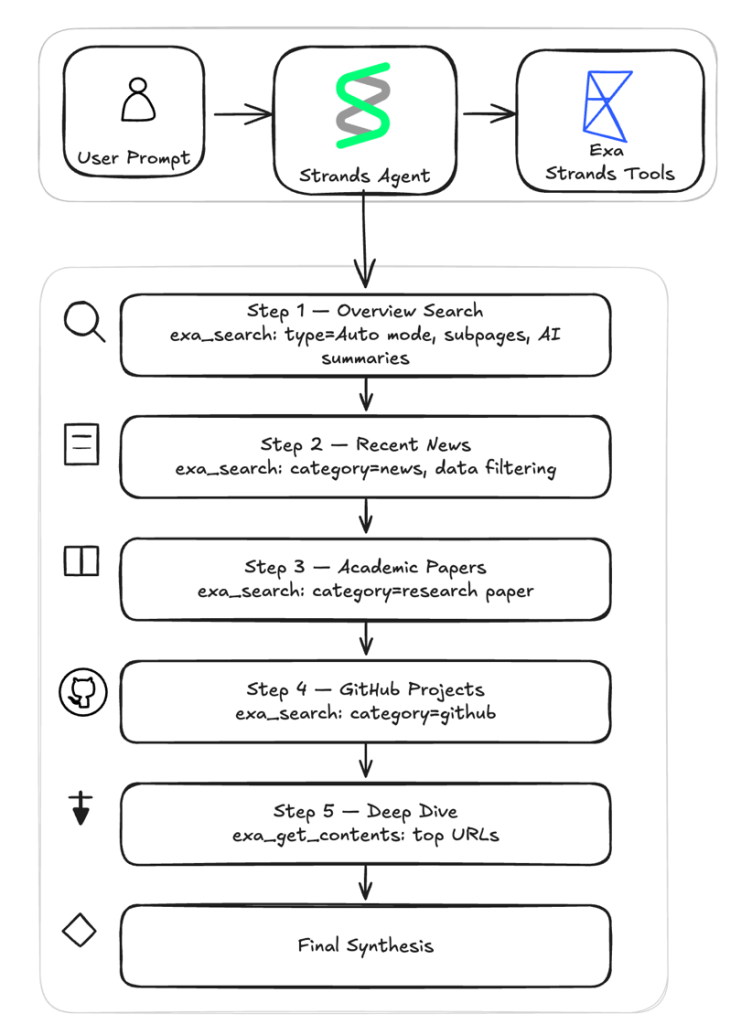
Both are optimized for AI consumption, returning structured content that your agent can reason over directly.
exa_search: Search the web using multiple modes including auto, fast, and deep. Your agent can refine results with filters for category, domain, date, and text content.exa_get_contents: Retrieve full-page content from URLs your agent has discovered whether from a previous search or from its own reasoning. The tool checks for cached results first to speed up repeated requests. If fresh content is needed, it can automatically fall back to live crawling to retrieve the most up-to-date version of the page.
Searching the web with exa_search
The exa_search tool gives your agent control over web search that goes beyond a basic query string. The tool supports four search modes. The default mode, auto, is the recommended starting point for most use cases.
- Instant (~200ms) – Designed for real-time applications such as autocomplete, live suggestions, and voice agents.
- Fast (~450ms) – Optimized for speed while still accessing Exa’s quality index. Suitable for agentic workflows where your agent makes dozens of search calls.
- Auto (~1s) [Recommended] – Balanced latency with high-quality results. Recommended for most use cases.
- Deep (~3-6s) – Runs parallel searches across query variations for maximum coverage. Best for research tasks where completeness matters.
Beyond search modes, exa_search gives your agent fine-grained control over how results are filtered and scoped. You can narrow a search to specific content categories such as news articles, company websites, GitHub repositories, PDFs, people profiles, or financial reports. Category filtering is most effective when your agent already knows what kind of source it needs. For example, filtering to research papers when the query is technical, or to news sources when recency is the priority. You can also request content and summaries in line with search results, all in a single call:
agent.tool.exa_search( query="recent advances in AI safety research", num_results=10, summary={"query": "key research areas and findings"}) .The response includes titles, URLs, and a synthesized summary of each result focused on the query you specified. Your agent can build foundational understanding of a topic without reading every page in full.
Extracting content with exa_get_contents
Once your agent has found relevant URLs, whether from a previous search or from its own reasoning, the exa_get_contents tool retrieves the full-page content. You pass it a list of URLs, and it returns the extracted text, ready for the agent to process.Exa maintains a content cache that serves results instantly for pages it has already crawled. For pages that are not in the cache, or when your agent needs the most current version of a page, the tool supports live crawling. You control this behavior with livecrawl modes. A configurable timeout controls how long to wait for live crawls to complete.You can also control how much text is returned. For example, to retrieve up to 5,000 characters of plain text from a page:
agent.tool.exa_get_contents(urls=["https://example.com/blog-post"], highlight={"maxCharacters": 5000})Prerequisites
To follow along with the examples in this post, you need:
- Python 3.10 or later
- An AWS account with Amazon Bedrock access
- An Exa API key
- The
strands-agentsandstrands-agents-toolspackages installed:pip install strands-agents strands-agents-tools
Setup
The Exa tools follow the same pattern as every other tool in the Strands Agents framework, so if you have used other Strands tools, the experience is the same.The Strands Agents SDK includes a library of pre-built tools covering file operations, web search, code execution, AWS services, memory management, and more. The Exa tools are part of this library. Import them and pass them to the Agent constructor through the `tools` parameter. The agent’s underlying LLM then decides when to call each tool as part of its reasoning loop. Because the integration talks to the Exa REST API directly, you don’t need to install or manage a separate SDK. The only new dependency is the `strands-agents-tools` package.To use Exa with Strands Agents, follow these steps:
1. Set your Exa API key
Exa requires an API key for authenticated access. Set the EXA_API_KEY environment variable with your key before running your agent. You can obtain a key from the Exa dashboard:
export EXA_API_KEY="your_exa_api_key_here"
2. Import and register the tools
In your agent code, import exa_search and exa_get_contents from strands_tools.exa and include them in the agent’s tool list:
from strands import Agent
from strands_tools.exa import exa_search, exa_get_contents
agent = Agent(tools=[exa_search, exa_get_contents])
3. Invoke your agent
Once the tools are registered, your agent can interleave search and content extraction naturally as part of its reasoning flow:
response = agent( "Search for the most recent trends in AI agents and provide a concise summary of key developments")With the agent set up, you can start using the Exa tools for different search scenarios.
Example: Building a Deep Research Agent with Exa
To see how both tools work together, the following example builds a deep research assistant that demonstrates both Exa tools in a multi-step workflow. Given a research question, the agent runs four targeted searches across different source types, extracts full content from the most promising results, and synthesizes everything into a structured research brief. The entire workflow executes within a single agent invocation, with multiple tool calls occurring as part of the reasoning loop.The key design insight is that different source types require different search parameters, but not different tools. The two Exa tools are reused throughout the workflow with different parameter configurations at each step: category to target news, PDFs, or repositories; date filters for recency; JSON schemas for structured extraction; and live crawling for freshness.
Get started
- Sign up for an Exa API key at the Exa dashboard
- Clone the sample repository and run the deep research assistant
- Modify the system prompt to target your domain: swap category filters, date ranges, and JSON schemas to match your use case
Setting up the agent
The setup takes a model, a system prompt, and the two Exa tools:
from strands import Agent
from strands.models.bedrock import BedrockModel
from strands_tools.exa import exa_search, exa_get_contents

def create_research_agent() -> Agent:
    model = BedrockModel(
        model_id="us.anthropic.claude-sonnet-4-6",
        region_name="us-west-2",
        max_tokens=20000,
    )
    return Agent(
        model=model,
        system_prompt=load_system_prompt(),
        tools=[exa_search, exa_get_contents],
    )
A system prompt defines the research workflow, guiding the agent through six steps: four targeted searches across different source types, a deep-dive content extraction, and a final synthesis pass. The agent decides when and how to call each tool, how to interpret the results, and when to move to the next step as part of its reasoning loop. The 6-step research workflowEach step instructs the agent to call the Exa tools with different parameters tuned for that kind of content.
Step 1: Overview search – A broad sweep using auto mode builds foundational understanding. The system prompt instructs the agent to call `exa_search` with these parameters.
Step 2: News search – The focus narrows to news sources within a 30-day date window. The date boundary is computed in Python and injected into the prompt. The max_age_hours sets the maximum acceptable age (in hours) for cached content.
Step 3: Research papers – For academic depth, the search targets the research paper category with a guided query to extract key findings, methodology, and conclusions as concise excerpts.
Step 4: GitHub projects – Open source implementations surface through the github category.
Step 5: Deep dive – The agent switches from discovery to extraction. The two or three most promising URLs from previous steps get their full content pulled with exa_get_contents. This step uses forced live crawling ("always" instead of "fallback") for fresh content, a higher character limit (4000) for comprehensive extraction, and subpage crawling to follow links to references, citations, and methodology pages.
Step 6: Synthesis – No tools are called in this final step. Everything gathered from the previous steps feeds into a structured research brief with sections for an executive summary, topic overview, recent developments, key research and papers, tools and implementations, deep dive insights, and a complete list of sources with URLs.
The multi-step workflow offers several advantages over a single search call or a basic search API wrapper:
- Grounded answers – Every claim in the final brief traces back to a source URL, reducing hallucination.
- Efficient token usage – Summaries at search and extraction time keep the content concise, so the LLM works with distilled knowledge rather than raw page dumps.
- Autonomous depth – The agent iterates across source types (news, papers, code repositories, full pages) without human steering, covering ground that a single search could not.
Tracing with Amazon Bedrock AgentCore Observability
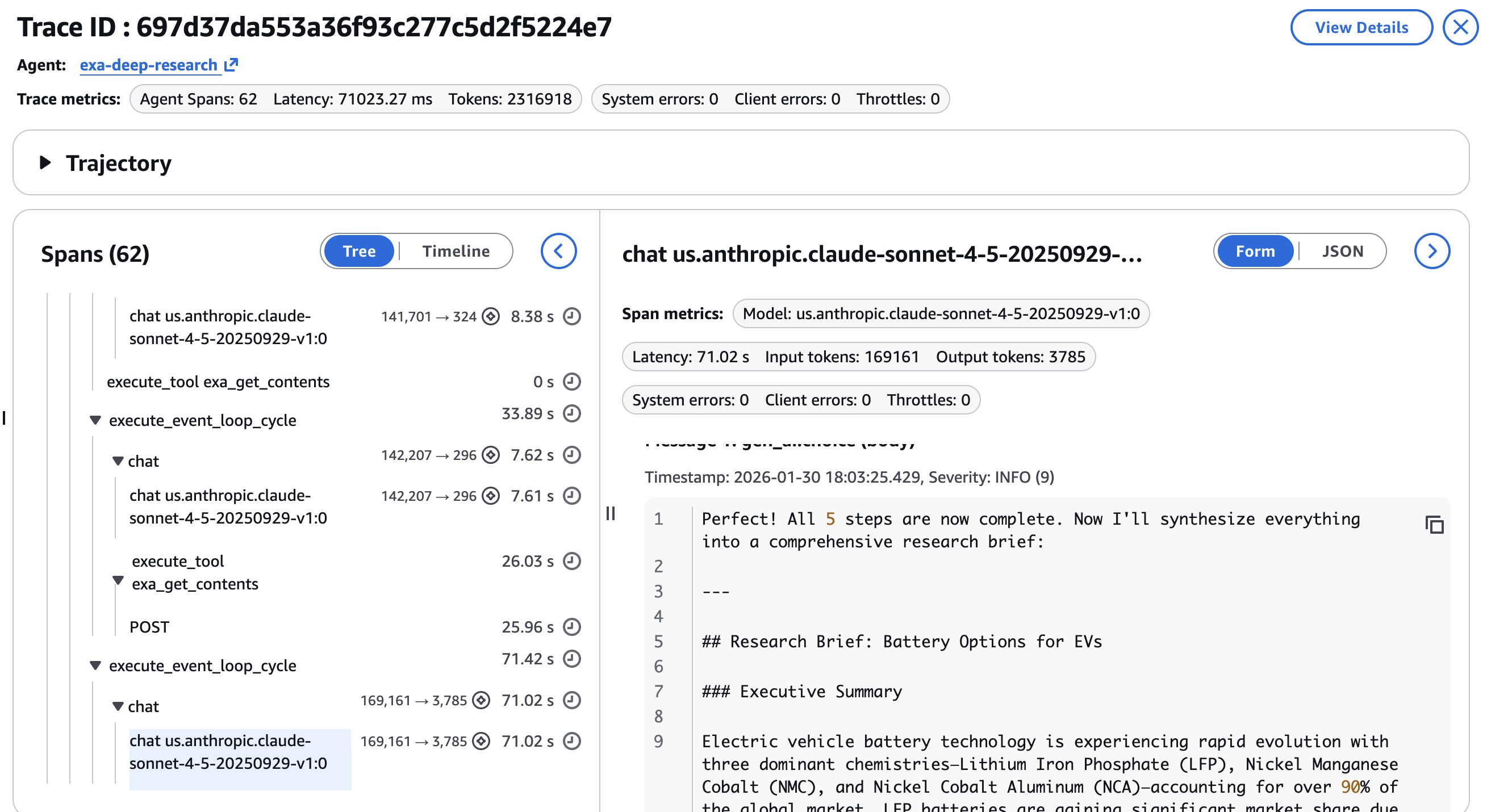
A 6-step pipeline with multiple tool calls is hard to debug without structured tracing. Amazon Bedrock AgentCore Observability, built on OpenTelemetry, instruments the full agent run with minimal code changes. Each tool call and LLM invocation becomes a span with parent-child relationships.In the CloudWatch GenAI Observability Dashboard, each research run appears as a full trace. You can see the average span latency across different spans in the agent.
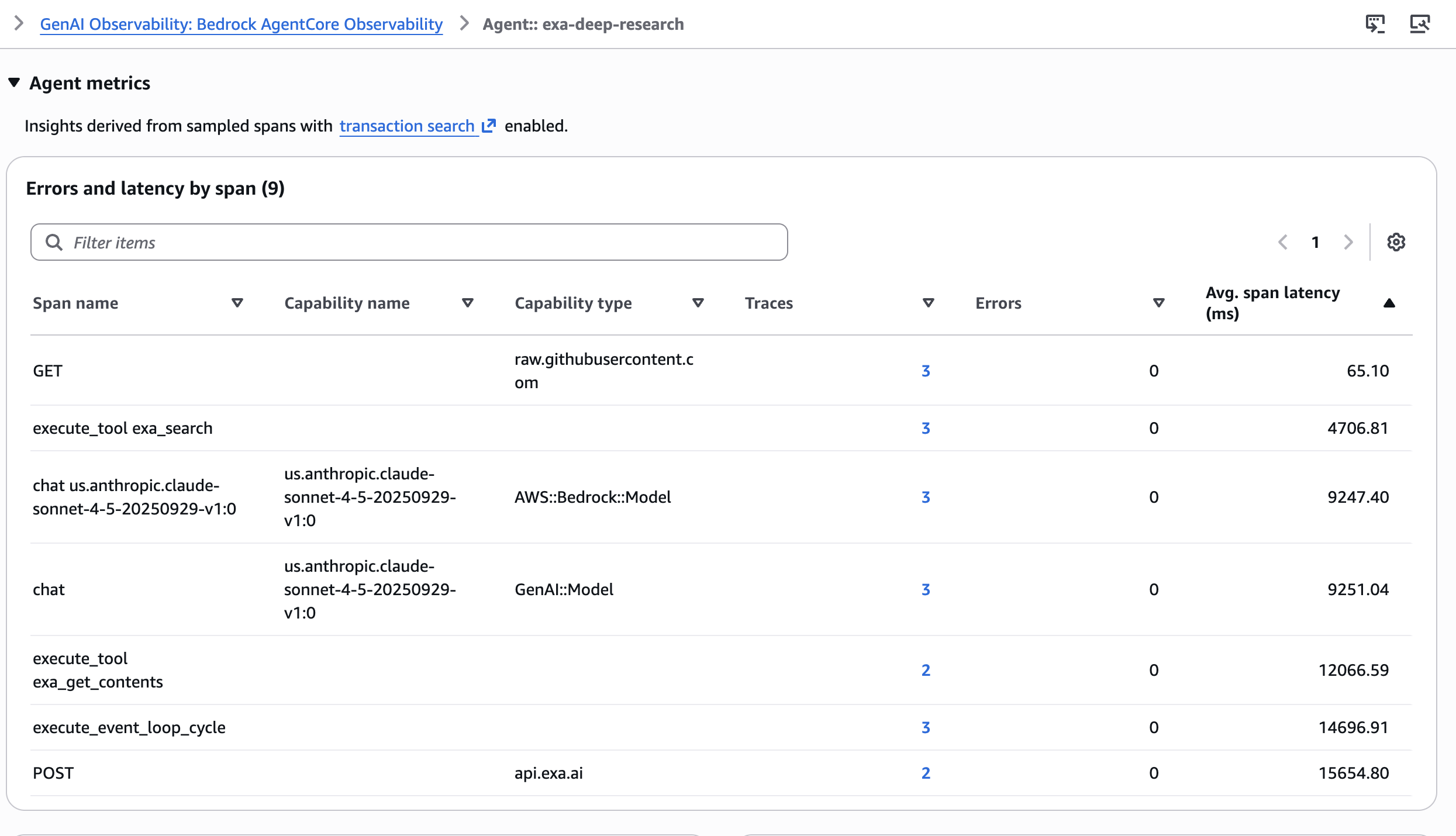
You can drill into individual spans to inspect:
- Tool call parameters per
exa_searchorexa_get_contentsinvocation, verifying the agent used the correct category, date range, and content limits at each step
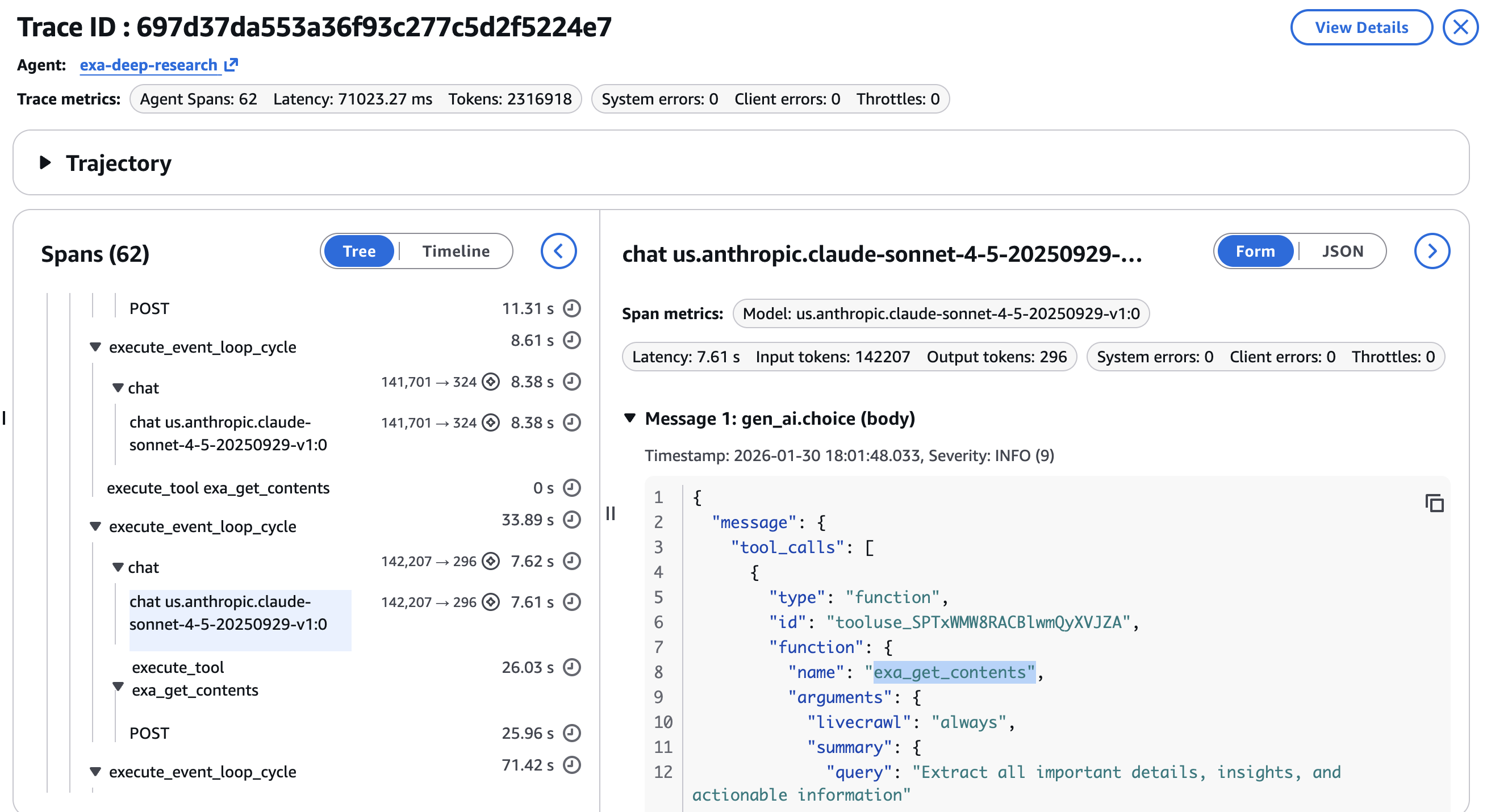
- Latency per step, identifying whether the news search or the deep dive extraction is the bottleneck
- Token consumption by LLM invocation, showing token distribution across search steps versus synthesis
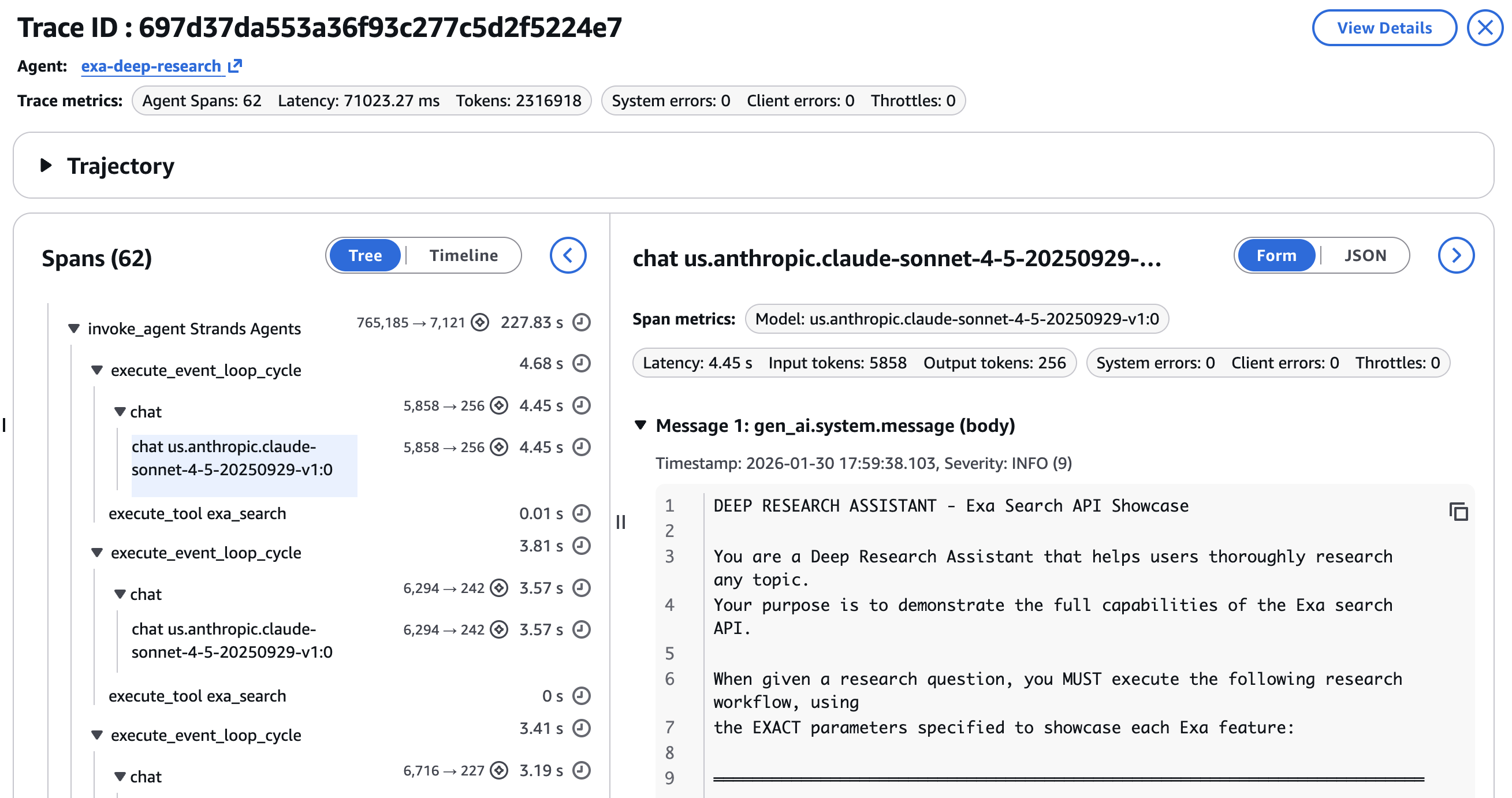
Agentic workflows are non-deterministic. The same query can produce different search results, different URL selections for the deep dive, and different synthesis outputs. Trace data turns debugging from guesswork into inspection. An example of the final response and the research brief is shown in the final step as in the screenshot below –
Best practices for using Exa tools
As you integrate Exa tools into your agents, a few patterns can help you optimize for quality, latency, and cost. The following recommendations will help you get the most out of the Exa tools in your agent workflows. For more on search types, content modes, and advanced filtering, see the Exa best practices documentation.
- Start with
autoand adjust from there: Theautosearch type handles most queries well. Switch todeepfor research tasks where missing a relevant source is costly, and tofastorinstantwhen the agent makes many sequential searches and cumulative latency matters more than per-query completeness. - Control content size to manage token budgets: Set
maxCharacterson “highlights” field (where default maxCharacters is 4,000).
Clean up resources
This walkthrough does not create any persistent AWS resources. If you no longer need your Exa API key, revoke it from the Exa dashboard
Conclusion
The Strands Agents SDK and Exa provide a path to building AI agents that are grounded in current, accurate web information. Exa’s search delivers semantic understanding, category filtering narrows results to the right content type, AI summaries with JSON schemas return exactly the structure your agent needs, and live crawling provides freshness. The Strands Agents integration exposes these capabilities through two tools and a few lines of setup code.
As the deep research assistant demonstrates, you can build a multi-step research agent that searches across news, academic papers, and code repositories, extracts full page content from the best results, and synthesizes everything into a grounded brief, all driven by a single system prompt. The agent targets source types with category filters, controls recency with date ranges, shapes output with JSON schemas and manages freshness with live crawling. You can test search, contents, and answer endpoints directly from the Exa dashboard before wiring them into your agent. The entire workflow is traceable through Amazon Bedrock AgentCore Observability, turning non-deterministic agent behavior into inspectable, debuggable spans. The pattern applies beyond research to competitive intelligence, technical support, market analysis, and other domains where agents need real-time web information.Try the deep research assistant sample with your own research questions. Get your Exa API key to start building, explore the Amazon Bedrock documentation to learn more about the underlying platform, and share your feedback on the Strands Agents GitHub repository.
About the authors