


















ToolSimulator: scalable tool testing for AI agents
You can use ToolSimulator, an LLM-powered tool simulation framework within Strands Evals, to thoroughly and safely test AI agents that rely on external tools, at scale. Instead of risking live API calls that expose personally identifiable information (PII), trigger unintended actions, or settling for static mocks that break with multi-turn workflows, you can use ToolSimulator's large language model (LLM)-powered simulations to validate your agents. Available today as part of the Strands Evals Software Development Kit (SDK), ToolSimulator helps you catch integration bugs early, test edge cases comprehensively, and ship production-ready agents with confidence.
You can use ToolSimulator, an LLM-powered tool simulation framework within Strands Evals, to thoroughly and safely test AI agents that rely on external tools, at scale. Instead of risking live API calls that expose personally identifiable information (PII), trigger unintended actions, or settling for static mocks that break with multi-turn workflows, you can use ToolSimulator’s large language model (LLM)-powered simulations to validate your agents. Available today as part of the Strands Evals Software Development Kit (SDK), ToolSimulator helps you catch integration bugs early, test edge cases comprehensively, and ship production-ready agents with confidence.
| In this post, you will learn how to:
|
Prerequisites
Before you begin, make sure that you have the following:
- Python 3.10 or later installed in your environment
- Strands Evals SDK installed:
pip install strands-evals - Basic familiarity with Python, including decorators and type hints
- Familiarity with AI agents and tool-calling concepts (API calls, function schemas)
- Pydantic knowledge is helpful for the advanced schema examples, but is not required to get started
- An AWS account is not required to run ToolSimulator locally
Why tool testing challenges your development workflow
Modern AI agents don’t just reason. They call APIs, query databases, invoke Model Context Protocol (MCP) services, and interact with external systems to complete tasks. Your agent’s behavior depends not only on its reasoning, but on what those tools return. When you test these agents against live APIs, you run into three challenges that slow you down and put your systems at risk.
Three challenges that live APIs create:
- External dependencies slow you down. Live APIs impose rate limits, experience downtime, and require network connectivity. When you’re running hundreds of test cases, these constraints make comprehensive testing impractical.
- Test isolation becomes risky. Real tool calls trigger real side effects. You risk sending actual emails, modifying production databases, or booking actual flights during testing. Your agent tests shouldn’t interact with the systems that they’re testing against.
- Privacy and security create barriers. Many tools handle sensitive data, including user records, financial information, and PII. Running tests against live systems unnecessarily exposes that data and creates compliance risks.
Why static mocks fall short
You might consider static mocks as an alternative. Static mocks work for straightfoward, predictable scenarios, but they require constant maintenance as your APIs evolve. More importantly, they break down in the multi-turn, stateful workflows that real agents perform.
Consider a flight booking agent. It searches for flights with one tool call, then checks booking status with another. The second response should depend on what the first call did. A hardcoded response can’t reflect a database that changes state between calls. Static mocks can’t capture this.
What makes ToolSimulator different
ToolSimulator solves these challenges with three essential capabilities that work together to give you safe, scalable agent testing without sacrificing realism.
- Adaptive response generation. Tool outputs reflect what your agent actually requested, not a fixed template. When your agent calls to search for Seattle-to-New York flights, ToolSimulator returns plausible options with realistic prices and times, not a generic placeholder.
- Stateful workflow support. Many real-world tools maintain state across calls. A write operation should affect subsequent reads. ToolSimulator maintains consistent shared state across tool calls, making it safe to test database interactions, booking workflows, and multi-step processes without touching production systems.
- Schema enforcement. Developers typically add a post-processing layer that parses raw tool output into a structured format. When a tool returns a malformed response, this layer breaks. ToolSimulator validates responses against Pydantic schemas that you define, catching malformed responses before they reach your agent.
How ToolSimulator works
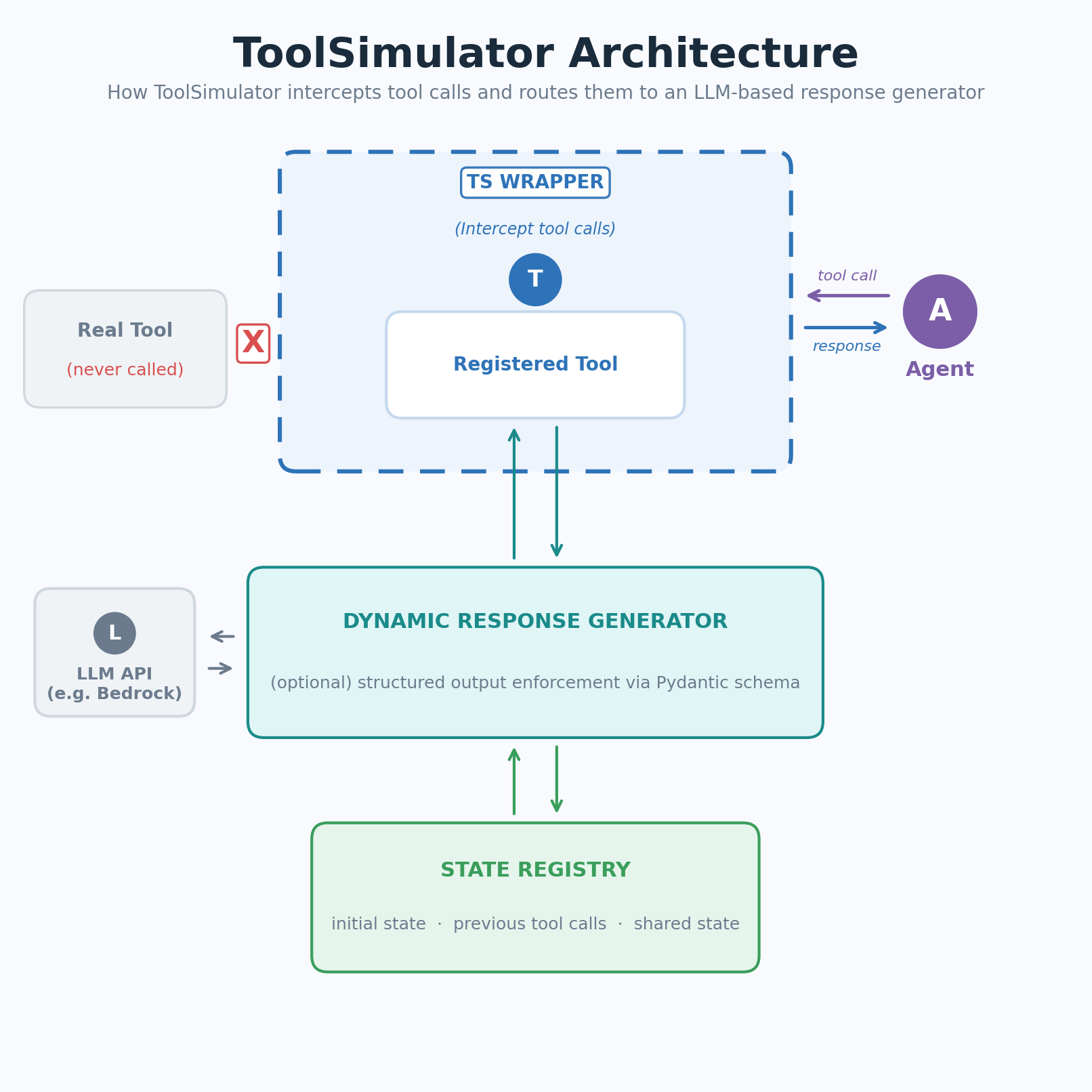 Figure 1: ToolSimulator (TS) intercepts tool calls and routes them to an LLM-based response generator
ToolSimulator intercepts calls to your registered tools and routes them to an LLM-based response generator. The generator uses the tool schema, your agent’s input, and the current simulation state to produce a realistic, context-appropriate response. No handwritten fixtures required.
Your workflow follows three steps: decorate and register your tools, optionally steer the simulation with context, then let ToolSimulator mock the tool responses when your agent runs.
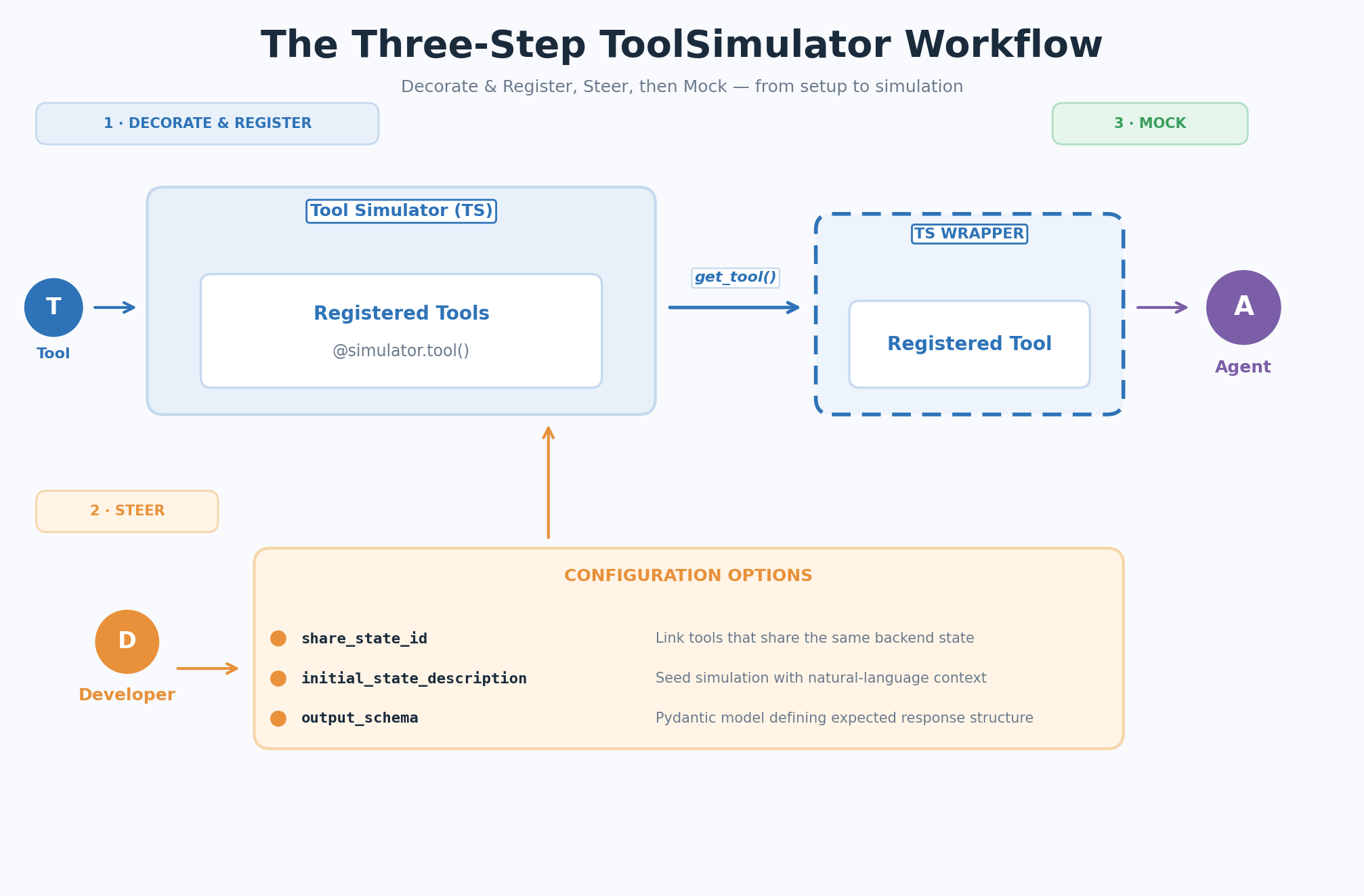 Figure 2: The three-step ToolSimulator (TS) workflow — Decorate & Register, Steer, Mock
Getting started with ToolSimulator
The following sections walk you through each step of the ToolSimulator workflow, from initial setup to running your first simulation.
Step 1: Decorate and register
Create a ToolSimulator instance, then wrap your tool function with the @simulator.tool() decorator to register it for simulation. The real function body can remain empty. ToolSimulator intercepts calls before they reach the implementation:
from strands_evals.simulation.tool_simulator import ToolSimulator

tool_simulator = ToolSimulator()

@tool_simulator.tool()
def search_flights(origin: str, destination: str, date: str) -> dict:
    """Search for available flights between two airports on a given date."""
    pass # The real implementation is never called during simulation
Step 2: Steer (optional configuration)
By default, ToolSimulator automatically infers how each tool should behave from its schema and docstring. No additional configuration is needed to get started. When you need more control, you can use these three optional parameters to customize simulation behavior:
share_state_id: Links tools that share the same backend under a common state key. State changes made by one tool (for example, a setter) are immediately visible to subsequent calls by another (for example, a getter).initial_state_description: Seeds the simulation with a natural language description of pre-existing state. Richer context produces more realistic and consistent responses.output_schema: A Pydantic model defining the expected response structure. ToolSimulator generates responses that conform strictly to this schema.
Step 3: Mock
When your agent calls a registered tool, the ToolSimulator wrapper intercepts the call and routes it to the dynamic response generator. The generator validates the agent’s parameters against the tool schema, produces a response that matches the output_schema, and updates the state registry so subsequent tool calls see a consistent world.
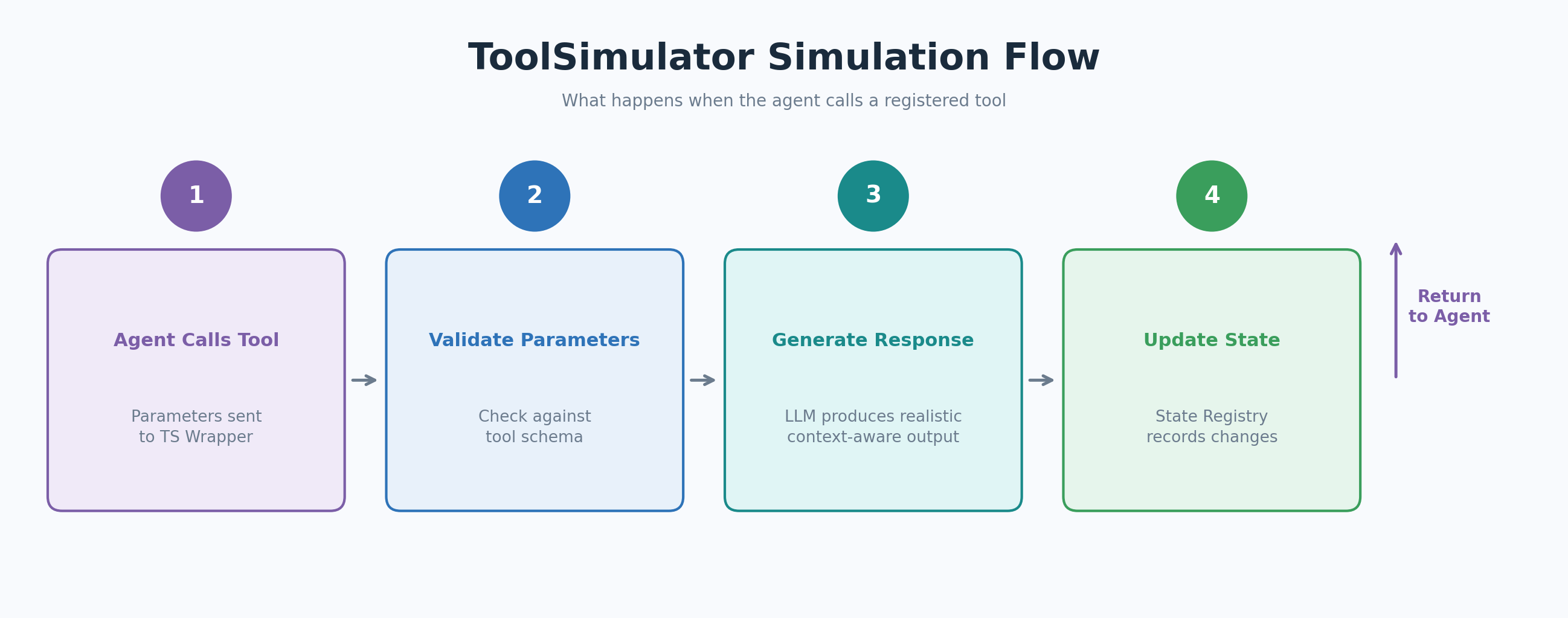 Figure 3: The ToolSimulator (TS) simulation flow when the agent calls a registered tool
The following example simulates a flight search tool attached to a flight search assistant:
from strands import Agent
from strands_evals.simulation.tool_simulator import ToolSimulator

# 1. Create a simulator instance
tool_simulator = ToolSimulator()

# 2. Register a tool for simulation with initial state context
@tool_simulator.tool(
    initial_state_description="Flight database: SEA->JFK flights available at 8am, 12pm, and 6pm. Prices range from $180 to $420.",
)
def search_flights(origin: str, destination: str, date: str) -> dict:
    """Search for available flights between two airports on a given date."""
    pass

# 3. Create an agent with the simulated tool and run it
flight_tool = tool_simulator.get_tool("search_flights")
agent = Agent(
    system_prompt="You are a flight search assistant.",
    tools=[flight_tool],
)

response = agent("Find me flights from Seattle to New York on March 15.")
print(response)
# Expected output: A structured list of simulated SEA->JFK flights with times
# and prices consistent with the initial_state_description you provided.
Advanced ToolSimulator usage
The following sections cover three advanced capabilities that give you more control over simulation behavior: running independent instances for parallel testing, configuring shared state for multi-turn workflows, and enforcing custom response schemas.
Run independent simulator instances
You can create multiple ToolSimulator instances side by side. Each instance maintains its own tool registry and state, so you can run parallel experiment configurations in the same codebase:
simulator_a = ToolSimulator()
simulator_b = ToolSimulator()
# Each instance has an independent tool registry and state --
# ideal for comparing agent behavior across different tool setups.
Configure shared state for multi-turn workflows
For stateful tools such as database getters and setters, ToolSimulator maintains consistent shared state across tool calls. Use share_state_id to link tools that operate on the same backend, and initial_state_description to seed the simulation with pre-existing context:
@tool_simulator.tool(
    share_state_id="flight_booking",
    initial_state_description="Flight booking system: SEA->JFK flights available at 8am, 12pm, and 6pm. No bookings currently active.",
)
def search_flights(origin: str, destination: str, date: str) -> dict:
    """Search for available flights between two airports on a given date."""
    pass

@tool_simulator.tool(
share_state_id="flight_booking",
)
def get_booking_status(booking_id: str) -> dict:
    """Retrieve the current status of a flight booking by booking ID."""
    pass

# Both tools share "flight_booking" state.
# When search_flights is called, get_booking_status sees the same
# flight availability data in subsequent calls.
Inspect the state before and after agent execution to validate that tool interactions produced the expected changes:
initial_state = tool_simulator.get_state("flight_booking")
# ... run the agent ...
final_state = tool_simulator.get_state("flight_booking")
# Verify not just the final output, but the full sequence of tool interactions.| Tip: Seeding state from real data Because |
Enforce a custom response schema
By default, ToolSimulator infers a response structure from the tool’s docstring and type hints. For tools that follow strict specifications such as OpenAPI or MCP schemas, define the expected response as a Pydantic model and pass it using output_schema:
from pydantic import BaseModel, Field

class FlightSearchResponse(BaseModel):
    flights: list[dict] = Field( ..., description="List of available flights with flight number, departure time, and price" )
    origin: str = Field(..., description="Origin airport code")
    destination: str = Field(..., description="Destination airport code")
    status: str = Field(default="success", description="Search operation status")
    message: str = Field(default="", description="Additional status message")

@tool_simulator.tool(output_schema=FlightSearchResponse)
def search_flights(origin: str, destination: str, date: str) -> dict:
    """Search for available flights between two airports on a given date."""
    pass

# ToolSimulator validates parameters strictly and returns only valid JSON
# responses that conform to the FlightSearchResponse schema.
Integration with Strands Evaluation pipelines
ToolSimulator fits naturally into the Strands Evals evaluation framework. The following example shows a complete pipeline, from simulation setup to experiment report, using the GoalSuccessRateEvaluator to score agent performance on tool-calling tasks:
from typing import Any
from pydantic import BaseModel, Field
from strands import Agent
from strands_evals import Case, Experiment
from strands_evals.evaluators import GoalSuccessRateEvaluator
from strands_evals.simulation.tool_simulator import ToolSimulator
from strands_evals.mappers import StrandsInMemorySessionMapper
from strands_evals.telemetry import StrandsEvalsTelemetry

# Set up telemetry and tool simulator
telemetry = StrandsEvalsTelemetry().setup_in_memory_exporter()
memory_exporter = telemetry.in_memory_exporter
tool_simulator = ToolSimulator()

# Define the response schema
class FlightSearchResponse(BaseModel):
    flights: list[dict] = Field( ..., description="Available flights with number, departure time, and price" )
    origin: str = Field(..., description="Origin airport code")
    destination: str = Field(..., description="Destination airport code")
    status: str = Field(default="success", description="Search operation status")
    message: str = Field(default="", description="Additional status message")

# Register tools for simulation
@tool_simulator.tool(
    share_state_id="flight_booking",
    initial_state_description="Flight booking system: SEA->JFK flights at 8am, 12pm, and 6pm. No bookings currently active.",
    output_schema=FlightSearchResponse,
)
def search_flights(origin: str, destination: str, date: str) -> dict[str, Any]:
    """Search for available flights between two airports on a given date."""
    pass

@tool_simulator.tool(share_state_id="flight_booking")
def get_booking_status(booking_id: str) -> dict[str, Any]:
    """Retrieve the current status of a flight booking by booking ID."""
    pass

# Define the evaluation task
def user_task_function(case: Case) -> dict:
    initial_state = tool_simulator.get_state("flight_booking")
    print(f"[State before]: {initial_state.get('initial_state')}")

    search_tool = tool_simulator.get_tool("search_flights")
    status_tool = tool_simulator.get_tool("get_booking_status")
    agent = Agent(
        trace_attributes={ "gen_ai.conversation.id": case.session_id, "session.id": case.session_id },
        system_prompt="You are a flight booking assistant.",
        tools=[search_tool, status_tool],
        callback_handler=None,
    )

    agent_response = agent(case.input)
    print(f"[User]: {case.input}")
    print(f"[Agent]: {agent_response}")

    final_state = tool_simulator.get_state("flight_booking")
    print(f"[State after]: {final_state.get('previous_calls', [])}")

    finished_spans = memory_exporter.get_finished_spans()
    mapper = StrandsInMemorySessionMapper()
    session = mapper.map_to_session(finished_spans, session_id=case.session_id)
    return {"output": str(agent_response), "trajectory": session}

# Define test cases, run the experiment, and display the report
test_cases = [
    Case( name="flight_search", input="Find me flights from Seattle to New York on March 15.", metadata={"category": "flight_booking"}, ),
]
experiment = Experiment[str, str](
    cases=test_cases,
    evaluators=[GoalSuccessRateEvaluator()]
)

reports = experiment.run_evaluations(user_task_function)
reports[0].run_display()
The task function retrieves the simulated tools, creates an agent, runs the interaction, and returns both the agent’s output and the full telemetry trajectory. The trajectory gives evaluators like GoalSuccessRateEvaluator access to the complete sequence of tool calls and model invocations, not just the final response.
Best practices for simulation-based evaluation
The following practices help you get the most out of ToolSimulator across development and evaluation workflows:
- Start with the default configuration for broad coverage. Add configuration overrides only for the specific tool environments that you want to control precisely. ToolSimulator’s defaults are designed to produce realistic behavior without requiring setup.
- Provide rich
initial_state_descriptionvalues for stateful tools. The more context that you seed, the more realistic and consistent the simulated responses will be. Include data ranges, entity counts, and relationship context. - Use
share_state_idfor tools that interact with the same backend, so write operations are visible to subsequent reads. This is essential for testing multi-turn workflows like booking, cart management, or database updates. - Apply
output_schemafor tools that follow strict specifications, such as OpenAPI or MCP schemas. Schema enforcement catches malformed responses before they reach your agent and break your post-processing layer. - Validate tool interaction sequences, not just final outputs. Inspect state changes before and after agent execution to confirm that tool calls occurred in the right order and produced the right state transitions.
- Start small and expand. Begin with your most common tool interaction scenarios, then expand to edge cases as your evaluation practice matures. Complement simulation-based testing with targeted live API tests for critical production paths.
Conclusion
ToolSimulator transforms how you test AI agents by replacing risky live API calls with intelligent, adaptive simulations. You can now safely validate complex, stateful workflows at scale, catching integration bugs early and shipping production-ready agents with confidence. Combining ToolSimulator with Strands Evals evaluation pipelines gives you full visibility into agent behavior without managing test infrastructure or risking real-world side effects.
Next steps
Start testing your AI agents safely today. Install ToolSimulator with the following command:
pip install strands-evalsTo continue exploring ToolSimulator and Strands Evals, take these next steps:
- Read the Strands Evals documentation to explore all configuration options, including advanced state management and custom evaluators.
- Try the example to see ToolSimulator in action. Extend the example by adding more tools and testing multi-step agent workflows.
- Explore Amazon Bedrock for the LLM backend options that power ToolSimulator’s response generation.
- Learn about AWS Lambda for serverless agent deployment strategies that pair well with ToolSimulator-based testing.
- Join the Strands community forums to ask questions, share your evaluation setups, and connect with other agent developers.
| Share your feedback. We’d love to hear how you’re using ToolSimulator. Share your feedback, report issues, and suggest features through the Strands Evals GitHub repository or community forums. |
About The Authors