















Build highly scalable serverless LangGraph multi-agent systems in AWS with Amazon Bedrock AgentCore
In this post, we provide a solution to build highly scalable, serverless multi-agent generative AI systems on AWS using LangGraph Agents as orchestrators integrated with Amazon Bedrock AgentCore Memory and Amazon Bedrock AgentCore Observability.
Generative AI has rapidly evolved from experimental prototypes into systems that are expected to operate reliably in production, at scale, and under real-world performance constraints. As organizations move beyond demos and proofs of concept, they increasingly encounter challenges related to inference latency, scalability, state management, and operational visibility. Building high-performance AI agents today requires more than powerful models and demands an implementation that can deliver consistent performance, preserve context across interactions, and provide deep observability into how agents reason and behave in production.
In this post, we provide a solution to build highly scalable, serverless multi-agent generative AI systems on AWS using LangGraph Agents as orchestrators integrated with Amazon Bedrock AgentCore Memory and Amazon Bedrock AgentCore Observability.
Our approach for building highly scalable serverless multi-agent orchestrations combines serverless technologies such as AWS Lambda and AWS Step Functions. These services can be used by developers to build LangGraph agents that scale automatically, respond to events in real time, and remove infrastructure management. This makes them ideal for dynamic, bursty agent workloads. By combining these services, you can orchestrate complex multi-tool agent workflows with durable state management, retries, and fine-grained cost control.
LangGraph’s explicit graph-based execution model enables deterministic coordination, parallelism, and conditional routing between agents, making complex multi-agent workflows more straightforward to reason and debug. By separating orchestration logic from agent behavior, you can use LangGraph to add, remove, or evolve specialized agents independently while maintaining a clear, auditable execution path. This is especially valuable for production systems that require predictable behavior, extensibility, and structured control over multi-agent reasoning.
AgentCore Observability extends these capabilities by providing detailed visibility into each invocation, capturing model inputs/outputs, latency, and tool-chain metrics across distributed serverless components. Integrated memory services from AgentCore Memory enable agents to maintain short-term conversational context and long-term knowledge across sessions.
Solution overview
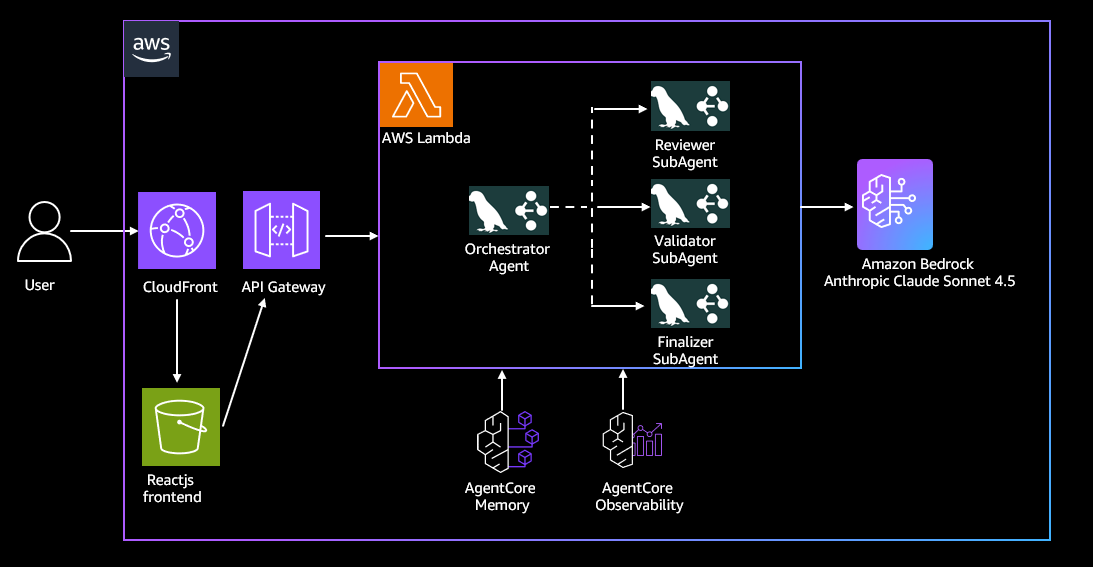
Our serverless LangGraph and AgentCore based multi-agent orchestration system solution is a generative AI-powered multi-agent campaign review system that orchestrates human reviews using diverse personas that enable marketing campaigns to resonate authentically with target audiences while maintaining legal alignment and brand standards. It consists of three specialized AI agents that analyze the marketing campaign in parallel – a persona reviewer agent reviews content from diverse demographic perspectives and provides resonance scoring, a validator agent verifies legal alignment and brand guideline adherence, while a finalizer agent then synthesizes feedback into actionable recommendations. Users upload campaign documents through a React frontend that also polls for results and displays reviews as they become available.
We use LangGraph to implement the orchestrator and specialized agents by modeling the system as a stateful execution graph. Each node represents a discrete agent function specifically persona review, compliance validation, and feedback synthesis—and edges define the control flow between these steps. The orchestrator is implemented as the supervising graph that routes execution, triggers parallel branches for specialized agents, and collects their outputs for final aggregation.The LangGraph orchestrator and specialized agents are together packaged as a Docker container.
We use AWS Lambda as the serverless managed runtime in AWS for our Strands agents to scale automatically, respond to events in real time, and remove infrastructure management. Our orchestrator agent displays its functionality as REST interfaces provided by Amazon API Gateway.
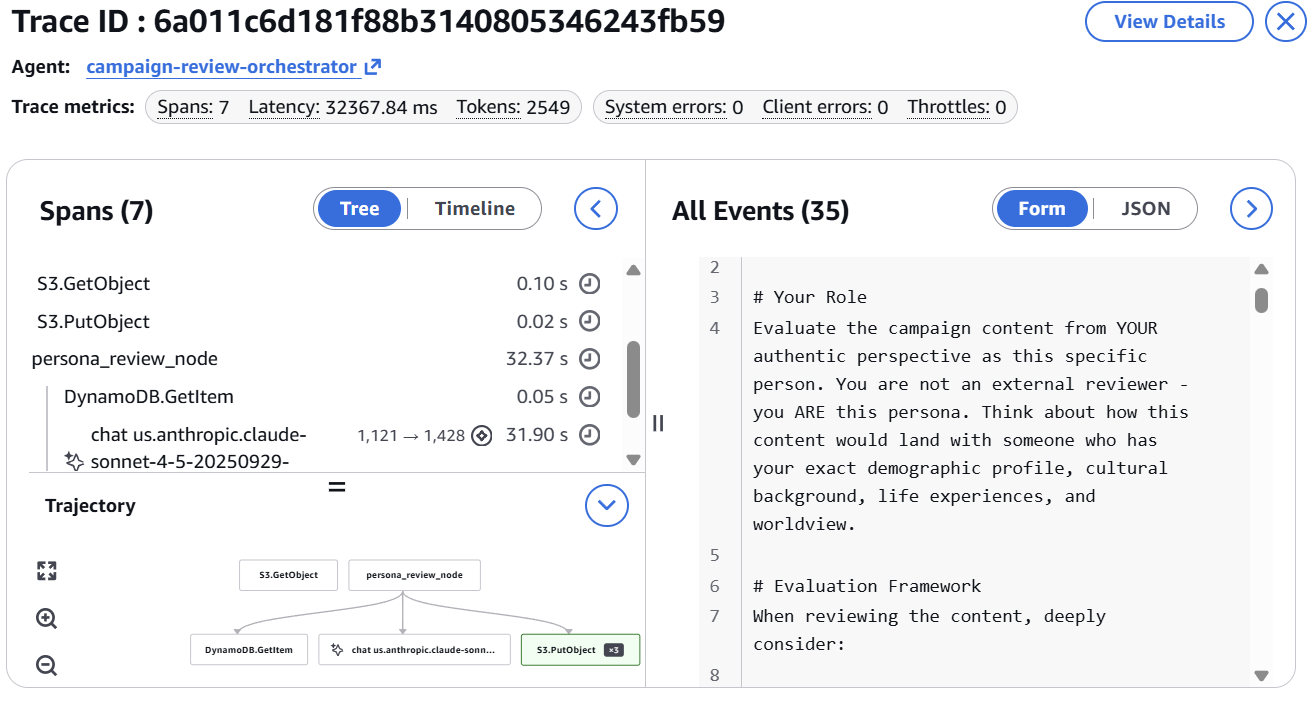
Our Agent implementation uses AgentCore Observability to provide detailed visualizations of each step in the agent workflow, enabling developers to inspect execution paths, audit intermediate outputs, and debug performance bottlenecks. Within AgentCore Observability, we provide real-time visibility within Amazon CloudWatch into operational performance dashboards and telemetry for key metrics such as traces, session count, latency, duration, token usage, and error rates.
We use AgentCore Memory for two key use cases within our Agent implementation specifically for multi-agent shared memory to provide both context and shared memory across independent agent runs and to provide support for multi-turn conversations. You can extend this implementation to provide an AI assistant natural language interface as our implementation using AgentCore Memory provides built-in support for storing conversational state and history. The following architecture diagram illustrates the various components of our solution.
Prerequisites
Complete the following prerequisites:
- Verify model access in Amazon Bedrock. In this solution, we use Anthropic’s Claude 4.5 Sonnet on Amazon Bedrock.
- Install the AWS Command Line Interface (AWS CLI).
- Install the AWS SAM CLI v1.100.0+
- Install Docker v20.x+.
- Install Node.js v18.x+
- Install Docker v20.x+
- Install Python v3.11+
Dependencies
Our Strands Agents implementation has the following dependencies that are packaged in the Dockerfile:
- langchain>=0.2.0
- langgraph==0.3.31
- langgraph-prebuilt~=0.1.8
- langgraph-sdk~=0.1.61
- langchain-aws>=0.2.18
- langchain_tavily
- requests
- bedrock-agentcore
- boto3
Deploy the solution
You can download the solution from our GitHub repo. Use the following step-by-step guidance also outlined exactly in the README of the GitHub repo to deploy and access the solution in your AWS environment:
Step 1: Clone the repository
git clone
cd aws-genai-campaign-review-langgraph
Step 2: Configure AWS credentials
Configure AWS CLI:
aws configure
Verify credentials:
aws sts get-caller-identity
Step 3: Set up an Amazon DynamoDB persona table
Make script executable:
chmod +x scripts/setup_persona_table.sh
Run setup script:
./scripts/setup_persona_table.sh
Step 4: Build the AWS SAM application
sam build
Step 5: Deploy infrastructure
Use a guided deployment and follow the prompts to provide your stack name, agent name, AWS region and accept the default values for other areas.
sam deploy --guided
Step 6: Get deployment outputs
Get API endpoints:
aws cloudformation describe-stacks --stack-name
Save these values:
- ApiEndpoint – API URL
- CampaignOrchestratorApi – Agent API URL
- CloudFrontURL – Front-end URL
- FrontendBucket – S3 bucket for front end
Step 8: Configure front-end environment
Get values from CloudFormation outputs:
API_URL=$(aws cloudformation describe-stacks --stack-name
AGENT_API_URL=$(aws cloudformation describe-stacks --stack-name
Create .env file:
cat > .env << EOF
VITE_API_URL=$API_URL
VITE_AGENT_API_URL=$AGENT_API_URL
VITE_AWS_REGION=
EOF
Step 9: Build and deploy front end
Install dependencies:
npm install
Build frontend:
npm run build
Get frontend bucket name:
FRONTEND_BUCKET= $(aws cloudformation describe-stacks --stack-name
Deploy to S3:
aws s3 sync dist/ s3://$FRONTEND_BUCKET --deleteInvalidate CloudFront cache (optional, for updates):
DISTRIBUTION_ID=$(aws cloudfront list-distributions --query "DistributionList.Items[?Origins.Items[0].DomainName=='${FRONTEND_BUCKET}.s3.us-west-2.amazonaws.com'].Id" --output text)
aws cloudfront create-invalidation --distribution-id $DISTRIBUTION_ID --paths "/*"
Step 10: Access the application
Get CloudFront URL:
aws cloudformation describe-stacks --stack-name
Open the URL in your browser to access the application. Use this campaign_brief.md file as the sample campaign document and upload it on the left panel. You will then be able to view the campaign review output from the multi-agent orchestration in the right panel. Navigate to the Bedrock AgentCore Observability console and select your agent for a detailed visualization of each step in your agent workflow as shown below
Clean up
To avoid recurring charges, clean up your account after trying the solution.
- Delete CloudFormation stack
sam delete --stack-name
- Delete DynamoDB table
aws dynamodb delete-table --table-name PersonaTable --region
Conclusion
In this post, we showed how combining LangGraph, Amazon Bedrock AgentCore, and serverless AWS services helps teams to build highly scalable, production-ready multi-agent generative AI systems. By using LangGraph’s explicit graph-based execution model for orchestration and AWS Lambda based runtimes for execution, developers can coordinate complex, parallel agent workflows with deterministic control flow, automatic scaling, and minimal operational overhead. Integrated AgentCore Memory and Observability address two of the most common challenges in real-world agent deployments—state management and visibility—by providing shared, durable context across agent runs and deep insight into agent behavior, performance, and cost.
Together, these capabilities form a repeatable architectural pattern for building enterprise-grade AI agents on AWS. Whether you’re implementing campaign review systems, digital assistants, or other multi-agent reasoning workflows, this approach allows you to decouple orchestration from execution, scale elastically with demand, and maintain full transparency into how agents reason and interact. By using LangGraph for structured orchestration and Amazon Bedrock AgentCore for managed runtime, memory, and observability, you can confidently move from experimental prototypes to reliable, scalable generative AI systems in production.
About the authors
 Kanishk Mahajan is Principal – AI/ML with AWS Professional Services. In this role, he leads GenAI and agentic transformations for some of AWS largest customers in Telco and Media & Entertaintment.
 Akshay Parkhi is a Machine Learning Engineer at Amazon Web Services with over 16 years of experience leading enterprise transformation across SAP, cloud, DevOps, and AI/ML. He architects and scales production-grade AI and agentic systems that power critical business outcomes in complex, real-world environments.