
















Enrich your datasets with business context: Migrating from legacy Topics to semantic datasets in Amazon Quick
In this post, we walk through what Dataset Enrichment is, how it differs from legacy Topics, and provide three migration scenarios with step-by-step guidance so you can move your business context into the dataset layer with confidence.
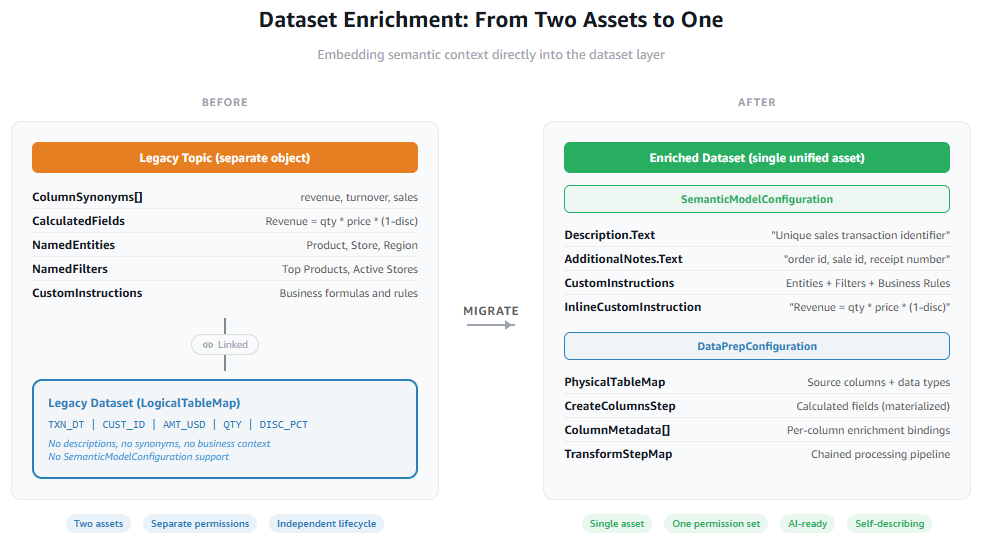
If you’ve been managing Amazon Quick legacy Topics alongside your datasets, you know the challenge: two assets that must stay perfectly synchronized, each with its own permissions, lineage, and versioning. Column synonyms drift. Calculated fields diverge. A rename in the dataset breaks the Legacy Topic silently. You can now use Amazon Quick to embed that business context directly into the dataset itself through Dataset Enrichment in the new data prep experience. Column descriptions, synonyms, calculated fields, custom instructions, and business rules all live alongside the data. Dataset Enrichment bakes business context directly into the dataset. Everything (permissions, semantics, AI context) travels with the data and is automatically inherited by anything built on top of it. One asset, one source of truth, one place to govern.
In this post, we walk through what Dataset Enrichment is, how it differs from legacy Topics, and provide three migration scenarios with step-by-step guidance so you can move your business context into the dataset layer with confidence.
Topic is now the multi-dataset semantic and reasoning layer, the construct where multiple datasets are composed, relationships are defined, business metrics are authored, and business terminology is mapped. Rather than introducing a net-new construct, we are re-purposing Topic to fulfill this role more completely. Moving dataset-intrinsic semantics down to where they belong, and elevating Topic to own the cross-dataset relationships, metrics, and business terminology that it was always meant to carry. This isn’t a cosmetic change. It establishes a clean, forward-looking architecture that supports both deterministic BI workflows and flexible AI-driven analytics from a shared semantic foundation. It also sets up the framework for catalog integration.
What is Topics (legacy)
Legacy Topics provided the initial approach to adding business context to datasets in Amazon Quick Sight. It stored column synonyms, calculated fields, named entities, filters, and custom instructions in a separate object that sat on top of the dataset, linked but independently managed. Going forward, we classify existing Topics as legacy. The new version of Topics is being elevated to a multi-dataset semantic layer. A single-entry point for cross-dataset Q&A that lets business users and AI workflows query across multiple enriched datasets in one conversation. Dataset Enrichment is the foundation that makes this possible: each dataset must carry its own semantic context before Topics can unify them at a higher level.
Key differences: Topics (legacy) vs. Dataset Enrichment (new data prep)
| Legacy Topics | Dataset Enrichment | |
| Where metadata lives | Separate legacy Topic object, linked to a dataset | Inside the dataset metadata itself |
| Column synonyms | Defined in Column Synonyms on the legacy Topic | Defined in Additional Notes on the column |
| Business rules & filters | Named Filters with structured conditions | Text-based rules in Custom Instructions |
| Calculated fields | Legacy Topic-level calculations (named expressions) | Calculated column (row-level transformation) |
| Named entities | Structured entity objects with synonyms | Text entries in Custom Instructions (dataset OUTPUT tab) |
| Custom instructions | Custom Instructions String on legacy Topic | Text entries in Custom Instructions (dataset OUTPUT tab) |
| Governance | Two assets to permission and audit | One asset to permission and audit |
| Semantic types | Properties of field | Properties of column |
| Aggregation levels | Properties of field | Handles by the agent at runtime based on the ask |
What stays the same during migration
Not everything changes. These aspects of your Quick Sight environment remain unchanged during migration:
- Rules datasets don’t require migration. Rule-based logic continues to work as before.
- SPICE storage and Direct Query mode are unaffected. Your data access patterns remain the same regardless of whether you use Topics or Dataset Enrichment.
- Dashboards and analyses aren’t rebuilt. They use the enriched dataset.
- The user-facing Q&A interaction model doesn’t change. Users still ask questions in natural language through Amazon Quick chat. The difference is invisible to them.
Why move business context into the dataset?
When business metadata lives in a separate legacy Topic object, you manage two assets that must stay synchronized. Permissions, lineage, and discoverability all split across boundaries. Dataset Enrichment collapses this:
- Single source of truth. Business context travels with the data. There’s no separate asset to drift out of sync.
- Automatic inheritance. Any dashboard, analysis, legacy Topic, or AI-powered chat feature built on the enriched dataset inherits the semantic context without additional configuration.
- Simpler governance. One asset to manage permissions, audit, and version control.
- AI-readiness. The dataset becomes self-describing for natural language querying. Amazon Quick’s chat experience can resolve ambiguous business language directly from dataset metadata without requiring a separate Topic.
What’s changed in the dataset definition as part of Dataset Enrichment
The new data prep experience introduces semantic_model_configuration on datasets. It has two layers:
Column-level metadata (inside TableMap):
| Property | Purpose | Example |
Description |
What the field represents | “Unique ID for each sales transaction” |
AdditionalNotes |
Synonyms and alternative names users might say | “order id, sale id, receipt number” |
Dataset-level metadata (inside SemanticMetadata):
| Property | Purpose | Example |
Description |
Overall summary of what the dataset contains | “Sales fact table covering transactions, revenue, and margins” |
CustomInstructions |
Business logic, formulas, named entities, and rules | “Revenue = quantity * unit_price * (1 – discount_applied)” |
Mapping from Legacy Topic fields to Dataset Enrichment:
| Legacy Topic field | Dataset SemanticModel target |
ColumnDescription |
ColumnProperties.Description.Text |
ColumnSynonyms[] |
ColumnProperties.AdditionalNotes.Text (comma-joined) |
CalculatedFields.Expression |
DataPrepConfiguration → CreateColumnsStep |
NamedEntities.EntityName + EntityDescription + Definition |
CustomInstructions.InlineCustomInstruction.InstructionText (as “Entity Name: definition (fields: …) (synonyms: …)”) |
Filters |
CustomInstructions.InlineCustomInstruction.InstructionText (as “Business Rule – Name: Output Column Name IN [values]”) |
CustomInstructionsString |
CustomInstructions.InlineCustomInstruction.InstructionText |
Solution overview
The migration is a four-step process. You identify your target dataset, locate the source legacy Topic, and run a Python script that extracts the legacy Topic’s metadata and writes it into the dataset’s SemanticModelConfiguration through the Quick Sight API. The script handles column descriptions, synonyms, calculated fields, named entities, filters, and custom instructions in a single pass. No manual UI work required.
Prerequisites
Before you begin, verify that you have the following in place:
- AWS Command Line Interface (AWS CLI) v2 (version 2.34.50 or later) installed and configured with valid credentials. Run
aws sts get-caller-identityto confirm your session is active. See the AWS CLI installation guide for setup instructions. Verify withaws --version. - Python 3.6 or later is required to run the mapping script in Step 3. Verify with
python3 --version. - Amazon Quick Enterprise edition with Q enabled. The migration relies on Quick Sight APIs that are only available in Enterprise accounts with the Q add-on active.
- A target dataset using the new data prep experience. The dataset must use
DataPrepConfiguration(notLogicalTableMap) and have column IDs on allInputColumns. See Creating a dataset in new data prep for more details. - An existing legacy Topic (source) with columns, descriptions, synonyms, and optionally calculated fields, entities, and filters that you want to migrate.
- AWS Identity and Access Management (IAM) permissions for the caller identity:
quicksight:DescribeDataSet,quicksight:UpdateDataSet, andquicksight:DescribeTopic. See Quick Sight IAM actions for the full policy reference.
Migration scenarios
The right approach depends on your current setup. We cover three scenarios, from simplest to most involved.
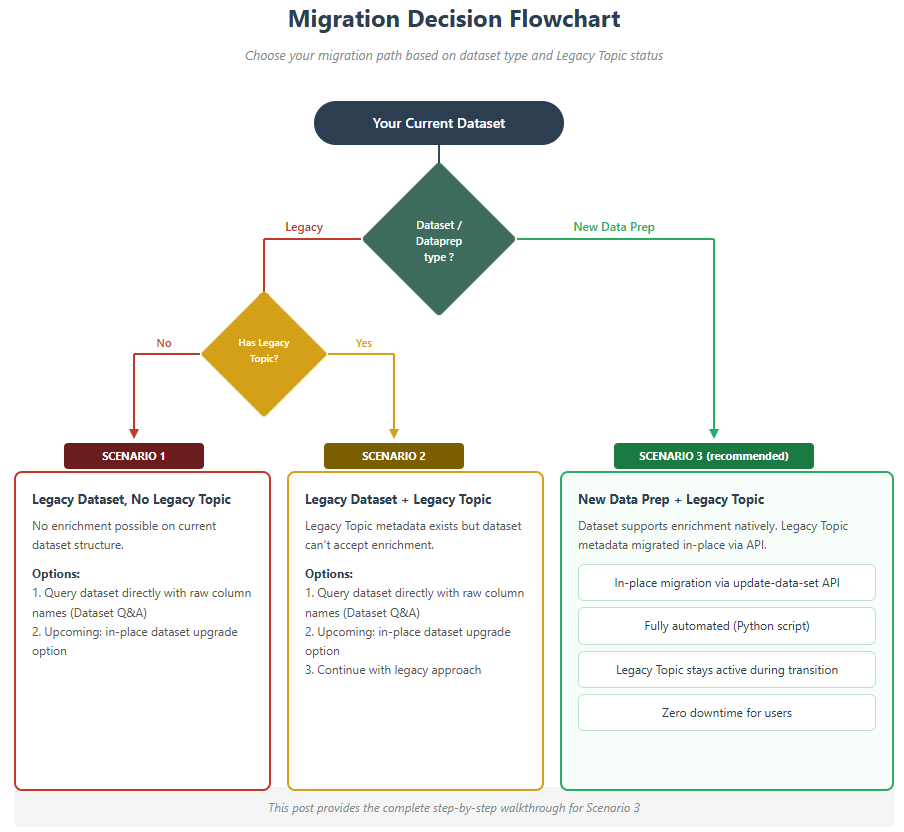
Scenario 1: Legacy datasets with no legacy Topics
Your dataset was built using the classic Quick Sight experience and has no semantic layer of any kind. Users see raw column names (TXN_DT, CUST_ID, AMT_USD) in dashboards, filters, and tooltips. When someone types a natural language question in Amazon Quick chat, the system has zero context to work with: no descriptions, no synonyms, no business rules. A question like “what’s our revenue this quarter?” returns nothing because nothing maps the word “revenue” to any column in the schema.
Legacy datasets ( using LogicalTableMap rather than DataPrepConfiguration) don’t support Dataset Enrichment. There’s no in-place upgrade path currently. You can’t add SemanticModelConfiguration to a legacy dataset, and there’s no migration API that converts one to the other. You can choose to query the dataset directly with raw column names using Dataset Q&A feature.
Scenario 2: Legacy Topics with legacy datasets
A Topic sits on top of a legacy dataset, providing the semantic layer your users depend on, column synonyms, calculated fields, named entities, named filters, and custom instructions. Users query through the Topic and get results. But underneath, the dataset itself has no enrichment. It still uses LogicalTableMap and exposes raw column names with no descriptions or business context of its own.
Like Scenario 1, the underlying legacy dataset doesn’t support SemanticModelConfiguration. There’s no way to push your legacy Topic metadata into the dataset directly. The path forward is creating a new dataset using the new data prep experience, migrating your legacy Topic’s metadata into it as Dataset Enrichment, validating the results, and cutting over. Alternatively you can use the Dataset Q&A feature with the legacy dataset.
Scenario 3: Legacy Topics with new data prep datasets
Current state: You already use the new data prep experience for your dataset. It has DataPrepConfiguration with SourceTableMap, TransformStepMap, and DestinationTableMap. But a legacy Topic is still layered on top providing the semantic context your users rely on: column synonyms, calculated fields, named entities, filters, and custom instructions. The dataset structure supports enrichment natively. It hasn’t been applied yet. This is the only scenario where a direct, in-place migration is possible. Your dataset already speaks the right API language, so you don’t need to recreate it.
Because the dataset uses DataPrepConfiguration, you can pass SemanticModelConfiguration directly to the update-data-set API. This means you can also:
- Migrate column descriptions and synonyms from your legacy Topic into
ColumnProperties.DescriptionandColumnProperties.AdditionalNoteson the dataset. Every column that had aColumnDescriptionorColumnSynonymsarray in the legacy Topic gets an equivalent entry in the dataset’s semantic layer. - Migrate calculated fields from legacy Topic-level expressions into
CreateColumnsStepentries inDataPrepConfiguration. These become first-class computed columns in the dataset, visible in dashboards and available for natural language queries without a legacy Topic. - Migrate named entities, filters, and custom instructions into
CustomInstructions.InlineCustomInstruction.InstructionText. Entity definitions, business rules, and formula documentation are preserved as structured text that the chat system reads at query time. - Keep the legacy Topic active during migration. Both the legacy Topic and the dataset enrichment can coexist temporarily. You validate the enriched dataset’s Q&A behavior against the legacy Topic’s and only remove the legacy Topic after you’re ready.
- Run the legacy Topic migration with a script. Because both
describe-topicandupdate-data-setare API calls, the transformation can be automated end-to-end. Extract legacy Topic metadata, transform it, apply it to the dataset, and verify. No manual UI work required.
The following step automates the enrichment of an Amazon Quick Sight dataset with semantic metadata extracted from a Quick Sight legacy Topic. It transfers business context, column descriptions, synonyms, calculated fields, named entities, filters, and custom instructions from a legacy Topic directly into the dataset’s SemanticModelConfiguration.
Step overview
You need four pieces of information before running the script. Get the dataset ID and Topic ID (Legacy) from the Quick console URLs (shown in Steps 1 and 2), and confirm your AWS account ID and AWS Region.
| Step | Action | Input |
| 1 | Get target dataset ID | Dataset ID |
| 2 | Get Topic ID | Topic ID |
| 3 | AWS Region | |
| 4 | Run Enrich Dataset python script | Both IDs and Region |
Required parameters
- ACCOUNT_ID = <<0358134xxxxx>>
- REGION = <>
- DATASET_ID = <<30c1e26a-e02a-4f2a-ac48-xxa1xxxxx916>>
- TOPIC_ID = <>
Step 1: Get target dataset ID
Open the Quick Sight console. In the left navigation panel, select Data, then switch to the Datasets tab. Select the dataset that you want to enrich. The dataset ID is the UUID at the end of your browser’s URL.
Example:

Step 2: Get the source legacy Topic ID
Open the Quick Sight console. In the left navigation panel, select Data, then switch to the Topics tab. Select the source legacy Topic that you want to migrate from. The Topic ID is the string at the end of your browser’s URL.
Example:

Step 3: Python code to enrich a dataset with information from a legacy Topic
The following script connects to the Quick Sight APIs, retrieves your existing legacy Topic metadata and target dataset schema, then intelligently maps every piece of business context to its new home in the dataset’s SemanticModelConfiguration. Column descriptions and synonyms become ColumnProperties, calculated fields are injected as CreateColumnsStep entries in your data prep pipeline, and named entities, filters, and custom instructions are consolidated into a structured CustomInstructions text block. After the mapping is complete, it applies the enriched payload directly to your dataset through a SigV4-signed API call. Your dataset becomes fully self-describing in a single execution, with no manual UI work and no risk of transcription errors.
Save the following script as enrich_dataset.py.
3.2 Run the script
Execute the script, passing your four parameters (Topic ID, Dataset ID, Account ID, and Region):
3.3 Expected output
After the script completes, confirm that the enrichment was applied correctly by inspecting the dataset through the Quick Sight API or in the Quick Sight console:
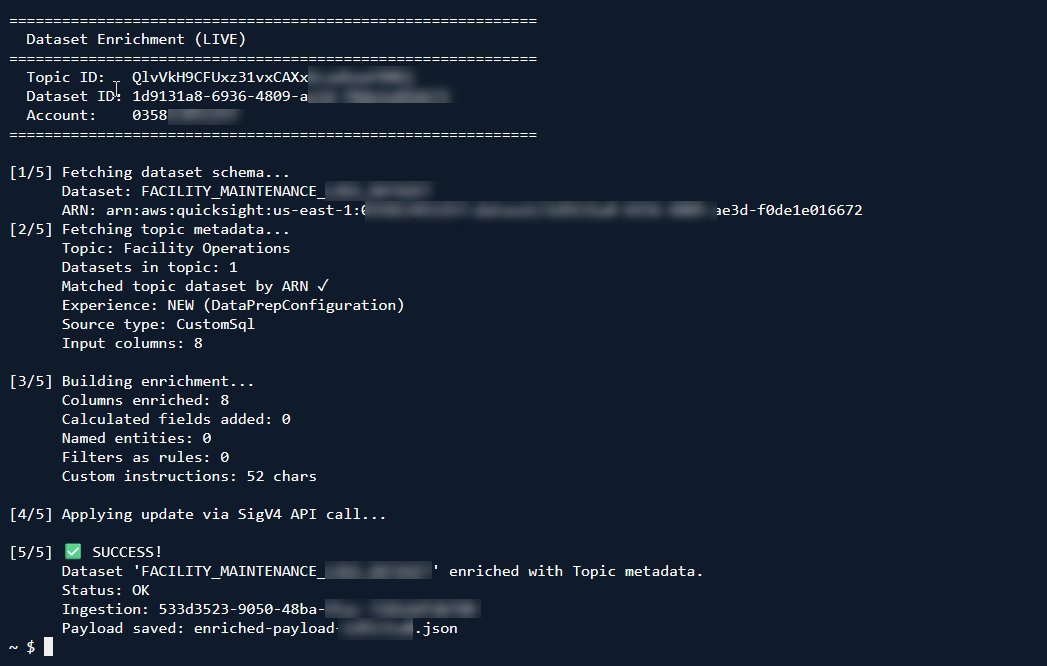
3.4 Verify the output file
physical_table_map: unchanged from the source dataset.data_prep_configuration: with an addedCreateColumnsStepfor calculated fields.semantic_model_configuration: with column descriptions, synonyms, and custom instructions (formulas, entities, and business rules).
Validation best practices
Across all scenarios, we recommend the following validation approach:
- Build a validation question set. Before migration, document 10–20 natural language questions that work correctly against your current legacy Topic. These become your regression test suite.
- Run side-by-side comparisons. Ask the same questions against the legacy Topic (before removal) and against the enriched dataset. Results should match.
- Test edge cases. Try ambiguous questions, synonym variations, and multi-step queries. The enriched dataset should handle these as effectively as (or better than) the legacy Topic did.
- Validate with actual users. Have 2–3 business users test the enriched dataset chat experience before you retire the legacy Topic. Their natural phrasing may reveal gaps in your synonym or entity coverage.
- Document behavioral differences. Some behaviors will differ between legacy Topic-based querying and dataset enrichment querying:
- Legacy Topic filters are pre-defined and selectable; business rules in custom instructions require the user to reference them by name or intent.
- Legacy Topic calculated fields support aggregation-level expressions; dataset calculated fields operate row-by-row (aggregations happen at query time).
- Named entities in legacy Topics have structured metadata; in dataset enrichment they’re text-based instructions.
Key considerations
- The
update-data-setAPI requires a full replacement of all configuration on every call. Incremental updates to individual columns aren’t supported. - Named entities and filters don’t have dedicated API fields in
SemanticModelConfiguration. They must be expressed as text withinCustomInstructions. - Not all legacy Topic calculation expressions translate directly to dataset-level expressions. Aggregation-based calculations may need restructuring.
- Currently, you can’t upgrade legacy datasets in-place. You must create a new dataset with the new data prep experience to enrich it.
Clean up
To avoid incurring ongoing charges, delete the AWS resources (IAM roles, Quick Sight data sources, policies) that you created as part of experimentation. For instructions, see the Amazon Quick documentation.
Conclusion
Dataset Enrichment in Amazon Quick moves business intelligence metadata from a separate legacy Topic layer into the dataset itself. One asset carries its own business meaning: column descriptions, synonyms, calculation logic, entity definitions, and business rules, all governed in one place.
To get started, identify your highest-value dataset, apply enrichment using the patterns in this post, and test it in Amazon Quick chat. For the full SemanticModelConfiguration API reference, see the Amazon Quick documentation. For questions and community discussion, visit the Amazon Quick Community..
About the authors