

















Securing Amazon Bedrock AgentCore Runtime with AWS WAF
This post shows you two architecture patterns that address this problem. Both use an internet-facing ALB with AWS WAF and route traffic through a VPC Interface Endpoint to AgentCore Runtime. Pattern 1 places an AWS Lambda proxy between the ALB and the VPC Endpoint, giving you full control over request transformation. Pattern 2 targets the VPC Endpoint ENI IP addresses directly from the ALB, removing the Lambda hop entirely. You also learn how to close the direct-access backdoor with a resource policy so that traffic flows through AWS WAF only. Both patterns have been tested end-to-end with SigV4 and OAuth (Amazon Cognito JWT) authentication.
When you deploy generative AI agents with Amazon Bedrock AgentCore as production API endpoints, you might want to enforce web application firewall policies, rate limiting, protection against common web threats, or audit controls via AWS WAF.
AWS WAF integrates with Elastic Load Balancing Application Load Balancers (ALBs), Amazon CloudFront distributions, and Amazon API Gateway REST APIs. Amazon CloudFront is designed for caching and content delivery. Since agent invocations are real-time and dynamic, caching doesn’t apply. Amazon API Gateway adds its own authentication and request transformation layer, which can create a double-authentication problem with the built-in SigV4 and OAuth handling in AgentCore. That leaves an internet-facing ALB as the integration point: It passes headers through transparently, supports VPC-internal routing, and attaches directly to an AWS WAF WebACL. From there, you route traffic to AgentCore through a VPC Interface Endpoint for the Bedrock AgentCore data plane service.
This is where the challenge appears. ALBs require health checks to verify that backend targets are responsive. But AgentCore Runtime requires authentication, SigV4 or OAuth, on API calls, including health check requests. Standard ALB health checks send unauthenticated requests, so they fail out of the box. You need a way to make health checks work without credentials while still passing authenticated production traffic through to AgentCore.
This post shows you two architecture patterns that address this problem. Both use an internet-facing ALB with AWS WAF and route traffic through a VPC Interface Endpoint to AgentCore Runtime. Pattern 1 places an AWS Lambda proxy between the ALB and the VPC Endpoint, giving you full control over request transformation. Pattern 2 targets the VPC Endpoint ENI IP addresses directly from the ALB, removing the Lambda hop entirely. You also learn how to close the direct-access backdoor with a resource policy so that traffic flows through AWS WAF only. Both patterns have been tested end-to-end with SigV4 and OAuth (Amazon Cognito JWT) authentication.
Architecture overview
The two patterns share a common foundation. A client application sends an authenticated request, either a SigV4 signature or an OAuth Bearer token, to an internet-facing ALB. AWS WAF inspects the request before the ALB forwards it to VPC Endpoint ENIs on HTTPS port 443. AgentCore validates the authentication and routes the request to the runtime container on its internal port 8080. The difference between the patterns is what sits between the ALB and the VPC Endpoint.
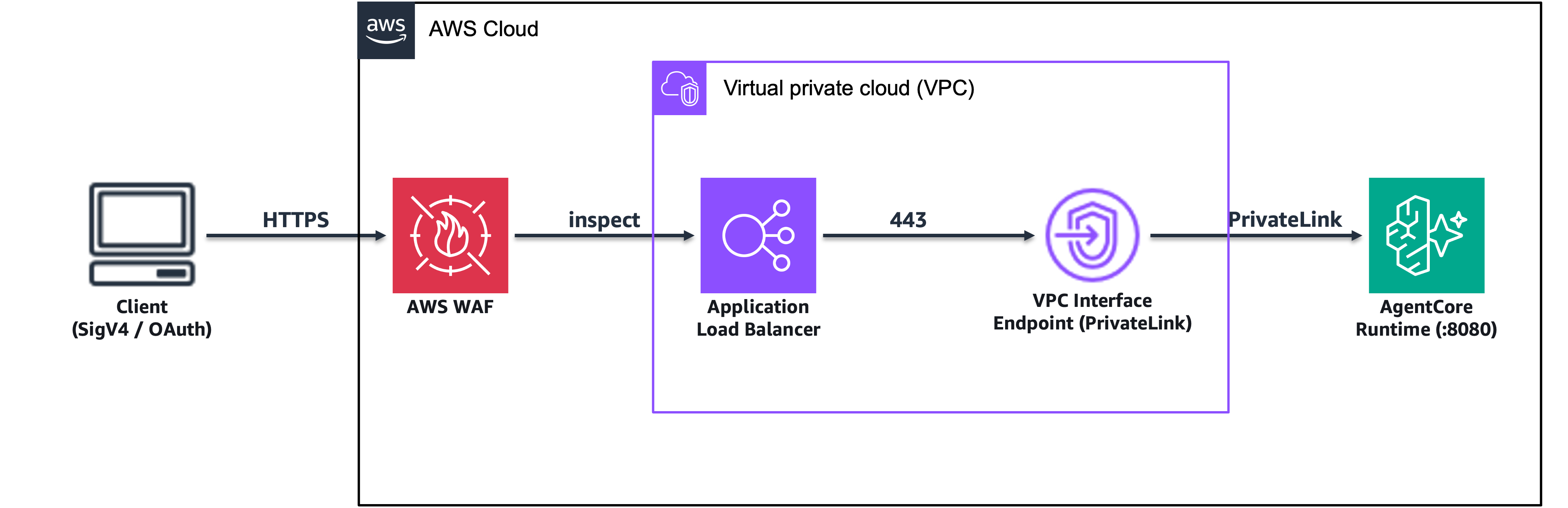
High-level architecture, Client → AWS WAF → ALB → VPC Endpoint (PrivateLink) → AgentCore Runtime container
The architecture has four components:
- AWS WAF attaches to the ALB and provides rate limiting, SQL injection protection, XSS filtering, and bot control through managed rule groups like AWSManagedRulesCommonRuleSet.
- ALB is internet-facing with an HTTPS listener on port 443, routing traffic to VPC Endpoint ENI IP targets.
- VPC Interface Endpoint (
com.amazonaws.) provides private connectivity to AgentCore through PrivateLink..bedrock-agentcore - AgentCore Runtime is the managed container running your agent code, listening on internal port 8080 and supporting both SigV4 and OAuth authentication.
Note: Use com.amazonaws. (data plane) for Runtime invocations. There are three separate endpoint services: bedrock-agentcore (data plane for Runtime, Memory, Tools), bedrock-agentcore-control (control plane), and bedrock-agentcore.gateway (Gateway only). Using the wrong endpoint will not route to your Runtime.
Prerequisites
To follow along with this walkthrough, you need:
- An AWS account with Amazon Bedrock AgentCore enabled.
- An AgentCore Runtime deployed (public or VPC mode).
- A VPC with public and private subnets across at least two Availability Zones.
- An AWS Certificate Manager (ACM) certificate in the same Region, for the ALB’s HTTPS listener.
- An Amazon Cognito User Pool (for the OAuth pattern) or AWS credentials (for the SigV4 pattern).
- Familiarity with ALB, VPC Endpoints, and AWS WAF.
The following sections describe two patterns for integrating AWS WAF with AgentCore. If you need request transformation, custom logging, or authentication translation between the ALB and AgentCore, start with Pattern 1. If you want the simplest architecture with the lowest latency and no additional components, skip to Pattern 2.
Pattern 1: ALB with Lambda proxy
In this pattern, a Lambda function sits behind the ALB and forwards requests, including the authentication header, to AgentCore through the VPC Endpoint. The Lambda function gives you a compute layer where you can transform requests, translate between authentication methods, or add custom logging before the request reaches AgentCore.
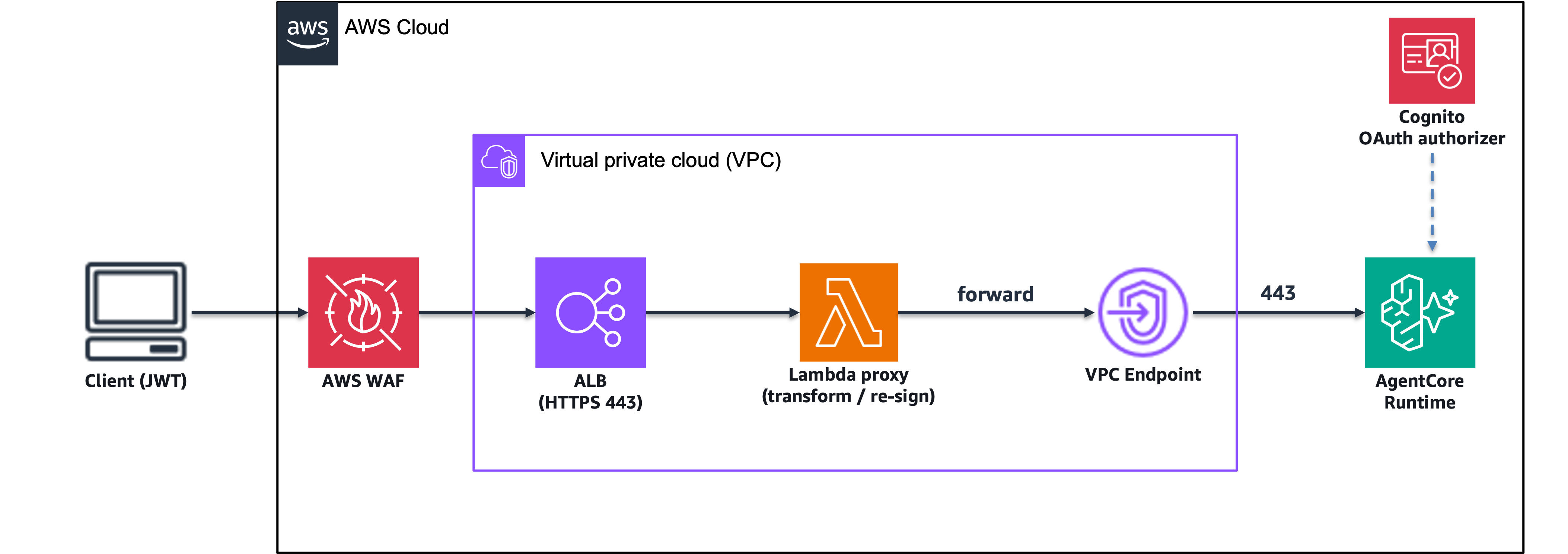
Pattern 1 architecture, Client (JWT) → AWS WAF → ALB → Lambda Proxy → VPC → VPC Endpoint → AgentCore Runtime (OAuth authorizer)
Choose Pattern 1 if you need:
- Request transformation, header manipulation, payload changes, or protocol translation.
- Custom logging or audit trails at the proxy layer.
- Translation between multiple authentication methods.
- An explicit compute layer between the ALB and backend (some security policies require this).
Create the VPC Endpoint
Create a VPC Interface Endpoint for the AgentCore data plane service in your private subnets:
Note: VPC Interface Endpoints incur hourly charges per Availability Zone plus data processing charges per GB. See VPC pricing.
Configure the VPC Endpoint security group to allow inbound HTTPS (port 443) only from the ALB’s security group. This restricts access so that traffic routed through the ALB can reach the VPC Endpoint. For example:
Create the Lambda proxy
The Lambda function receives requests from the ALB and forwards them to AgentCore through the VPC Endpoint. For OAuth, it passes the Authorization header (the Bearer token) through unchanged, along with the original request path and body, so the JWT reaches AgentCore as-is. For SigV4, the signature is bound to the original request host and becomes invalid after the request is forwarded to the VPC Endpoint, so the proxy re-signs the request using its own execution-role credentials.
The following Python snippet shows the core forwarding logic. The function reads the Authorization header from the ALB event, constructs the target URL using the VPC Endpoint DNS name, and forwards the request with the original headers and body intact. This forwarding path works as-is for OAuth Bearer tokens. SigV4 requests require the additional re-signing step, which is included in the accompanying repository.
For brevity, the preceding snippet focuses on the forwarding logic. The complete production-ready implementation, including SigV4 signing, query string handling, ALB health check responses, and structured error handling, is available in the accompanying GitHub repository.
Note: The Lambda proxy incurs charges per request and for compute duration (GB-seconds). See AWS Lambda pricing.
Configure ALB with Lambda target group
Create a Lambda target group, register the proxy function, and create an HTTPS listener on the ALB. The ALB handles TLS termination and forwards the decrypted request to the Lambda function.
Note: Application Load Balancers incur hourly charges plus Load Balancer Capacity Unit (LCU) charges based on traffic. See Elastic Load Balancing pricing.
Attach AWS WAF
Associate an AWS WAF WebACL with the ALB. A typical starting configuration includes AWSManagedRulesCommonRuleSet for protection against common web threats, a rate-based rule to throttle excessive requests per source IP, and AWSManagedRulesBotControlRuleSet if your agents are exposed to browser-based clients. You can add or remove managed rule groups based on your threat model. These are examples, not a prescriptive minimum.
Note: AWS WAF incurs charges per WebACL per month, per rule, and per million requests inspected. See AWS WAF pricing.
Note: Lambda target groups don’t use path-based health checks. The ALB verifies the function is invocable by calling it directly, so no special health check configuration is needed.
Pattern 1 trade-offs
| Aspect | Impact |
| Latency | Adds 50–200 ms per request (Lambda cold start). Mitigate with provisioned concurrency. |
| Cost | Lambda invocation cost per request. |
| Complexity | Additional component to deploy, monitor, and maintain. |
| Flexibility | Full control over request/response transformation and custom logging. |
Note: The Lambda proxy adds approximately 50–200 ms of latency per request. For latency-sensitive workloads, consider Pattern 2, which removes this overhead.
Pattern 2: ALB directly to VPC Endpoint
In this pattern, the ALB targets the VPC Endpoint ENI IP addresses directly on HTTPS port 443. There is no Lambda function and no Network Load Balancer. The ALB passes authentication headers through to AgentCore transparently. This architecture has fewer components and removes the Lambda proxy hop.
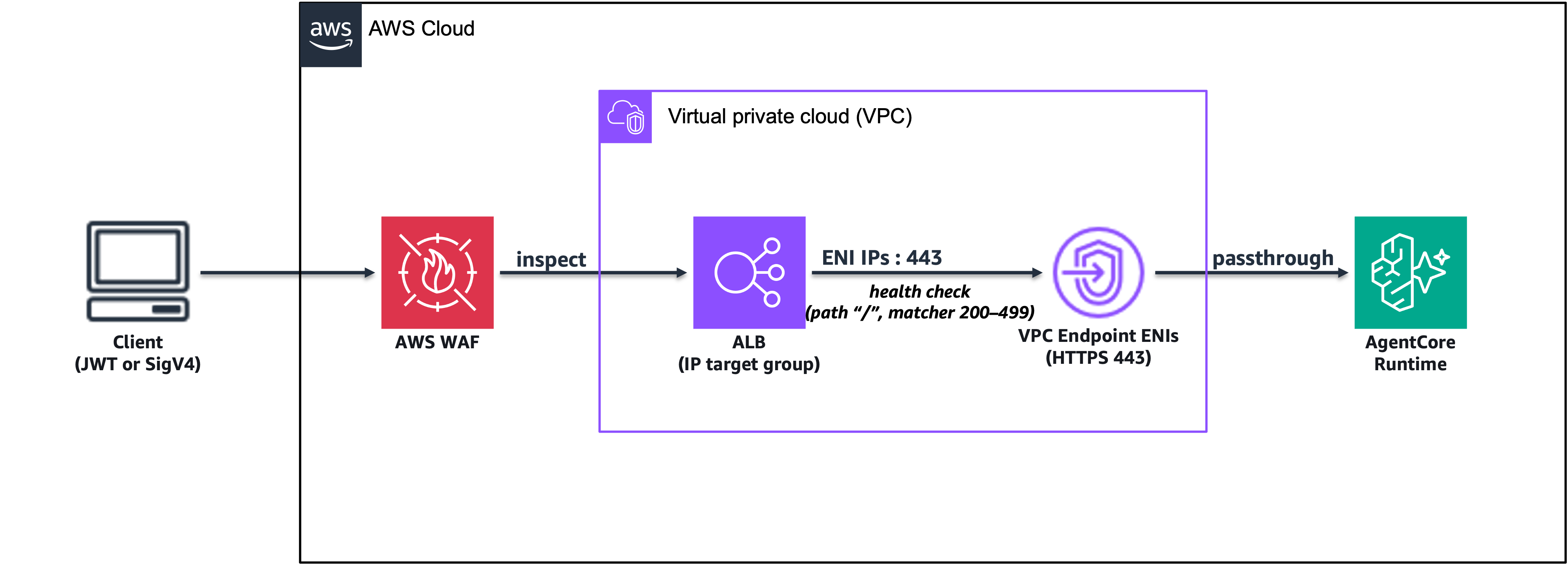
Pattern 2 architecture, Client (JWT or SigV4) → AWS WAF → ALB → VPC Endpoint ENIs (HTTPS 443) → AgentCore Runtime
Choose Pattern 2 if you want:
- A simpler architecture with fewer components.
- No request transformation between the ALB and AgentCore.
- Minimal latency with no additional hops.
- Your client application to handle SigV4 or OAuth signing directly.
Create the VPC Endpoint
Create a VPC Interface Endpoint for com.amazonaws. Get the private IP addresses of the ENIs created by the VPC Endpoint. These IPs become the targets for your ALB target group.
This step is the key configuration that makes Pattern 2 work. Create an IP-type target group on HTTPS port 443 with a health check that doesn’t require authentication.
Note: This target group is available at no additional cost, but the associated Application Load Balancer incurs hourly plus LCU charges, and the VPC Interface Endpoint incurs hourly and data processing charges. See Elastic Load Balancing pricing.
The health check uses path / with a matcher of 200–499. AgentCore returns a 404 on / because it isn’t a valid API path, but the ALB accepts responses in the 200–499 range as healthy. This works because the goal is to verify that the VPC Endpoint is responding. The specific status code doesn’t matter. This approach requires no authentication for health checks.
Register the VPC Endpoint ENI IPs as targets:
Create an HTTPS listener on the ALB that forwards to the target group. The ALB handles TLS termination using your ACM certificate:
Associate an AWS WAF WebACL with the ALB, using the same approach described in Pattern 1, Step 4.
The ALB passes the Authorization header through without modification. Both SigV4 signatures and OAuth Bearer tokens reach AgentCore transparently.
For SigV4 (AWS SDK), point the SDK to the ALB endpoint URL. The SDK handles signing automatically:
For OAuth (browser or curl), pass the JWT as a Bearer token:
Note: When using the client_credentials grant in Amazon Cognito, the JWT contains a client_id claim but no aud claim. Configure the AgentCore OAuth authorizer with allowedClients (which matches client_id) instead of allowedAudience.
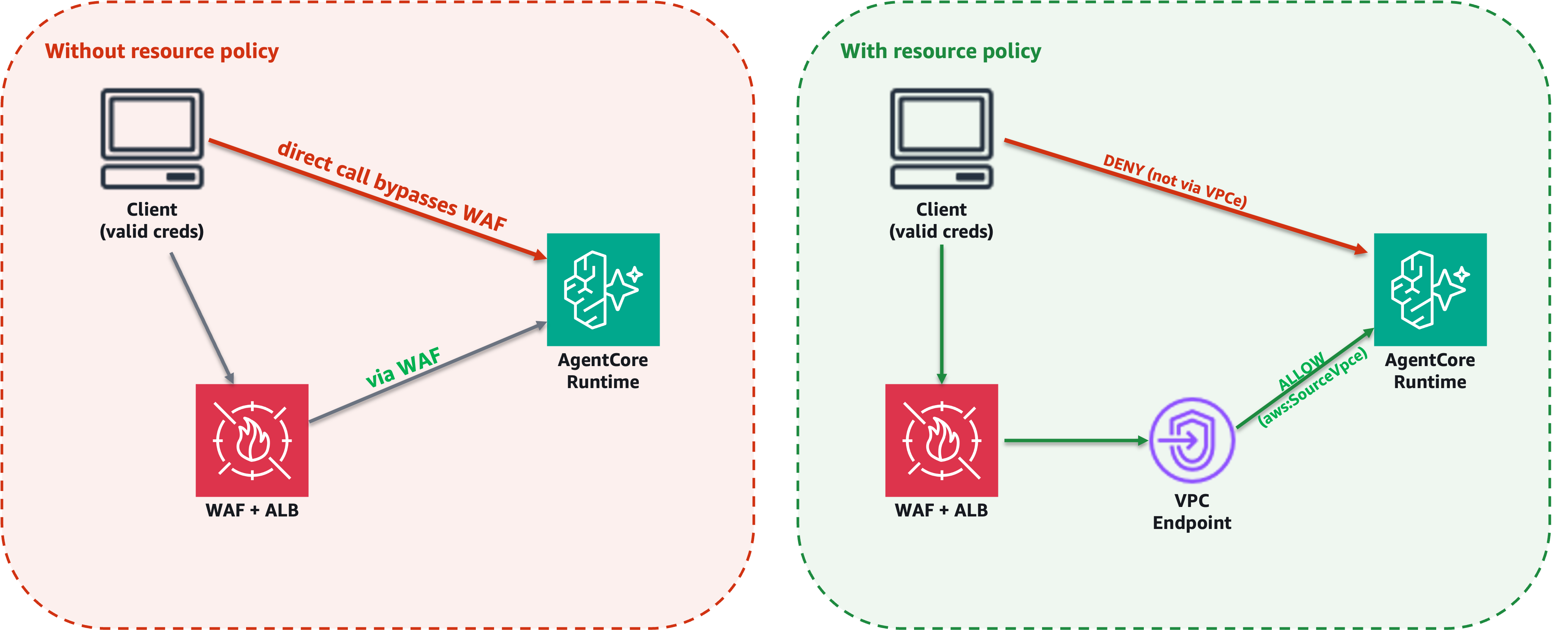
Both patterns require a resource policy to help prevent direct access to AgentCore that bypasses AWS WAF. Without this policy, users with valid credentials can call the AgentCore public endpoint directly, circumventing AWS WAF protections.
Without resource policy (left): direct access bypasses AWS WAF. With resource policy (right): only VPC Endpoint traffic is allowed.
The resource policy uses two statements. The first statement allows InvokeAgentRuntime only when the request originates from your specific VPC Endpoint (aws:SourceVpce condition). The second statement denies InvokeAgentRuntime for requests not originating from that VPC Endpoint, with aws:ViaAWSService set to false to avoid blocking internal AgentCore service calls.
Apply the policy using the put-resource-policy API:
The following is an example resource-policy.json file:
After applying the resource policy, verify that direct access is blocked and AWS WAF-routed access works. The following table shows the expected results:
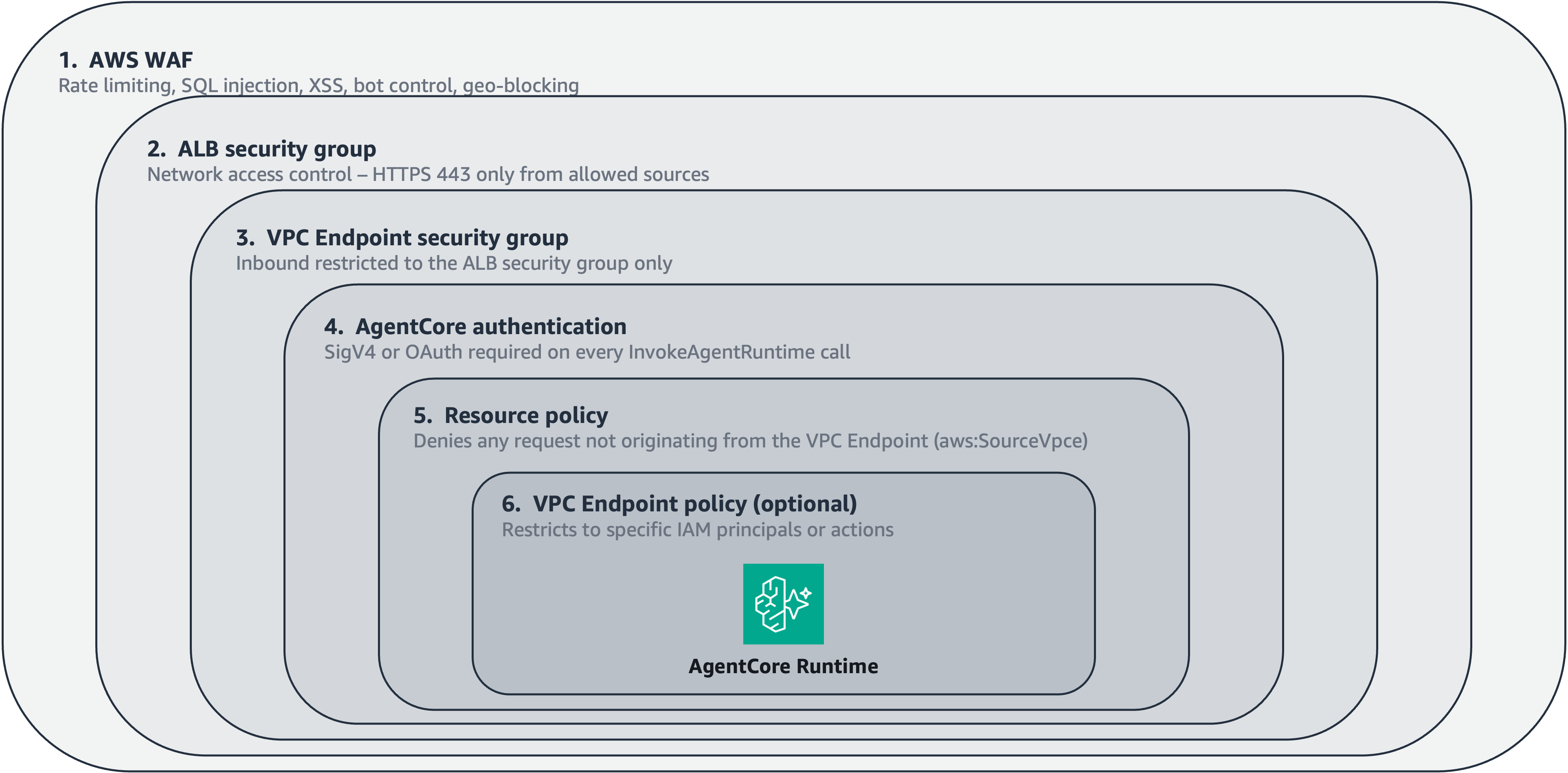
Both patterns provide multiple layers of security. Each layer addresses a different threat vector, and together they form a defense-in-depth posture for your agent runtime. The following figure and table show how these layers stack from the outermost perimeter (AWS WAF) to the innermost control (VPC Endpoint Policy). A request must pass through every layer before reaching your agent runtime.
Defense-in-depth layers, AWS WAF → ALB Security Group → VPC Endpoint Security Group → AgentCore Authentication → Resource Policy → VPC Endpoint Policy
The following table summarizes the key differences to help you choose the right approach.
Before selecting a pattern, review the following considerations that apply to both architectures. These affect how you configure authentication, networking, and endpoint routing.
Port 443 only. The VPC Endpoint exposes only HTTPS 443. Port 8080 (the container’s internal port) is not accessible through the VPC Endpoint. AgentCore routes 443 → 8080 internally.
Private DNS not required. The ALB targets VPC Endpoint ENI IPs directly, so Private DNS on the VPC Endpoint is not required for either pattern.
OAuth blocks SigV4. When an AgentCore Runtime is configured with an OAuth authorizer, SigV4 requests are rejected with “Authorization method mismatch.” Choose one authentication method per runtime.
VPC Endpoint service selection. Use bedrock-agentcore for Runtime data plane. The bedrock-agentcore.gateway endpoint is for AgentCore Gateway only and will not route to your Runtime.
ENI IP stability. VPC Endpoint ENI IPs are stable but can change if the endpoint is recreated. Monitor target health and update targets if IPs change.
If you created resources while following along, delete them to avoid ongoing charges. Remove the resource policy first, then disassociate the AWS WAF WebACL from the ALB. Delete the ALB (listener and target groups first, then the load balancer), the VPC Interface Endpoint, and associated security groups. For Pattern 1, delete the Lambda function. If you created a test AgentCore Runtime or Amazon Cognito User Pool, note that deleting these permanently removes agent configurations and users respectively.
For a detailed cleanup sequence with commands, see the repository README.
You now have two tested architecture patterns for placing AWS WAF in front of Amazon Bedrock AgentCore Runtime. Pattern 2 (direct VPC Endpoint) has fewer components, no Lambda latency overhead, and no extra cost for most use cases. Pattern 1 (Lambda proxy) adds flexibility when you need request transformation or custom authentication logic between the ALB and AgentCore.
Regardless of which pattern you choose, apply a resource policy to close the direct-access backdoor so that traffic flows through AWS WAF. Combined with VPC Endpoint security groups and the built-in authentication in AgentCore, these patterns provide defense in depth for your AI agent deployments.
To learn more, explore the following resources:
Retrieve the VPC Endpoint ENI IP addresses
Create an IP target group with a health check
Register the targets
Create the HTTPS listener
Attach AWS WAF
How authentication passes through the ALB
Pattern 2 trade-offs
Aspect
Impact
Latency
No Lambda latency overhead, direct passthrough.
Cost
No additional compute cost.
Complexity
Minimal components, ALB + VPC Endpoint only.
Flexibility
No request transformation capability.
Closing the direct-access backdoor with resource policies
Verifying the resource policy
Test
Expected result
OAuth through ALB → VPC Endpoint
200 OK, request flows through WAF and VPC Endpoint
OAuth direct to AgentCore public endpoint
403, not authorized to perform bedrock-agentcore:InvokeAgentRuntime
SigV4 to OAuth-configured runtime
403, Authorization method mismatch
No authentication through ALB
401, Missing Authentication Token
Defense in depth: Security layers
Layer
Protection
Applies to
AWS WAF
Rate limiting, SQL injection, XSS, bot control, geo-blocking
Both patterns
ALB Security Group
Network-level access control, HTTPS 443 only from allowed sources
Both patterns
VPC Endpoint Security Group
Restricts inbound to ALB security group only
Both patterns
AgentCore Authentication
SigV4 or OAuth required on every invocation
Both patterns
Resource Policy
Denies access not originating from the VPC Endpoint
Both patterns
VPC Endpoint Policy (optional)
Restricts to specific IAM principals or actions
Both patterns
Choosing between the patterns
Criteria
Pattern 1 (Lambda Proxy)
Pattern 2 (Direct VPC Endpoint)
Components
WAF + ALB + Lambda + VPC Endpoint
WAF + ALB + VPC Endpoint
Additional latency
50–200 ms
No Lambda hop
Additional cost
Lambda invocations
None
Request transformation
Yes, full control
No
Health check approach
Lambda handles health
Path / with matcher 200–499
Authentication
Lambda forwards token
ALB passes through transparently
Complexity
Medium
Low
Start here if…
You need custom logic or multi-auth translation
You want the simplest, lowest-latency option
Important considerations
Cleanup
Conclusion
About the authors