

![LUMI MENAGERIE [Endgame Content]](https://clan.fastly.steamstatic.com/images/39206668/16c2657022c6007f2b6745eae48ffa25699199e5.png?#)
















Deepgram enhances Amazon SageMaker AI support with AWS IAM Temporary Delegation
In this post, we cover why Deepgram built on IAM temporary delegation, how the integration works end-to-end, and what it unlocks for customers running Deepgram speech models on SageMaker AI. With this integration, Deepgram has reduced the time for initial investigation on a SageMaker AI support ticket from days to minutes.
Enterprises running self-hosted speech AI need fast, auditable support without giving partners long-lived access to their accounts. When a model returns unexpected results or an endpoint misbehaves, the engineer best positioned to diagnose it is often on the partner side. But provisioning cross-account AWS Identity and Access Management (IAM) roles for every support engagement is operationally expensive and a recurring audit conversation. Amazon SageMaker AI delivers a managed deployment option for self-hosted Deepgram speech AI models. It provides AWS Marketplace listings for Nova, Flux, and Aura-2, along with validated reference architectures and Terraform modules that layer onto existing AWS infrastructure. To bring the same operational maturity to day-two support, Deepgram has integrated with IAM temporary delegation, a new IAM capability that grants partners scoped, time-limited, customer-approved access to specific resources, with no long-lived credentials, no cross-account roles to provision, and no shared secrets.
In this post, we cover why Deepgram built on IAM temporary delegation, how the integration works end-to-end, and what it unlocks for customers running Deepgram speech models on SageMaker AI. With this integration, Deepgram has reduced the time for initial investigation on a SageMaker AI support ticket from days to minutes. Previously, initial investigation required scheduling a screen-share across customer and partner calendars. Now a customer approves a request in their own IAM console, which also reduces long-standing cross-account access.
Amazon SageMaker AI delivers a managed control plane for self-hosted Deepgram
Enterprise customers choose to self-host Deepgram for the usual reasons: data residency, network isolation, and regulatory compliance. But they don’t want to trade away the operational posture of a managed cloud service to get there. SageMaker AI is how we close that gap: a single AWS native control plane for deploying, scaling, and observing Deepgram speech models inside the customer’s own account.
Deepgram has invested in SageMaker AI as a first-class deployment target across the axes that matter most to enterprise platform teams:
- AWS Marketplace listings for Deepgram’s Nova, Flux, and Aura spanning speech-to-text (STT) and text-to-speech (TTS) speech models, with one-click subscription and consolidated AWS billing.
- Validated reference architectures covering Amazon Virtual Private Cloud (Amazon VPC) isolation, AWS PrivateLink, auto scaling, and observability.
- Terraform modules that platform teams can layer onto their existing AWS infrastructure instead of building the deployment from scratch.
The result is a self-hosted experience that no longer means “you’re on your own.”
The support access problem
Production deployments eventually need support. A model is returning unexpected results, an endpoint is autoscaling slower than expected, graphics processing unit (GPU) utilization looks off. The engineer best positioned to diagnose it is on the Deepgram team. The challenge they face is how to investigate a workload running inside a customer Amazon VPC they don’t have access to.
The traditional options all have drawbacks. Long-lived cross-account IAM roles work, but customers don’t want to provision, audit, and remember to revoke them, and platform teams don’t want to be the ones answering for them at the next audit. Shared screens and copy-pasted logs are slow, error-prone, and a poor fit for regulated environments where every command needs to be attributable. Asking the customer to run commands on Deepgram’s behalf works for trivial issues, but doesn’t scale for issues that require iteration.
We needed a way to give a Deepgram engineer scoped, auditable access to exactly one SageMaker AI endpoint, for a bounded window, with the customer in control of the approval and no standing trust between accounts.
Prerequisites
To use the integration described in this post, you need the following:
- An active Deepgram model deployment on Amazon SageMaker AI in your AWS account.
- IAM permissions in your AWS account to review and approve delegation requests, including
iam:GetDelegationRequestandiam:AcceptDelegationRequest. - An AWS CloudTrail trail enabled in the AWS Region where the SageMaker AI endpoint runs, so delegated API calls are captured for audit.
- An active Deepgram support contract or account that includes access to the Deepgram support ticketing system.
- Awareness that running this integration incurs AWS charges for SageMaker AI endpoint hosting (including GPU instances), Amazon CloudWatch logs, AWS CloudTrail, and associated networking resources. Deepgram offers a 14-day trial at no additional cost for its models, but AWS infrastructure costs apply from the start of deployment.
IAM temporary delegation
IAM temporary delegation is a new IAM capability built for exactly this shape of problem.
The partner submits a delegation request against a pre-registered, parameterized permission template. The customer reviews it in their own IAM console and sees the fully resolved permissions, with every resource Amazon Resource Name (ARN) spelled out and no wildcards. The customer then approves the request. AWS then issues short-lived AWS Security Token Service (AWS STS) credentials to the partner, scoped to the template, bounded by SessionDuration, and tagged in the customer’s AWS CloudTrail with the partner’s account ID for end-to-end auditability.
No IAM roles to create. No long-lived keys to rotate. No cross-account trust to maintain. Approval lives where security teams already expect it: in the customer’s own IAM console.
How Deepgram’s integration works
Deepgram engineers keep working in the support ticketing system throughout the workflow. The integration is built directly into Deepgram’s support ticketing system, wired to AWS over a single Amazon Simple Notification Service (Amazon SNS) topic.
End-to-end flow (each step is labeled with the actor who performs it, whether Engineer, Customer, or System):
- [Engineer] In the customer support ticket, run the
/delegate_accesscommand. - [Customer] When the integration prompts you in the ticket, reply with the SageMaker AI endpoint ARN, the single piece of information that scopes the entire request. To find the ARN, run
aws sagemaker describe-endpoint --endpoint-name--query EndpointArn - [System] The integration calls
iam:CreateDelegationRequestwith the pre-registeredDeepgramSageMakerReadOnlyTroubleshootingpermission template, passing the endpoint’s Region, account ID, and name as runtime parameters. - [Customer] Open the deep link to your IAM console that the integration sends you. If the link doesn’t work, navigate to IAM console, then Access management, then Delegation requests.
- [Customer] In the IAM console, review the fully resolved permissions.
- [Customer] Choose Approve to grant access to exactly one Amazon CloudWatch log group and one
DescribeEndpointresource. - [System] AWS publishes an exchange token to Deepgram’s Amazon SNS topic.
- [System] The integration exchanges the token for STS credentials using
sts:GetDelegatedAccessToken. - [System] The integration posts the credentials to the ticket’s internal discussion.
- [System] Credentials expire automatically after twelve hours.
- [Customer] Revoke access at any time before expiration by choosing Revoke on the delegation request in the IAM console.
- [Engineer] Verify endpoint access by running
aws sagemaker describe-endpoint --endpoint-namewith the issued STS credentials. - [Engineer] Verify log access by running
aws logs tail /aws/sagemaker/Endpoints/with the issued STS credentials. - [Customer] Verify delegated activity by reviewing AWS CloudTrail events tagged with Deepgram’s partner account ID.
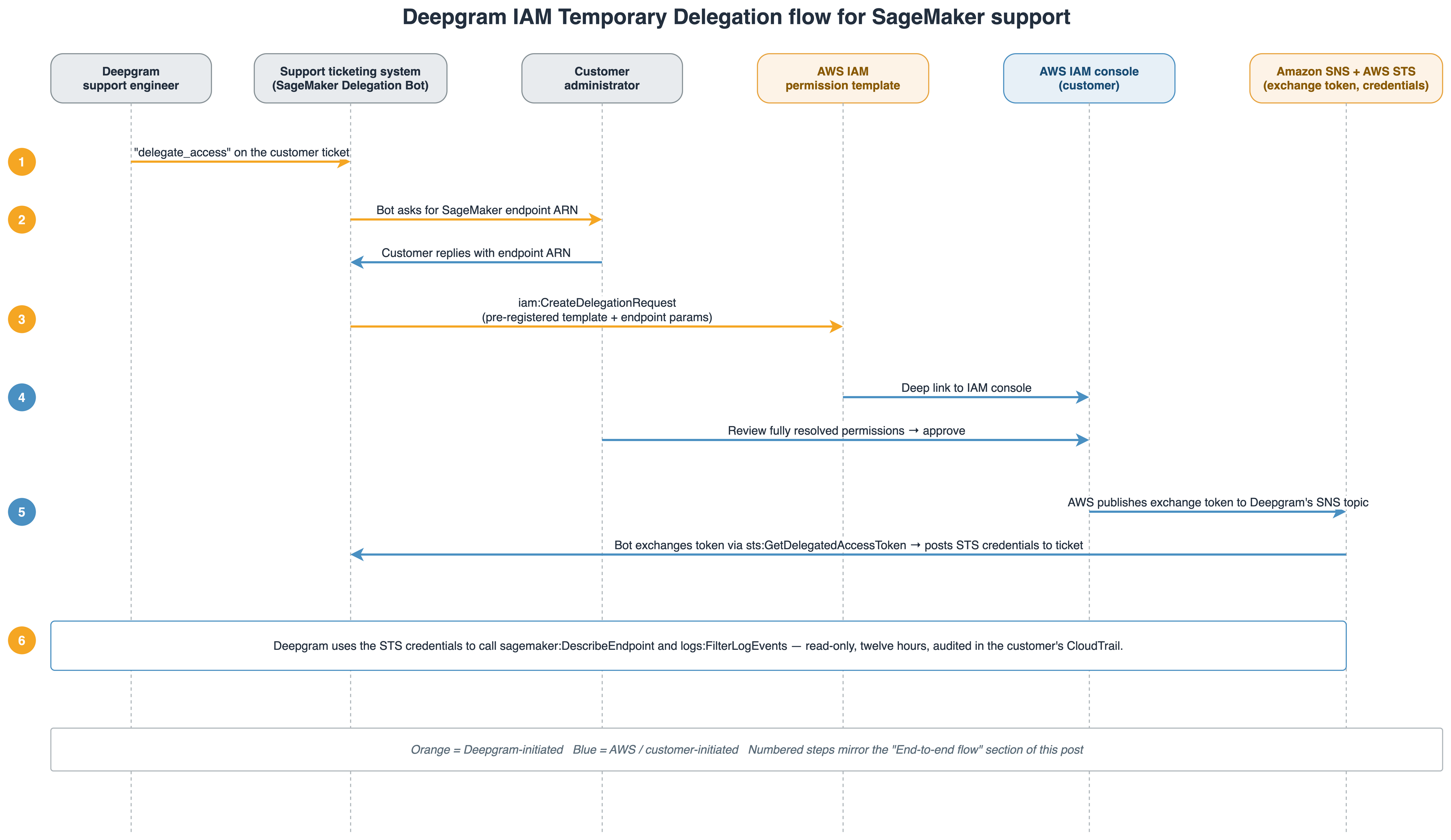
Figure 1 — End-to-end IAM Temporary Delegation flow for Deepgram support on Amazon SageMaker AI
What the customer sees
When a Deepgram engineer initiates a request, the customer receives a link. Opening it brings them straight to the approval screen in their own IAM console. There’s no setup and no role to create.
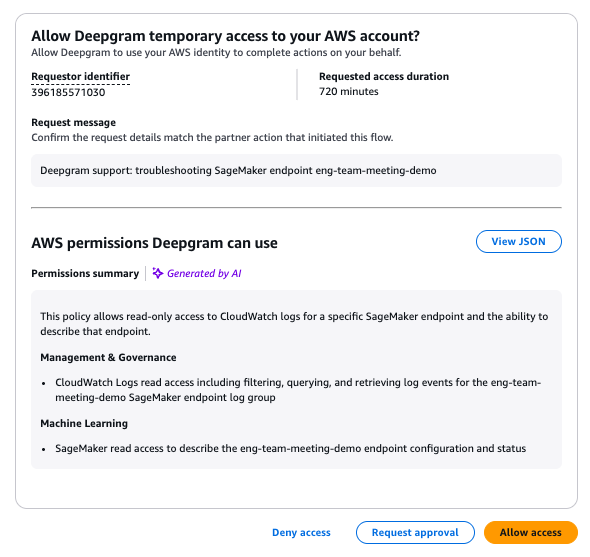
Figure 2 — The approval screen shows who is requesting access, for how long, why, and a plain-language summary of the permissions
Customers who want to see the exact permissions, rather than the summary, choose View JSON to inspect the fully resolved policy, with every action and every resource ARN spelled out and no wildcards. The permission template is parameterized at definition time but not wildcarded at approval time.
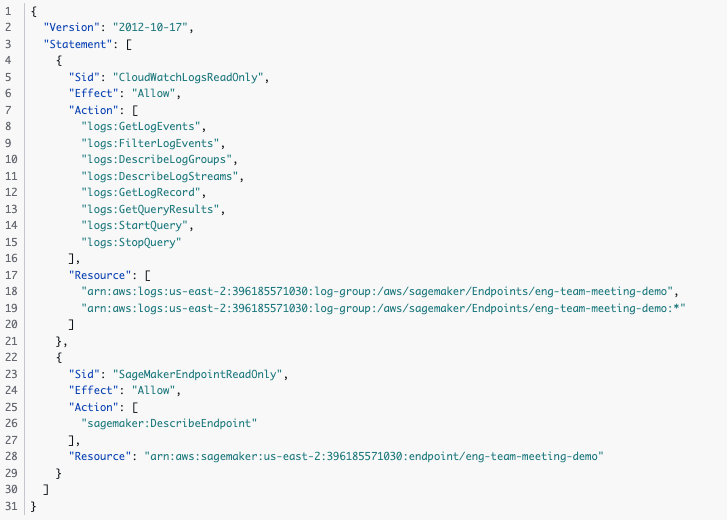
Figure 3 — View JSON shows the complete, fully scoped IAM policy
From the approval screen, the customer has three choices: Deny access, Allow access, or Request approval. A reviewer who holds the iam:AcceptDelegationRequest permission can choose Allow access, and access begins immediately.
If the reviewer doesn’t have that permission, they choose Request approval, add a business justification, and the request is forwarded to their account administrator. After the administrator approves, access begins.
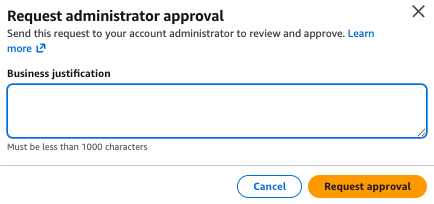
Figure 4 — Reviewers without approval rights can forward the request, with justification, to an administrator
Either path ends at the same confirmation: Deepgram has been granted temporary, time-bounded access, and every action it takes is recorded in the customer’s AWS CloudTrail.
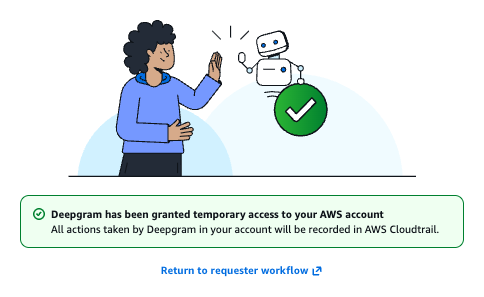
Figure 5 — Confirmation that scoped, audited access has been granted
Read-only. One endpoint. One Region. One account. Twelve hours. API calls made using the delegated credentials appear in the customer’s AWS CloudTrail tagged with Deepgram’s partner account ID, when CloudTrail is enabled and configured to log the relevant API actions.
Why this matters
For Deepgram customers, the integration collapses time-to-first-look on a SageMaker AI support ticket from “schedule a screen-share when both sides are free” to “approve a request in the IAM console.” For Deepgram’s security-conscious enterprise buyers, it replaces a recurring IAM role provisioning conversation with a no-standing-access posture that’s strictly stronger than the alternative.
Clean up
To avoid ongoing charges and remove temporary access after testing, complete the following steps:
Warning: The following cleanup steps permanently delete resources and log data. Back up any logs or data that you want to retain before proceeding. These operations cannot be undone.
- In the IAM console, navigate to Access management, then go to Delegation requests.
- Revoke any active Deepgram delegation requests.
- Delete the SageMaker AI endpoint:
aws sagemaker delete-endpoint --endpoint-name. - Delete the endpoint configuration:
aws sagemaker delete-endpoint-config --endpoint-config-name. - Delete the model:
aws sagemaker delete-model --model-name. - Delete the associated Amazon CloudWatch log group to stop log storage charges:
aws logs delete-log-group --log-group-name /aws/sagemaker/Endpoints/. - If you created an AWS CloudTrail trail specifically for this integration, delete it in the CloudTrail console.
- If you no longer need the model, unsubscribe from the Deepgram listing on AWS Marketplace.
- Verify cleanup by confirming that
aws sagemaker list-endpointsreturns no Deepgram endpoints. Endpoint hosting charges stop once the endpoint is deleted. Log storage charges continue until the log group is removed.
Conclusion
Self-hosted speech AI on Amazon SageMaker AI supports the data residency, network isolation, and compliance posture enterprises need. AWS IAM Temporary Delegation helps close the day-two support gap that previously came with that posture. Together, they let Deepgram engineers diagnose customer endpoints in minutes instead of days, with scoped, time-bounded access that customers approve in their own IAM console and audit end-to-end in the customer’s AWS CloudTrail, with no long-lived credentials, no cross-account roles, and no shared secrets. As IAM temporary delegation expands across more SaaS partners on AWS, Deepgram and AWS will keep investing in making secure, low-friction support the default for self-hosted speech AI.
Get started
SageMaker AI is a preferred deployment option for self-hosted Deepgram speech AI models, and IAM Temporary Delegation is the latest investment in making the day-two experience match the day-one experience. Every Deepgram model available on SageMaker AI including Nova, Flux, and Aura-2 comes with a 14-day trial at no additional cost, so platform teams can stand up a real deployment in their own AWS account before committing. Running Deepgram models on SageMaker AI incurs charges for endpoint hosting (including GPU instances), Amazon CloudWatch logs, and associated networking resources. While Deepgram offers a 14-day trial at no additional cost, AWS infrastructure costs apply from the start of deployment, so review the SageMaker AI pricing page and use AWS Cost Explorer to monitor your spending.
To get started or to learn more, reach out to your Deepgram account representative or your AWS account representative. To learn more about the underlying capability, see the AWS IAM Temporary Delegation documentation.
About the authors