
![[Dev Letter] The End of the LMG Meta Rotation and What’s Next](https://clan.fastly.steamstatic.com/images/27971017/e8946308fc8705ee8eed610867b469a28660016e.png?#)















Migrate agentic workloads to Amazon Bedrock AgentCore
An agent that works in a notebook is not an agent in production. This post walks through migrating a LangGraph customer support agent to Amazon Bedrock AgentCore in two stages: onto Runtime, Gateway, and Memory, then to model-driven planning on Strands Agents, retiring operational burdens along the way.
An agent that works in a notebook isn’t an agent in production. After real users arrive, you own work that has nothing to do with your agent’s reasoning. Keep one user’s session out of another’s, and hold state across turns and days. Auth for every tool the agent calls sits in your code, and the operating system underneath needs patching. Those are four of the ten operational burdens this post maps.
When the agent reaches production, add Amazon Bedrock Guardrails to filter harmful content, validate grounding against your source documents, and block prompt injection attempts. Those controls apply to any agent regardless of which stage you stop at.
This post starts from an agent you already have. It’s a LangGraph customer support agent that classifies each message, escalates an angry customer and answers everyone else with three tools, and its model calls already go to Amazon Bedrock. You own the container, the web server and the conversation state in the process. Inference is the one call a migration doesn’t touch, so being on Amazon Bedrock already isn’t the head start it sounds like. If your model calls go to OpenAI or Anthropic directly, one constructor changes, shown at stage 0.
In this post you move that agent in two stages. Stage 1 transitions it onto Amazon Bedrock AgentCore Runtime, Gateway and Memory, graph unchanged. Stage 2 rebuilds the loop as model-driven planning on Strands Agents. Stop after stage 1 and you have a hosted agent with managed tools and durable state. Stage 3 hands the loop to an AgentCore harness, a capability of Amazon Bedrock AgentCore, documented here rather than built.
Where you are
The agent in this post answers support questions. A customer asks where an order is, or how to return something, and the agent looks it up, answers what it can, and escalates what it can’t. It runs on compute you provision, patch and scale.
That last clause is what this post is about. None of it describes what the agent does.
In code the migration is bounded, and four constructs are all it touches. What you operate is the longer list, and the next section maps it.
| LangGraph construct | Strands equivalent | AgentCore feature |
build_graph(...), plus the container and web server you run it in |
Agent(model=..., system_prompt=..., tools=...), callable |
Runtime: BedrockAgentCoreApp and an @app.entrypoint function, on one microVM per session |
@tool functions bound with ToolNode(tools) and llm.bind_tools(tools) |
tools from MCPClient.list_tools_sync(), passed to Agent(tools=...) |
Gateway: an AWS Lambda target, published as Model Context Protocol (MCP) tools named supportTools___ |
MemorySaver() with thread_id in the invoke config |
AgentCoreMemorySessionManager(AgentCoreMemoryConfig(...)) |
Memory: state keyed on actor_id and the session |
add_conditional_edges("classify_intent", route_intent) |
no equivalent: model-driven planning replaces the branch, or you keep the graph | Runtime hosts it unchanged. Nothing replaces it |
The last row answers the question “what does AgentCore take away from me”. Nothing. Runtime is where your agent runs, not what decides its next step. Losing the hand-written branch is a choice, made at stage 2.
Solution overview
The point of moving is to shed the work that has nothing to do with your agent’s reasoning. Amazon Bedrock AgentCore is a platform to build, connect, and optimize agents at scale, with any framework or model. You attach its services one at a time, each attachment retiring specific burdens, and the following figure maps the ten onto them. Runtime takes the compute, so OS patching, auto scaling and session isolation stop being yours. By default it runs on AWS-managed infrastructure, and you can attach it to a virtual private cloud (VPC) you own. Either way you still design the network, place edge protection in front of your entry point, and decide authorization. Gateway takes tool auth and calls your function with its own execution role. Checkpoint storage goes to Memory, which holds conversation state across turns, processes and days.
AWS Identity and Access Management (IAM) policies, VPC configuration, web application firewall (WAF) rules, and secrets rotation stay yours at every stage. Dependency updates move at stage 3 and nowhere earlier.
Three more services attach without replacing anything. Identity brokers credentials and refreshes OAuth access tokens for APIs the agent calls on someone’s behalf. This walkthrough does not exercise it. The agent signs its Gateway calls with its own IAM credentials using Signature Version 4, and Gateway then invokes the AWS Lambda target under its own execution role. Nothing in that path needs a third-party token. Policy decides individual tool calls at the Gateway. Observability sends Runtime logs, metrics and traces to Amazon CloudWatch without you configuring it.
Take the stages in order. Stage 1 moves where the agent runs and changes nothing about how it thinks, which keeps one variable in play. Stage 2 moves how it plans, against a runtime you have already proved. A team rewriting the agent anyway can start at stage 2, because the gateway, target and Memory store built first serve either stage. Stage 3 is documented, not built.
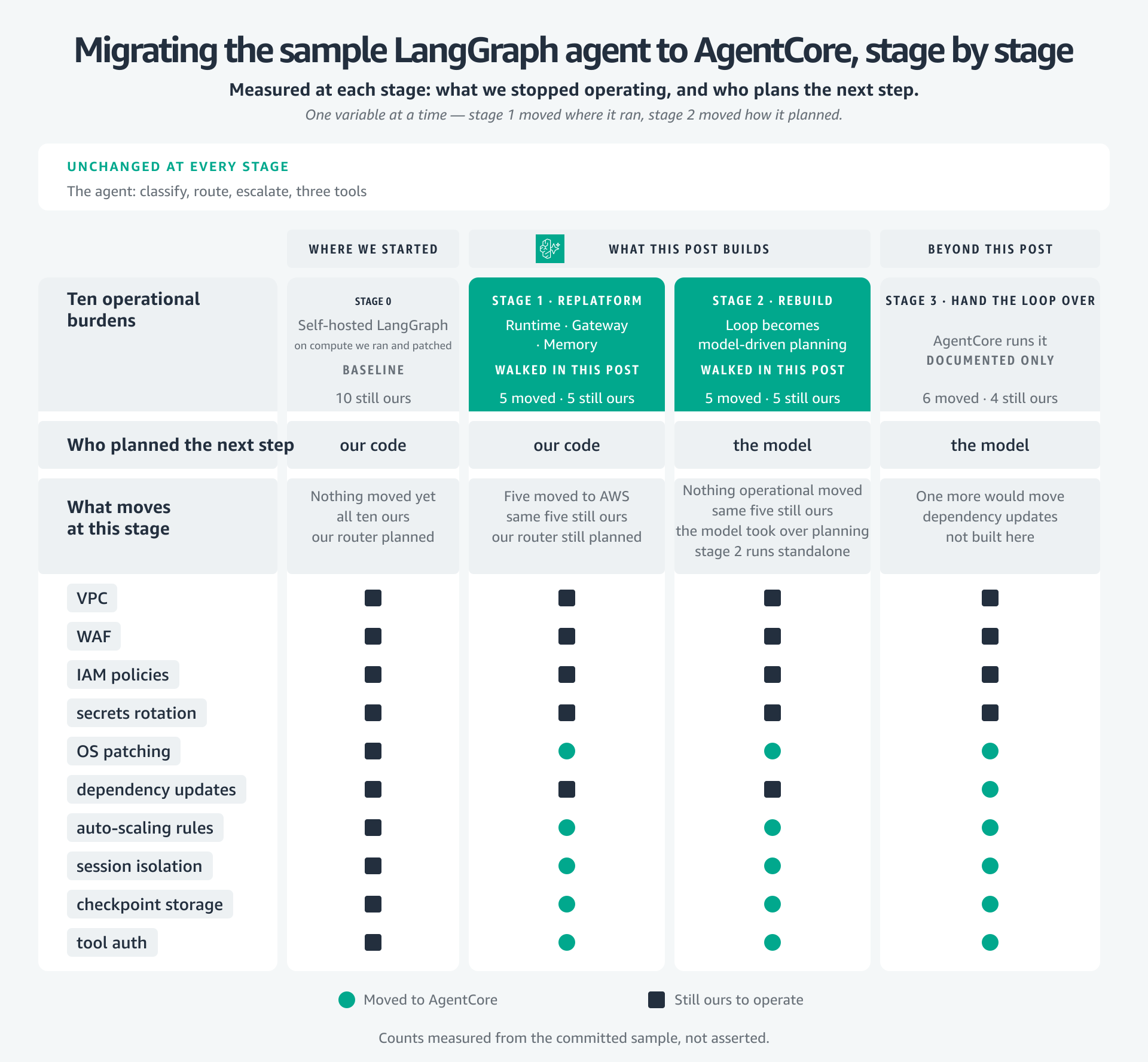
Figure 1: What stops being yours to operate, and who plans the agent’s next step. Stage 1 moves the first, stage 2 moves the second
Migration walkthrough
The sample repository is laid out as the following stages, so each stage can be compared against the one before it. The following figure is the shape of that comparison: what each stage started from, what moved, and why the next one follows. Where this post gives a count of what moved, that count is measured from the committed sample rather than estimated.
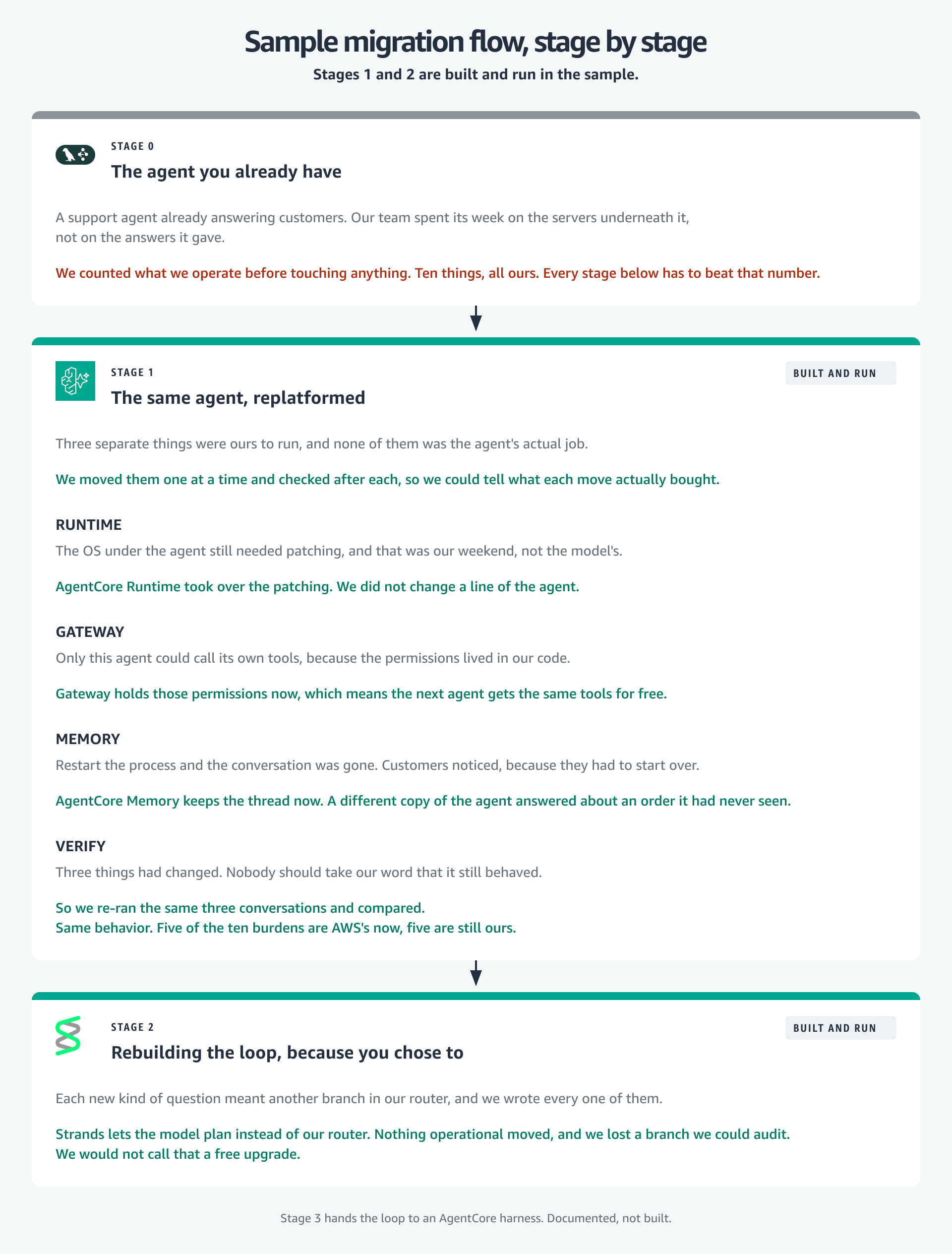
Figure 2: Where each stage started, what moved, and why the next one follows
Prerequisites
You need an AWS account with Amazon Bedrock model access enabled, Python 3.12, and the AWS Command Line Interface (AWS CLI) configured with credentials that can create AgentCore, Lambda, Amazon Simple Storage Service (Amazon S3) and IAM resources. Enable CloudWatch Transaction Search once for the account as well, or the traces this walkthrough produces cannot be viewed.
That creates a virtual environment and installs seven requirements. If you already run a LangGraph agent against Amazon Bedrock, the new ones are strands-agents, bedrock-agentcore, mcp and langgraph-checkpoint-aws. Two are pinned rather than floored, because an unpinned langchain-aws resolves higher and drags boto3 forward with it.
Confirm the install with the test suite, which needs no credentials:
Stage 0: The agent you already have
Read the agent before changing it, because its current behavior is the baseline every later stage must preserve. It’s a compiled StateGraph: classify_intent asks the model for one word, and a hand-written route_intent reads it. An angry customer goes to escalate, which returns a fixed handoff and makes no model call. Everyone else goes to assist, which calls the model with the tools bound:
Three tools hang off it as @tool functions over an HTTP backend: lookup_order, process_return and search_faq. They return an {"error": ...} payload instead of raising, because an exception inside the tool node kills the run while an error payload is something the model can act on.
State is a MemorySaver checkpointer keyed on a thread_id passed at invoke time, and it’s the one piece with a hard limit. A dictionary in the process dies with the process, and two replicas cannot see each other’s conversations. Everything else here is fine at production scale. That is not.
The model is ChatBedrockConverse, so inference already goes to Amazon Bedrock and stage 0 touches no AgentCore API. If you’re arriving from OpenAI or Anthropic instead, that constructor is your one change, with the model ID and AWS Region as arguments. For model availability by Region, refer to Supported models by AWS Region in Amazon Bedrock. Record the baseline before you move anything: which tools ran, and the final message from the graph state, not the model’s reply. That makes the next stage a comparison rather than a hope. This runs locally and creates nothing in AWS:
Stage 1: The same agent, migrated
Stage 0 left you a working agent and a recorded baseline. Stage 1 is where five of the ten burdens stop being yours, and the agent’s behavior is the thing that doesn’t change. Three things move: Runtime takes the process, two of the three tools go behind Gateway, and the conversation state lands in Memory. Inference does not move, because it was never the problem.
The migrated package doesn’t copy stage 0, it imports it:
Those two imports carry the graph topology, the router, the state schema, all three prompts and all three tool bodies, so none of it can drift. They also make the cost countable, measured from disk rather than asserted: 45 lines change inside the agent, 22 lines are new supporting code the SDK doesn’t ship, and 85 lines are imported untouched. That 22 is small for one reason. The expensive piece used to be a hand-written LangGraph checkpointer over AgentCore Memory, and it now ships in a package, so a tool adapter is all the glue left.
Runtime: Hosting the loop
All ten operational burdens are still yours, and the baseline is now recorded over three turns. The machine underneath the loop moves first, because patching an operating system is not what your agent does. It is also the least code you will change for the most return: the operating system stops being yours to patch, and session isolation becomes one microVM per session. Wrap the loop you have in BedrockAgentCoreApp and give it an entrypoint:
The invoke call inside it is stage 0’s. What changed is where the thread_id comes from. Stage 0 chose one. Here it arrives as context.session_id on the RequestContext Runtime passes in. Build the graph once and hold it, because a per-request graph rebuilds the model client and can tear down the MCP session the tools need.
The same wrapper takes a CrewAI or LlamaIndex loop, or one you wrote: accept a payload dict, invoke, return a dict.
Gateway: Publishing two of the three tools
The operating system and the compute underneath the loop have stopped being yours. Tool auth hasn’t. The reason to put a tool behind a gateway is what moves with it: auth stops being your code’s problem, and reach grows, because a published tool is callable by your next agent, where a function inside this process is only ever this agent’s. So lookup_order and process_return become MCP tools published by AgentCore Gateway, a capability of Amazon Bedrock AgentCore, from a Lambda function. You register it and change no code inside it.
search_faq stays a local Python function through every stage, and that is the normal case rather than a compromise. A tool no other agent needs and no policy gates has nothing to gain from the trip.
Conversion is two calls on a bedrock-agentcore-control client. Create the gateway, choosing an authorizerType. AWS_IAM signs with credentials you have, CUSTOM_JWT wants a bearer token.
Both returned values matter later: gateway_id names the gateway when you register the target, and gateway_url is the MCP endpoint the agent connects to.
Then register a target, which is the conversion itself. Point Gateway at your function and declare its tools with a JSON schema.
With GATEWAY_IAM_ROLE, Gateway calls your function as itself and passes tool arguments as the raw event, so an Amazon API Gateway handler needs adapting.
The agent discovers the tools, SigV4-signing every request:
Discovered tools arrive prefixed with the target name and three underscores. lookup_order becomes supportTools___lookup_order, and searching the list for the original name returns nothing.
list_tools_sync() returns Strands tool objects, the LangGraph tool node wants LangChain BaseTool objects, and the two share no interface. Those 22 lines convert between them. The same module merges both sources, matching on the part after the last ___, so Gateway tools supersede same-named local functions and search_faq stays local.
Memory: State that used to die with the process
With compute and tool auth moved, conversation state is the remaining boundary in this stage. It still dies with the process, so two instances can’t read the same conversation. Memory retires that limit. Stage 0’s MemorySaver becomes a checkpointer backed by AgentCore Memory, keyed on actor_id and the session instead of a thread_id you chose. Create the store first, and set event_expiry_days deliberately, because checkpoints inherit it.
The checkpointer ships first party, a dependency rather than a file you own. It’s in the requirements you already installed, pinned:
Construct it with the memory id and nothing else. It takes no actor_id. It reads actor_id and thread_id off the RunnableConfig on each call instead of binding either at construction, so both travel with every invocation:
Test the durability, don’t assume it. A second process sharing only the memory, actor and session ids answered a question about an order it had never been told. Don’t assert on event counts, though. Two runs of identical code produced different totals.
You get durable conversation state shared across instances, sync and async. The saver also implements list and delete_thread. History and time travel work through the interface LangGraph already uses.
Deploying it, and verifying it ran
Prove the module locally first, because failures are legible there and inside Runtime they are not. app.run() serves the same POST /invocations contract Runtime invokes. Then call CreateAgentRuntime with a codeConfiguration, which is a zip of your source in Amazon S3 with dependencies vendored beside it. No container, no Amazon Elastic Container Registry (Amazon ECR), no Docker. If you’re estimating this migration, that sentence is the estimate: pip is the only build tool the deploy needs.
Two traps cost real time, and neither error names its cause. First, pip install -t on a laptop installs laptop wheels, and Runtime is ARM64 (Advanced RISC Machine 64-bit) Linux. Vendor for the target application and the Python version the deploy names, so wheels and runtime agree:
That 3.12 is the deploy target, not your local interpreter.
Second, a requirements.txt inside the zip is inert. The archive is the finished environment. Miss a dependency and the failure reads Runtime initialization time exceeded ... 30s rather than the ModuleNotFoundError that happened. Vendor the dependency, don’t tune the timeout.
The commands that follow create real AWS resources and start incurring charges. The Clean up section at the end removes everything the walkthrough makes.
Then validate against the baseline you recorded. Stage 1 needs two ARNs, and one script creates the Lambda behind the gateway target and prints both:
Stage 1 prints the same per-turn output stage 0 did, so the check is a diff, not a judgement about reply text. The sample asserts that diff rather than leaving it to your eye: test_stage1_replatform.py requires the gateway call to arrive as supportTools___lookup_order carrying {"order_id": "12345"}, so a renamed tool or a dropped argument fails the run instead of passing a visual inspection.
When the agent does something you didn’t expect, you need to see what it actually did. Normally that means owning the instrumentation: a tracing package, environment variables, a collector to run. Runtime instruments the agent it hosts, and AgentCore Observability, a capability of Amazon Bedrock AgentCore, sends the result to CloudWatch. There’s no tracing package in the requirements and no OTEL_* variable to set. The log group appears after the first invocation without being asked for, and the spans show up in CloudWatch once Transaction Search is on.
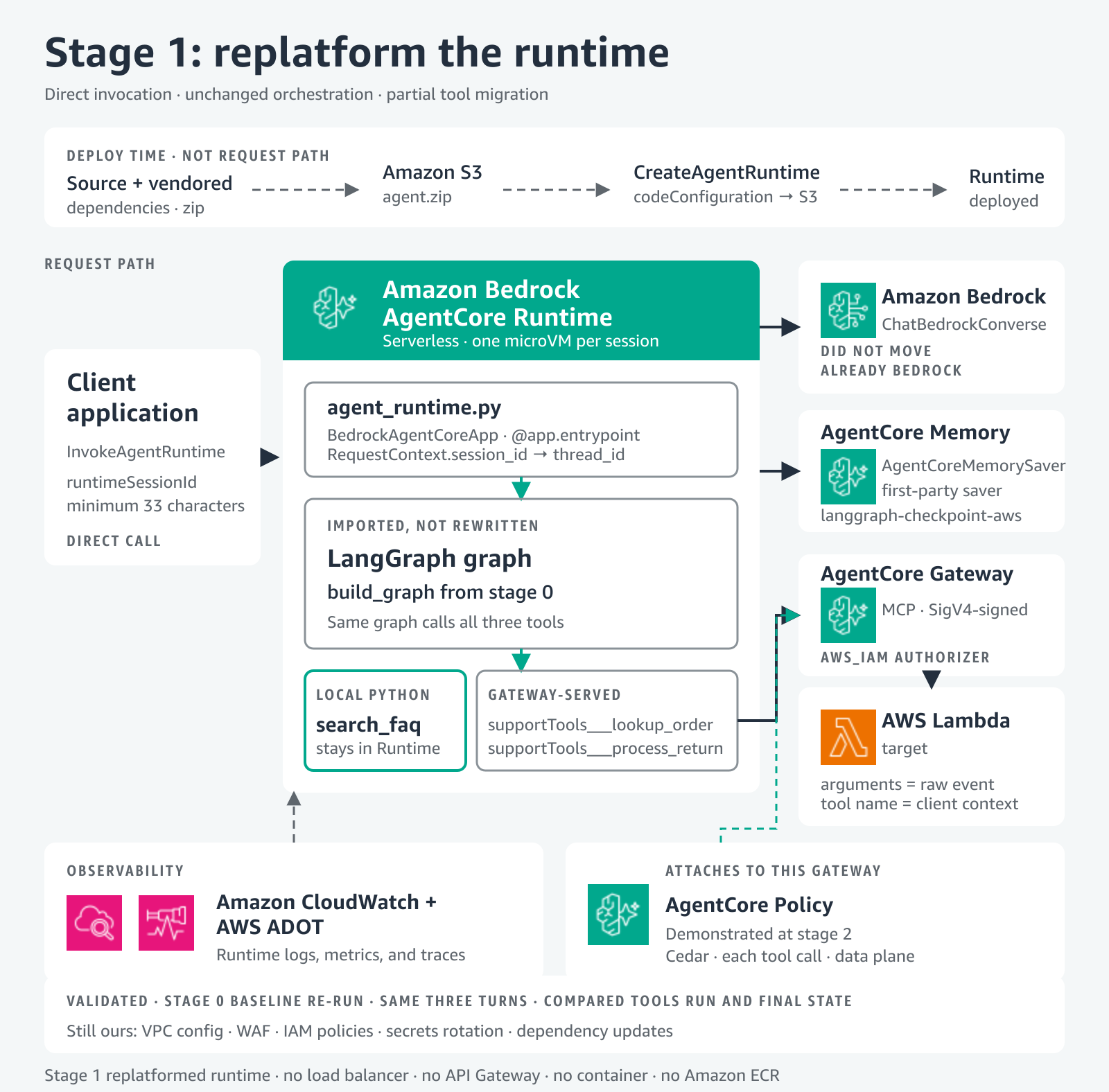
Figure 3: The client calls Runtime directly, the graph is imported and not rewritten, and two of the three tools move behind Gateway
That’s stage 1: the same agent giving the same answers, with five of the ten burdens now handled by AgentCore. Who plans the next step hasn’t changed, and that question is stage 2’s.
Stage 2: Rebuilding the loop, because you chose to
Five of the ten operational burdens have moved, and five remain yours: VPC configuration, WAF, IAM policies, secrets rotation and dependency updates. Stage 2 moves none of them, because this stage changes who plans the next step. Take it when the hand-written branch is the ceiling: when route_intent is the file you keep editing, and a new intent means a new node rather than a new line in a prompt.
Model-driven orchestration replaces the branch. Stage 0’s classify_intent node and route_intent decided the next step in Python. A Strands agent hands that decision to the model, so add_conditional_edges has no counterpart. That is a loss as well as a gain. The branch was deterministic and auditable, and a model’s plan is neither.
The bedrock-agentcore SDK ships a session manager for Strands agents, so the wiring is a config object and a constructor argument:
The session manager rides into Agent(**kwargs) beside the model, system prompt and tools, and it carries stage 1’s three ids, with thread_id now named session_id.
Stage 2 reuses stage 1’s gateway, target and Memory store. It does not reuse the stage-1 runtime, because the program inside it is a different loop. Amazon Bedrock didn’t move here either. Same model, every stage. Run it with the same two ARNs:
Authorization on the tool call itself
Stage 2 handed planning to the model and lost the auditable branch. Policy in Amazon Bedrock AgentCore puts a deterministic decision back in front of every tool call: Cedar rules evaluate on each call through the gateway, in the data plane, on a path the application can’t bypass. A guardrail on model output is not on that path, and by the time it runs, the tool call has happened.
Policy attaches to the Gateway rather than the loop, so this works on the stage-1 agent unchanged. It appears here because the sample runs it here.
The sample ships two rules: a read-only identity may call lookup_order, a privileged identity might also call process_return. There is no forbid rule anywhere. Cedar is default-deny, so the read-only caller’s refusal is the absence of a matching permit. Coming from IAM, that is the habit to unlearn.
Both caller roles are created with identical IAM policies, which is why the enforcement is provably Cedar’s and not an IAM gap. Same permissions, same gateway, two callers against two tools, one refusal.
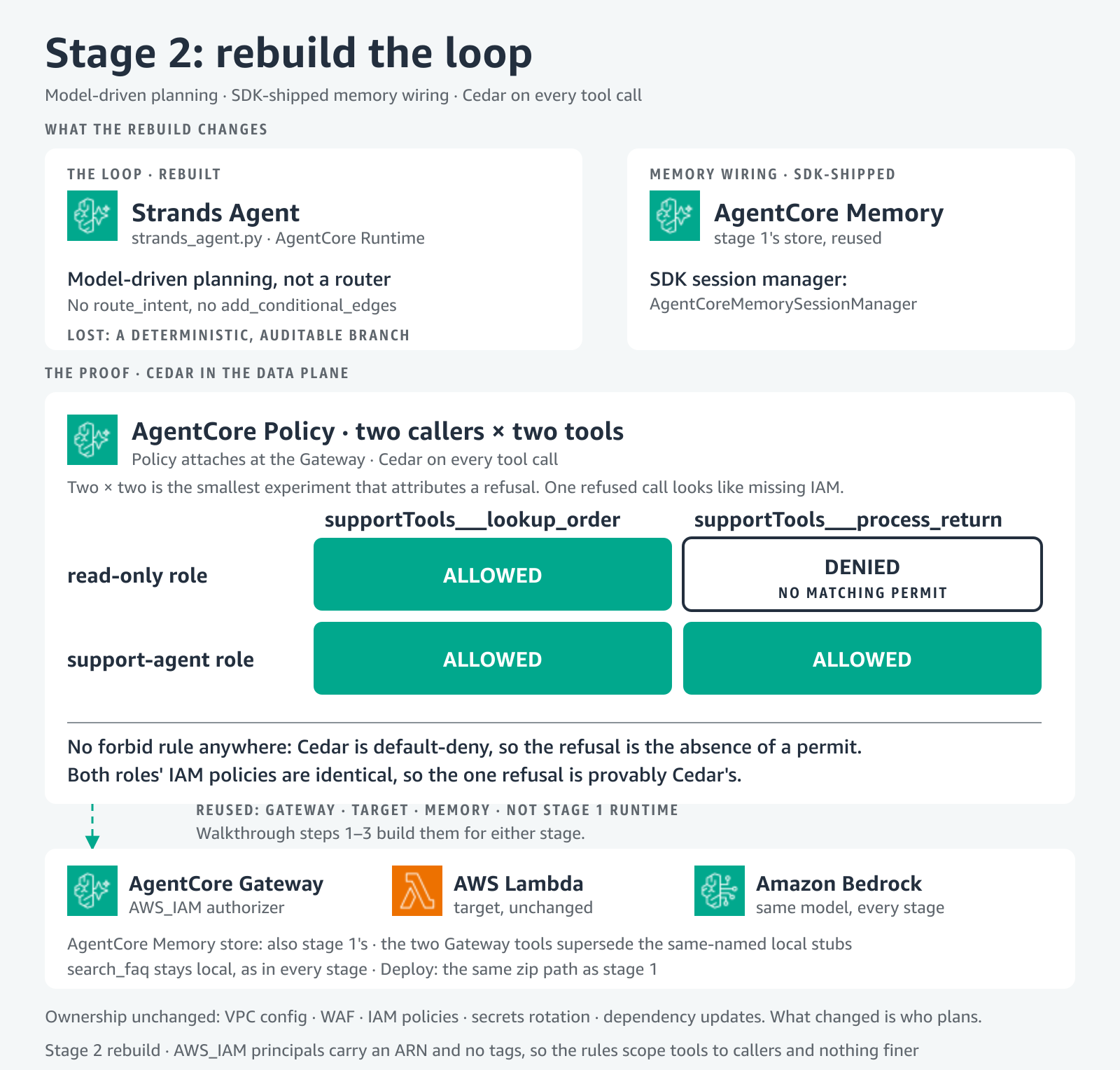
Figure 4: The loop becomes the model’s, memory wiring collapses into an SDK-shipped session manager, and Cedar decides every tool call at the Gateway
The loop is the model’s now, but it still ships as your code. Stage 3 is what removing that last piece looks like.
Stage 3: Hand the loop over
One burden stays tied to owning the code, and this is the only stage that moves it. An AgentCore harness runs the loop for you, powered by Strands Agents. You declare the agent as configuration (model, system prompt, tools, memory and limits) and AWS runs it, so switching a model is a configuration change rather than a redeploy. If you want the harness, what you run is stage 2’s agent. It hosts a single model-driven loop, not a graph, so a graph-shaped agent reaches it by becoming that loop first. That is the one place the recommended order is also the only order.
The figure marks that column documented rather than measured. Six of the ten burdens move there, against five at stage 2, and dependency updates is the only one that moves here, because the agent stops being your code. Secrets rotation isn’t among them. Identity refreshes tokens rather than rotating the secrets behind them, so that burden stays yours at stage 3 too.
Common pitfalls
Migration changes more than infrastructure. These are the patterns that cost teams the most time after the move.
1. Assuming feature parity
Assuming parity sets up an argument nobody can close. Your agent won’t behave identically after migration, and without criteria agreed before the move, every difference in wording becomes that argument. Define acceptance criteria on outcomes, not implementation, then test them: 90 percent of order-status queries resolved without escalation, a response within 5 seconds. AgentCore Evaluations, a capability of Amazon Bedrock AgentCore, has built-in evaluators.
2. Holding state in the process
This one is paid for in production, by a user who stepped away, because no quick test idles long enough to catch it. A session isn’t an invocation: one session holds invocation after invocation, and Runtime ends an execution environment after 15 minutes of inactivity by default, provisioning a new one for the same session. That idle window is idleRuntimeSessionTimeout, settable from 60 seconds to 8 hours, so tuning it moves the deadline rather than removing it. The session survives, your in-memory state does not, and the symptom is state that disappears only after a quiet period. Hold the graph, as stage 1 does, but keep every fact the next turn needs in Memory.
3. Overlooking authentication architecture
Authentication gaps cost rework, not configuration: the tool that needs user-delegated access surfaces late and changes the invocation path. So map every flow first: how your agent authenticates to external APIs, how people authenticate to the agent, how you scope permissions. AgentCore Identity, a capability of Amazon Bedrock AgentCore, answers the first, referenced on your gateway target in place of GATEWAY_IAM_ROLE.
Clean up
To avoid ongoing charges, remove what you created. The walkthrough tears down everything it made:
That is twelve resources in dependency order, and the Amazon CloudWatch log group is the one to notice. Nothing asked for it, the service created it on the runtime’s first log line, and deleting the runtime does not remove it. Delete the gateway target before the gateway, and poll GetMemory until the store is gone, because DeleteMemory returns first.
The Lambda function backing your tools, its execution role and the gateway’s are yours to delete.
Conclusion
Stage 1 is a stopping point. You get the orchestration you already trust, on managed compute, with managed tools and durable state. So is stage 2, for agents where hand-written routing has become the constraint. Stage 3 takes the loop out of your code base.
None of this needs doing twice. AgentCore features attached in four shapes: a keyword argument for the gateway tools, a pinned dependency for the checkpointer, a config object for the session manager, a file of Cedar rules for Policy. Adding Identity or a second gateway target is that size of change, not this migration again.
The order is the same for most agents and the stopping stage is not. Stateful sessions and hard external dependencies are where you resequence it.
Leave a comment with questions or your own experience.
Next steps
Clone the sample repository, read its security architecture comparison, then the Amazon Bedrock AgentCore documentation.
About the authors