

















Stream low-latency speech from AI agents using Kokoro TTS on Amazon SageMaker AI
Voice agents often wait for an agent's full response before starting speech synthesis, adding latency users feel directly. This post shows how to stream each sentence to a Kokoro-82M text-to-speech model on Amazon SageMaker AI as the agent produces it, and how to get that audio back to a browser over Server-Sent Events or a unified binary transport.
A customer asks an AI voice agent a question and waits. The agent already has an answer, it’s midway through generating a long, multi-paragraph response, but the customer hears nothing for five seconds. By the time an answer arrives, the customer is frustrated, confused, and no longer paying attention.
Text-to-speech integrations create exactly that gap. A one-sentence response might generate in 600 milliseconds, but the full response takes five seconds, and the integration waits for all of it before synthesis starts.
This post shows how to close that gap. We stream each sentence to a hosted Kokoro-82M text-to-speech (TTS) model on Amazon SageMaker AI as soon as an agent produces it, so synthesis begins on sentence one instead of the finished response. Getting that audio back to a browser needs its own solution too, so we also cover both transports for doing it and what each costs in practice.
Solution overview
This solution closes the gap by streaming synthesis alongside generation instead of waiting for it to finish. As the agent produces each sentence, that sentence streams immediately to a hosted Kokoro-82M text-to-speech model, so audio playback can start before the agent finishes speaking its full response. Kokoro-82M holds only 82 million parameters, small enough to run cheaply on a single mid-tier GPU instance. That keeps both latency and inference cost low for a voice agent handling real traffic.
Kokoro-82M runs in a custom container on a SageMaker AI real-time endpoint, on an ml.g5.xlarge GPU instance. The container exposes two routes: POST /invocations, which streams a response for one complete input, and WS /invocations-bidirectional-stream, which keeps one connection open across many messages in both directions.
The following diagram shows the request path from client to model:
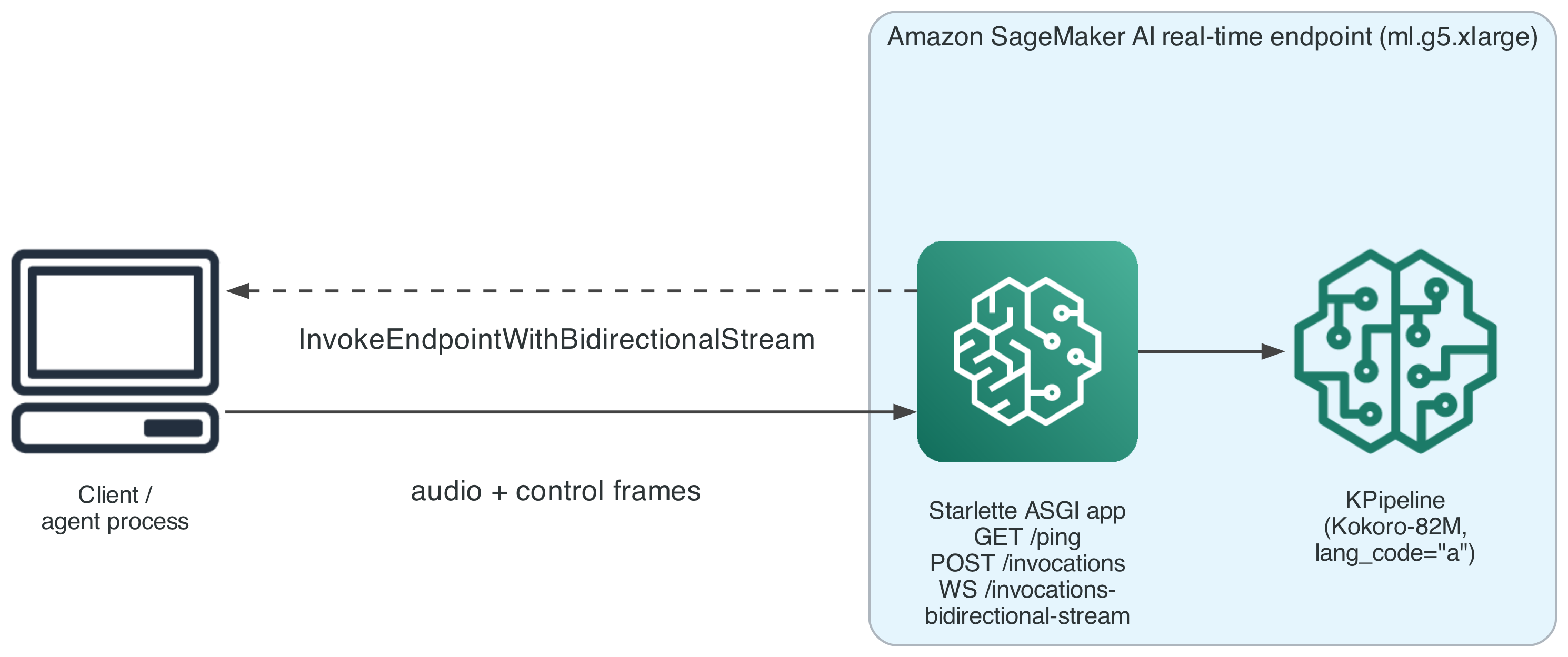
Figure 1: Request path from the client to the SageMaker AI real-time endpoint over a bidirectional stream
Prerequisites
Before you begin, you need:
- An AWS account with permissions to create SageMaker AI endpoints; AgentCore runtime, a capability of Amazon Bedrock AgentCore; AWS Identity and Access Management (IAM) roles; and an Amazon Elastic Container Registry (Amazon ECR) repository, including at minimum the
sagemaker:CreateEndpoint,sagemaker:CreateEndpointConfig,sagemaker:CreateModel,sagemaker:InvokeEndpointWithBidirectionalStream, andbedrock:InvokeModelWithResponseStreamactions. - The sample container pins an older PyTorch with a known advisory (
PYSEC-2026-2286, fixed in torch 2.10.0). Review and upgrade the pin before any non-proof-of-value use. - AWS Cloud Development Kit (AWS CDK) v2, installed and bootstrapped in your target account and AWS Region.
- A SageMaker AI real-time endpoint deployed from a container that declares the
com.amazonaws.sagemaker.capabilities.bidirectional-streaming=trueDocker label. - Python 3.12 or later, uv, and Docker to build the container image (the underlying HTTP/2 client only ships pre-built wheels for Python 3.12 and newer).
- The AWS SDK for Python (Boto3) with support for
invoke_endpoint_with_bidirectional_stream. - Familiarity with WebSockets and Starlette or a comparable ASGI framework.
- The deployment code from the GitHub repository referenced in this post.
Walkthrough
The walkthrough first deploys the endpoint and agent, then works through the client-side changes that make incremental streaming work end to end.
Deploy the endpoint and agent
The Kokoro-82M endpoint and the agent runtime deploy through two CLI tools, each wrapping its own AWS CDK stacks:
speech-infra deploy provisions the Kokoro-82M endpoint. This includes the foundation and model-cache stacks that create the underlying IAM roles and sync the model’s weights into Amazon Simple Storage Service (Amazon S3). The endpoint stack then builds the container image and creates the SageMaker AI model, endpoint configuration, and endpoint. agent-infra deploy provisions the Amazon Bedrock AgentCore runtime hosting the Strands agent, which calls the endpoint you just deployed, so deploy the endpoint first.
Step 1: Handle the WebSocket frame type SageMaker AI actually sends
The bidirectional transport SageMaker AI uses delivers every piece of a client’s message to your container as a binary WebSocket frame. A common way to write a Starlette WebSocket handler is calling receive_text(), which reads message["text"] and raises KeyError if that key isn’t present. Because every message this client sends arrives as binary, that handler fails on every request.
The failure is commonly misdiagnosed. A generic exception handler that forwards str(e) to the client turns KeyError('text') into an error frame reading 'text', which looks like a missing field, not a framing issue. The endpoint itself reports InService throughout, since it accepts connections and responds to every message, with an error each time.
Accept either frame type explicitly instead of assuming one will show up:
This decodes bytes as UTF-8 when no text field is present, rather than assuming one frame type. Test it by sending a binary frame, because this failure mode produces a well-formed error frame and a healthy endpoint status, not an obvious crash.
Step 2: Keep the session open between messages
After your container finishes synthesizing one message’s audio, the instinct is to close the session, the way an HTTP cycle ends. That’s wrong here. After sending a message’s audio and a synthesis_complete control frame, the container loop should go back to waiting on receive() for the next message on the same, still-open session. Close the connection only when the client sends an explicit {"type": "close"} message.
The following diagram shows one session carrying two sentences in sequence, closing only at the end:
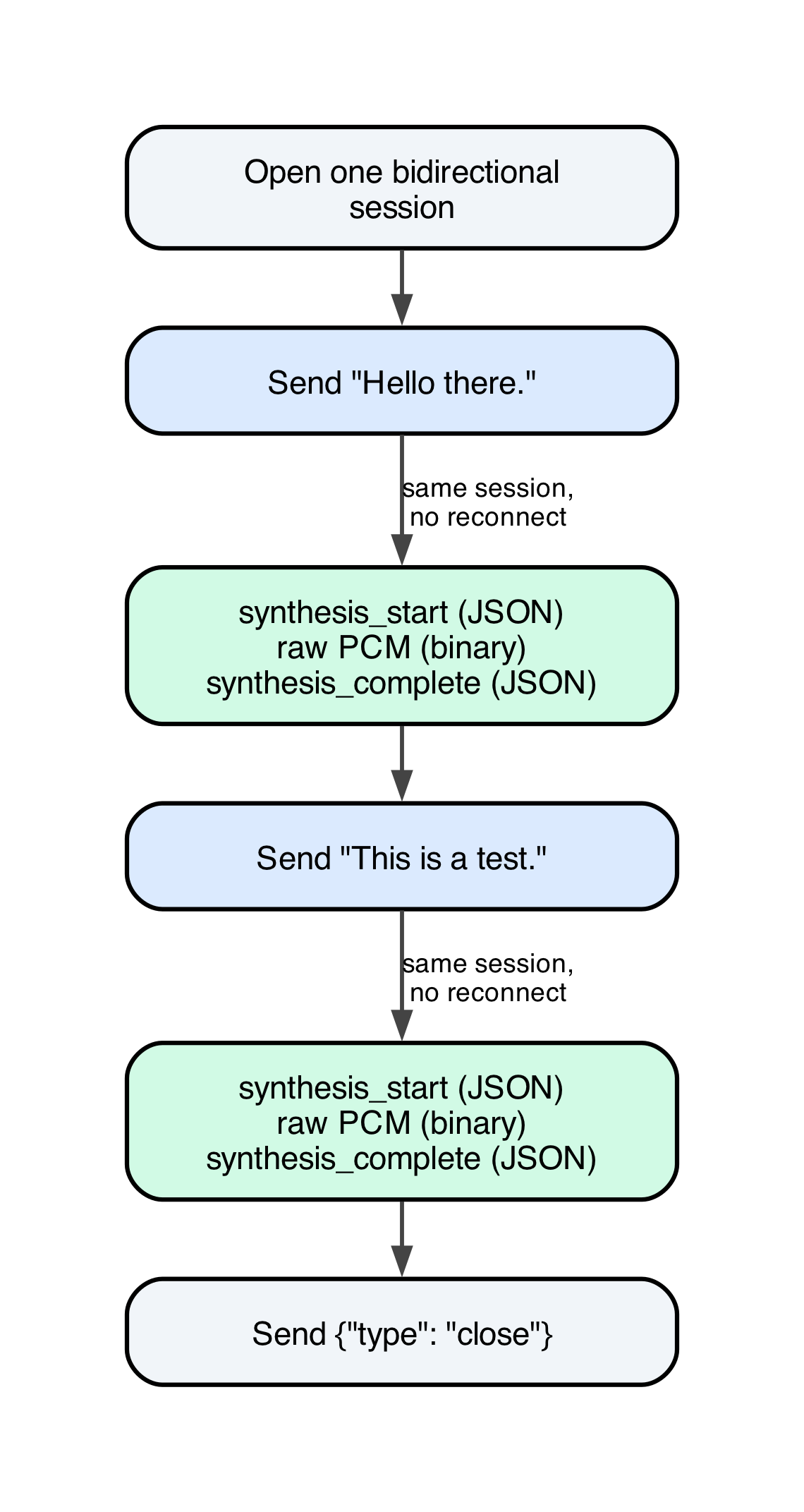
Figure 2: One bidirectional session carrying two sentences in sequence, closing only at the end
This way, you can send several sentences, one after another, on one persistent session, with no reconnection cost between them. Closing eagerly after one response would force a new connection per sentence, undoing most of the latency benefit.
Step 3: Stream sentences as the agent produces them
With the session behavior in place, the client-side fix for the latency problem is a class that normalizes text arriving in two shapes: a complete string known up front, or a live token stream. It produces the same output either way: complete sentences, ready to send as soon as each one is complete.
Call feed() once per fragment of text as it arrives. It returns any newly completed sentences, holding back trailing text. Call flush() once, at the end of input, to release whatever partial text remains even without trailing punctuation. This keeps a stream that ends before a period arrives from dropping a final sentence.
This isn’t concurrent synthesis. Every bidirectional handler is a strictly sequential loop: receive a message, synthesize its audio, send that audio, send synthesis_complete, then receive the next message. Sentence two’s audio isn’t generated while sentence one’s still transmits. What incremental sending buys is narrower: synthesis on sentence one begins the instant it exists, rather than waiting for the full response. For a multi-sentence response with real generation time between its first and last sentence, that’s the entire latency win.
We verified this against a live endpoint sending a three-sentence input over one session. All three chunks arrived with audio matching the text sent for each:
| Chunk | Text | Audio bytes | Duration (s) |
| 1 | “Hello there.” | 73,200 | 1.525 |
| 2 | “This is a post deployment check.” | 108,000 | 2.250 |
| 3 | “It has three sentences.” | 98,400 | 2.050 |
Step 4: Choose a transport for getting audio back to the client
Streaming text into the model incrementally solves half the problem. The other half is getting the resulting audio out to whatever renders it, commonly a browser. Most agent and chat frontends already stream text over Server-Sent Events (SSE): one-directional, and supported natively by most browsers. SSE is a text protocol, not built to carry a raw binary payload. A team adding voice to an existing SSE pipeline naturally reaches for the pattern it already has: base64-encode the audio and wrap it in a JSON event.
We measured the cost of that approach across 24 clips, confirmed with Amazon Transcribe that quality didn’t differ across encodings, and compared MP3 against AAC:
| Candidate | Raw bytes | Base64 bytes | Bitrate |
| Raw PCM | 2,396,400 | 3,195,200 | 384 kbps |
| MP3 48k | 308,304 | 411,072 | 49.5 kbps |
| AAC 32k fMP4 | 258,039 | 344,084 | 41.6 kbps |
Base64 inflates every payload by close to the expected 33%. The subtler cost is frame alignment. SSE events are delimited by a blank line, but the audio inside is delimited into MP3 frames. The two schemes don’t necessarily align with how the transport chunks the data. In one measured response, four logical MP3 frames arrived as six delivery chunks, two ending mid-frame. A consumer that treats each delivery chunk as one complete unit fails on ordinary, healthy traffic. The fix buffers incoming bytes and acts only once a delimiter is found:
The alternative used today for the model-facing leg skips base64 and SSE framing entirely. It multiplexes raw binary audio and JSON control frames over the same bidirectional session already carrying incremental text input, and tells them apart with one rule.
A chunk that fails to decode as a JSON object is audio, forwarded as received, with no encoding step anywhere in the path. One edge case matters: raw PCM audio can legitimately begin with byte 0x7b, the ASCII character {, the same character that opens a JSON object. This rule avoids misclassifying that audio because it requires the entire chunk to parse as valid JSON, not its first byte alone, something a PCM frame will essentially never do.
Note: If your frontend already has a working SSE pipeline for text, base64-encoded audio inside an SSE event is the pragmatic choice. It costs roughly 33 percent extra payload and a buffer-and-reassemble step, but reuses infrastructure you already operate. If you’re building the voice path fresh, or latency is the priority, the unified binary and JSON approach avoids both costs and reuses the connection already carrying text.
Step 5: Put it together in a real agent
The fuller, end-to-end case is a live, generative agent composing its response one token at a time, with no way to know sentence four until sentence one exists. This example runs as a Strands agent, backed by Amazon Bedrock, deployed to Amazon Bedrock AgentCore runtime, calling the Kokoro endpoint with the pattern from Step 4. Three communication legs connect in this design: the browser-facing leg carrying Server-Sent Events back to the caller, the agent’s streaming call to Amazon Bedrock for text generation, and the agent’s bidirectional session with the Kokoro endpoint for synthesis.
The following diagram shows those three communication legs, and where the overlap between generation and synthesis happens:
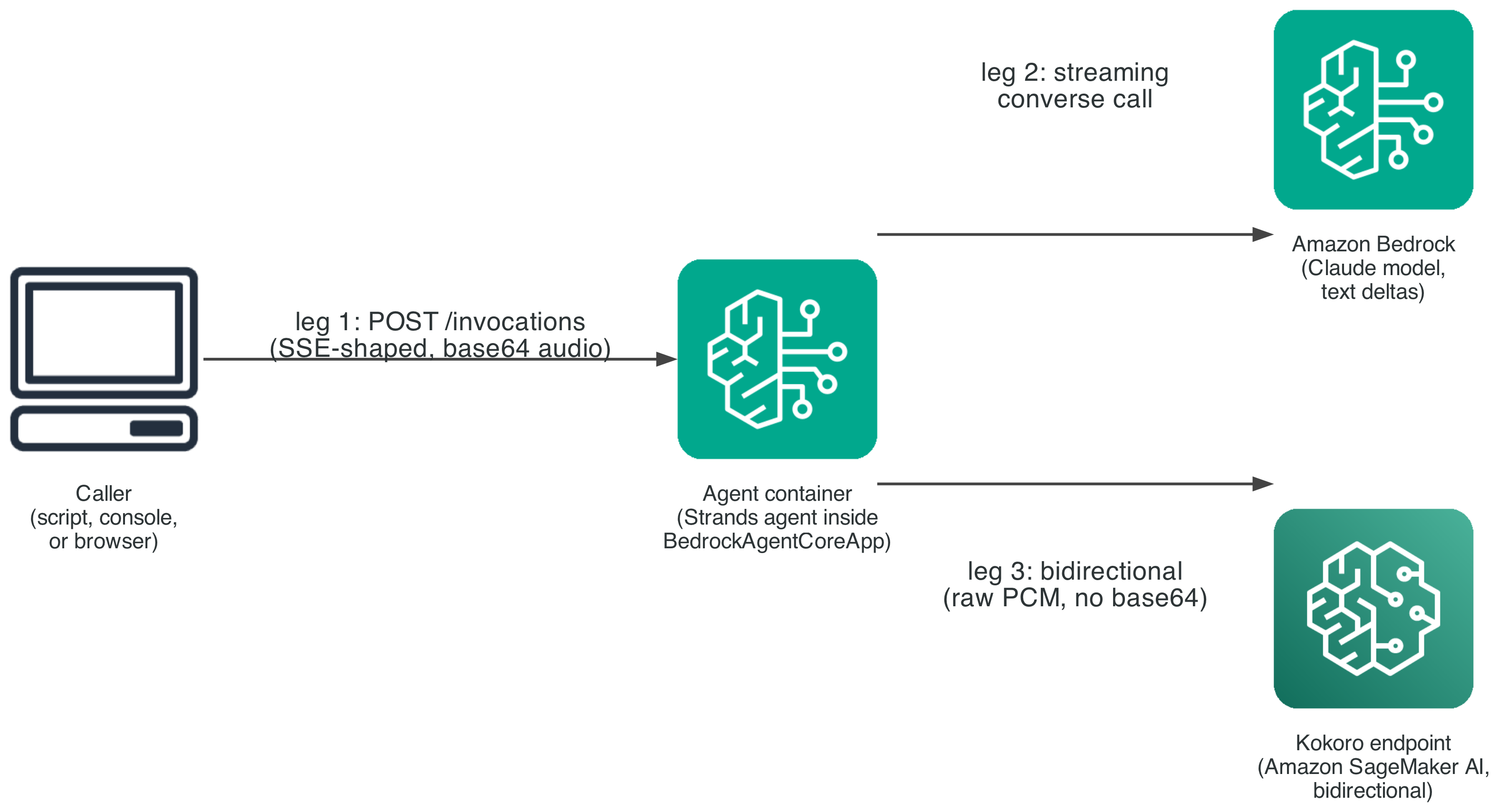
Figure 3: The three communication legs connecting the caller, Amazon Bedrock, and the Kokoro endpoint
The request payload carries a mode field, either "bidi" or "batch", dispatched to two code paths inside the same entrypoint function. A benchmark between them changes exactly one variable: when synthesis starts. In run_bidi, two tasks run concurrently. One drains the Bedrock text stream and feeds completed sentences into the chunker. The other drains the Kokoro session and emits audio chunks as they arrive. Both push into one shared queue, so a consumer yields events in true arrival order: audio for an early sentence can reach the caller while Bedrock still generates a later one. run_batch is the deliberate opposite: it waits for the full response before one synthesis call, kept as a fair baseline.
Going the other direction, the leg from the agent container back to the caller does use base64, for a different reason than Step 4 describes. BedrockAgentCoreApp’s entrypoint must yield plain, JSON-serializable dictionaries, which its SDK turns into data: {json}\n\n frames automatically. There’s no way to hand it a raw binary frame. That’s a consequence of the JSON-native managed runtime, not the choice Step 4 measured and moved away from. Both run_bidi and run_batch pay that identical cost on this leg, so the measured difference between them is purely timing: when the first audio chunk is emitted.
Testing and validation
We isolated the TTS transport’s own contribution to time to first audio by sending the same 267-character, four-sentence block of text two ways: as one message (batch), and as only its first sentence (incremental). We ran five trials each against the live endpoint.
As measured earlier, sending only the first sentence cut mean time to first audio byte from 329.3 ms to 156.7 ms, a 52.4 percent relative improvement, isolated to the TTS transport itself.
We then measured the fuller, end-to-end case with a real language model producing the text, running the identical prompt through run_bidi and run_batch against the same live Bedrock model and endpoint, so the only variable is when synthesis starts.
Using that same methodology, bidi mode’s time to first audio measured 2.4 times faster than batch mode against a local container, and 3.5 times faster against the deployed AgentCore runtime.
The following chart shows that gap across both environments:
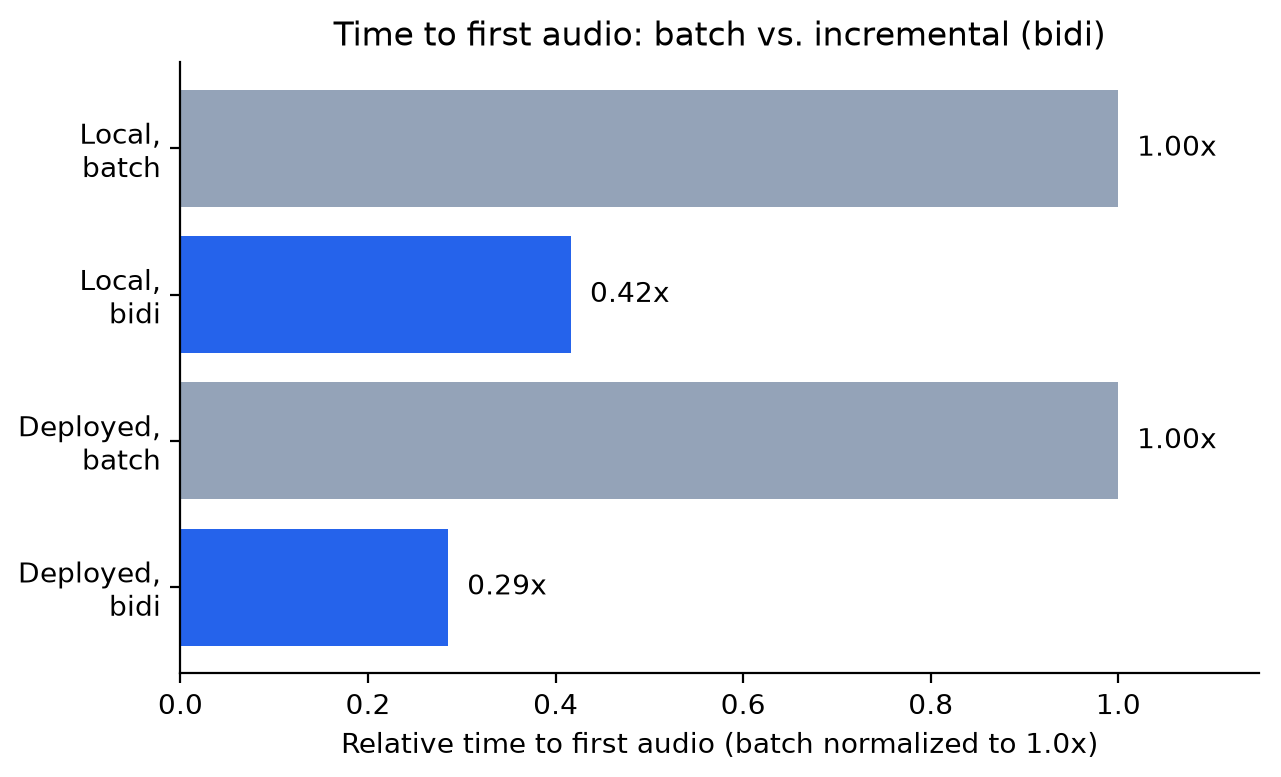
Figure 4: Relative time to first audio for batch and bidi modes, locally and on the deployed runtime
The gap widens, rather than narrows, for the deployed case once a real network hop is added. run_bidi absorbs that hop inside the overlap it’s already exploiting between generation and synthesis. run_batch has no equivalent overlap to hide that cost in, since it does one thing at a time, so every added millisecond of network overhead lands directly on its serial wait.
To reproduce this comparison against your own deployment, run the same bidi-vs-batch test the agent container exposes:
This sends the prompt through both modes and reports the timestamp of the first audio_chunk event against agent_start for each. If you see errors instead, check for the KeyError: 'text' symptom from Step 1. An endpoint reporting InService while every request fails signals that bug, not a deployment issue.
Clean up
To avoid ongoing charges, tear down the resources this walkthrough creates in reverse deployment order, agent first, then endpoint:
agent-infra destroy removes the Amazon Bedrock AgentCore runtime resource. speech-infra destroy removes the SageMaker AI model, endpoint configuration, and endpoint. Neither empties the Amazon S3 bucket that caches model weights or deletes the Amazon ECR repository holding the container image, since both can be shared across models. If you no longer need them, empty and delete the Amazon S3 bucket and remove the Amazon ECR repository manually, since a stored model checkpoint and container image continue to incur small storage charges until removed.
Conclusion
We showed how to remove one source of avoidable latency from a voice agent, waiting for an agent’s full response before starting speech synthesis, and how to quantify a second, quieter cost: base64-encoded audio inside SSE inflates payload by about a third and can misalign with MP3 frame boundaries if you don’t buffer for it. Streaming each sentence into a SageMaker AI bidirectional endpoint as soon as an agent produces it cut time to first audio by more than half in isolation, and by 2.4 to 3.5 times in a deployed agent. Multiplexing binary audio and JSON control frames over that session, instead of encoding audio as text, removes the size inflation and frame-realignment work a naive SSE relay requires.
If you’re adding voice to an agent that already streams text over SSE, start with the base64 approach in Step 4 and revisit the unified transport once latency becomes the priority. To learn more, see the Amazon SageMaker AI real-time inference documentation and the Amazon Bedrock AgentCore documentation. If you’d like help applying this pattern to your own architecture, contact your AWS account team.
About the author