











Build WhatsApp AI agents with Amazon Bedrock AgentCore
SMART, an open-source Python SDK and Terraform stack, deploys the full WhatsApp channel layer to your AWS account with one command. Bring any agent that runs on Amazon Bedrock AgentCore, and SMART handles webhook ingestion, media, conversation memory, scheduling, and Meta message templates.
Across Latin America, India, and Southeast Asia, WhatsApp is one of the most widely used messaging applications. That makes it an obvious place to build an AI agent. For many end users, it is how they expect to interact with businesses. However, it is also a genuinely difficult surface to build for, even when your agent already runs on Amazon Bedrock AgentCore.
The agent is rarely the hard part. The integration is. Inbound messages arrive as deeply nested, type-dependent payloads that must be authenticated and normalized before your agent can read them. Media such as voice notes, images, and documents each require their own processing pipeline. Beyond message handling, you need conversation memory that survives sessions, durable schedules for reminders, and an authenticated path for external systems to trigger outbound messages. And anything you send more than 24 hours after the end user’s last message must use a pre-approved Meta message template.
Wiring that up means configuring more than 10 AWS services and learning a set of WhatsApp system behaviors that most teams discover only by hitting them. None of it is visible to a customer, but all of it has to work. Most teams either build it from scratch or hand the integration to a third-party service.
SMART (Social Messaging Agent Runtime Toolkit) is a third option: an open source Python SDK and Terraform stack that gives you the full channel layer. You provide an agent that runs on Amazon Bedrock AgentCore runtime, and SMART handles the rest. One command deploys the entire infrastructure to your AWS account.
Teams are already running on SMART with Amazon Bedrock AgentCore. Webmotors, originally scoped as a two-month engagement, compressed delivery to six weeks and moved their internal team into controlled production ahead of a full launch.
Whether you are starting from scratch or migrating an existing agent, you own the agent’s logic. You let SMART handle the channel.
The channel layer you don’t need to build
The following table compares what each concern costs to build yourself against what SMART provides.
| Concern | Building it yourself | With SMART |
| Webhook ingestion | Signature verification, nested payloads, a dozen message types | Handled, so you receive a clean prompt |
| Media | Download, transcribe, store, clean up, and upload outbound files before sending | Full lifecycle, both directions |
| Message templates and the 24-hour window | Meta approval flow, category rules, tracking which window each conversation is in | Declared in YAML, synced by CLI |
| Conversation memory | Multi-tier memory, session-break handling | Amazon Bedrock AgentCore memory, one function call |
| Scheduling and triggers | Amazon EventBridge Scheduler wiring, authenticated ingress, routing | Built in |
| Infrastructure | More than 10 AWS services stitched together | One terraform apply |
| Local development | Redeploy and tunnel on every change | Test locally with the CLI without redeploying |
The agentic layer
Amazon Bedrock AgentCore is a platform to build, connect, and optimize agents at scale, with any framework or model. SMART builds on two of its main capabilities:
- AgentCore runtime hosts and scales your agent without you managing infrastructure.
- AgentCore memory persists conversation history across sessions and deployments, scoped to each phone number automatically.
Because AgentCore is framework-agnostic, so is SMART. Strands Agents gets memory wired automatically. LangGraph, Pydantic-AI, or another framework that gives you control over the conversation loop can integrate too. The SDK exposes the same memory and session hooks regardless of framework. You keep full control over the elements that differentiate your product: framework, model, prompt, and business logic.
The contract between SMART and your agent is deliberately small. Your agent receives the inbound message and returns text, optionally with rich message attachments. Everything else, session wiring, memory binding, delivery scheduling, is handled for you.
The following example is a complete agent.py for a SMART project. The scaffolding command (socialagent init) creates the project structure and configuration around it. This file is where your agent logic lives.
The create_session_manager() function binds the agent to AgentCore memory scoped to that phone number, so history survives across sessions and deployments for the memory retention period (7 days by default).
The socialagent_notify_context() wrapper is the other pattern worth keeping. Tools sometimes need to send something while the agent is still working, such as a button list or a progress update. Sending it immediately corrupts the conversation history, and the user’s next message fails. The wrapper collects those messages instead, and they go out in order once the turn finishes. Your tools send messages normally and do not deal with the timing.
Architecture
The following diagram shows how an inbound message travels from WhatsApp to your agent and back, and where the shared infrastructure sits.
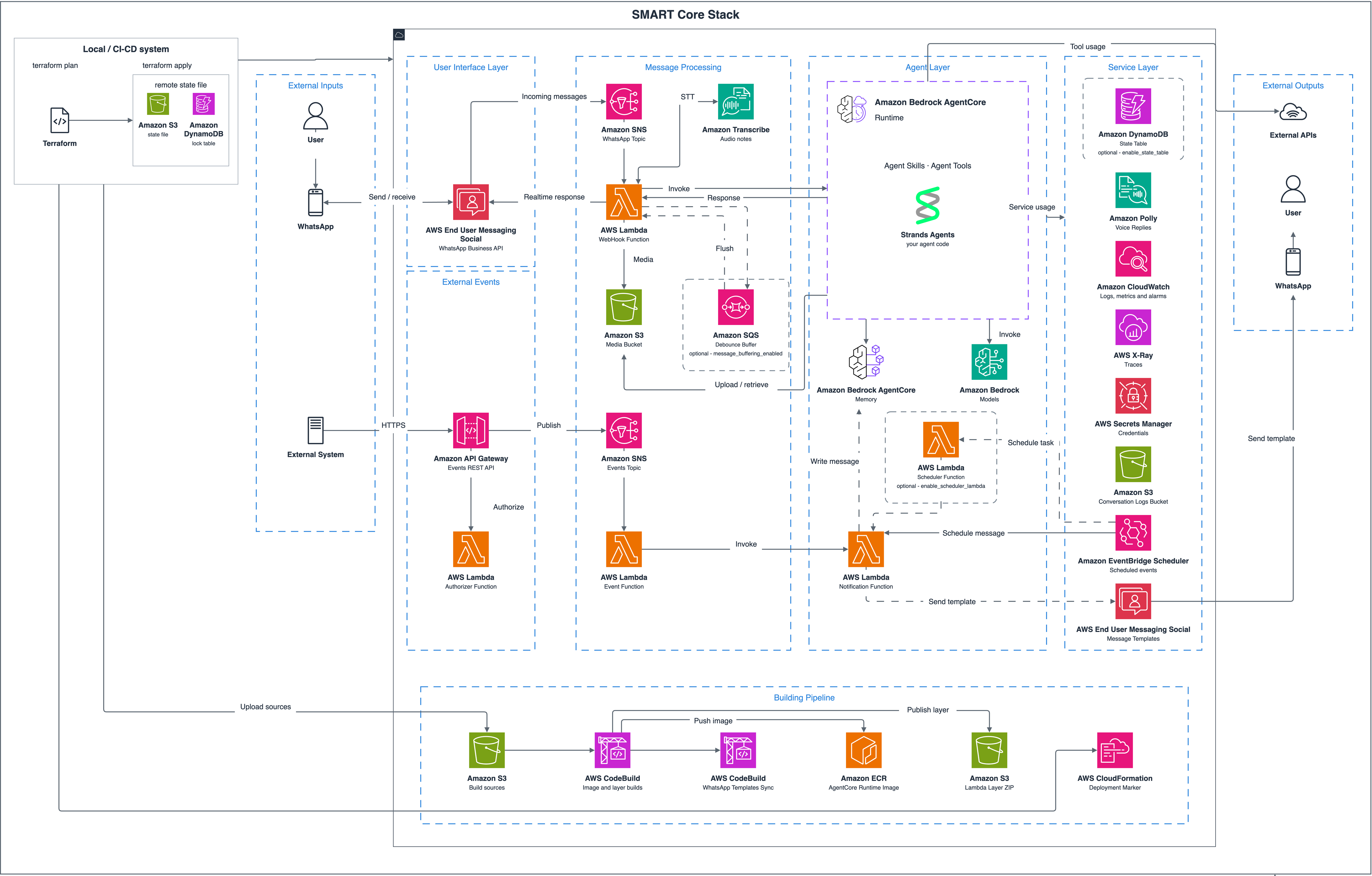
Figure 1: How an inbound WhatsApp message flows through the SMART channel layer to the agent and back
The SMART core stack is organized into distinct layers: message processing, an agent layer, and a service layer. AWS End User Messaging Social receives inbound WhatsApp messages and routes them to the processing layer. An AWS Lambda function handles the channel logic, while Amazon Bedrock AgentCore provides the runtime, memory, and observability for the agent itself. Supporting services such as Amazon DynamoDB (optional, for per-user state), AWS Secrets Manager, Amazon CloudWatch, and Amazon Simple Storage Service (Amazon S3) supply state management, credentials, monitoring, and storage across the stack.
Inbound events arrive through Amazon Simple Notification Service (Amazon SNS). On each event, the webhook Lambda function verifies the SNS message signature, normalizes the payload, and rate-limits each user (20 messages per minute by default, with the DynamoDB state table enabled). It then fires a read receipt and typing indicator, so the conversation feels alive before the model finishes. Voice notes go through Amazon Transcribe. Other media becomes a descriptor or goes to a hook you register if you want custom handling. When the agent throttles or fails, the user receives a readable message that you can customize, rather than silence.
Agents built on SMART interact directly with end users, so production deployments should include appropriate safeguards. The Terraform stack creates and configures an Amazon Bedrock Guardrails resource by default. With a single guardrail variable in your environment configuration, you can use the stack’s default guardrail, bring your own, or opt out entirely. The controls that you apply are up to you. SMART makes sure the wiring is already in place.
After the message is ready, the webhook function passes it to AgentCore runtime. AgentCore memory maintains conversation context across sessions, and AgentCore Observability, a capability of Amazon Bedrock AgentCore, traces every step for debugging and audit.
The webhook function sends the reply and messages your tools queued during the turn. A notification function handles sends outside a turn, such as proactive or scheduled messages. External systems trigger your event handlers by posting to an Amazon API Gateway endpoint protected by an API key and a Lambda authorizer. The event is published to Amazon SNS and the event Lambda runs your handler. Amazon EventBridge Scheduler handles time-based outreach, such as reminders and recurring check-ins. With message templates managed through AWS End User Messaging, you can send structured notifications outside the 24-hour WhatsApp session window.
A single socialagent deploy provisions the following resources (it runs terraform apply under the hood).
- Amazon Bedrock AgentCore runtime and AgentCore memory.
- The webhook, notification, event, and scheduler Lambda functions, on Python 3.12, each with AWS X-Ray tracing and a dead-letter queue.
- The Amazon SNS ingestion topic and the event API.
- Amazon EventBridge Scheduler.
- Amazon S3 buckets for media and audit trails.
- Amazon CloudWatch dashboards and alarms.
The agent container image and the Lambda layer build in AWS CodeBuild during the apply. Docker isn’t required locally.
What you need
Before you deploy, confirm that you have the following.
- AWS End User Messaging Social, with a WhatsApp Business Account (WABA) linked and a phone number registered. That account is the identity Meta issues to a business. For a step-by-step guide, see Getting started with AWS End User Messaging Social, which walks you through linking your WABA and registering a phone number.
- An AWS account with AgentCore runtime and AgentCore memory available in your AWS Region, and model access enabled. This walkthrough uses Claude Haiku 5.5 on Amazon Bedrock by default. You can access many more foundation models (FMs) through Bedrock. See model support by Region.
- Python 3.11 or later locally.
- Terraform 1.7 or later, uv, and the AWS Command Line Interface (AWS CLI). The repository ships a starting-point AWS Identity and Access Management (IAM) policy for the deployer role. See the infrastructure README for the full list of actions.
Note: This is sample code, for non-production usage. You should work with your security and legal teams to meet your organizational security, regulatory and compliance requirements before deployment.
Ship it
Start by cloning the repository and scaffolding a project.
The --blueprint flag selects a project blueprint. Three blueprints ship, and minimal is the default if you don’t pass an argument:
minimal: a bare-bones echo agent with no tools, skills, or message templates. Start here to build from scratch.personal-assistant: a general-purpose assistant with conversation memory, per-user state, scheduling, skills, and rich/voice/image media tools, built on Strands. Start here for conversational, do-it-all agents.appointment-scheduler: a booking agent that walks the user through a catalog of items and time slots, confirms the appointment, stores it as per-user state, and sends reminders. Start here for scheduling and booking flows.
You get a project with your agent.py, socialagent.dev.yaml (the project’s deployment configuration), handler stubs for the webhook, notification, event, and scheduler paths, and a vendored copy of socialagent_runtime/. The personal assistant and appointment-scheduler blueprints also bring tools, skills, and a templates.yaml for your message templates. minimal ships none of those, so you add them as required.
Next, iterate locally, with no infrastructure at all.
The socialagent dev command runs your real agent loop and real tools in a terminal read-eval-print loop (REPL), with AWS channel I/O stubbed. Memory becomes a local file-backed session, and state becomes a local JSON file shared across your dev sessions. Notifications print to the terminal, including buttons and list rows. One-shot schedules run immediately. Recurring ones are registered but do not fire. Tool calls appear inline. The reply arrives as one message, as on WhatsApp. The /event and /schedule commands exercise the handler paths. No deployment is involved, so you can test a change as soon as you save it.
Two caveats apply. The model call is real, so a blueprint other than minimal needs AWS credentials and Amazon Bedrock access. The REPL also doesn’t simulate IAM or Meta’s template review. Testing through a deployed stack is highly recommended before you consider something done.
You can add capabilities as recipes. Each recipe is a plain Python function plus a markdown skill that teaches the agent when to use it.
Wiring the recipe to the agentic layer is the developer responsibility, which is what keeps recipes portable if you change agent frameworks.
When the behavior is right locally, deploy the stack.
One step Terraform cannot do for you. AWS End User Messaging Social needs to know where to deliver inbound messages. Point your WhatsApp Business Account at the Amazon SNS topic the stack created. That setting lives on the business account, not in the stack. Point the WABA’s event destination at the stack’s SNS topic using the admin console’s Bind action, or with aws socialmessaging put-whatsapp-business-account-event-destinations from the CLI. Until it is linked, inbound messages go nowhere, and nothing errors.
When the project includes a templates.yaml, the deploy step also syncs your message templates with Meta. If you need to sync templates independently, run uv run socialagent templates sync, which reads the phone number ID and prefix from socialagent.dev.yaml and the template definitions from templates.yaml. A rejected template will fail the deploy, so fix the wording before retrying.
Meta sorts templates by purpose, and a transactional one has more permissive sending rules than a promotional one. Keep the wording plain. Emojis and marketing language are the usual reason a template gets reclassified as promotional. Running templates sync --force re-registers every template, sending approved ones back through Meta review. A plain sync skips them. Leave approved templates alone unless you need to change their content.
Now you’re ready to message your WhatsApp number.
Operate it
Shipping one bot is a project. Operating a fleet of them is the part nobody budgets for, so you also get an optional administration console with its own Terraform root. Deploy it once. Each SMART stack that sets admin_registry_bucket registers itself to a shared Amazon S3 registry on deploy, and the administration console discovers those stacks from there.
The console gives you fleet health at a glance, then per-bot depth. From a single stack view, you can do the following.
- Read real conversations and reply by hand.
- Inspect and cancel Amazon EventBridge schedules, and browse per-user state.
- Restart an individual Lambda function or the runtime.
- Review deployment history, recent errors, and Amazon CloudWatch logs.
- Trigger test events.
- Manage message templates with a WhatsApp-style rendering, and see a warning when Meta has reclassified one.
The console also owns the phone-number binding described earlier, so rebinding a number to a different stack is a UI action.
Sign-in runs through Amazon Cognito, with multi-factor authentication (MFA) required. Role-based permissions are then enforced on every API route. The console itself is served from Amazon CloudFront over a private Amazon S3 bucket.
The console runs on AWS services end to end. Every conversation stays within two providers: Meta and AWS. Model calls may be processed in other AWS Regions through Amazon Bedrock cross-Region inference. See docs/data-flows.md in the repository for details on inference routing, media processing, and service opt-out options.
Clean up
To avoid ongoing charges, tear down the stacks in the following order.
Terraform will not remove three things. The media and audit S3 buckets block destroy while they hold objects, unless enable_force_destroy is set. Templates registered with Meta persist. Your phone number registration is account-level and stays in place.
Get started
When building a WhatsApp AI product, the agent is where your differentiation lives. The channel integration is what eats your roadmap. SMART moves that boundary for you. Write a prompt, a few tools, and your business logic. In return you get webhook ingestion, media handling, conversation memory, scheduling, and template management. All backed by one-command infrastructure, a local development loop, and an administration console running in your own AWS account.
To go further, take the following next steps.
- Get the code from the SMART repository on GitHub.
- Set up your WhatsApp Business Account with AWS End User Messaging Social.
- Start with
socialagent initandsocialagent dev, which need no AWS infrastructure. - Read the documentation in the repository for the areas this post summarized, including notifications, media handling, events and scheduling, per-user state, and message templates.
- For further research, see the AgentCore documentation.
We would love to see what you build with it.
About the authors