



















Simplify ModelOps with Amazon SageMaker AI Projects using Amazon S3-based templates
This post explores how you can use Amazon S3-based templates to simplify ModelOps workflows, walk through the key benefits compared to using Service Catalog approaches, and demonstrates how to create a custom ModelOps solution that integrates with GitHub and GitHub Actions—giving your team one-click provisioning of a fully functional ML environment.
Managing ModelOps workflows can be complex and time-consuming. If you’ve struggled with setting up project templates for your data science team, you know that the previous approach using AWS Service Catalog required configuring portfolios, products, and managing complex permissions—adding significant administrative overhead before your team could start building machine learning (ML) pipelines.
Amazon SageMaker AI Projects now offers an easier path: Amazon S3 based templates. With this new capability, you can store AWS CloudFormation templates directly in Amazon Simple Storage Service (Amazon S3) and manage their entire lifecycle using familiar S3 features such as versioning, lifecycle policies, and S3 Cross-Region replication. This means you can provide your data science team with secure, version-controlled, automated project templates with significantly less overhead.
This post explores how you can use Amazon S3-based templates to simplify ModelOps workflows, walk through the key benefits compared to using Service Catalog approaches, and demonstrates how to create a custom ModelOps solution that integrates with GitHub and GitHub Actions—giving your team one-click provisioning of a fully functional ML environment.
What is Amazon SageMaker AI Projects?
Teams can use Amazon SageMaker AI Projects to create, share, and manage fully configured ModelOps projects. Within this structured environment, you can organize code, data, and experiments—facilitating collaboration and reproducibility.
Each project can include continuous integration and delivery (CI/CD) pipelines, model registries, deployment configurations, and other ModelOps components, all managed within SageMaker AI. Reusable templates help standardize ModelOps practices by encoding best practices for data processing, model development, training, deployment, and monitoring. The following are popular use-cases you can orchestrate using SageMaker AI Projects:
- Automate ML workflows: Set up CI/CD workflows that automatically build, test, and deploy ML models.
- Enforce governance and compliance: Help your projects follow organizational standards for security, networking, and resource tagging. Consistent tagging practices facilitate accurate cost allocation across teams and projects while streamlining security audits.
- Accelerate time-to-value: Provide pre-configured environments so data scientists focus on ML problems, not infrastructure.
- Improve collaboration: Establish consistent project structures for easier code sharing and reuse.
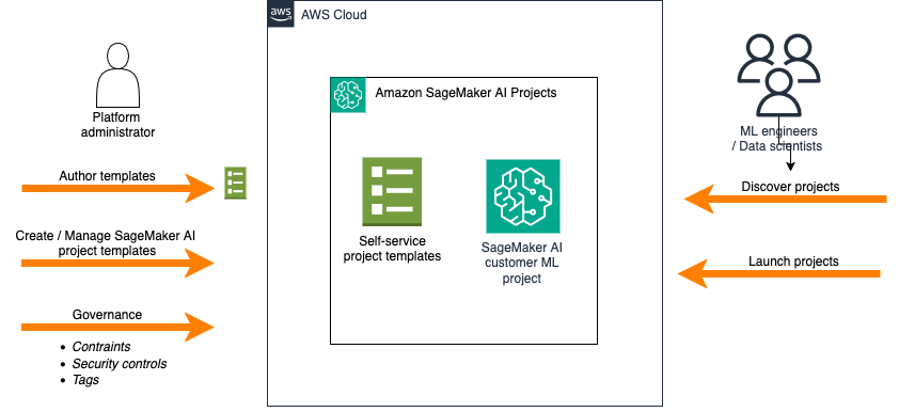
The following diagram shows how SageMaker AI Projects offers separate workflows for administrators and ML engineers and data scientists. Where the admins create and manage the ML use-case templates and the ML engineers and data scientists consume the approved templates in self-service fashion.
What’s new: Amazon SageMaker AI S3-based project templates
The latest update to SageMaker AI Projects introduces the ability for administrators to store and manage ML project templates directly in Amazon S3. S3-based templates are a less complicated and more flexible alternative to the previously required Service Catalog. With this enhancement, AWS CloudFormation templates can be versioned, secured, and efficiently shared across teams using the rich access controls, lifecycle management, and replication features provided by S3. Now, data science teams can launch new ModelOps projects from these S3-backed templates directly within Amazon SageMaker Studio. This helps organizations maintain consistency and compliance at scale with their internal standards.
When you store templates in Amazon S3, they become available in all AWS Regions where SageMaker AI Projects is supported. To share templates across AWS accounts, you can use S3 bucket policies and cross-account access controls. The ability to turn on versioning in S3 provides a complete history of template changes, facilitating audits and rollbacks, while also supplying an immutable record of project template evolution over time. If your teams currently use Service Catalog-based templates, the S3-based approach provides a straightforward migration path. When migrating from Service Catalog to S3, the primary considerations involve provisioning new SageMaker roles to replace Service Catalog-specific roles, updating template references accordingly, uploading templates to S3 with proper tagging, and configuring domain-level tags to point to the template bucket location. For organizations using centralized template repositories, cross-account S3 bucket policies must be established to permit template discovery from consumer accounts, with each consumer account’s SageMaker domain tagged to reference the central bucket. Both S3-based and Service Catalog templates are displayed in separate tabs within the SageMaker AI Projects creation interface, so organizations can introduce S3 templates gradually without disrupting existing workflows during the migration.
The S3-based ModelOps projects support custom CloudFormation templates that you create for your organization ML use case. AWS-provided templates (such as the built-in ModelOps project templates) continue to be available exclusively through Service Catalog. Your custom templates must be valid CloudFormation files in YAML format. To start using S3-based templates with SageMaker AI Projects, your SageMaker domain (the collaborative workspace for your ML teams) must include the tag sagemaker:projectS3TemplatesLocation with value s3://. Each template file uploaded to S3 must be tagged with sagemaker:studio-visibility=true to appear in the SageMaker AI Studio Projects console. You will need to grant read access to SageMaker execution roles on the S3 bucket policy and enable CORS onfiguration on the S3 bucket to allow SageMaker AI Projects access to the S3 templates.
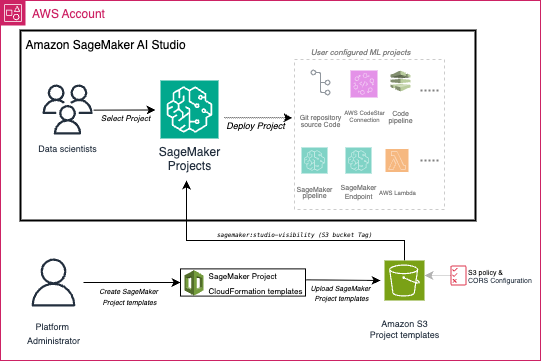
The following diagram illustrates how S3-based templates integrate with SageMaker AI Projects to enable scalable ModelOps workflows. The setup operates in two separate workflows – one-time configuration by administrators and project launch by ML Engineers / Data Scientists. When ML Engineers / Data Scientists launch a new ModelOps project in SageMaker AI, SageMaker AI launches an AWS CloudFormation stack to provision the resources defined in the template and once the process is complete, you can access all specified resources and the configured CI/CD pipelines in your project.
Managing the lifecycle of launched projects can be accomplished through the SageMaker Studio console where users can navigate to S3 Templates, select a project, and use the Actions dropdown menu to update or delete projects. Project updates can be used to modify existing template parameters or the template URL itself, triggering CloudFormation stack updates that are validated before execution, while project deletion removes all associated CloudFormation resources and configurations. These lifecycle operations can also be performed programmatically using the SageMaker APIs.
To demonstrate the power of S3-based templates, let’s look at a real-world scenario where an admin team needs to provide data scientists with a standardized ModelOps workflow that integrates with their existing GitHub repositories.
Use case: GitHub-integrated MLOps template for enterprise teams
Many organizations use GitHub as their primary source control system and want to use GitHub Actions for CI/CD while using SageMaker for ML workloads. However, setting up this integration requires configuring multiple AWS services, establishing secure connections, and implementing proper approval workflows—a complex task that can be time-consuming if done manually. Our S3-based template solves this challenge by provisioning a complete ModelOps pipeline that includes, CI/CD orchestration, SageMaker Pipelines components and event-drive automation. The following diagram illustrates the end-to-end workflow provisioned by this ModelOps template.
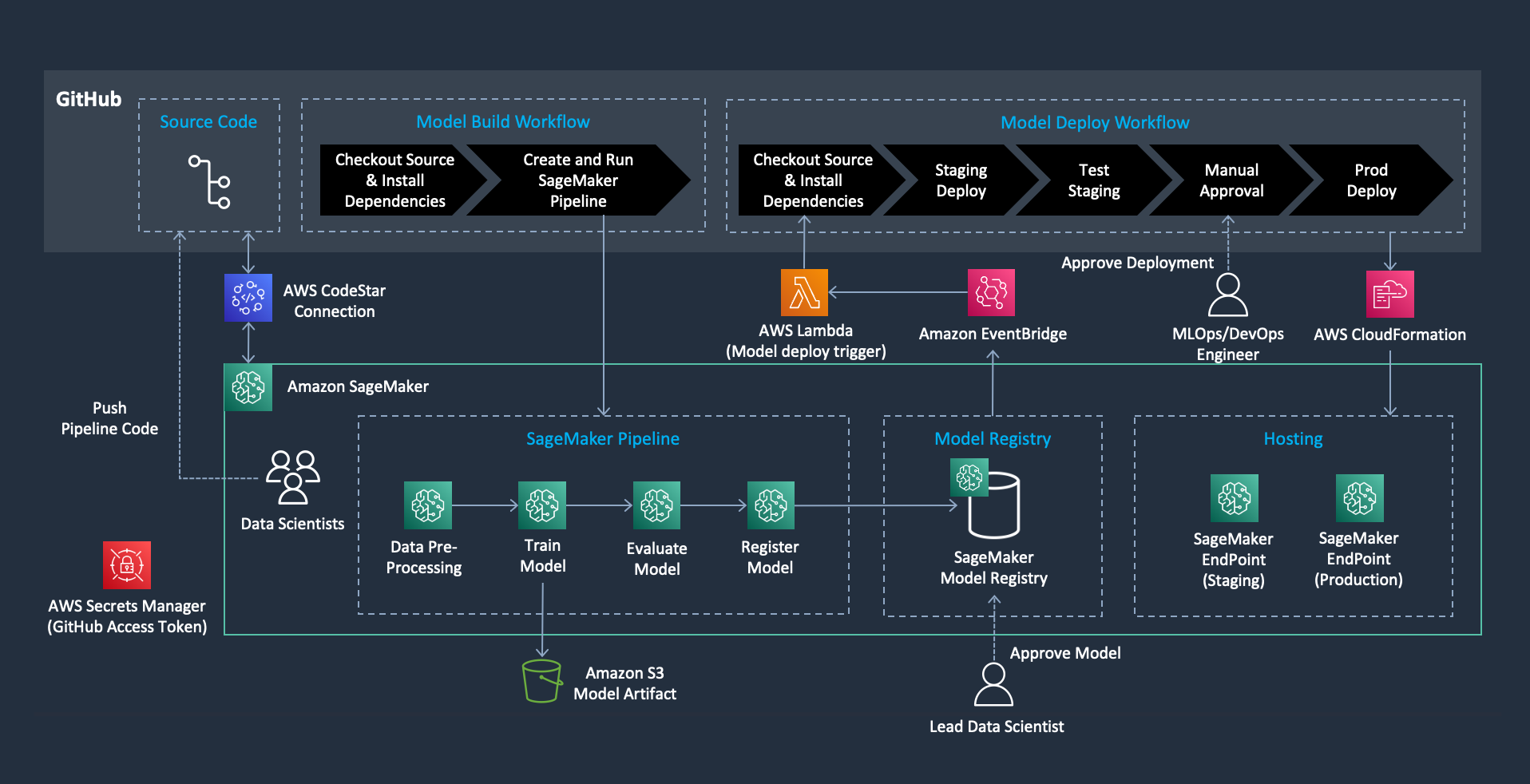
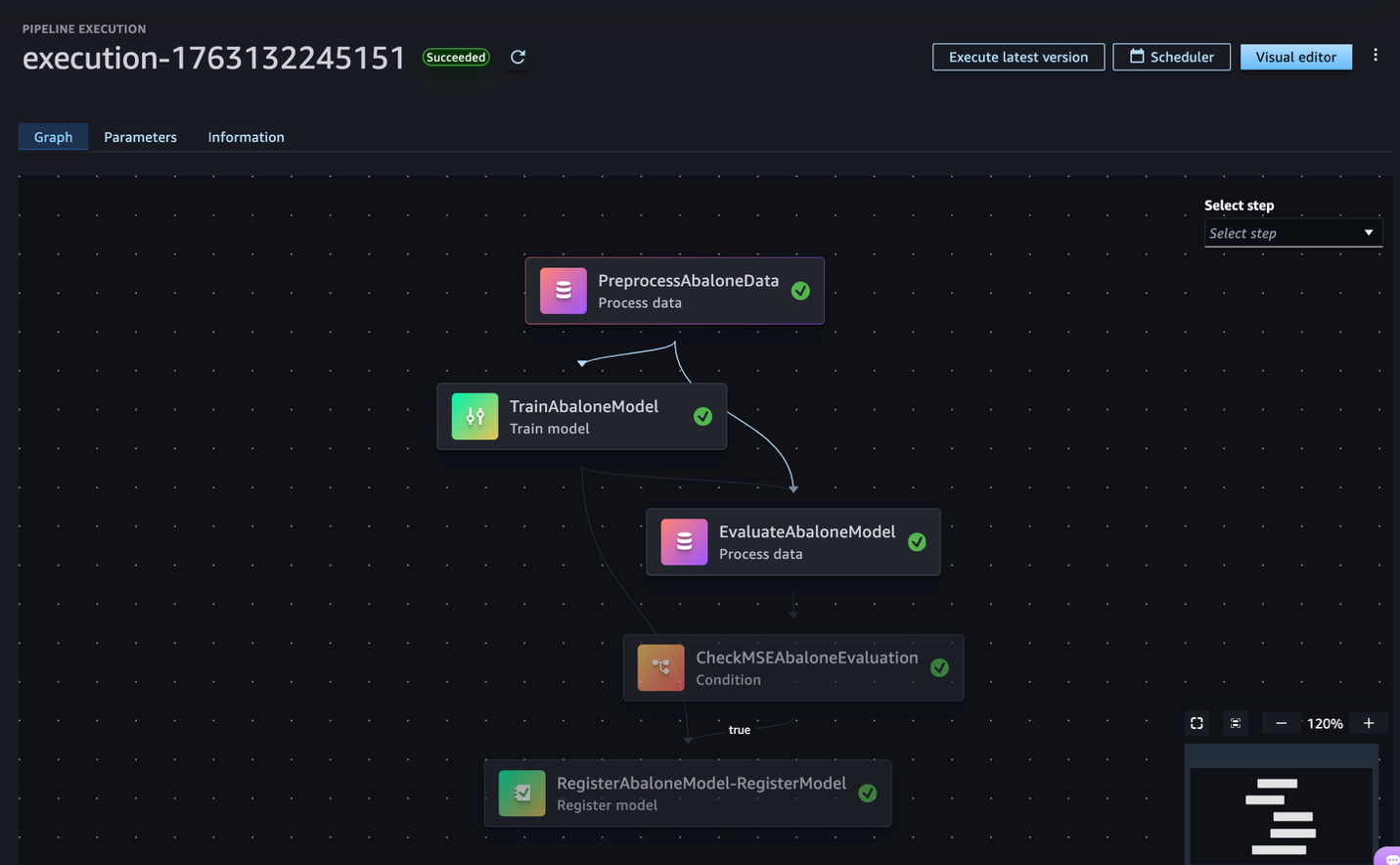
This sample ModelOps project with S3-based templates enables fully automated and governed ModelOps workflows. Each ModelOps project includes a GitHub repository pre-configured with Actions workflows and secure AWS CodeConnections for seamless integration. Upon code commits, a SageMaker pipeline is triggered to orchestrate a standardized process involving data preprocessing, model training, evaluation, and registration. For deployment, the system supports automated staging on model approval, with robust validation checks, a manual approval gate for promoting models to production, and a secure, event-driven architecture using AWS Lambda and Amazon EventBridge. Throughout the workflow, governance is supported by SageMaker Model Registry for tracking model versions and lineage, well-defined approval steps, secure credential management using AWS Secrets Manager, and consistent tagging and naming standards for all resources.
When data scientists select this template from SageMaker Studio, they provision a fully functional ModelOps environment through a streamlined process. They push their ML code to GitHub using built-in Git functionality within the Studio integrated development environment (IDE), and the pipeline automatically handles model training, evaluation, and progressive deployment through staging to production—all while maintaining enterprise security and compliance requirements. The complete setup instructions along with the code for this ModelOps template is available in our GitHub repository.
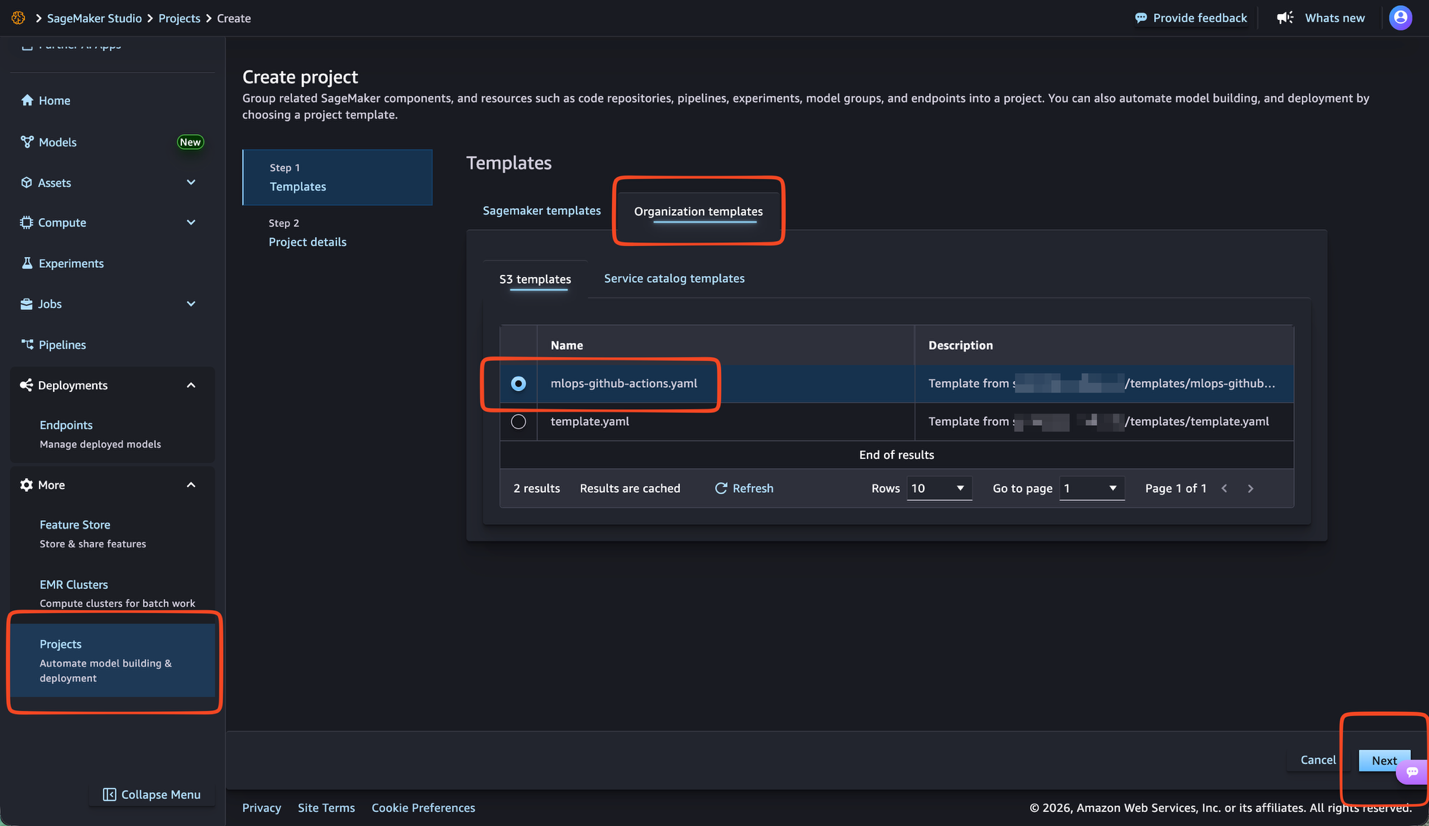
After you follow the instructions in the repository you can find the mlops-github-actions template in the SageMaker AI Projects section in the SageMaker AI Studio console by choosing Projects from the navigation pane and selecting the Organization templates tab and choosing Next, as shown in the following image.
To launch the ModelOps project, you must enter project-specific details including the Role ARN field. This field should contain the AmazonSageMakerProjectsLaunchRole ARN created during setup, as shown in the following image.
As a security best practice, use the AmazonSageMakerProjectsLaunchRole Amazon Resource Name (ARN), not your SageMaker execution role.
The AmazonSageMakerProjectsLaunchRole is a provisioning role that acts as an intermediary during the ModelOps project creation. This role contains all the permissions needed to create your project’s infrastructure, including AWS Identity and Access Management (IAM) roles, S3 buckets, AWS CodePipeline, and other AWS resources. By using this dedicated launch role, ML engineers and data scientists can create ModelOps projects without requiring broader permissions in their own accounts. Their personal SageMaker execution role remains limited in scope—they only need permission to assume the launch role itself.
This separation of responsibilities is important for maintaining security. Without launch roles, every ML practitioner would need extensive IAM permissions to create code pipelines, AWS CodeBuild projects, S3 buckets, and other AWS resources directly. With launch roles, they only need permission to assume a pre-configured role that handles the provisioning on their behalf, keeping their personal permissions minimal and secure.
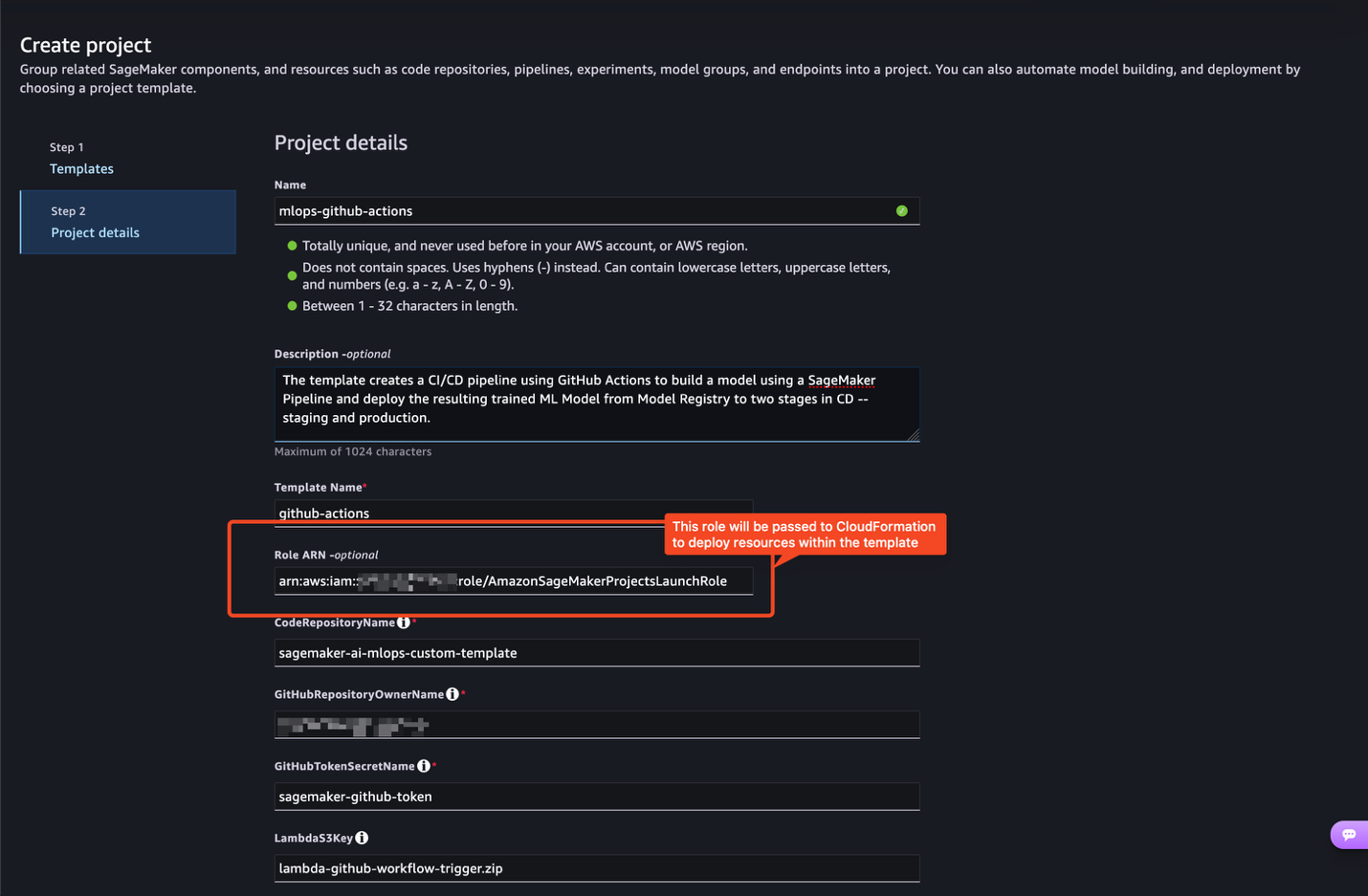
Enter your desired project configuration details and choose Next. The template will then create two automated ModelOps workflows—one for model building and one for model deployment—that work together to provide CI/CD for your ML models. The complete ModelOps example can be found in the mlops-github-actions repository.
Clean up
After deployment, you will incur costs for the deployed resources. If you don’t intend to continue using the setup, delete the ModelOps project resources to avoid unnecessary charges.
To destroy the project, open SageMaker Studio and choose More in the navigation pane and select Projects. Choose the project you want to delete, choose the vertical ellipsis above the upper-right corner of the projects list and choose Delete. Review the information in the Delete project dialog box and select Yes, delete the project to confirm. After deletion, verify that your project no longer appears in the projects list.
In addition to deleting a project, which will remove and deprovision the SageMaker AI Project, you also need to manually delete the following components if they’re no longer needed: Git repositories, pipelines, model groups, and endpoints.
Conclusion
The Amazon S3-based template provisioning for Amazon SageMaker AI Projects transforms how organizations standardize ML operations. As demonstrated in this post, a single AWS CloudFormation template can provision a complete CI/CD workflow integrating your Git repository (GitHub, Bitbucket, or GitLab), SageMaker Pipelines, and SageMaker Model Registry—providing data science teams with automated workflows while maintaining enterprise governance and security controls. For more information about SageMaker AI Projects and S3-based templates, see ModelOps Automation With SageMaker Projects.
By usging S3-based templates in SageMaker AI Projects, administrators can define and govern the ML infrastructure, while ML engineers and data scientists gain access to pre-configured ML environments through self-service provisioning. Explore the GitHub samples repository for popular ModelOps templates and get started today by following the provided instructions. You can also create custom templates tailored to your organization’s specific requirements, security policies, and preferred ML frameworks.
About the authors
 Christian Kamwangala is an AI/ML and Generative AI Specialist Solutions Architect at AWS, based in Paris, France. He partners with enterprise customers to architect, optimize, and deploy production-grade AI solutions leveraging the comprehensive AWS machine learning stack . Christian specializes in inference optimization techniques that balance performance, cost, and latency requirements for large-scale deployments. In his spare time, Christian enjoys exploring nature and spending time with family and friends
 Sandeep Raveesh is a Generative AI Specialist Solutions Architect at AWS. He works with customer through their AIOps journey across model training, generative AI applications like agents, and scaling generative AI use-cases. He also focuses on go-to-market strategies helping AWS build and align products to solve industry challenges in the generative AI space. You can connect with Sandeep on LinkedIn to learn about generative AI solutions.
 Paolo Di Francesco is a Senior Solutions Architect at Amazon Web Services (AWS). He holds a PhD in Telecommunications Engineering and has experience in software engineering. He is passionate about machine learning and is currently focusing on using his experience to help customers reach their goals on AWS, in discussions around MLOps. Outside of work, he enjoys playing football and reading.



![KAIZEN Locations & Map Guide – Boss, Chest, Weapon, Style [KASHIMO]](https://www.destructoid.com/wp-content/uploads/2026/02/kaizen-locations-and-map-guide.jpg)




