













Evaluate your Amazon Nova Sonic voice agent at scale, no microphone required
In this post, we walk you through the Nova Sonic Test Harness, an open source framework that we built to solve both problems. It serves as a rapid iteration tool for tuning system prompts and tool configurations (run a conversation, see results, adjust, repeat) and as a comprehensive evaluation framework for validating voice agent quality at scale. It runs complete multi-turn conversations with Amazon Nova Sonic automatically, evaluates them using LLM-as-judge techniques, and can even detect cases where the model’s audio output doesn’t match its text output (audio hallucinations). No microphone required.
Voice agents are transforming how businesses interact with customers, handling appointment bookings, order inquiries, account management, and more through natural spoken conversation. But as these agents grow more capable, a fundamental challenge emerges: how do you test them?
Unlike text-based chatbots where you can script inputs and assert outputs, voice agents operate in a fundamentally different paradigm. They stream audio bidirectionally, respond non-deterministically, maintain context across multi-turn conversations, and use tools in real time. The only way most teams test today is to have someone physically talk to the system and listen to what comes back. That’s slow, inconsistent, and doesn’t scale.
This testing gap creates two critical problems for teams building voice applications:
- Iterating system prompts and tool configurations is painfully slow. Every time you tweak a prompt or adjust tool definitions to improve accuracy, you need to manually re-test dozens of conversation scenarios to see if things got better or worse. Without automated feedback, prompt engineering becomes guesswork.
- There’s no reliable evaluation framework for voice agent quality. You can’t run a regression suite before deploying a change. You can’t measure whether your agent handles edge cases correctly across hundreds of scenarios. You can’t catch subtle regressions, like the agent suddenly forgetting to confirm a booking, until a real customer hits them.
If you have 50 conversation scenarios across 3 user personas, you’re looking at 150 manual tests, each taking several minutes of real-time interaction. Run that after every prompt change and you will burn days on QA.
In this post, we walk you through the Nova Sonic Test Harness, an open source framework that we built to solve both problems. It serves as a rapid iteration tool for tuning system prompts and tool configurations (run a conversation, see results, adjust, repeat) and as a comprehensive evaluation framework for validating voice agent quality at scale. It runs complete multi-turn conversations with Amazon Nova Sonic automatically, evaluates them using LLM-as-judge techniques, and can even detect cases where the model’s audio output doesn’t match its text output (audio hallucinations). No microphone required.
Why speech-to-speech testing is different
If you’ve tested text-based large language models (LLMs) before, you might wonder why you can’t just adapt those tools. Here’s what makes voice agent testing fundamentally harder:
Bidirectional streaming. Speech-to-speech models don’t use request-response. They maintain a persistent, full-duplex connection where audio and text flow in both directions simultaneously. Standard HTTP testing tools can’t interact with this protocol.
Non-deterministic responses. Ask the same question twice and you will get different wording, different audio timing, even different tool call ordering. You can’t write assertions like “expect exact string X.”
Multi-turn context. A single turn tells you almost nothing. The interesting behavior happens across turns: does the model remember what the caller said earlier? Does it follow up appropriately? Does it know when the conversation is done?
Audio-text divergence. Speech-to-speech models produce text and audio at the same time, and they can say different things. The text might read “3:00 PM” while the audio says “3:30 PM.” You can’t catch this by reading transcripts alone.
Session limits. Connections time out after about 8 minutes. If your test conversation is longer, you must handle reconnection and history replay.
The test harness handles all of these. Let’s look at how it works.
How the test harness works
At a high level, the harness does four things: it configures a test scenario, runs a full conversation with Nova Sonic, evaluates the result, and produces a report. The entire pipeline runs unattended. You define the scenario in a JSON file and come back to the results.
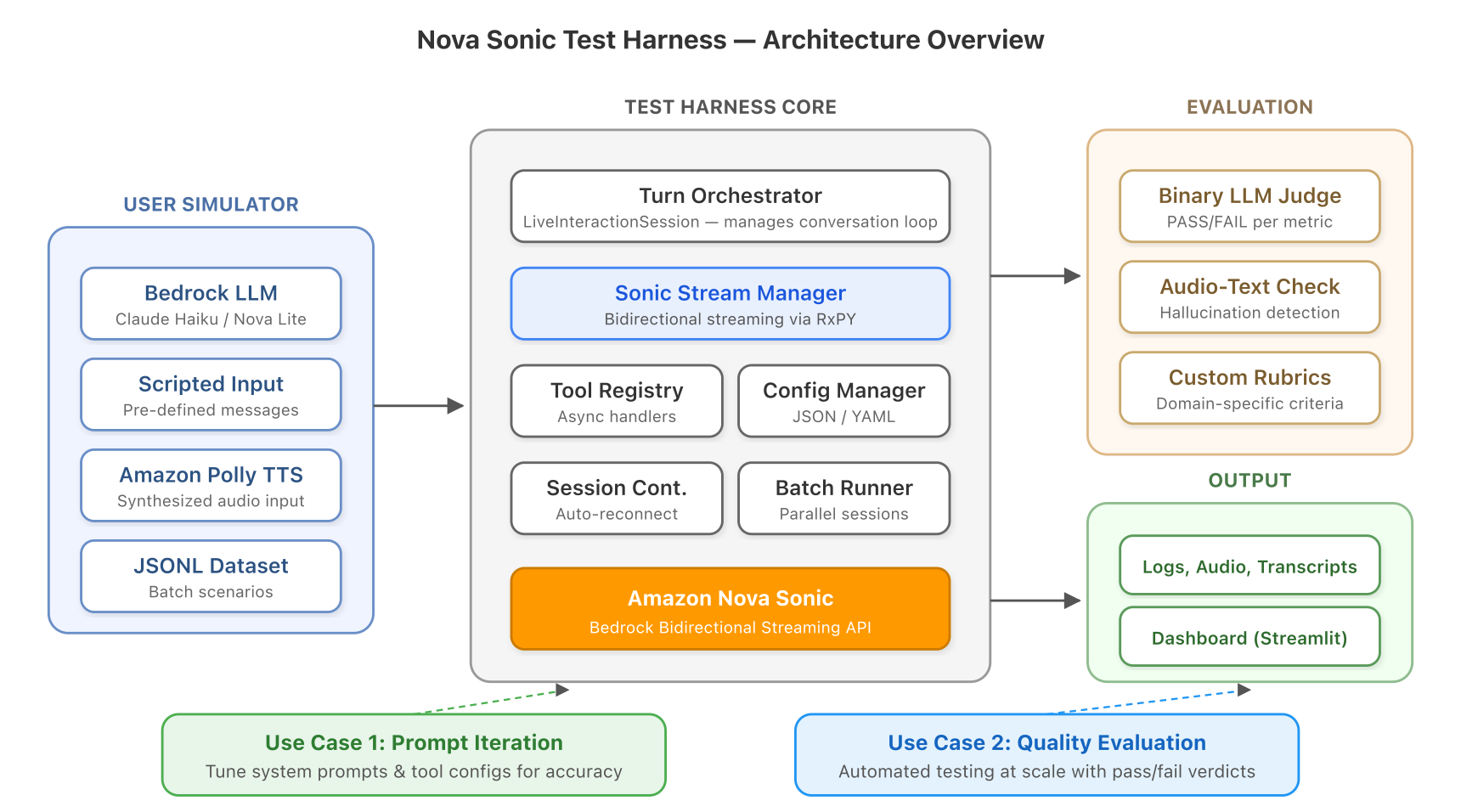
Figure 1: Architecture overview. The test harness coordinates a user simulator, Nova Sonic, and an LLM judge across AWS services.
Let’s walk through each phase.
Defining a test scenario
Every test starts with a JSON configuration file. Think of it as describing a conversation scenario: who is Nova Sonic pretending to be, who is the caller, what tools are available, and what does “success” look like?
Here’s a real example, testing an appointment booking agent:
The key insight is that you’re defining goals and evaluation criteria, not expected outputs. Because Nova Sonic responds differently every time, we evaluate against rubrics rather than checking for exact strings.
A model registry (models.yaml) maps short aliases like claude-haiku to full Amazon Bedrock model IDs, so configurations don’t break when model versions change.
Running the conversation
After you have a configuration file, the harness runs the conversation automatically. Here’s what happens each turn:
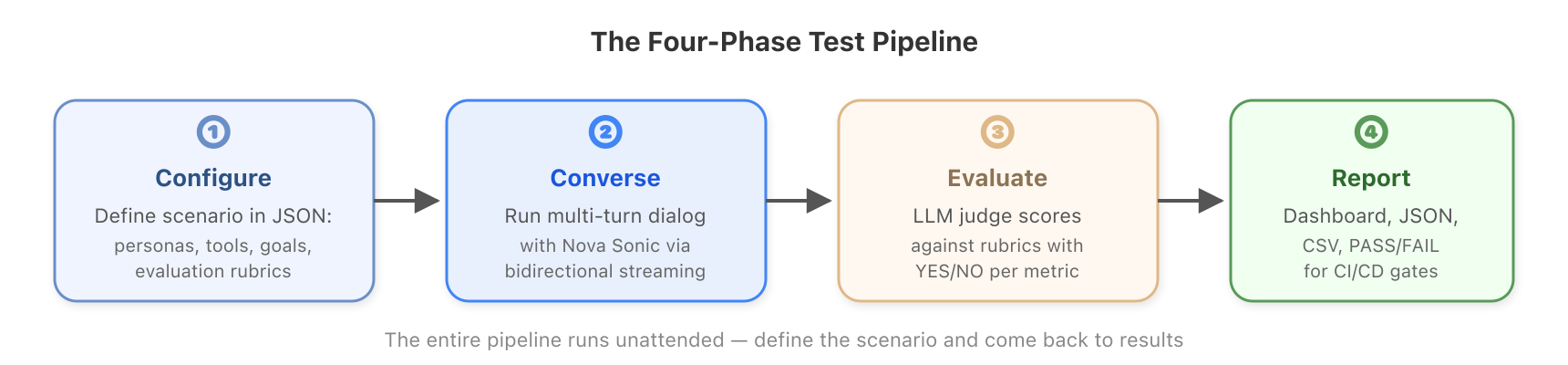
Figure 2: The four-phase test pipeline from configuration to results.
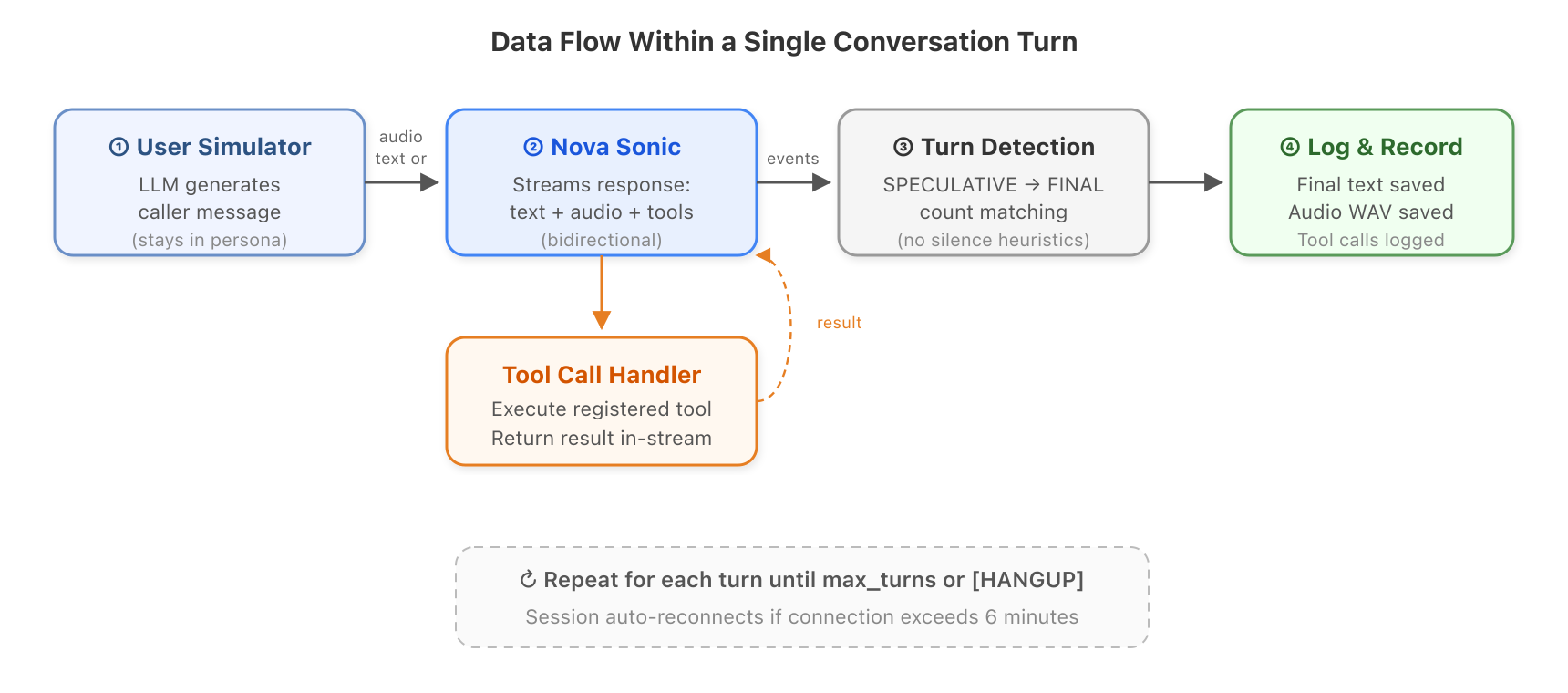
Figure 3: Data flow within a single conversation turn.
- The user simulator generates a message. An LLM (for example, Claude Haiku on Amazon Bedrock) reads the conversation so far and decides what the caller would say next. It stays in character. If the persona is “impatient customer,” it acts impatient.
- The message goes to Nova Sonic. Either as text (fast, good for most testing) or as synthesized audio using Amazon Polly (for testing the full speech recognition pipeline).
- Nova Sonic streams back its response. Text, audio, and possibly tool calls arrive asynchronously. The harness processes all of these in real-time using reactive streams.
- The harness detects when the turn is done. Nova Sonic produces text in two stages (speculative, then final). When all speculative blocks have been finalized, the turn is complete. This is more reliable than waiting for silence or using timeouts.
- Tool calls are handled in-stream. If Nova Sonic asks to call a tool (like checking appointment availability), the registered handler runs and returns the result without breaking the connection.
- Everything is logged. The final text, audio WAV, tool calls, and timing metadata are all saved.
Then the loop repeats.
What about long conversations?
Nova Sonic connections time out after about 8 minutes. The SessionContinuationManager handles this transparently: it monitors connection age, creates a new session before timeout (default: 6 minutes), and replays the conversation history into the new session. Your test scenario doesn’t need to know about this. It just works.
Evaluating quality
After the conversation ends, the harness passes the full transcript to a separate LLM judge (for example, Claude Opus). The judge knows nothing about the test setup. It only sees the conversation and the evaluation criteria. This prevents bias.
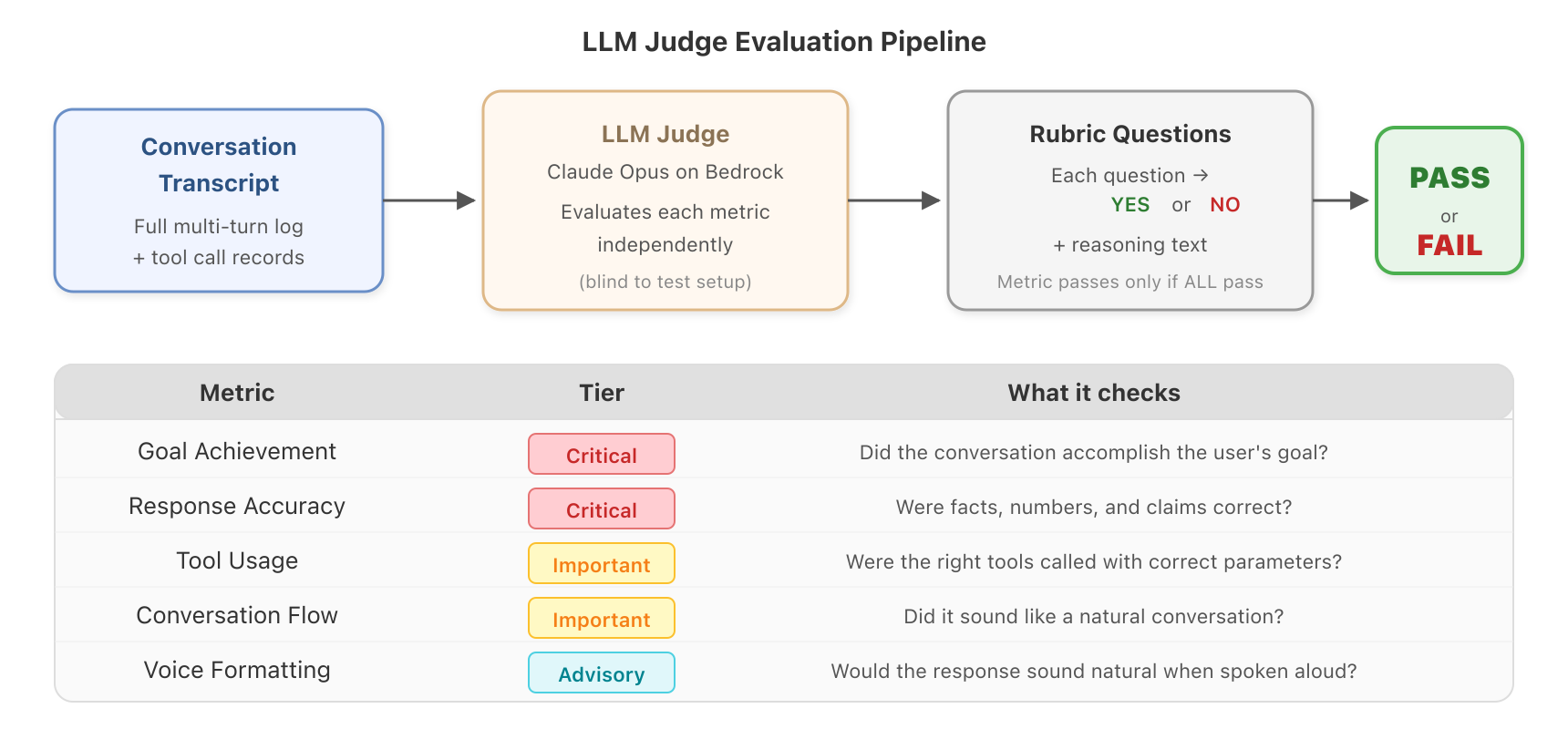
Figure 4: The LLM judge evaluates each metric independently with YES/NO rubric verdicts.
The judge assesses six built-in metrics, organized into three tiers:
| Metric | Tier | What it checks |
| Goal Achievement | Critical | Did the conversation accomplish what the user wanted? |
| Response Accuracy | Critical | Were facts, numbers, and claims correct? |
| Tool Usage | Important | Were the right tools called with correct parameters? |
| Conversation Flow | Important | Did it sound like a natural conversation? |
| System Prompt Compliance | Important | Did the agent stay in character? |
| Voice Formatting | Advisory | Would the response sound natural when spoken aloud? |
The tier system determines pass/fail logic: both critical metrics must pass for an overall PASS. Important metrics contribute to the pass rate score. Advisory metrics are reported but don’t affect the verdict.
Each metric is evaluated through multiple rubric questions that receive strict YES/NO answers. A metric passes only if all its rubric questions pass. This means when something fails, you know exactly which question failed and can read the judge’s reasoning to understand why.
You can also define custom rubric questions for your domain. For a healthcare agent, you might add: “Did the agent verify insurance information before booking?” For a banking agent: “Did the agent confirm the transfer amount before executing?”
Viewing results
Results come in multiple formats depending on your workflow:
- Interactive dashboard. With a Streamlit app, you can browse batch results visually, compare runs, drill into failures, and search across transcripts.
- Structured JSON/CSV. Every session produces an interaction log, evaluation results, and audio files in an organized directory. Batch summaries aggregate pass rates across all sessions.
- Continuous integration and delivery (CI/CD)-friendly verdicts. The binary PASS/FAIL output and numeric pass rate are designed to plug directly into automated quality gates.
Catching audio hallucinations
Speech-to-speech models produce text and audio outputs simultaneously. Most of the time they match. But occasionally, Nova Sonic might write one thing and say another. Imagine a voice agent telling a customer their order arrives “next Monday” in audio while the text stream says “next Tuesday.” If you’re only checking text logs, you’ll never catch it.
- Upload each turn’s audio to Amazon Simple Storage Service (Amazon S3).
- Transcribe it using Amazon Transcribe (what was actually spoken).
- Compare the transcription against the text output using an LLM.
- Classify every difference: filler words, phrasing variants, or factual errors.
Each turn gets a verdict:
- CONSISTENT. Only filler words (“um,” “uh”) or no differences at all.
- MINOR_DIFFERENCES. Phrasing variants with the same meaning (“I can help you” compared to “Let me help”).
- HALLUCINATION. Factual discrepancy. Different numbers, dates, names, or claims between text and audio.
This matters most for voice agents that communicate specific facts: appointment times, prices, phone numbers, medication names, confirmation codes. A hallucination in any of these could directly harm a user.
Testing at scale
Testing one scenario is useful for development. But for confidence before deployment, you must test dozens of scenarios, with different personas, edge cases, and conversation paths, and you must run them repeatedly to account for non-determinism.
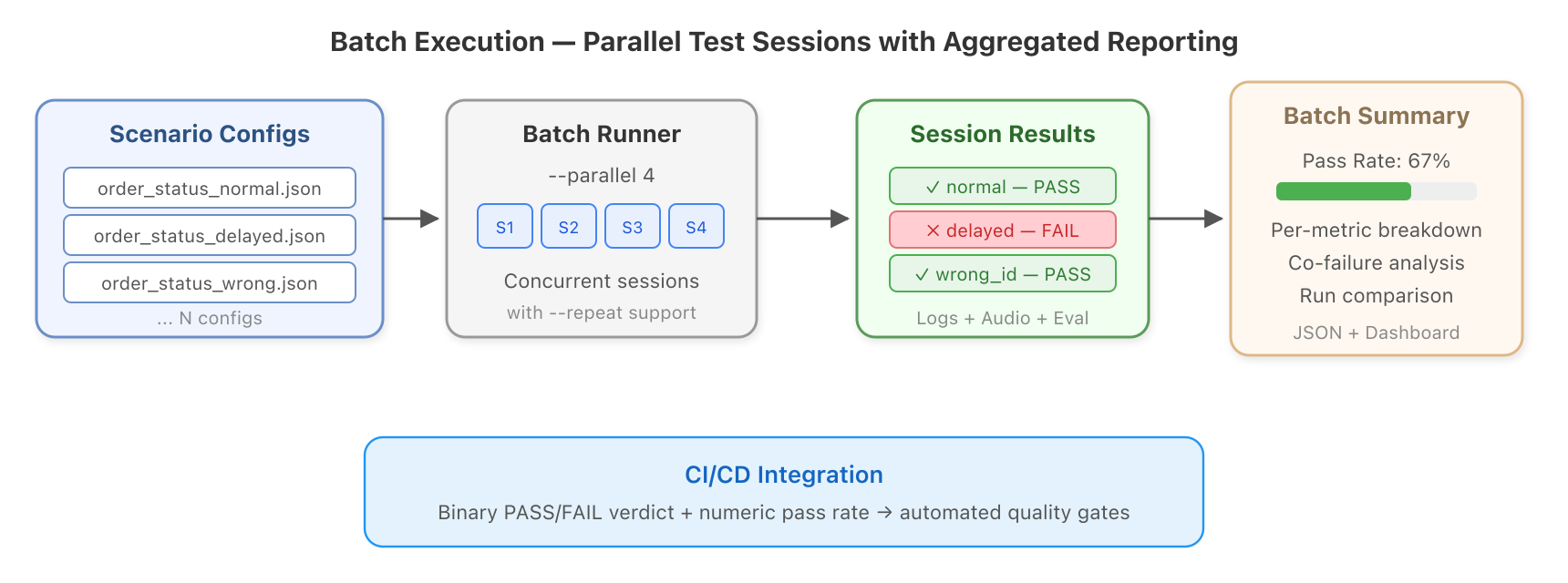
Figure 5: Batch execution runs parallel test sessions with aggregated quality reporting.
The batch runner makes this practical:
The harness ships with ready-to-use scenario packs: 12 healthcare scenarios (appointment booking, insurance claims, referrals), eight banking scenarios (transfers, balance inquiries, disputes), and five customer service variants (angry, calm, confused callers with different order states).
After a batch run, the dashboard shows pass rates across all scenarios, per-metric breakdowns, co-failure correlations (which metrics tend to fail together), and side-by-side comparison between runs. You can see exactly what improved or regressed after a prompt change.
Choosing the right input mode
Different testing needs call for different approaches. The harness supports four input modes:
| Mode | How it works | When to use it |
| Text (default) | LLM-generated messages sent as text events | Day-to-day testing, prompt iteration, tool validation |
| Amazon Polly TTS | User text synthesized to audio using Amazon Polly | Testing the full automatic speech recognition (ASR) pipeline, production-realistic conditions |
| Scripted | Pre-defined messages, no LLM involved | Regression testing, exact reproducibility between runs |
| Dataset-driven | Scenarios loaded from JSONL or Hugging Face | Benchmark evaluation, large-scale test suites |
Text mode is fastest and supports the highest parallelism. Use Amazon Polly mode when you specifically need to test how Nova Sonic handles real audio input (including potential ASR misinterpretations). Use scripted mode for regression tests where you need identical inputs every time.
Getting started
For full setup instructions, prerequisites, and configuration details, see the GitHub repository. You will run your first automated conversation in under five minutes.
AWS services used
| Service | What it does in the harness | Required? |
| Amazon Bedrock | Hosts Nova Sonic, user simulator LLMs, and judge LLMs | Yes |
| Amazon Polly | Converts user text to speech for audio input testing | Optional |
| Amazon S3 | Temporarily stores audio files for transcription | Optional |
| Amazon Transcribe | Converts audio to text for hallucination detection | Optional |
Clean up
Amazon Bedrock model invocations are pay-per-use with no idle charges. If you used the optional services, delete any Amazon S3 buckets created for audio evaluation (the objects inside are cleaned automatically, but the bucket itself persists). You can remove Amazon Transcribe jobs from the AWS Management Console if needed.
Conclusion
Before this tool, testing a Nova Sonic voice agent meant one of two things: have a human talk to it (slow, inconsistent, doesn’t scale), or don’t test it (risky, especially when iterating prompts or deploying to new scenarios).
The Nova Sonic Test Harness gives you a third option: automated, repeatable, scalable testing that covers the full conversation lifecycle, from the first turn to evaluation to hallucination detection. It handles the hard parts (bidirectional streaming, session timeouts, non-deterministic evaluation) so you can focus on building better voice experiences.
Key takeaways
- No audio hardware is needed. Test Nova Sonic as easily as testing any API.
- LLM-powered evaluation. Handles non-determinism with rubric-based assessment instead of brittle assertions.
- Audio hallucination detection. Catches text and audio divergence.
- Scales horizontally. Run hundreds of scenarios in parallel with one command.
- Open source and extensible. Add your own tools, metrics, rubrics, and scenarios.
Clone the repository and run your first test today. As your Nova Sonic application grows, the testing grows with it.
About the authors