

















Securing AI agents with temporal policies in Amazon Bedrock AgentCore
Temporal policies in Amazon Bedrock AgentCore let you define stateful rules that evaluate authorization based on an agent's session history. Learn how to enforce workflow sequencing, prevent data fabrication, cap financial exposure, and require human approval for high-value actions.
Before AI agents, it was generally sufficient for access controls to treat each action as an independent event. Applications relied on deterministic business logic to enforce whether actions happened in the right order or whether the data was up-to-date. AI agents behave in fundamentally different ways than traditional applications. They decide at runtime which tools to call, with which arguments, and in what order. That flexibility, combined with increasingly intelligent models, makes agents equal measures capable and challenging to control. One tool call might be deemed safe when considered in isolation, but harmful in the context of the preceding call, such as after reading from an untrusted data source. The question then becomes, how do you enforce authorization rules that account for an agent’s session history, in a way the agent cannot circumvent?
Temporal policies in Amazon Bedrock AgentCore let you define stateful rules that determine authorization to AgentCore Gateway targets by evaluating the current request in the context of prior events in an agent’s trajectory. Because these policies run at the AgentCore Gateway perimeter, outside the agent’s own code, the agent cannot intercept or manipulate them.
In this post, you will learn what temporal policies are, how they work, and walk through an example to demonstrate. We will show you how to use temporal policies to enforce workflow sequencing, prevent data fabrication between tool calls, cap cumulative financial exposure per session, and require human approval for high-value actions. You will also see how to automatically tighten permissions when an agent operates without human engagement. First, however, we will explore the needs and use cases for stateful policies in more detail.
Why agents need stateful policy enforcement
Existing access controls in AgentCore Policy enforce stateless, deterministic rules on each individual request: who can call which tool, under what conditions. Stateless controls are necessary but often insufficient for agents. Consider the following scenarios where existing stateless controls fail to catch critical issues:
- An agent calls a
lookup_customertool, hallucinates a different account number than what was returned, and passes it to atransfer_fundstool that then moves money to the wrong customer’s account. - A runaway agent executes dozens of trades in a loop because nothing tracks that cumulative exposure has already exceeded the risk limit.
- An agent both approves and denies the same insurance claim within seconds.
Each individual tool call in these scenarios would pass a stateless policy check. The problem only becomes apparent when you look at the agent’s trajectory, the ordered sequence of actions in a session. Temporal policies extend Policy in AgentCore with this trajectory-aware enforcement layer. Temporal policies run at the gateway, outside the agent’s code, so they cannot be bypassed regardless of what the agent does, how it is prompted, or what bugs exist in the agent code. Some common temporal policy use cases include:
- Enforcing output integrity across chained tools. Require that an argument passed to the current tool call exactly matches the output of a prior tool call, preventing the agent from hallucinating or substituting values between steps.
- Enforcing tool-call ordering. Require that one tool is called before another tool to verify standard operating procedure (SOP) adherence.
- Requiring human approval before privileged actions. Block destructive or sensitive tool calls until an explicit human approval event is recorded in the trajectory.
- Enforcing data freshness. Require that a data lookup completed within a given timeframe before a dependent action is authorized, preventing decisions based on stale information.Temporal policies are authorization controls that answer the question “given the recent trajectory observed at the AgentCore Gateway, is this specific request authorized?”. They evaluate whether a gateway-routed request should be permitted based on the current request and recent trajectory (that is, events within a session). They do not transform requests, call tools, perform analysis, or directly orchestrate the agent.
Temporal policies operate on the traffic that flows through AgentCore Gateway. Because Gateway routes an agent’s Model Context Protocol (MCP) tool calls, agent-to-agent calls, and model inference calls through a single endpoint, a temporal policy can govern all three whenever your agent issues those calls through the gateway. This gives you one consistent place to reason about an agent’s behavior over time, regardless of which kind of call the agent is making.
How temporal policies work
Temporal policies build on the existing policy engine that’s already used for stateless access control. They introduce the concept of agent trajectories, which are bounded sequences of actions identified by a principal and session ID. Agents never see the policy logic, never touch the state store, and cannot alter the controls. As with the existing AgentCore Policy features, temporal policies deny by default and forbid wins over permit.
When the gateway receives a tool call, the policy engine:
- Queries the trajectory state for actions, inputs, and outputs relevant to the policies being evaluated.
- Evaluates each temporal policy against the current request in the context of its historical scope (that is, prior events within the customer-defined trajectory).
- Returns a deterministic ALLOW or DENY decision and logs the full context of the decision.
Every request that a temporal policy evaluates must carry an x-amzn-bedrock-agentcore-policy-session-id header, which identifies the session the request belongs to. You decide what constitutes the beginning and end of a session. The boundary can reflect whatever unit of work makes sense for your application, whether that is a single user conversation, a multi-step task, or a longer-running workflow. Because there can be no more than one concurrent authorization request per session, we recommend keeping the scope of a session as narrow as possible. If no header is passed, one will be generated on your behalf. However, note that a new session ID means that the policy engine will evaluate against a new, empty trajectory with no history.
A session is never defined by its ID alone. AgentCore combines the session ID with the end user’s identity to produce a unique session, which means two different identities can present the same session ID and still be treated as having entirely separate sessions. Policies apply independently to each trajectory, because the underlying identity differs. Within an active session, agent trajectories carry a maximum look-back window of 24 hours. Any trajectory events older than that are automatically deleted. One additional rule governs the relationship between sessions and the policies themselves. Whenever a change is made to the policies in a policy engine, existing sessions are invalidated. This makes sure that each session is evaluated against the current set of policies and each relevant trajectory event is recorded with the expected schema.
Applying temporal policies to a private banking portfolio agent
To make these concepts concrete, we’ll walk through how temporal policies can secure a hypothetical private banking agent. The agent helps wealth advisors at a financial services firm manage client portfolios. It retrieves client profiles, loads portfolio holdings, fetches real-time market prices, performs analysis, and executes trades on the advisor’s behalf.
In this scenario, the following MCP tools are exposed through the AgentCore Gateway:
| Tool | Description |
| get_client_profile | Retrieves client’s risk tolerance, investment policy, account restrictions, and associated portfolio IDs |
| load_portfolio | Retrieves a client’s portfolio holdings and current positions |
| get_market_price | Fetches current market price for a security |
| execute_trade | Executes a buy or sell order against a portfolio |
| rebalance_portfolio | Adjusts portfolio allocations across holdings |
There are three different advisor roles: junior advisors (limited trade authority), senior advisors (full trade authority), and compliance officers (read-only monitoring access). In this example, we will use Amazon Cognito for identity and pass JWTs for inbound auth to the AgentCore Gateway, which hosts our agent’s tools. To learn about AgentCore Gateway and how to set up auth with Gateway, read the AgentCore Gateway Documentation. Temporal policies use Dogwood, a new open-source governance language designed for agents and their tools. Dogwood supports evaluating existing Cedar policies and enables support for temporal conditions. Because Dogwood is compatible with existing Cedar policies, customers can continue to use their current Cedar policies without needing to migrate. For additional detail on Dogwood and its semantics, you can read the language documentation or this blog post.
The compliance team requires the following temporal controls before the agent reaches production:
- The agent must pull the client profile, then load the portfolio, before any trade executes.
- The
portfolio_idused in a trade must exactly match the output fromget_client_profile. - Market prices must be retrieved within 1 minute of a trade execution.
- No single session can exceed $60,000 in total trade value.
- Any individual trade over $25,000 requires advisor approval, one approval per trade.
- The agent cannot buy and then sell the same security within the same trajectory if it sells for a loss.
- After 15 minutes without advisor interaction, the agent loses access to write operations.
Request flow through gateway and policy
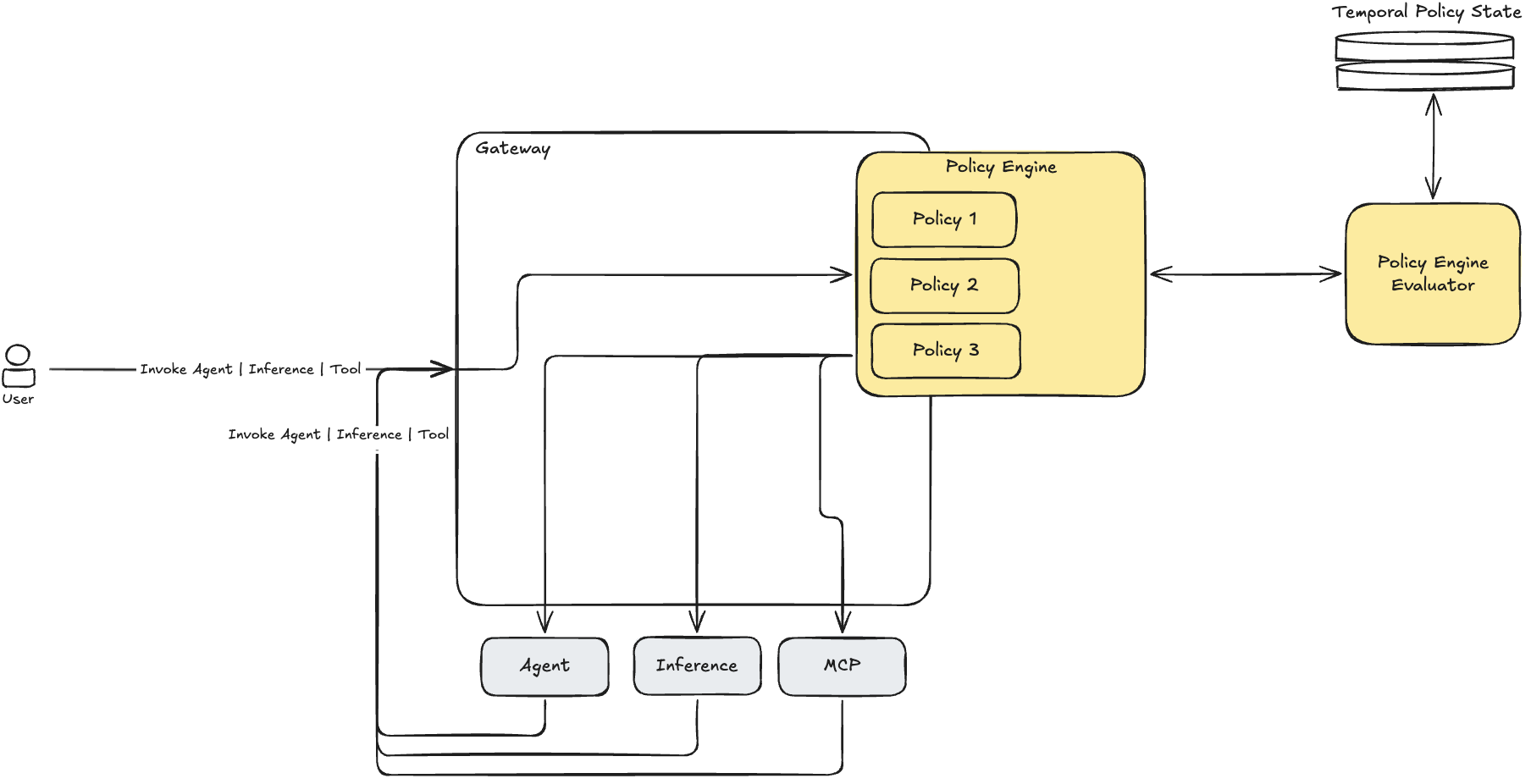
Figure 1: Request flow through AgentCore Gateway and Policy
This diagram demonstrates how requests to your gateway are intercepted and evaluated by Policy in AgentCore. When the portfolio agent initiates a tool call, the following steps occur:
- The request arrives at the AgentCore Gateway. The advisor is already authenticated through AgentCore Identity. The request carries the trajectory ID for the current session.
- The policy engine retrieves the trajectory’s accumulated state.
- Each temporal policy evaluates the current request against that history.
- If all policies permit, the request proceeds to the MCP tool. If any policy forbids, the request is denied and the denial is logged.
- On successful execution, the action and its result are appended to the trajectory state for future evaluations.
Implementing temporal policies
If you have an existing policy engine in ENFORCE mode, you can either update its enforcement mode to LOG_ONLY, or you can change the enforcement mode of the individual policies. Switching existing policies or policy engines to LOG_ONLY mode is not recommended for production workloads since policies will no longer enforce those security rules.
Prerequisites
Before implementing this solution, verify that you have met the following prerequisites:
- An active AWS account with Amazon Bedrock AgentCore enabled.
- An AgentCore Gateway with at least one MCP target configured.
- A policy engine attached to the gateway.
- Appropriate Identity and Access Management (IAM) permissions to create and manage policy resources (see documentation).
Policy 1: Workflow sequencing (multi-hop chain)
The compliance team requires that the agent follow get_client_profile, then load_portfolio, then rebalance_portfolio in sequence. Without the client profile, the agent has no system-verified context about which portfolios belong to this client, what the client’s risk tolerance is, or what account restrictions apply.
This policy forbids rebalance_portfolio unless get_client_profile and load_portfolio have both completed in the correct order within this trajectory. An agent that skips the load profile step and jumps directly to rebalancing is denied regardless of what instructions it received.
| Trajectory state | Action attempted | Expected result |
| Empty | rebalance_portfolio (portfolio_id: ” 8821”, amount: 15000) | DENY |
| get_client_profile completed | rebalance_portfolio (portfolio_id: ” 8821”, amount: 15000) | DENY |
| get_client_profile then load_portfolio completed | rebalance_portfolio(portfolio_id: ” 8821”, amount: 15000) | ALLOW |
Policy 2: Output-to-input integrity
The portfolio_id passed to execute_trade must exactly match one of the portfolio IDs returned by get_client_profile. The agent cannot fabricate or substitute a different portfolio ID.
This policy prevents an attacker from using prompt injection to steer the agent to trade against a different client’s portfolio. The attacker can convince the LLM to use a fabricated ID, but the policy verifies the value against what the CRM system actually returned.
| get_client_profile returned | execute_trade portfolio_id | Expected result |
| port-8821 | port-8821 | ALLOW |
| port-8821 | port-3347 | DENY |
Policy 3: Data freshness
A get_market_price call must have completed within the last 30 seconds before execute_trade is authorized. The agent cannot act on stale quotes.
In volatile markets, even a 60-second-old quote can represent significant price drift. This policy forces the agent to refresh its market data before every trade, ensuring that decisions are based on current information.
| Time since get_market_price | Action | Expected result |
| 4 seconds ago | BUY Stock A | ALLOW |
| 2 minutes ago | BUY Stock A | DENY |
| Never called | BUY Stock A | DENY |
Policy 4: Cumulative budget cap per trajectory
Total trade value in a single policy session (or trajectory) cannot exceed $60,000. This contains blast radius from runaway agents or successful attacks.
A compromised agent executing dozens of small trades that individually look fine can still accumulate catastrophic exposure. After $60,000, all trades are denied until a new trajectory begins.
| Prior cumulative trades | Current trade amount | Total | Expected result |
| $0 | $15,000 | $15,000 | Allow |
| $15,000 | $22,000 | $37,000 | Allow |
| $37,000 | $30,000 | $67,000 | DENY |
Policy 5: Human approval for large trades (one-time consumption)
Any trade exceeding $25,000 requires the advisor’s explicit approval. Each approval is consumed by a single trade. A second large trade requires a fresh approval.
This prevents the agent from interpreting a single approval as blanket permission for multiple large trades. Each approval covers exactly one execution.
| Trade amount | Approval in trajectory | Expected result |
| $15,000 | None | Allow (below threshold) |
| $30,000 | None | DENY |
| $30,000 | Approved (unconsumed) | ALLOW |
| $30,000 (second trade) | Only prior approval (consumed) | DENY |
Policy 6: Mutual exclusion
The agent cannot buy and then sell the same security within the same trajectory if it sells for a loss.
If the agent sold AAPL two minutes ago and now tries to buy AAPL, the request is denied. The contradiction itself is the signal that something has gone wrong and the session should be reviewed.
| Prior action | Current action | Time gap | Expected result |
| SELL Stock A | BUY Stock A | 2 min | DENY |
| SELL Stock A | BUY Stock A | 7 min | ALLOW |
| SELL Stock A | BUY Stock B | 2 min | ALLOW (different security) |
Policy 7: Progressive trust decay
After 15 minutes without advisor interaction, the agent loses access to write operations (execute_trade, rebalance_portfolio). The advisor can re-engage at any time to restore full access.
If the advisor walks away, the agent naturally converges toward read-only behavior. This ensures that extended autonomous operation does not accumulate unchecked risk.
| Time since last advisor interaction | Action attempted | Expected result |
| 3 minutes | execute_trade | ALLOW |
| 20 minutes | execute_trade | DENY |
| 20 minutes | get_market_price | ALLOW (read-only) |
Cost considerations
You only pay for the authorization requests performed during agent execution. Each time an agent calls a tool through AgentCore Gateway, Policy checks the action against your rules to determine whether it is allowed or denied. Your first 100 temporal policies per policy engine are included in the existing per-authorization-request price (see the AgentCore pricing page for details).
Clean up
To avoid ongoing charges, remove the resources you created in this walkthrough. Delete the resources in order: first delete the temporal policies from the policy engine, then detach the policy engine from the gateway, and then delete the policy engine itself. A policy engine cannot be deleted while it still contains policies or remains attached to a gateway. If you created the gateway, its MCP target solely for this walkthrough, delete those as well. Note that deleting or changing policies invalidates any active policy sessions, so perform cleanup only after your test sessions are complete.
List and delete the policies on the policy engine. Repeat the delete-policy command for each of the seven policies:
Detach the policy engine from the gateway by updating the gateway without a policy engine configuration:
Delete the policy engine:
(Optional) Delete the gateway target and gateway if you created them for this walkthrough:
Conclusion
In this post, you learned how temporal policies bring stateful, trajectory-aware authorization to agentic AI systems. You applied seven policy patterns to a hypothetical private banking portfolio agent. These patterns covered workflow sequencing, output-to-input integrity, data freshness, cumulative budget caps, human-in-the-loop approvals, mutual exclusion, and progressive trust decay. These patterns generalize across domains where agents interact with sensitive tools at runtime. Because enforcement happens at the AgentCore Gateway perimeter, outside the agent’s own reasoning loop, these protections remain tamper-proof regardless of model behavior. This gives you a declarative, auditable way to enforce operational boundaries without constraining the flexibility that makes agents valuable. To get started, review the AgentCore documentation.
About the authors