















Deploying Multi-Turn RL Infrastructure for Amazon Nova on Amazon SageMaker HyperPod
In this post, you deploy a two-phase infrastructure for multi-turn RL using Amazon Nova Forge on Amazon SageMaker HyperPod. By the end, you have an event-driven pipeline that starts training when you upload data to Amazon Simple Storage Service (Amazon S3). The training job teaches the model to play Wordle, a placeholder for your own RL task.
When you build enterprise agents that execute multi-step workflows, you face a fundamental training challenge. These agents query databases, call APIs, cross-reference results, and recover from mid-process failures. The quality of any single action depends on what happens several steps later.
Standard reinforcement learning from human feedback (RLHF) optimizes single responses in isolation. This approach falls short for multi-step workflows where an agent that validates data before proceeding prevents a cascade of downstream errors. Multi-turn reinforcement learning (RL) addresses this gap by optimizing over entire interaction sequences. Your agents learn tool orchestration, error recovery, and multi-step reasoning through trial and error. Supervised fine-tuning (SFT), retrieval-augmented generation (RAG), and continued pre-training are complementary techniques, but they typically do not teach these sequential decision-making capabilities on their own.
Amazon SageMaker AI also offers multi-turn RL as a fully managed, serverless capability, bringing this technique to SageMaker training jobs with no infrastructure to manage. When you need full control over the training stack: your own agent environment, custom orchestration, or specific instance configurations. For these cases, the multi-turn RL infrastructure for Amazon Nova on Amazon SageMaker HyperPod gives you the compute, orchestration, and reward-routing layers to train agents on these complex workflows. Amazon Nova delivers frontier intelligence and industry-leading price performance, and Amazon Nova Forge extends this with multi-turn RL training capabilities.
In this post, you deploy a two-phase infrastructure for multi-turn RL using Amazon Nova Forge on Amazon SageMaker HyperPod. By the end, you have an event-driven pipeline that starts training when you upload data to Amazon Simple Storage Service (Amazon S3). The training job teaches the model to play Wordle, a placeholder for your own RL task.
Solution overview
The solution is an event-driven pipeline: you upload a dataset to Amazon S3, and the infrastructure provisions compute, routes rewards, and runs multi-turn RL training automatically. Three layers do the work. A SageMaker HyperPod cluster generates responses and applies GRPO (Group Relative Policy Optimization) weight updates. ECS on AWS Fargate runs your reward environment. The Nova Forge SDK routes messages between the model and that environment while tracking conversation state across turns. AWS Step Functions orchestrates the run, triggered by Amazon EventBridge when data lands in S3.
The architecture is split into two phases: a one-time AWS Cloud Development Kit (AWS CDK) deployment provisions the long-lived foundation (VPC, EKS/HyperPod, ECS, S3, IAM, and the pipeline), while each training run spins up its own ephemeral resources. This keeps GPU compute from sitting idle between runs and lets you iterate without redeploying.
The following diagram shows how these components interact during a training run.
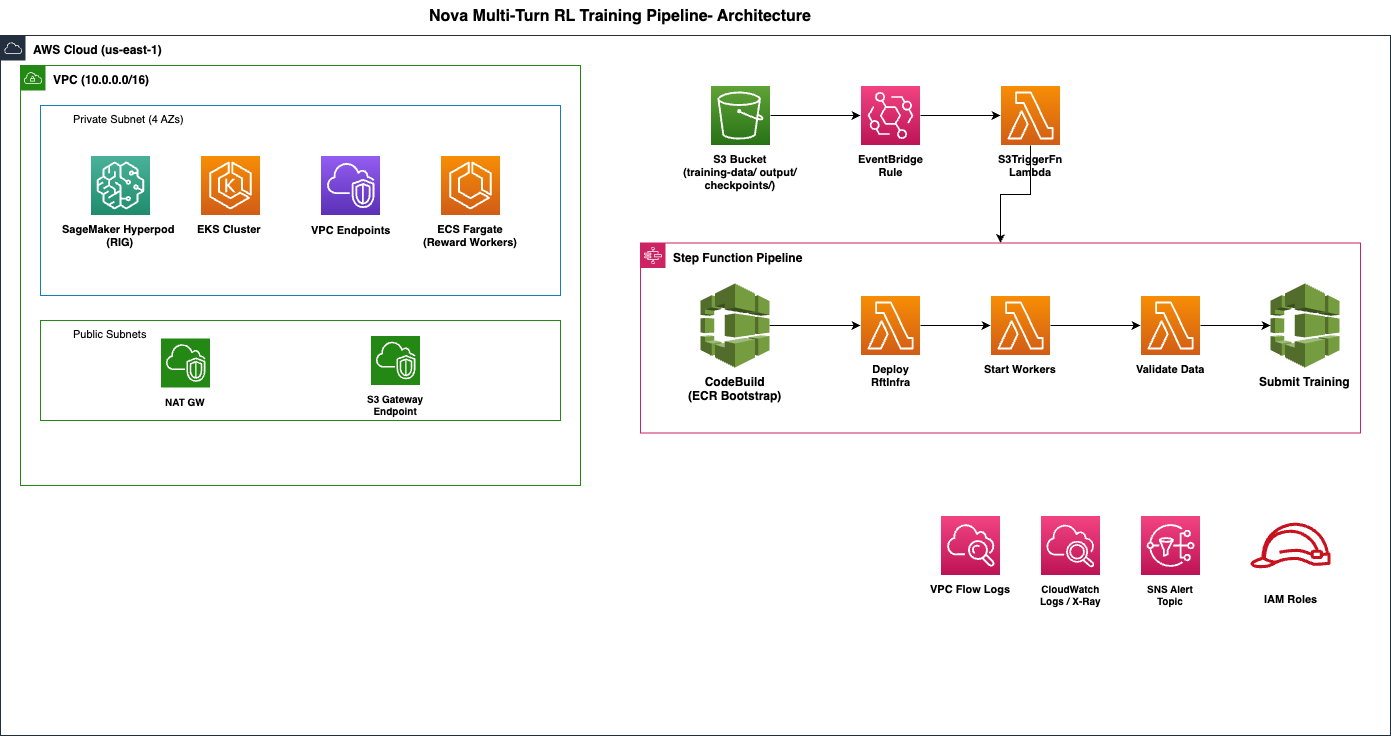
Multi-turn RL on Amazon SageMaker HyperPod infrastructure architecture
The pipeline orchestrates a multi-turn conversation loop across three compute surfaces:
- Amazon SageMaker HyperPod (EKS): Training primary, worker pods, and vLLM generation replicas run on P5 instances. The model generates responses. Training pods perform GRPO weight updates using reward signals.
- ECS on Fargate: Reward workers run your environment (for example, Wordle or a custom Bring Your Own Orchestrator (BYOO) environment). They receive model responses via SQS, score them against your rubric, and return reward signals.
- Amazon Nova Forge : The SDK’s proxy layer routes messages between the model and the reward environment, tracking conversation state across turns.
Prerequisites
Before you deploy, make sure you have the following:
- Amazon Nova Forge subscription: You need this subscription to access the Nova Forge SDK and model training APIs.
- SageMaker HyperPod instance quota: Minimum of 10 ×
ml.p5.48xlargeforgeneration_replicas: 4. Request 12–14 for production workloads.ml.p5en.48xlargeis also supported. - Bootstrapped CDK environment: Run
cdk bootstrapbefore your first deploy. - Python 3.12+: The CDK app and AWS Lambda runtime require this version.
- AWS CDK v2: Install with
npm install -g aws-cdk. This synthesizes and deploys the AWS CloudFormation stack. - AWS Command Line Interface (AWS CLI) v2: Configured with credentials that have permissions to create VPCs, EKS clusters, SageMaker HyperPod clusters, IAM roles, and Step Functions.
- Docker: You use Docker to build the Lambda container images that package the Nova Forge SDK.
Important: This infrastructure costs approximately $786–$1,180 per hour when running (10–12
ml.p5.48xlargeinstances). Review the Cost breakdown section and plan to destroy the stack when you are not actively training.
Deploy the infrastructure
Clone and install
Start by cloning the sample repository and installing the Python dependencies for the AWS CDK app. Run these commands from your local machine or development environment:
Configure
Set all parameters in cdk.json under the context key. Two parameters are required before your first deployment:
| Parameter | Description |
project_tag |
Unique prefix for all resource names (for example, my-nova-rl“. Becomes part of your EKS cluster name, HyperPod cluster name, and S3 bucket tags. |
sdk_resource_prefix |
Prefix for SDK-created resources (for example, nrl-myproject). The Nova Forge SDK uses this when naming its CloudFormation stacks, Lambda functions, and SQS queues. |
Key infrastructure parameters:
| Parameter | Default | Description |
instance_type |
ml.p5.48xlarge |
HyperPod instance type |
instance_count |
10 |
Number of instances in the Restricted Instance Group |
nova_model |
NOVA_LITE_2 |
Model to train: NOVA_MICRO, NOVA_LITE, NOVA_LITE_2, or NOVA_PRO |
vf_env_id |
wordle |
Built-in reward environment for validation |
use_custom_env / custom_env_id |
— | Set use_custom_env to “true” and specify the directory name under custom-environments/ for BYOO |
reward_cpu / reward_memory |
2048 CPU, 4096 MiB | Fargate task sizing |
eks_kubernetes_version |
1.32 | EKS cluster version |
Training parameters. These flow through the pipeline event to the training job:
| Parameter | Default | Description |
training_method |
— | RFT_MULTITURN_FULL or RFT_MULTITURN_LORA |
max_steps |
10 |
Number of training steps |
generation_replicas |
4 |
vLLM generation replicas |
| global_batch_size | 64 |
Samples per training step |
You can override any parameter at deploy time:
Deploy
Two-phase deployment model
The infrastructure follows a two-phase deployment model that separates long-lived foundational resources from ephemeral per-run resources. This separation reduces costs by creating expensive compute resources only when you need them, speeds up iteration by avoiding full redeployment for each training run, and simplifies management by giving each layer an independent lifecycle.
Phase 1: AWS CDK deploy (one-time): When you run cdk deploy, you provision the foundational infrastructure:
- An Amazon Virtual Private Cloud (Amazon VPC) with private subnets and VPC endpoints.
- An Amazon Elastic Kubernetes Service (Amazon EKS) cluster with a HyperPod Restricted Instance Group (RIG).
- An Amazon Elastic Container Service (Amazon ECS) cluster on AWS Fargate for reward workers.
- An Amazon Simple Storage Service (Amazon S3) bucket for training data and checkpoints.
- AWS Identity and Access Management (IAM) roles.
- An AWS Step Functions pipeline.
- Amazon EventBridge rules.
The deployment takes approximately 30-40 minutes. The majority of time is spent on EKS cluster creation (~15 minutes), followed by SageMaker HyperPod Helm chart installation via AWS CodeBuild (~5 minutes), SageMaker HyperPod cluster provisioning (~15-25 minutes, depending on P5 capacity), and Lambda container image builds (~5 minutes).
Phase 2: Runtime (per training run): When you upload a .jsonl file to the S3 bucket’s training-data/ prefix, EventBridge triggers a Step Functions pipeline that creates the runtime resources for that training run. The Nova Forge SDK deploys its own AWS CloudFormation stack containing AWS Lambda functions (conversation proxy), Amazon Simple Queue Service (Amazon SQS) FIFO queues (message routing between model and environment), an Amazon DynamoDB table (conversation state tracking), and ECS Fargate tasks (reward workers). The SDK manages the lifecycle of these resources.
Trigger a training run
After you deploy the infrastructure, you start a training run with a single S3 upload. EventBridge watches the bucket’s training-data/ prefix and starts the Step Functions pipeline automatically.
A successful training run shows increasing reward scores in the Amazon CloudWatch metrics over successive steps. For the Wordle environment, expect the model to converge within 50-100 steps, with average reward improving from near-zero to 0.6-0.8 as the model learns to narrow guesses based on feedback.
Prepare your training data
The .jsonl file uses a metadata-based format: each line contains a prompt and the ground-truth answer that the reward environment uses for scoring:
The id field must be unique across all records. The model sees metadata.prompt at the start of each conversation, and the reward environment uses metadata.answer to score the model’s responses across turns. Each training example becomes a multi-turn conversation: the model generates a guess, receives feedback from the reward environment, and iterates until it solves the puzzle or exhausts its turns.
Upload and trigger automatically
When a file lands in the training-data/ prefix, EventBridge detects the PutObject event and invokes the S3TriggerFn Lambda function. This function extracts the file path, merges it with the training parameters from cdk.json, and passes the resulting event data to Step Functions, which executes the pipeline through five stages. You can watch progress in the Step Functions console, where each step shows its input, output, duration, and retry count.
Trigger manually for ad-hoc runs
To iterate on parameters without re-uploading data, use the setup script to bypass EventBridge and invoke the pipeline directly:
This helps during development: point at an existing dataset and experiment with different step counts, batch sizes, or the training method (full fine-tuning versus LoRA) without modifying cdk.json or redeploying.
Monitor and debug
You can monitor and troubleshoot every layer of this multi-stage pipeline across SageMaker HyperPod, ECS, Lambda, and SQS. The infrastructure provides observability at every layer so you can isolate issues quickly.
Pipeline monitoring
The Step Functions console is the primary dashboard. Each execution shows step-by-step progress with timing, input and output data, and retry history. Every step writes to its own Amazon CloudWatch Log Group.
During normal operation, each Step Functions step completes within its expected time window: infrastructure setup in 2-3 minutes, reward worker deployment in 1-2 minutes, data validation in under 1 minute, and training submission in 3-5 minutes. SQS queues should show messages flowing steadily with no sustained backlog.
Failure alerting
An Amazon Simple Notification Service (Amazon SNS) topic, encrypted with AWS Key Management Service (AWS KMS), publishes a notification when a Step Functions execution fails. Subscribe to receive alerts by email, Slack, or PagerDuty:
Trigger failures
If an S3 upload does not start the pipeline, check the dead-letter queue. Failed EventBridge-to-Lambda invocations are stored here with the original S3 event data and error details:
Common causes include malformed file names (the trigger expects a .jsonl extension), IAM permission drift, and Lambda concurrency limits.
Training stall debugging
If the pipeline starts but training stalls, the root cause is usually in the message-routing layer between the model and the reward environment. Check SQS queue health using the SDK built-in diagnostic:
A growing backlog in the request queue with an empty response queue indicates that reward workers are not processing. A growing backlog in the response queue indicates that the model is not consuming rewards. Either pattern tells you which component to investigate.
HyperPod health
Verify that all training and generation pods are running on the SageMaker HyperPod cluster:
All pods should show Running or Completed status. Pods stuck in Pending indicate insufficient instance capacity in the Restricted Instance Group. Pods in CrashLoopBackOff (a Kubernetes status indicating the container is repeatedly crashing and restarting) indicate container-level errors. Check the pod logs with kubectl logs for details.
Clean up and manage cost
The cleanup script stops active resources in this order: Step Functions executions, ECS tasks, the SDK CloudFormation stack, and the CDK stack.
To avoid charges, run the following command to destroy the entire stack:
To destroy the infrastructure while keeping your training data in S3 (storage charges still apply):
Important: Destroy the stack when you are not actively training. SageMaker HyperPod instances and NAT Gateway idle costs accumulate quickly.
Cost breakdown
| Resource | Hourly Cost | Notes |
| SageMaker HyperPod 8 × ml.p5.48xlarge | ~$786/hr | Minimum configuration (10 instances, 8 used for compute) |
| SageMaker HyperPod 12 × ml.p5.48xlarge | ~$1,180/hr | Production configuration (12 instances with headroom) |
| EKS control plane | $0.10/hr | |
| NAT Gateway | ~$0.045/hr | |
| ECS Fargate reward workers | ~$0.15-0.30/hr | + data transfer |
| S3, Lambda, CodeBuild, SQS, DynamoDB | Negligible |
For current Amazon Nova Forge pricing, see the Amazon Nova pricing page.
Optimize for cost
You can reduce idle costs with two strategies:
- Scale to zero: Provision a single-instance cluster with automatic scaling policies that scale down to zero during periods of inactivity, eliminating idle compute costs.
- Instance-type scheduling: Use lower-cost instance types during setup and off-peak phases, then transition to higher-performance instances when training workloads begin.
Conclusion
You now have a production-ready, event-driven infrastructure for multi-turn reinforcement learning with Amazon Nova Forge on Amazon SageMaker HyperPod. Upload a dataset to Amazon S3, and the pipeline handles provisioning, training orchestration, and reward routing automatically. To adapt this to your use case, replace the Wordle environment with your own API-calling agent or enterprise workflow.
Next steps:
- Clone the sample repository: aws-samples/nova-multi-turn-rl-infra.
- Read the Amazon SageMaker HyperPod documentation.
- Read about Amazon Nova capabilities and pricing.
- Customize your pipeline with the AWS Step Functions developer guide.
About the authors