














Scaling UX testing with Amazon Nova Act: A new approach to user flow analysis
Using generative AI enables parallel execution of comprehensive user flow testing at scale. This solution demonstrates how to build a cloud-deployed UX testing platform that automatically generates test scenarios from documentation, executes user flows at scale using the intelligent navigation capabilities of Nova Act, and provides actionable insights through automated analysis.
User experience (UX) testing faces multiple challenges that limit an organization’s ability to improve how users interact with their platforms. UX testing evaluates how easily and effectively users can navigate digital interfaces to complete intended tasks, such as finding products, creating accounts, or completing purchases. Unlike traditional Quality Assurance (QA) testing that focuses on functional bugs, UX testing examines user workflows to identify navigation friction and interface elements that impact user satisfaction. Manual testing doesn’t scale. Testers can only evaluate a limited number of user journeys, often focusing on critical paths while edge cases remain unexplored. Further, traditional automation tools require hard-coded scripts that break whenever interfaces change, creating maintenance overhead that limits test coverage. Meanwhile, comprehensive testing across diverse user journeys, device types, and interaction patterns remains prohibitively costly and time-consuming for most organizations.
Amazon Nova Act offers a different approach to these challenges. Nova Act is a multimodal foundation model that can understand and interact with web browser interfaces through vision and action. Unlike scripting tools that rely on predefined element selectors, Nova Act navigates websites intelligently by processing visual information. It analyzes screenshots of web pages just as a human tester would. This makes Nova Act a powerful tool for automated UX testing because it mimics human reasoning when navigating interfaces. The model examines screenshots to understand page layout, identifies interactive elements through visual cues, and makes contextual decisions about which actions to take next. This visual understanding allows Nova Act to adapt to interface changes and handle dynamic content that would break traditional automation tools like Selenium or Playwright. Amazon Nova Act’s reasoning and chain of thought logs provide valuable insight into website design and intuitiveness.
Using generative AI enables parallel execution of comprehensive user flow testing at scale. This solution demonstrates how to build a cloud-deployed UX testing platform that automatically generates test scenarios from documentation, executes user flows at scale using the intelligent navigation capabilities of Nova Act, and provides actionable insights through automated analysis.
Solution overview
The following diagram highlights a four-part solution, starting with documentation processing and flow discovery and ending with final analysis.
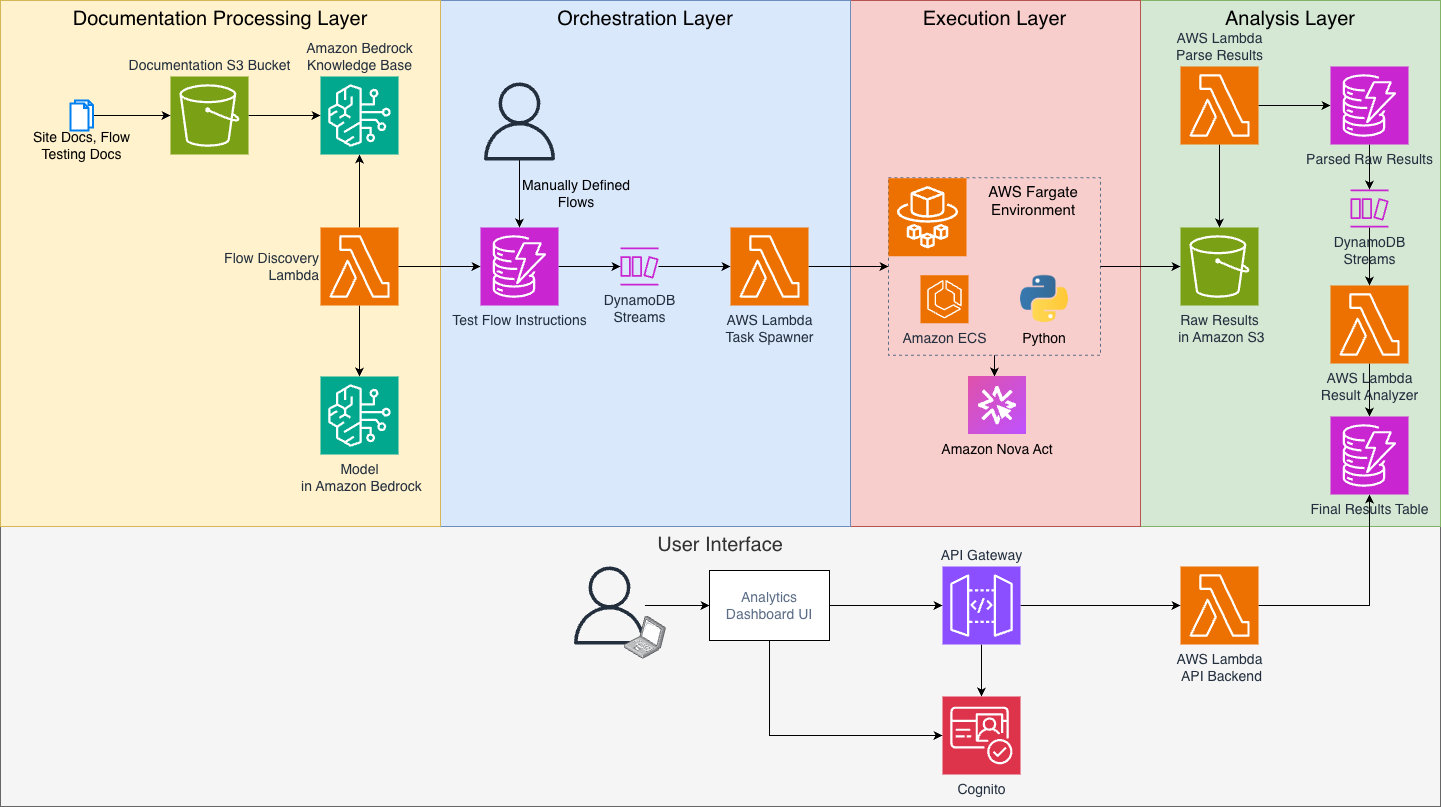
The solution is composed of the following layers:
Documentation processing layer – The foundation layer handles test scenario generation:
- Amazon Simple Storage Service (Amazon S3) stores your site documentation, user guides, and flow testing specifications. This unstructured content provides the generative AI-powered flow discovery engine with context about your site and how you expect users to interact with it.
- This documentation is ingested into an Amazon Bedrock Knowledge Base for semantic similarity search.
- AWS Lambda uses Claude 4.5 Sonnet in Amazon Bedrock to transform user flows into comprehensive testing scenarios. The system takes a list of tasks, like buying a coffee maker via search or adding a new credit card to your account via the settings menu. For each task, it retrieves relevant information from the knowledge base to understand how to accomplish it on your site. Claude then generates detailed test instructions at multiple levels of granularity, creating the step-by-step interaction paths for Amazon Nova Act to test.
Orchestration layer – The orchestration layer manages test execution at scale:
- Amazon DynamoDB stores generated test flows with metadata and execution parameters.
- Amazon DynamoDB Streams triggers batch processing when new flows are available.
- AWS Lambda functions coordinate test execution and spin up Amazon Elastic Container Service (Amazon ECS) tasks for parallel processing.
Execution layer – The execution layer runs intelligent user flow testing:
- Amazon ECS with AWS Fargate provides scalable, serverless compute for parallel test execution.
- Amazon Nova Act agents execute user flows in parallel browser sessions.
- Real-time interaction logging captures detailed behavioral data for analysis.
Analysis layer – The analysis layer transforms test results into metrics:
- Amazon S3 stores detailed execution chain of thought reasoning logs, screenshots, and behavioral data.
- AWS Lambda processes results using Amazon Bedrock to analyze flow execution patterns, calculate usability scores, and identify friction points across different instruction granularity levels.
- Amazon DynamoDB stores the analysis results.
- The dashboard is presented in a React application.
This architecture introduces three critical generative AI-powered capabilities: an optional intelligent flow discovery from unstructured documentation using Amazon Bedrock Knowledge Base, Nova Act computer use for website testing, and automated results analysis that identifies UX patterns and friction points to inform strategic decisions.
Setup guide
Before deploying the solution, verify you have the following:
- Node.js v20 or newer.
- npm v10.8 or newer.
- An AWS account.
- The AWS Cloud Development Kit (AWS CDK) set up (for prerequisites and installation instructions, see Getting started with the AWS CDK).
Deployment process
The complete solution and deployment instructions are available in the aws-samples GitHub repository.
The solution uses AWS CDK to automate infrastructure deployment:
Take note of the outputs printed when the stack deployment is complete. You will need those in the following steps.
Using the solution
After deployment, you have a few options for creating test flows: automatic generation from documentation, manual flow definition, or a hybrid approach. We suggest the hybrid approach combining the two approaches that we cover: using automatic generation to establish baseline coverage from existing documentation, then supplementing with manually defined flows for specific test cases, new features, or edge scenarios that require precise control.
Option 1: Automatic flow generation from documentation
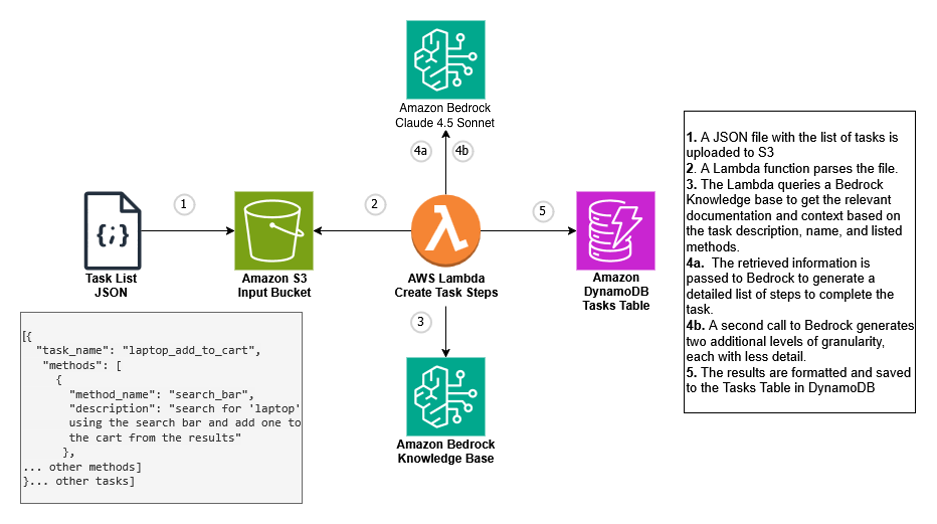
The solution uses a Lambda function integrated with Claude 4.5 Sonnet to convert user tasks into detailed testing workflows. To use this system effectively, identify your top user flows and provide them as input, ensuring you include multiple ways of achieving the same goal. For example, if purchasing a coffee maker is a key user journey, include both the search-based approach and the menu navigation method as separate tasks. The system processes each task by consulting the knowledge base to learn the specific implementation details of your website, understanding how these actions are performed within your unique site architecture.
The system then produces testing instructions across three levels of detail, ranging from high-level user goals down to granular step-by-step procedures. Where a basic instruction might state “purchase a highly-rated stainless steel coffee maker,” the detailed version expands this into precise actions like selecting kitchen appliances from the menu, applying material and rating filters, and completing the checkout sequence. For more information, see lambda/flow_discovery/index.py.
- Upload documentation: Place your application documentation, user guides, and flow specifications in the designated S3 bucket. You can find the S3 bucket URL using the CDK stack deployment outputs. The system supports various document formats including user manuals and guides, feature specifications, common user journey docs, and existing test case documentation.
- Upload task specification: Place your
tasks.jsonfile in the S3 bucket starting withuxflowteststack-tasksbucket. See the project README for the expected JSON format. This will trigger flow discovery. - Wait for processing: Processing happens asynchronously after upload. The flow discovery component analyzes your documentation to identify potential user flows and converts them into executable test scenarios. To track processing status, you can review the Lambda processing logs.
- Review generated flows: Generated flows appear in the DynamoDB table and become available for execution after processing completes.
Option 2: Manual flow definition
For precise control over test scenarios or when you have specific flows not covered in documentation, you can manually define custom flows by inserting them directly into the DynamoDB table. You can find the table name in the stack outputs. This approach is ideal for testing specific edge cases, validating new features before documentation exists, and testing flows that require specific user context or data. See the README for the required JSON schema.
Key components:
flow_id: Unique identifier for tracking and results correlation.starting_url: The webpage where the test flow begins.instructions: Array of natural language steps for Nova Act to execute.method_name: Represents a different method to completing a task, such as using the search versus navigation.gran_n: Represents a different level of instruction granularity, ranging from high-level instructions like “buy a stainless steel toaster with good ratings via the search” to step-by-step versions.
Customizing the solution
For applications requiring user authentication, you can configure persistent browser sessions to maintain logged-in states across test runs. This removes the need to re-authenticate for each test execution and enables testing of authenticated user flows. When your tests need to extract structured data from web pages, such as validating form submissions or capturing dynamic content, Nova Act supports Pydantic schemas for reliable data extraction. Nova Act also handles file operations, so you can test upload workflows and validate downloaded content.
Here’s an example of configuring persistent authentication. You can find and modify the Python code that runs the Nova Act flows in Amazon ECS at ecs/ecs_act_headless/app.py.
For detailed implementation of structured data extraction with Pydantic schemas, file upload/download handling, and authentication setup, refer to the Nova Act SDK documentation.
Execution results
The solution generates the following results for each test execution and stores them in Amazon S3. You can find the raw results in the flow-test-results-bucket.
- Summary metrics (
results_summary.json):
Each test execution generates a summary file containing high-level metrics about the flow execution. The summary includes duration of each step, number of actions required, success/failure status, and any extracted data.
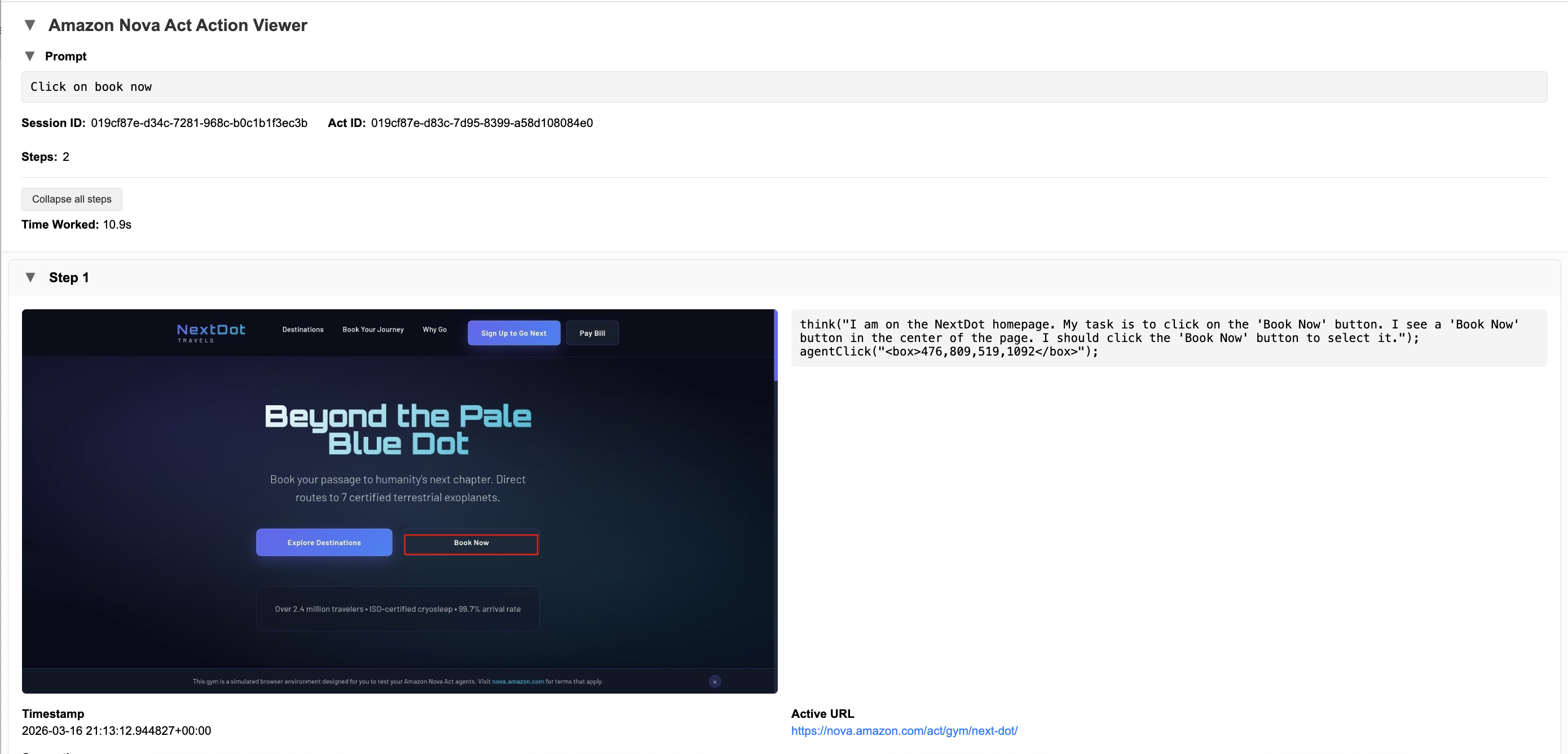
- Detailed interaction logs: The Amazon Nova Act SDK generates detailed HTML reports showing screenshots of what Nova Act observed, the decision-making process and reasoning, and specific actions taken (clicks, scrolls, form inputs).
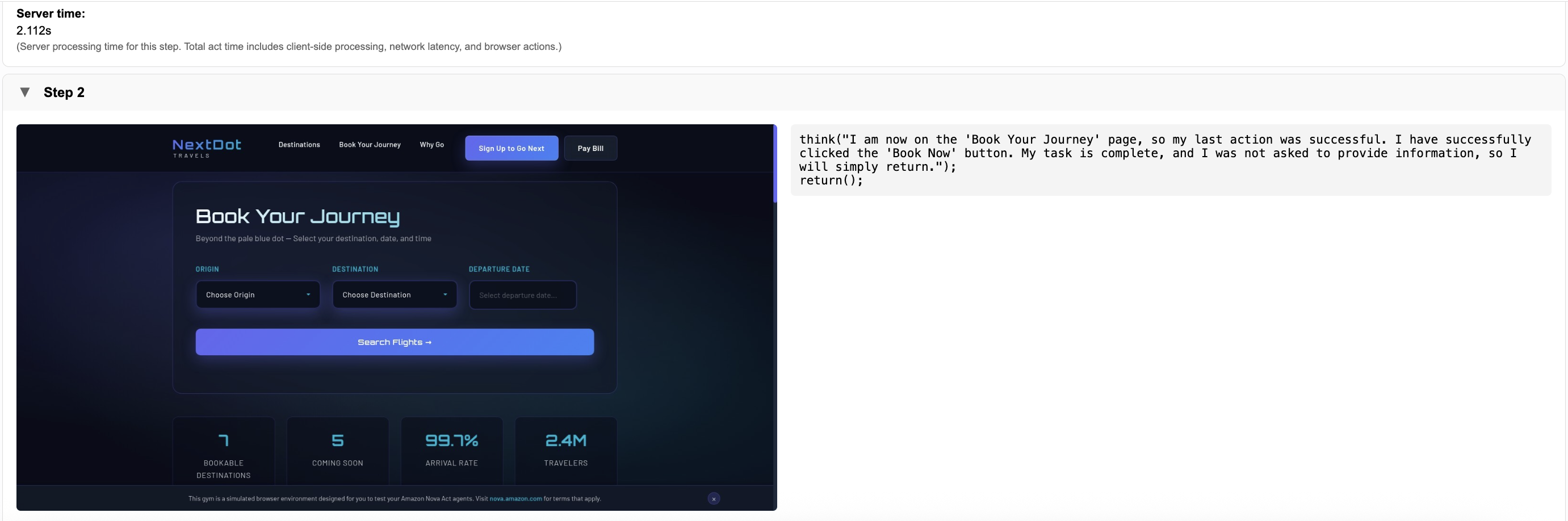
Analysis methods
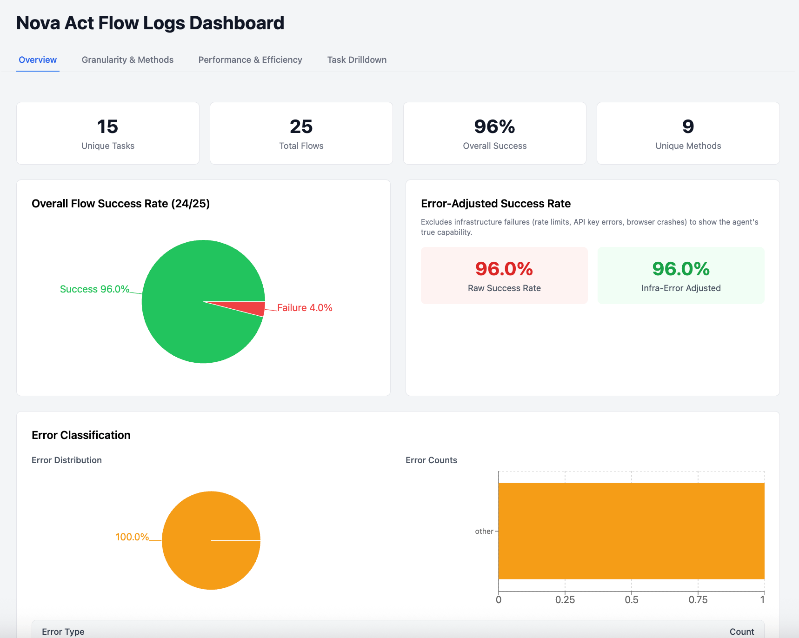
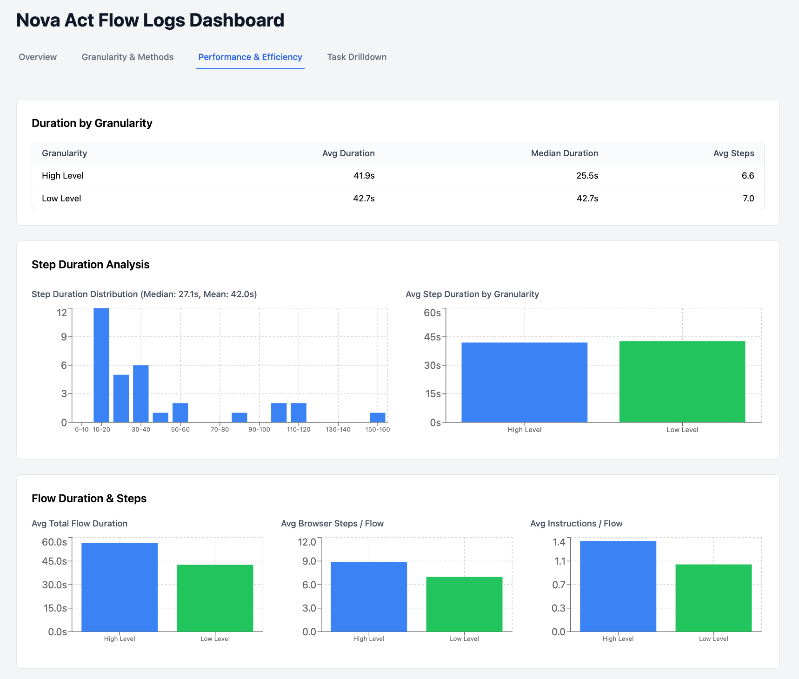
The Lambda function processes raw execution results and computes metrics across different abstraction layers to calculate raw counts, infrastructure-adjusted signals, and composite quality scores. These metrics power a React dashboard built for multiple audiences and use cases.
The dashboard is organized into different tabs. For example, the Overview tab presents the overall health of the test run, with a dedicated error-adjusted panel that separates infrastructure failures from true agent failures. The Performance & Efficiency tab breaks down step and flow timing by granularity level, showing how the level of instruction detail affects the quality of the user experience being tested.
The following screenshots show a few key metrics.
Clean up
To clean up the solution run the following command:
Conclusion
UX testing traditionally requires significant time and resources, often limiting how thoroughly teams can validate their interfaces. This Amazon Nova Act solution addresses these constraints by automating test execution at scale.
The combination of the Nova Act intelligent browser interaction capabilities and scalable cloud infrastructure creates a new pattern for UX testing. With this pattern, comprehensive flow testing, interface validation, and data-driven UX decisions become practical at scale. Teams can now test more user journeys, catch issues earlier, and iterate faster on their user experiences.
Teams can use the Nova Act automation to test every new feature and interface change thoroughly before release. Instead of limited sample testing, teams can validate entire user journeys across different devices and scenarios. This comprehensive testing approach helps catch UX issues early while reducing both testing costs and time spent manually validating changes.
Learn more
To learn more, refer to the following resources:
- Introducing Amazon Nova Act.
- Amazon Nova Act home page.
- Amazon Nova Act Python SDK.
- Amazon Nova Act SDK (preview): Path to production for browser automation agents.
About the authors