
















Spreading the load: How Salesforce met Multi-AZ HA with SageMaker Inference Components
Learn how Salesforce used Amazon SageMaker AI Inference Component placement (the SchedulingConfig parameter) to distribute model copies across multiple Availability Zones, meeting their Multi-AZ high availability compliance requirements without sacrificing the cost efficiency of multi-model co-hosting.
When Salesforce set out to make Agentforce (Salesforce’s AI foundation for agents) highly available (HA) across multiple Availability Zones (AZs), the team faced a gap. Amazon SageMaker AI Inference Components (ICs) could cut GPU costs, but their default placement didn’t guarantee the Multi-AZ resilience Salesforce’s compliance bar required.
For Salesforce, the ICs delivered an 8x reduction in infrastructure costs by co-hosting multiple models on shared GPUs. However, this cost win introduced a new question: how do you make IC endpoints highly available across multiple AZs?
This post explores how Salesforce used the new IC Placement capability (surfaced through the SchedulingConfig parameter in the CreateInferenceComponent API) to meet their Multi-AZ HA compliance requirements.
The challenge: Single points of failure in IC deployments
By default, the SageMaker placement algorithm optimizes each IC deployment operation independently, distributing new copies evenly across instances without considering AZ balance. Even with a multi-AZ endpoint, this per-operation view means copies of a specific model can end up unevenly distributed across AZs, creating potential single points of failure:
- Instance-level failure: A single instance crash takes down all copies of a model.
- AZ-level failure: An AZ outage makes the entire model unavailable.
- Compliance risk: Salesforce mandates 2-AZ support for every production model. Default placement for ICs, optimized for cost alone, did not yet meet their internal 2-AZ compliance bar.
The solution: SchedulingConfig
AWS introduced the SchedulingConfig parameter in the CreateInferenceComponent API. It gives customers fine-grained control over IC copy placement across instances and AZs. Two key sub-parameters drive the HA behavior:
- AvailabilityZoneBalance: Controls cross-AZ distribution, balancing copies evenly across Availability Zones with configurable imbalance tolerance.
- PlacementStrategy (within each AZ):
SPREADdistributes copies across as many instances as possible for fault isolation.BINPACKpacks copies onto fewer instances for utilization efficiency.
Code example: Deploying an IC with Multi-AZ HA placement
Scenario: Salesforce has a multi-AZ SageMaker endpoint with 4 instances distributed evenly across 2 Availability Zones (2 instances in AZ-1, 2 instances in AZ-2). The team wants to deploy a model with 4 IC copies so that they are spread across both AZs for high availability.
The following CreateInferenceComponent call deploys the model with SPREAD placement and AZ balancing:
With SPREAD, SageMaker distributes 4 copies across 4 instances: 2 in AZ-1 and 2 in AZ-2. When you set MaxImbalance to 1, you configure the system to tolerate at most a 1-copy difference between any two AZs.
For lighter models needing only 2 copies, MaxImbalance: 0 enforces strict balance: exactly 1 copy per AZ:
Scaling while preserving AZ balance
When you perform scale-out and scale-in operations, SageMaker helps you maintain AZ balance through your configured SchedulingConfig parameters. When you scale out, SageMaker places new copies to maintain even AZ distribution. When you reduce CopyCount, SageMaker symmetrically removes copies across AZs.
Important: Never set
CopyCountto 1 for HA-critical models. A single copy can only reside in one AZ, which means you would immediately break your 2-AZ compliance requirements.
Note:
SchedulingConfiggoverns the placement plan for each individual scale operation. For ongoing consolidation and rebalancing over time (for example, after repeated scale-in/scale-out cycles), configure the endpoint’sScaleInPolicywith theCONSOLIDATIONstrategy. With this configuration, a background sweeper periodically consolidates IC copies and releases idle instances while honoring AZ balance constraints.
The three pillars of the placement algorithm
The new placement algorithm introduced three fundamental improvements. Each directly addressed Salesforce’s HA requirements:
- Balanced final distribution: The algorithm considers the balance of the final distribution rather than only immediate placement needs.
- Availability-aware distribution: SageMaker evenly distributes copies across AZs on a best-effort basis. Endpoint and inference component update operations persist multi-AZ placement, so HA is preserved during model updates.
- Within-AZ optimization: Within each AZ, the
PlacementStrategycontrols instance-level distribution.BINPACKpacks copies onto fewer instances to maximize GPU utilization.SPREADdistributes copies across as many instances as possible for maximum fault isolation.
Salesforce chose SPREAD for Pillar 3, prioritizing fault isolation over packing density. This helps prevent a single instance failure from taking down multiple copies of the same model.
Target architecture: Before and after
Continuing the preceding scenario: Salesforce’s endpoint has 4 instances across 2 AZs. Over time, the team deploys three ICs to this endpoint, each created in separate operations: IC1 (4 copies), IC2 (2 copies), and IC3 (2 copies).
Later, the team deploys IC3, a lighter model needing only 2 copies with strict AZ balance:
With MaxImbalance: 0, you configure the algorithm to target exactly 1 copy per AZ, which helps you keep IC3 available even if an entire AZ fails.
The following diagram illustrates how the default placement and the new SchedulingConfig placement differ when all three ICs are deployed to the same endpoint:
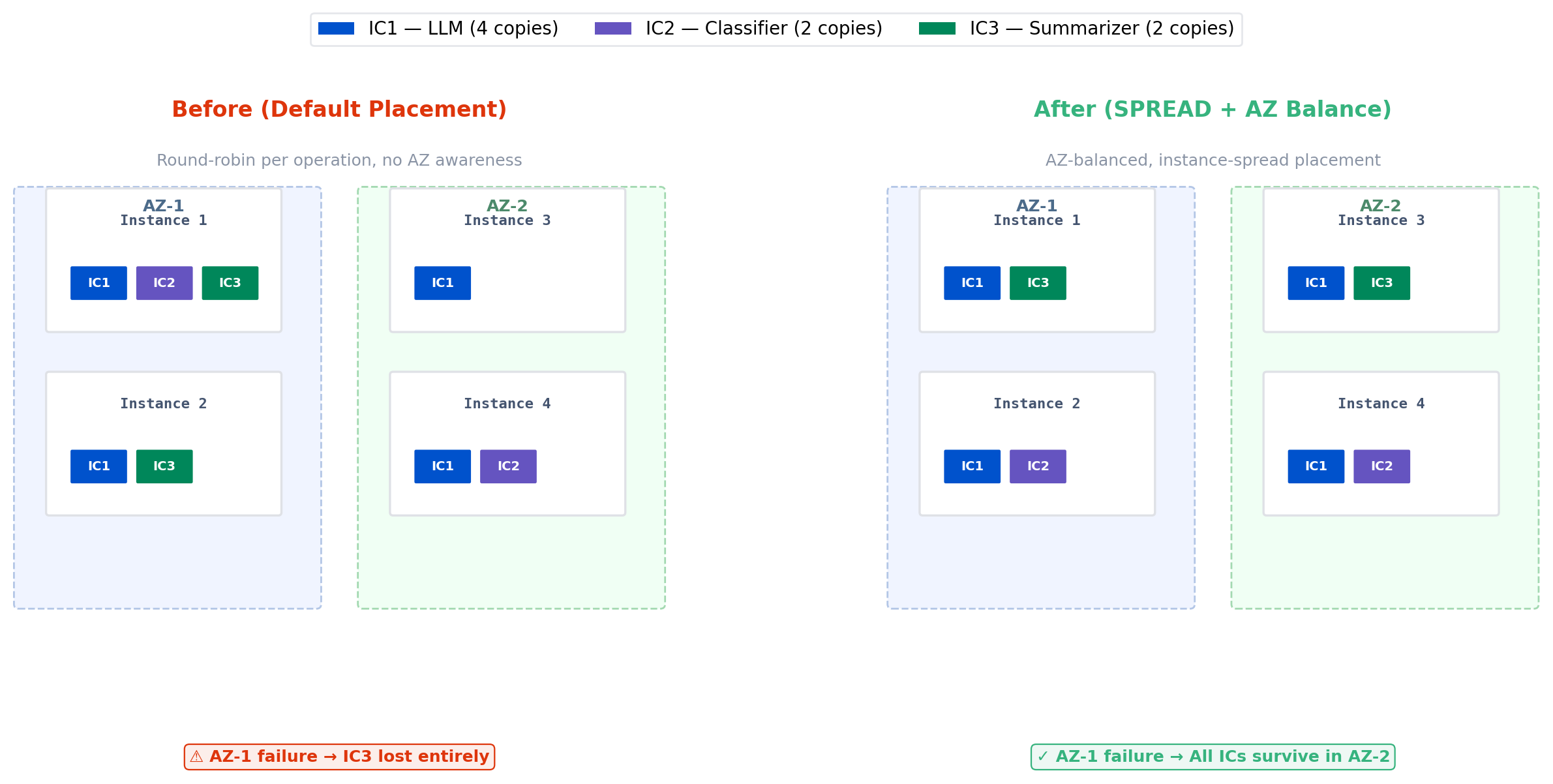
Figure 1: Default placement compared to SchedulingConfig placement across two Availability Zones
Note: Models requiring multiple GPUs per copy (for example, large language models (LLMs) needing 4 accelerators) follow the same placement logic.
SPREADhelps place each multi-GPU copy on a separate instance, and AZ balancing distributes them evenly across zones.
Implementation considerations
The following sections cover capacity planning, configuration, and monitoring for Multi-AZ HA deployments.
Capacity reservations
AWS strongly recommends On-Demand Capacity Reservations (ODCR) for capacity planning in AZ-constrained Regions. Salesforce pre-provisions reserved GPU capacity in each target AZ to help verify balanced IC placement. Without ODCR, on-demand capacity constraints may limit the distribution you want in high-demand Regions.
Note: The placement algorithm supports partial deployment. If capacity constraints prevent full AZ balance, SageMaker still places copies on available instances rather than failing the operation entirely. This means the feature is usable even without ODCR. However, balance may not be optimal.
Key configuration parameters
The following table summarizes the recommended parameter values for Multi-AZ HA placement:
| Parameter | Value | Purpose |
| PlacementStrategy | SPREAD | Distribute copies across instances (not packed) |
| EnforcementMode | PERMISSIVE | Best-effort AZ balance. Places copies wherever available if balance cannot be achieved (currently the only enforcement mode) |
| MaxImbalance | 0 or 1 | Max copy count difference between any two AZs |
| CopyCount | ≥ 2 | Minimum 2 copies required for 2-AZ compliance |
| ManagedInstanceScaling.MinInstanceCount | ≥ 2 | Minimum 2 instances to span 2 AZs |
| DataCacheConfig.EnableCaching | True | Faster scale-out by caching model artifacts |
| RoutingConfig.RoutingStrategy | LEAST_OUTSTANDING_REQUESTS | Automatic failover routing across AZs |
Note:
DataCacheConfigandRoutingConfigare general endpoint/IC configuration features independent of the IC placement strategy. They are included in this table because they complement HA deployments, but they are not part of theSchedulingConfigplacement feature itself.
Monitoring AZ balance with SageMaker AI Insights
SageMaker AI Insights provides built-in observability for IC placement health. With detailed observability enabled, the following metrics help validate and maintain Multi-AZ HA:
- AZ skew (Reliability tab): Shows distribution imbalance percentage across your fleet. Use this to detect drift from balanced placement after scaling events.
- IC copy count per AZ: Confirms each inference component maintains the expected copy distribution across Availability Zones.
- Rebalancing events and duration: Tracks when SageMaker automatically rebalances copies and how long the operation takes.
- Insufficient Capacity Error (ICE) count per AZ: Monitors ICE events by AZ and instance type. You can use this to help determine if ODCR capacity may need adjustment.
You can access these metrics in the SageMaker AI Insights dashboard and through Amazon CloudWatch. A detailed walkthrough of observability for IC-based endpoints will be covered in an upcoming blog post.
The following screenshot shows an example of the SageMaker AI Insights Reliability tab with AZ balance metrics:
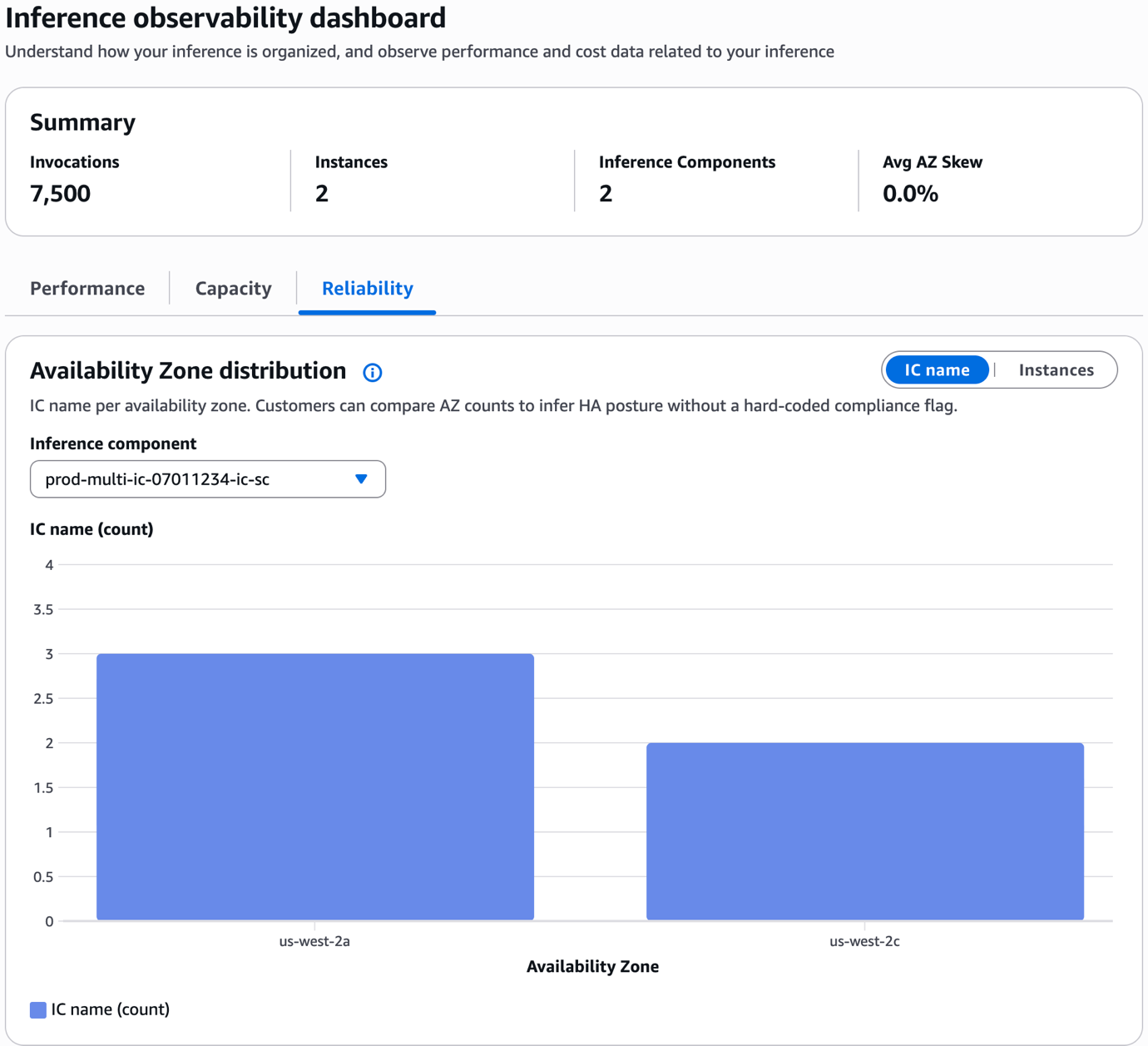
Figure 2: SageMaker AI Insights Reliability tab with AZ balance metrics
Results
By using the IC Placement capability, Salesforce’s AI team achieved:
- Multi-AZ HA compliance: Every model deployment in Salesforce’s fleet satisfies their 2-AZ support requirement.
- Eliminated single points of failure: No model can be fully taken offline by a single instance or AZ failure.
- Preserved cost efficiency: Multi-model co-hosting continues to deliver infrastructure cost savings, while
SPREADplacement maximizes fault isolation across instances. - Resilient scaling: Scale-up and scale-down operations preserve multi-AZ distribution.
- Persistent HA through updates: Model updates no longer risk breaking AZ balance.
Key takeaways for enterprise AI teams
Salesforce’s journey to Multi-AZ HA with SageMaker Inference Components offers several lessons. Enterprise AI teams should consider the following:
- Design HA at the IC level, not just the endpoint level. Even with a multi-AZ endpoint, IC copies can be concentrated in a single AZ without explicit placement controls.
- Use
SchedulingConfigwithSPREADandAvailabilityZoneBalancefor workloads with high availability requirements. This is the recommended starting configuration for most models with HA requirements. - Pre-provision capacity with ODCR. To achieve balanced AZ placement, you must provision available capacity in each target AZ. Don’t rely on on-demand capacity for HA-critical deployments.
- Set minimum
CopyCountto 2 and minimum instance count to 2 as the HA baseline. - Never scale to
CopyCount: 1for HA-critical models. A single copy can only reside in one AZ, which means you would immediately break your 2-AZ compliance requirements. - Monitor IC distribution continuously using SageMaker AI Insights. Track AZ Skew, IC Copy Count per AZ, and Rebalancing Events on the Reliability tab to detect and remediate imbalance before it becomes a reliability issue.
Conclusion
IC Placement gives enterprise AI teams the control they need to meet strict availability requirements without sacrificing cost efficiency. For Salesforce, this capability unlocked Multi-AZ HA compliance for their production Agentforce models. It also serves as a reference pattern for enterprises running AI workloads with strict availability requirements on SageMaker.
AI workloads are increasingly business-critical with strict uptime requirements. The ability to control exactly how model copies are distributed across infrastructure is no longer a nice-to-have. It’s a fundamental requirement.
Further reading
For more information, see the following resources.
API references
- CreateInferenceComponent API (Boto3) — Full parameter reference for deploying ICs with SchedulingConfig.
- InferenceComponentSchedulingConfig — PlacementStrategy (SPREAD/BINPACK) and scheduling configuration.
- InferenceComponentAvailabilityZoneBalance — EnforcementMode and MaxImbalance parameters.
Blogs and articles
- Optimizing Salesforce’s Model Endpoints with Amazon SageMaker AI Inference Components — The original Salesforce + SageMaker cost optimization story.
- Monitor Endpoint Metrics and Create Alarms — SageMaker AI Insights observability metrics reference.
Best practices
- Inference Cost Optimization Best Practices — SageMaker cost optimization strategies.
- Inference Optimization for SageMaker AI Models — Quantization, compilation, and model optimization.
About the authors