
















Benchmarking small LLM inference on SageMaker AI: G7 vs G5 and G6
Benchmark two 30B Mixture-of-Experts models, Qwen3-Coder-30B and NVIDIA Nemotron-3-Nano-30B, across G5, G6, G6e, and G7 GPU instances on Amazon SageMaker AI. Compare throughput, latency, and cost-per-token, and see how G7's NVIDIA Blackwell GPUs deliver measurable price-performance gains for real-time LLM inference.
Choosing the right GPU instance for large language model (LLM) inference is one of the most impactful decisions you make when deploying generative AI at scale. A single generation jump can slash latency, increase throughput, and reduce cost-per-token. However, the real-world magnitude of those gains depends on model architecture, quantization format, and workload shape.
In this post, we benchmark two representative 30B Mixture-of-Experts (MoE) models across three GPU instance families on Amazon SageMaker AI Inference using Amazon SageMaker AI Generative AI inference recommendation. This feature provides both recommendations for throughput, cost, and latency, and benchmarking for common metrics such as time to first token and latency.
Using this feature, we demonstrate how the new G7 instances powered by NVIDIA Blackwell GPUs deliver measurable gains in throughput, latency, and cost-per-token.
Use case 1: AI coding assistant
Deploy Qwen3-Coder-30B for enterprise coding tasks such as code generation, debugging, refactoring, and developer copilots. Benchmark ml.g5.12xlarge (A10G), ml.g6.12xlarge (L4), and ml.g7.12xlarge (RTX PRO 4500 Blackwell) instances using the Amazon SageMaker AI DJL Large Model Inference (LMI) container to compare price and performance.
The G5 and G6 configurations each use four GPUs with 96 GB of aggregate GPU memory, while G7 uses two GPUs with 64 GB. This comparison shows how G7 performs with half the number of accelerators and less total GPU memory.
Use case 2: Enterprise AI assistant
Deploy NVIDIA Nemotron-3-Nano-30B-A3B-NVFP4 for reasoning, question answering, summarization, and agentic workloads. Use Amazon SageMaker AI Generative AI Inference Recommendations with vLLM to evaluate G6 (L4), G6e (L40S), and G7 (RTX PRO 4500 Blackwell) configurations and identify the best price-performance option.
For the 12xlarge configurations, G6 provides four GPUs with 96 GB of aggregate GPU memory, G6e provides four GPUs with 192 GB, and G7 provides two GPUs with 64 GB. Generative AI Inference Recommendations automates the benchmarking and configuration selection across these GPU options.
Together, these use cases demonstrate two complementary ways to evaluate G7: direct benchmarking with LMI and automated optimization with Generative AI Inference Recommendations and vLLM. By varying the models, serving stacks, GPU configurations, and workloads, the benchmarks show when G7 can provide better price-performance than prior-generation GPU instances.
Solution overview
Before we walk through the use cases, we explain how Amazon SageMaker AI generative AI inference recommendations simplifies the process of finding the right production configuration. You provide your model, expected workload, and optimization goal. Amazon SageMaker AI then evaluates candidate configurations on real GPU infrastructure and returns validated, deployment-ready recommendations based on actual performance.
You can connect each workflow directly to the two use cases:
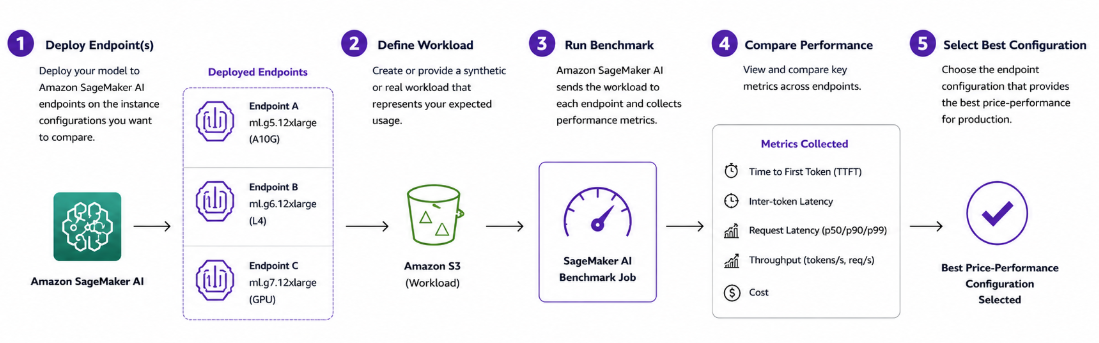
1. Benchmarking workflow: When you already have an endpoint
Use benchmarking when you have a model deployed to an Amazon SageMaker AI endpoint and want to understand how it performs under your expected workload. In our Qwen3-Coder-30B use case, we will first show you how to deploy the model to Amazon SageMaker AI endpoints on different GPU instances and then benchmark those endpoints to compare latency, throughput, and price-performance as shown in the diagram.
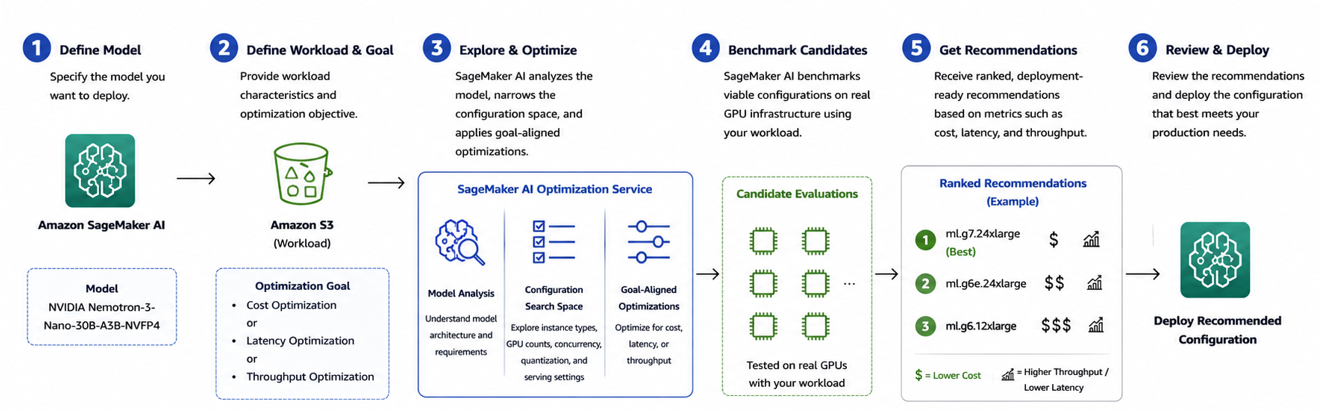
2. Recommendation workflow: When you want Amazon SageMaker AI inference recommendation to recommend the configuration
Use the recommendation workflow when you want help determining which deployment configuration is best for your model and workload. In our NVIDIA Nemotron-3-Nano-30B use case, we will define the model, candidate instance families, workload, and optimization objective. Amazon SageMaker AI then evaluates candidate configurations, benchmarks for viable options, and returns ranked recommendations based on metrics such as cost, latency, and throughput. You can review the recommendations and deploy the configuration that best meets your production requirements as shown in the following diagram:
Instance hardware comparison
Both cases use instances from the AWS EC2 G5, G6, G6e, and G7 families. Each family pairs a different NVIDIA GPU generation with varying amounts of memory, bandwidth, and networking. The key differences that affect Mixture-of-Experts (MoE) inference performance are:
- GPU memory capacity (which determines whether a model fits on a single GPU).
- Memory bandwidth (which governs decode speed).
- Native support for low-precision formats like FP8 and NVFP4.
Why memory bandwidth matters for MoE models: MoE architectures are memory-bandwidth bound during token generation (decoding) because each token activates only a small subset of experts. Higher memory bandwidth directly reduces inter-token latency and increases throughput.
Why NVFP4 matters: NVFP4 is a 4-bit floating-point format introduced by NVIDIA with the Blackwell GPU architecture. NVIDIA’s native FP4 quantization on Blackwell Tensor Cores reduces model size to approximately 4 bits per weight with minimal quality loss.
Note: Only G7 instances have native FP4 Tensor Core support. Other generations such as G5 and G6 run NVFP4 weights without hardware acceleration, which puts G7 at a structural advantage for MoE deployment choice.
Prerequisites
- An AWS account with Amazon SageMaker AI access.
- An AWS Identity and Access Management (IAM) execution role with Amazon SageMaker AI and Amazon Simple Storage Service (Amazon S3) permissions.
- Instance quota for your target instance types in your AWS Region.
- Python 3.10+ with the Amazon SageMaker Python SDK (
sagemaker>=3.16.0) - Model artifacts uploaded to Amazon S3
Note: G7 is generally available in US East (Ohio) and US West (Oregon) only.
Use case 1: Benchmark Qwen3-Coder-30B across GPU instances
In this use case, we benchmark Qwen3-Coder-30B-A3B-Instruct-FP8 across three GPU instance types: ml.g5.12xlarge, ml.g6.12xlarge, and ml.g7.12xlarge to determine which configuration provides the best performance for our coding workload using this walkthrough notebook.
We use the same model, DJL Large Model Inference (LMI) 28.0 serving container, and workload across all three configurations to provide an apples-to-apples comparison. The accompanying notebook contains the complete code for model configuration, endpoint deployment, and benchmarking.
The workflow consists of three steps:
- Configure the benchmark
- Run the benchmark
- Compare the results
Step 1: Configure the benchmark
We first define the model and workload that we want to evaluate. For this test, we use Qwen3-Coder-30B-A3B-Instruct-FP8, a Mixture-of-Experts (MoE) coding model, and deploy it using the DJL Large Model Inference (LMI) 28.0 container.
We evaluate the same model across the following Amazon SageMaker AI instance types:
| Configuration | Value |
| Model | Qwen3-Coder-30B-A3B-Instruct-FP8 |
| Serving framework | DJL Serving, LMI 28.0 |
| Instances | ml.g5.12xlarge, ml.g6.12xlarge, ml.g7.12xlarge |
| Benchmark tool | SageMaker AI generative AI benchmarking |
| Input tokens | 128 mean |
| Output tokens | 128 mean |
| Concurrency | 4 |
| Requests | 100 |
| Region | us-east-2 |
We use the same serving and workload configuration for each endpoint so that the underlying instance type is the primary variable in the comparison.
The accompanying notebook provides the complete configuration and deployment code for each endpoint.
Step 2: Run the benchmark
After the endpoints are available, we define a synthetic workload that represents our coding inference scenario and run the Amazon SageMaker AI benchmark against each endpoint.
For this example, the workload contains 100 requests at a concurrency of four, with an average of 128 input tokens and 128 output tokens per request.
At a high level, the benchmark is started using the following Amazon SageMaker Python SDK operations:
Amazon SageMaker AI sends the workload to the endpoint and collects performance metrics using NVIDIA AIPerf. We repeat the same benchmark for the G5, G6, and G7 endpoints.
For the initial comparison, we use non-streaming requests and evaluate:
- Output token throughput
- Request throughput
- Average request latency
- P50, P90, and P99 request latency
For interactive applications, you can also set streaming=True to measure time to first token (TTFT) and inter-token latency (ITL).
Step 3: Compare the benchmark results
The following table shows the results from running the same non-streaming workload across the three instance types.
| Metric | G5.12xl | G6.12xl | G7.12xl |
| Output token throughput | 346.3 tok/s | 243.4 tok/s | 391.3 tok/s |
| Request throughput | 2.69 req/s | 1.89 req/s | 3.04 req/s |
| Average request latency | 1,475.2 ms | 2,109.7 ms | 1,315.8 ms |
| P50 request latency | 1,459.7 ms | 2,063.7 ms | 1,308.2 ms |
| P90 request latency | 1,497.7 ms | 2,136.1 ms | 1,356.4 ms |
| P99 request latency | 1,881.1 ms | 3,315.7 ms | 1,501.1 ms |
For this specific workload and configuration, our testing showed that G7 delivered the highest throughput and lowest latency among the three configurations tested. At 391.3 output tokens per second, G7 provides approximately 60.8 percent higher throughput than G6 and 13.0 percent higher throughput than G5.
G7 also reduces average request latency by approximately 37.6 percent compared with G6 and 10.8 percent compared with G5. The difference is even greater at P99, where G7 reduces latency by approximately 54.7 percent compared with G6 and 20.2 percent compared with G5.
| Metric | G7 vs. G6 | G7 vs. G5 |
| Output token throughput | +60.8% | +13.0% |
| Average latency reduction | 37.6% | 10.8% |
| P99 latency reduction | 54.7% | 20.2% |
Evaluate streaming performance
We also run a streaming benchmark on the G7 endpoint to evaluate responsiveness for interactive coding applications.
| Metric | Average | P50 | P90 | P99 |
| TTFT | 118.9 ms | 117.9 ms | 127.9 ms | 286.0 ms |
| ITL | 8.9 ms | 8.9 ms | 9.1 ms | 9.4 ms |
| Output token throughput | 408.1 tok/s | — | — | — |
G7 achieves a median TTFT of approximately 118 ms, allowing an interactive application to begin displaying generated content quickly. Its average ITL of 8.9 ms also provides consistent token delivery for use cases such as developer copilots and IDE-based code generation.
Key findings
The benchmark shows why measuring your actual model and workload is important when selecting inference infrastructure. For this Qwen3-Coder workload, ml.g7.12xlarge provides the strongest overall performance of the three tested configurations, delivering the highest throughput and lowest average and tail latency.
These results are specific to the model, serving configuration, token distribution, concurrency, and workload used in this benchmark. For production deployments, use workload characteristics that reflect your application’s expected traffic.
In the next use case, we take a different approach. Instead of choosing the endpoint configurations ourselves and benchmarking them, we use Amazon SageMaker AI Generative AI Inference Recommendations to explore candidate configurations and recommend the best options for the workload.
Use case 2: Generate deployment recommendations for Nemotron-3-Nano-30B
In this use case, we use Amazon SageMaker AI Generative AI Inference Recommendations to identify suitable deployment configurations for NVIDIA Nemotron-3-Nano-30B-A3B-NVFP4. Unlike the benchmarking workflow, where we start with endpoints we want to compare, the recommendation workflow starts with the model, expected workload, candidate instances, and optimization objective. Amazon SageMaker AI evaluates viable configurations and returns measured performance recommendations.
For this example, we optimize for throughput using PerformanceTarget.THROUGHPUT. We also analyze cost per output token using the measured throughput and instance price, and review latency metrics such as TTFT and ITL. The accompanying notebook contains the complete implementation.
Step 1: Define representative workloads
We evaluate two workload profiles to understand how request shape affects the recommended deployment configuration.
| Profile | Input tokens | Output tokens | Example workload |
| A | 512 ± 50 | 256 ± 30 | Chat and conversational applications |
| B | 3,500 ± 50 | 200 ± 20 | RAG and long-context applications |
Profile A represents a balanced conversational workload. Profile B represents a Retrieval Augmented Generation (RAG)-style workload where the model processes substantially more input context before generating a shorter response.
Step 2: Generate throughput-optimized recommendations
We use ModelBuilder and generate_deployment_recommendations() to evaluate candidate GPU configurations with vLLM as the inference framework. The recommendation job is explicitly configured to optimize for throughput:
Amazon SageMaker AI evaluates the candidate deployment configurations and returns measured performance results, including output-token throughput and latency metrics such as time to first token (TTFT) and inter-token latency (ITL). The notebook follows this same ModelBuilder → generate_deployment_recommendations → recommendations workflow.
We then calculate estimated cost per one million output tokens using the measured throughput:
Cost per 1 million output tokens = ($/hour × 1,000,000) ÷ (output tokens/second × 3,600)
This gives us two useful views of the same results: the configuration that provides the highest throughput, and the configuration that provides the best cost per generated token. Cost is therefore a derived price-performance metric in this example. Throughput remains the optimization target.
Step 3: Compare the recommendations
For the shorter 512-input / 256-output token workload, g7.48xlarge provides the highest measured throughput at 2,397 output tokens per second, while g7.2xlarge provides the lowest estimated cost at $0.90 per 1 million output tokens.
For the longer 3,500-input / 200-output token RAG workload, throughput decreases as the model spends more computation processing the larger prompt. However, the same overall pattern remains: g7.48xlarge provides the highest throughput, while g7.2xlarge provides the lowest cost per output token.
| Workload | Lowest cost/token | Highest throughput |
| Chat – 512/256 | g7.2xlarge — $0.90/1M | g7.48xlarge — 2,397 tok/s |
| RAG – 3500/200 | g7.2xlarge — $2.29/1M | g7.48xlarge — 816 tok/s |
When we compare the most cost-efficient configurations from the tested GPU families, G7 provides approximately 1.4× lower cost per token than G6e for both workload profiles. Compared with G6, G7 provides approximately 4.9× lower cost per token for the chat workload and 5.6× lower for the RAG workload.
Key findings
This use case highlights that the best deployment configuration depends on the production objective. Because this recommendation job is configured to optimize for throughput, Amazon SageMaker AI helps identify configurations that perform well for that target. We can then use the returned performance measurements to make additional price-performance comparisons.
For the workloads tested:
- Throughput objective: g7.48xlarge provides the highest aggregate output-token throughput.
- Cost efficiency: g7.2xlarge provides the lowest estimated cost per output token.
- Latency: TTFT and ITL are available as additional responsiveness metrics, but latency isn’t the optimization objective in this example.
The comparison also demonstrates why workload characteristics matter. Increasing the input length from a conversational workload to a long-context RAG workload reduces absolute throughput and increases cost per generated token, even when using the same model.
Together, the two use cases show the two ways to use Generative AI Inference recommendation: use benchmarking when you already have endpoint configurations you want to measure and use Generative AI Inference Recommendations when you want Amazon SageMaker AI to help identify the deployment configuration for your model and workload.
Note: The results presented in this post are specific to the models, configurations, workloads, and Regions tested. We recommend benchmarking with workload characteristics representative of your own application before making production deployment decisions.
Clean up
To avoid ongoing charges, delete the resources you created during this walkthrough. Each Amazon SageMaker AI real-time endpoint incurs cost as long as it remains in service.
For use case 1, delete the Amazon SageMaker model, endpoint configuration, and endpoint you created during the LMI deployment. Also delete the AIPerf benchmark job. You can perform these deletions from the Amazon SageMaker AI console by navigating to Inference, selecting Endpoints, and choosing the endpoint you created. Alternatively, use the DeleteEndpoint, DeleteEndpointConfig, and DeleteModel API actions through the AWS SDK or AWS Command Line Interface (AWS CLI).
For use case 2, delete any endpoints and endpoint configurations created by the inference recommendation jobs. Each recommendation job also publishes a ModelPackage. Delete it from the Amazon SageMaker AI console under Inference, Model registry, or use the DeleteModelPackage API action.
Optionally, if you no longer need the model artifacts, remove the serving.properties file and any cached model weights from your S3 bucket to avoid storage charges.
Conclusion
In this post, we demonstrated two complementary ways to evaluate and optimize generative AI inference on Amazon SageMaker AI using 30B Mixture-of-Experts (MoE) models across multiple GPU generations. Across both approaches, G7 emerged as the strongest-performing instance family for the workloads we tested, delivering leading throughput, latency, and cost efficiency.
In the first use case, we deployed Qwen3-Coder-30B-A3B-Instruct-FP8 with DJL Large Model Inference (LMI) and used Amazon SageMaker AI generative AI benchmarking to compare G5, G6, and G7 configurations.
For the 128-input/128-output token workload, ml.g7.12xlarge achieved approximately 391.3 output tokens per second. That is 13 percent higher than G5 and 60.8 percent higher than G6, and it delivered the lowest average and P99 request latency among the configurations tested. Notably, G7 achieved these results with two GPUs and 64 GB of aggregate GPU memory, compared with four GPUs and 96 GB on the G5 and G6 configurations.
In the second use case, we used Amazon SageMaker AI Generative AI Inference Recommendations with NVIDIA Nemotron-3-Nano-30B-A3B-NVFP4 to automatically explore configurations across G6, G6e, and G7 for conversational and long-context RAG workloads. G7 again led the results: ml.g7.48xlarge achieved the highest measured throughput at 2,397 output tokens per second for the shorter workload, while ml.g7.2xlarge delivered the lowest estimated cost per output token at $0.90 per million tokens for chat and $2.29 per million tokens for RAG.
Across these benchmarks, G7 consistently stood out from maximizing throughput and reducing latency to minimizing cost per output token. At the same time, production requirements vary by model architecture, quantization, token lengths, concurrency, latency targets, and cost objectives. Generative AI Inference Recommendations help you measure these tradeoffs with your own workloads and select the configuration that best meets your production requirements. You can reproduce the benchmarks in this post using the notebooks in the accompanying GitHub repository. For more on optimizing LLM inference on Amazon SageMaker AI, see Streaming benchmark and recommendation results to MLflow with Amazon SageMaker AI and Amazon SageMaker AI now supports optimized generative AI inference recommendations.
About the authors