

















Build an AI-powered product tagging system with Amazon SageMaker serverless model customization
Manually tagging thousands of catalog products is slow and inconsistent. This walkthrough shows how to customize Qwen3-8B with supervised fine-tuning (SFT) and reinforcement learning with verifiable rewards (RLVR) on Amazon SageMaker serverless model customization, then deploy it for asynchronous inference to build a cost-efficient product tagging system.
Retail catalogs rarely arrive as clean, structured attributes. Product names, descriptions, and category paths come from many sources and change continuously. Search, recommendations, and catalog navigation depend on consistent tags, but manually applying those tags across thousands of stock keeping units (SKUs) is slow and difficult to keep consistent.
A general-purpose frontier model can generate tags with prompt engineering, but a high-volume tagging workflow usually has a narrower objective: return the right attributes in the right schema, consistently. When the taxonomy is stable and the output can be scored programmatically, customizing a smaller open-weight model can be a better fit for the task. With this approach, you can teach the model the schema directly and optimize the trade-off between missing tags and unnecessary tags. You avoid paying for broad capabilities that the workflow does not need on every request.
In this walkthrough, we customize Qwen3-8B with supervised fine-tuning (SFT), then optimize it with reinforcement learning with verifiable rewards (RLVR) using Group Relative Policy Optimization (GRPO). Amazon SageMaker serverless model customization manages the training capacity, while the optimized model is deployed separately to Amazon SageMaker Asynchronous Inference for batch-oriented catalog enrichment. Read the SageMaker serverless model customization overview.
Serverless versus Amazon SageMaker Training Jobs (SMTJ). The earlier Qwen3-8B example in the amazon-sagemaker-examples repository uses Amazon SageMaker Training Jobs with customer-selected GPU instances and custom training images. This walkthrough uses the Amazon SageMaker Python SDK v3 serverless customization trainers (SFTTrainer and RLVRTrainer). When no compute configuration is supplied, Amazon SageMaker selects and releases the training capacity for the customization job. For official serverless notebooks, see the Amazon SageMaker Python SDK v3 serverless model customization examples.
Prerequisites
Before you begin, prepare the following resources and use least-privilege permissions. Replace placeholder values with resources from your own AWS account.
- Amazon SageMaker AI permissions: Manage serverless customization jobs, AI Registry datasets and evaluators, model package groups, models, endpoints, asynchronous inference, and
iam:PassRolewhere required. - Amazon Simple Storage Service (Amazon S3) access: Read and write the source catalog, transformed training data, model artifacts, asynchronous inference requests, and outputs.
- Amazon Elastic Container Registry (Amazon ECR) access: Required only if you build and host the vLLM inference image. Serverless SFT and RLVR don’t require a custom training image.
- Serverless model customization availability: Use an AWS Region and model/technique combination supported for Qwen3-8B SFT and RLVR.
- Endpoint quota: Make sure there’s sufficient hosting quota for ml.g6.2xlarge and the endpoint count used for the asynchronous endpoint.
- Dataset: Use the public Amazon Sales Dataset for the walkthrough or a private catalog that can be transformed into the same prompt/target schema.
- Local tools: Python 3.11+, AWS Command Line Interface (AWS CLI) v2, pandas, Amazon SageMaker Python SDK v3, and Docker if you build the vLLM inference image.
- Authentication: Use AWS IAM Identity Center or another short-lived credential flow for the target account and Region. Avoid root credentials and long-lived access keys.
Useful references: supported open-weight models and customization types · Amazon SageMaker Processing · Amazon SageMaker Asynchronous Inference
Solution overview
The workflow is intentionally split into three concerns: data preparation, serverless model customization, and inference. The figure that follows shows only the key handoffs, so it’s clear which stages are serverless training and which stage is provisioned serving.
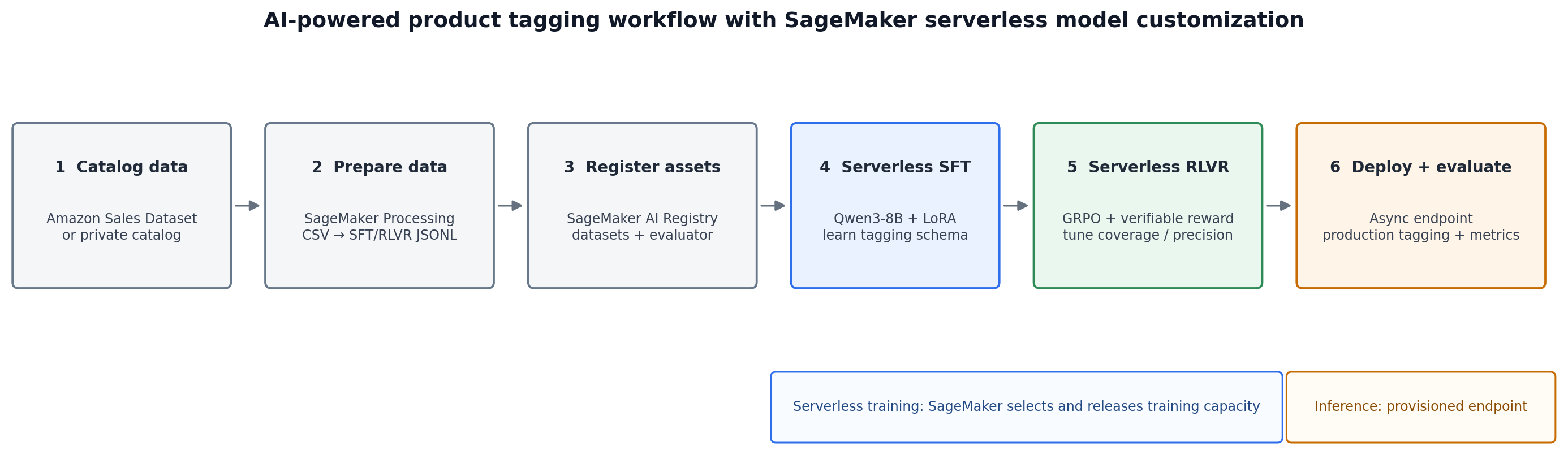
Figure 1: Simplified product-tagging workflow from source catalog to deployment and evaluation
The data is transformed once into versioned assets, SFT teaches the model the tagging schema, and RLVR optimizes behavior against a deterministic reward. The final model package is then hosted for inference. In this walkthrough, “serverless” refers to the training path. The asynchronous inference endpoint uses a provisioned ml.g6.2xlarge instance.
Step 1: Source and prepare supervised fine-tuning data
The walkthrough starts with the Amazon Sales Dataset on Kaggle, which contains more than 1,000 product records. Fields include product_id, product_name, category, about_product, pricing, ratings, reviews, and product links. For this tagging workflow, the useful inputs are the catalog-facing fields such as the product name, category path, and description. In production, use your own approved catalog and trusted labels.
Run the transformation as an Amazon SageMaker Processing job so the same data preparation can be repeated and audited. The processing script reads the source file from Amazon S3, normalizes catalog text and category paths, removes unusable rows, maps the validated product information into the existing nine-category tagging target, splits training and validation data, and writes JSONL files back to S3. Those files are then registered as versioned datasets in Amazon SageMaker AI Registry.
Each SFT JSONL row contains a messages array. The example is expanded for readability. The actual file contains one complete JSON object per line.
The system and user turns form the prompt, while the final assistant turn is the supervised target. Upload separate training and validation files to Amazon S3 and register them in Amazon SageMaker AI Registry. The customization trainer consumes the versioned dataset ARN rather than a conventional training input channel.
Read the versioned ARN from dataset.arn instead of constructing it manually. Repeat the registration for validation data, and register the RLVR versions with CustomizationTechnique.RLVR.
Step 2: Teach Qwen3-8B the tagging schema with serverless SFT
Amazon SageMaker serverless model customization first teaches Qwen3-8B the expected instruction-to-tag pattern. In the Python SDK v3, SFTTrainer is the client-side helper that submits this customization job. The trainer resolves the supported Qwen3-8B recipe, applies Low-Rank Adaptation (LoRA), consumes the registered dataset ARNs, and publishes the output to a model package group. Because no compute argument is supplied, Amazon SageMaker uses serverless training capacity managed by AWS instead of a customer-selected training instance.
SFT is expected to provide the largest jump in schema adherence because it directly demonstrates the desired I/O behavior. The next stage uses RLVR to optimize the remaining quality trade-offs rather than relearning the format from scratch.
Step 3: Convert the supervised examples into RLVR data
After SFT, the model can follow the schema but can still miss expected attributes or add unnecessary ones. RLVR is a good fit because the tagging output is structured and can be compared to a reference without requiring another large language model (LLM) to judge every completion.
For each SFT row, keep the system and user turns in prompt and move the final assistant content into reward_model.ground_truth. Give each row a split-aware ID and retain the answer in extra_info for the evaluator.
Step 4: Optimize with serverless RLVR and GRPO
RLVR continues from the SFT model package and uses a deterministic reward function to score candidate tag sets. GRPO generates a group of completions for each prompt. This implementation uses eight candidates with rollout_n=8. The evaluator scores each completion independently. GRPO computes group-relative advantages, and KL regularization limits drift away from the SFT reference model.
Reward function design
The reward is deterministic: it checks the nine-category output format and uses fuzzy matching at a 0.5 threshold to compare predicted tags with the reference. That makes the training signal verifiable without a separate judge model.
Overall = 0.30 × recall + 0.30 × precision + 0.30 × accuracy + 0.05 × match_quality + 0.05 × formatting
The progressive reward schedule deliberately changes emphasis during training. Early iterations favor recall so the model learns not to miss expected attributes. Later iterations increase precision so it learns to avoid unsupported or unnecessary tags. This makes the business trade-off explicit in the reward rather than leaving it implicit in prompting.
Track the run with MLflow and model package groups. Record the selected hyperparameters, reward weights, metrics, and model lineage so you can compare SFT and RLVR runs and reproduce the chosen model version.
Step 5: Deploy the optimized model for asynchronous inference
Training and inference use different infrastructure choices in this walkthrough. SFT and RLVR use Amazon SageMaker serverless model customization. Serving uses an Amazon SageMaker Asynchronous Inference endpoint on ml.g6.2xlarge. This is well suited to batch-oriented catalog enrichment where requests can be queued and results can be written to Amazon S3. The custom vLLM image is used only for inference, not for the serverless training stages.
For production, add an autoscaling policy if you want the asynchronous endpoint to scale with queue depth or scale down when idle.
Step 6: Invoke the endpoint and evaluate tagging quality
Send an OpenAI-compatible request to the asynchronous endpoint. For larger payloads, upload the request body to Amazon S3 and pass the S3 URI as InputLocation, then poll the returned OutputLocation. This walkthrough uses temperature=0.1 and max_tokens=1024 for stable generation.
Results and what they mean for the catalog workflow
The evaluation shows that SFT provides most of the task adaptation, while GRPO adds a smaller improvement that shifts the model toward higher coverage. The following table separates those effects so you can interpret the trade-off.
| Model | Overall | Recall | Precision | Accuracy |
| Baseline | 0.354 | 0.327 | 0.397 | 0.327 |
| SFT | 0.6827 | 0.6689 | 0.652 | 0.6689 |
| GRPO | 0.6941 | 0.703 | 0.638 | 0.686 |
SFT is the main quality driver. The weighted Overall score rises from 0.354 to 0.6827, with recall moving from 0.327 to 0.6689 and precision from 0.397 to 0.652. That is the effect of teaching the model the task and schema directly.
GRPO then makes a narrower trade-off. Overall increases from 0.6827 to 0.6941 and recall from 0.6689 to 0.703, while precision decreases slightly from 0.652 to 0.638. For a catalog team, this means GRPO can be useful when missing valid attributes is more costly than producing a small number of extra tags. If unnecessary tags are more damaging downstream, adjust the reward weights to favor precision instead.
These metrics measure tagging quality, not business conversion directly. Use them as model-selection signals, then validate the production impact with catalog-specific measures such as attribute completeness, manual correction rate, search/filter coverage, and downstream recommendation quality.
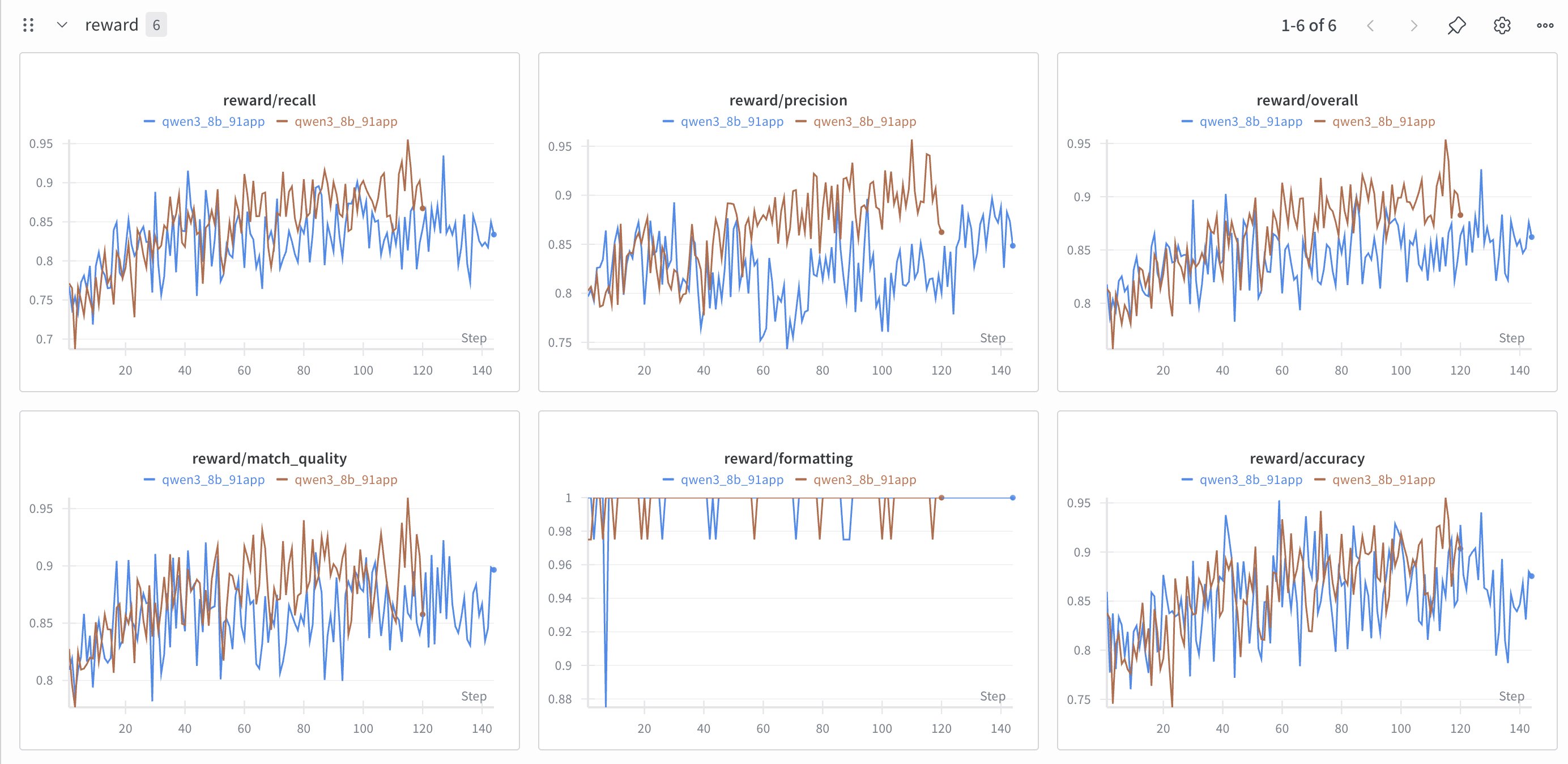
Figure 2: Training reward trends from the RLVR run. The final model selection should use held-out evaluation metrics, not training curves alone
Clean up
After validating the walkthrough, delete only the resources created for it: the endpoint, endpoint configuration, model, reward AWS Lambda and evaluator, dataset versions, model package groups, S3 prefixes, and the ECR inference image. Confirm resource names before deleting shared assets.
Conclusion
Product tagging is a strong customization candidate when the schema is stable, the workload is repetitive, and correctness can be scored programmatically. In this example, Qwen3-8B learns the nine-category format through serverless SFT, then RLVR with GRPO uses a verifiable reward to tune the balance between coverage and precision. The result is not that every metric improves equally. Rather, the reward design makes the desired catalog trade-off explicit and measurable.
A frontier model remains useful when the task changes frequently, the taxonomy is still evolving, or the workflow needs broader reasoning beyond a fixed tagging schema. For a mature high-volume tagging task, however, serverless model customization gives you a managed path to specialize an open-weight model without selecting training instances or maintaining training containers.
You can reproduce and extend the serverless customization flow with the Amazon SageMaker Python SDK v3 serverless model customization examples on GitHub, including SFT, RLVR, AI Registry, and end-to-end notebooks. For the service concepts and supported models, see the Amazon SageMaker AI model customization documentation.
About the authors