





















Announcing instance preference lists for Amazon SageMaker AI training jobs
Amazon SageMaker AI now offers instance preference lists for training and processing jobs. Specify an ordered list of up to five instance types, and SageMaker AI automatically launches on the first type with available capacity, eliminating manual retry loops and capacity-watching scripts.
Getting access to the right GPUs when you need them is one of the biggest challenges in training or customizing AI models at scale. During peak demand periods, your preferred GPU may not be immediately available – and when your job is tied to one specific GPU configuration, the only option is to wait or manually try alternatives. This slows down experimentation and pulls engineering focus away from model development. What if you could submit a single job with a list of suitable GPU options and have Amazon SageMaker AI automatically find available capacity from your list – reducing wait times and getting your teams back to building?
Today, we’re excited to announce Instance preference lists for Amazon SageMaker AI Training Jobs and Amazon SageMaker Processing Jobs, helping you secure on-demand capacity faster by automatically checking across your preferred instance types. With this feature, you can specify an ordered list of up to five acceptable instance types when creating a training or processing job. Amazon SageMaker AI automatically evaluates your list in priority order and launches on the first type with available capacity – making it faster to secure GPU resources and start training. This removes the manual retry loops, complex monitoring scripts, and additional time teams sometimes invest in building systems to manage job submission for jobs that can run across multiple instance types.
The result is faster job starts, higher capacity utilization, and more time spent building models rather than managing constraints.
Customer challenges
During peak demand periods, securing your preferred GPU instances on-demand can be challenging. When a training job is pinned to a single instance type and that capacity isn’t immediately available, some teams might resort to submitting multiple requests across different types to find where capacity exists. This manual process can slow down the experimentation cycle. For time-critical workloads like nightly re-training pipelines, production fine-tuning runs, and scheduled data processing, these delays can impact model freshness and iteration speed.
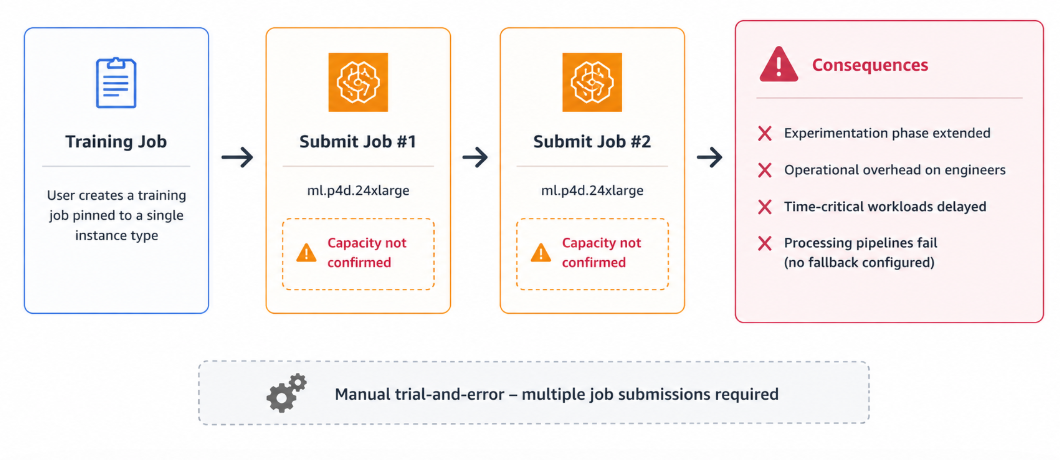
Figure 1: A training job pinned to one instance type waits for capacity while other instance types may have capacity
Teams have responded with custom retry scripts that poll job status, cancel stalled requests, and resubmit with alternative instance types. But these workarounds are brittle. They don’t integrate with reserved capacity options such as Flexible Training Plans (FTP), and they add operational overhead that compounds across multiple training runs.
The core challenge is that pinning a training job to a single instance type creates fragility. Many training workloads run equivalently on two or three instance families, so teams with Flexible Training Plans need a way to express a preference order. They can then try the reservation first and fall back to alternative instance types using on-demand capacity.
Consider these scenarios. A team training a multi-billion parameter model submits multiple job requests to find available capacity, while equivalent compute on another instance type is available. A nightly processing pipeline is pinned to a single type and fails at 2 AM with an InsufficientCapacityError. Had the platform evaluated alternative types at launch, the job would have started. An organization with a Training Plan wants their reservation evaluated first, then an alternative type on on-demand if the plan is fully consumed, without resubmitting. In each case, the answer is the same: let the platform evaluate multiple instance types automatically at job creation, in a single API call.
Solution: Instance preference lists
Instance Preferences lists on SageMaker Training and Processing Jobs: instead of requesting one instance type, you provide an ordered priority list of up to five types. Amazon SageMaker AI handles the rest. It evaluates your list in priority order, selects the first type with available capacity, and launches your job without manual intervention.
The following diagram illustrates the end-to-end provisioning workflow. It shows how a training job request flows through the instance preference list, beginning with the reserved capacity check and then falling back to alternative instance types using on-demand capacity if the preferred type is unavailable.
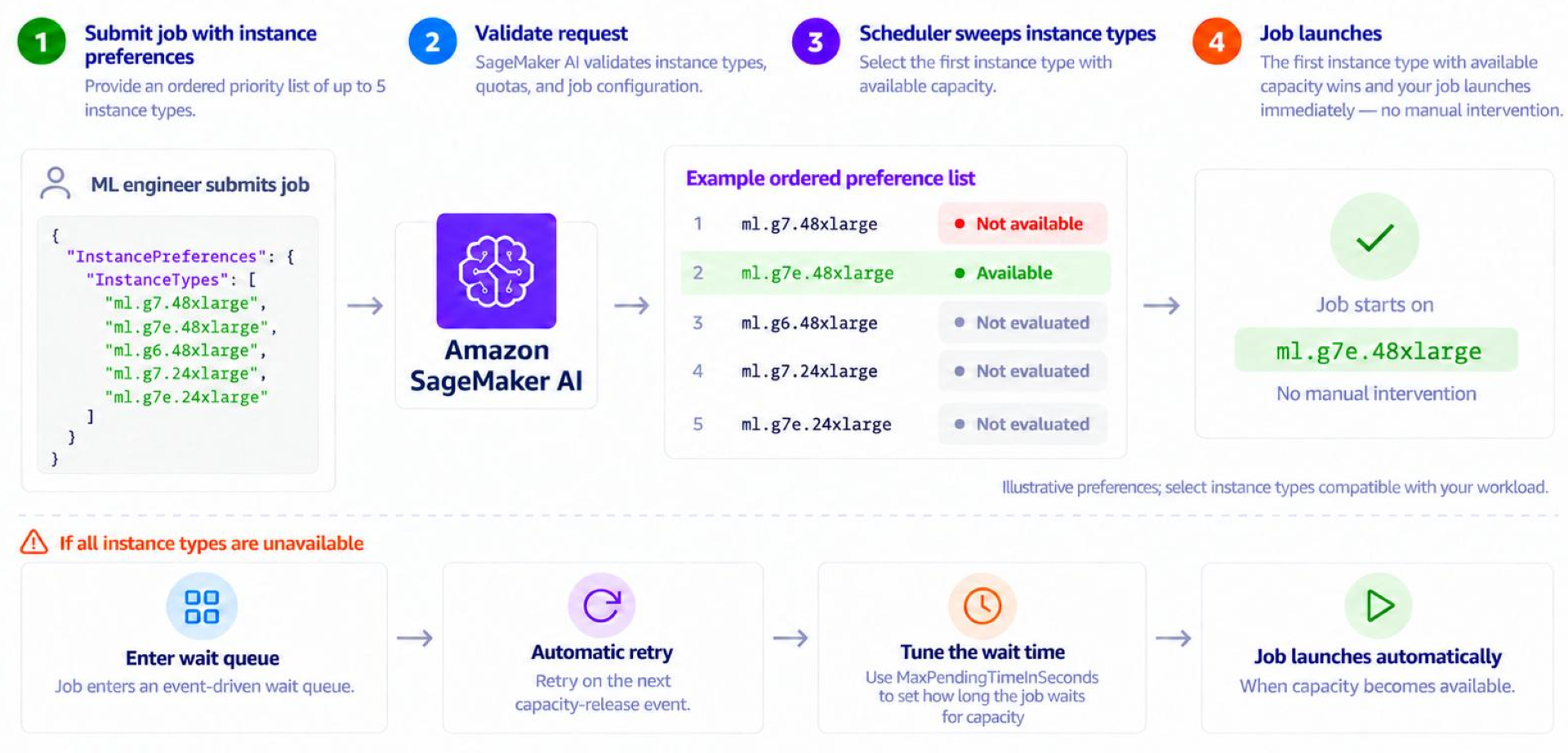
Figure 2: End-to-end provisioning workflow for an instance preference list, from the reserved capacity check to on-demand fallback
- Step 1: You submit your job with an ordered preference list of up to five instance types as shown in the preceding diagram.
- Step 2: Amazon SageMaker AI validates your job configuration and preference list against supported instance types and resource limits.
- Step 3: The scheduler performs a single in-memory sweep across your ordered types and identifies the first with available capacity.
- Step 4: The winning instance type provisions immediately and your job begins execution.
Retry (if needed): If no listed type has capacity at the moment of evaluation, the job enters an efficient event-driven queue and automatically retries when capacity becomes available. This retry window is bounded by MaxPendingTimeInSeconds, which gives you control over maximum queue time.
MaxPendingTimeInSeconds takes effect only for jobs that request accelerated computing instance types, such as instances in the ml.p, ml.g, and ml.trn families. It has no effect on jobs that request CPU-only instance types.
If the job specifies InstancePreferences, MaxPendingTimeInSeconds bounds the total time Amazon SageMaker AI spends working through your list of instance types. This timeout applies to the entire preference list, not to each instance type individually. It only takes effect when the list includes at least one accelerated computing instance type.
Your job either starts immediately on the first available type or waits with automatic retry. There are no custom scripts and no polling loops.
Training Plan integration
Organizations that have invested in Flexible Training Plans (FTPs), which reserve GPU capacity for a defined duration at discounted rates, gain a natural extension with instance preference lists. You can attach a Training Plan to specific preferences in your list and leave others on on-demand. The sweep evaluates your reservation first. If that preference can’t provision, it moves to the next type in your list, which might use on-demand capacity.
The diagram compares two provisioning paths. The first path uses a Flexible Training Plan, which provides reserved GPU capacity that is pre-paid and guaranteed. This option takes priority in the preference list, and the plan type must match the specified preference (for example, ml.p5.48xlarge with a TrainingPlanArn). If reserved capacity is unavailable, the system falls back to the second path, which provisions on-demand capacity at standard rates with no commitment required (for example, ml.p5.24xlarge). Whichever path has capacity first wins, and no manual switching is required.
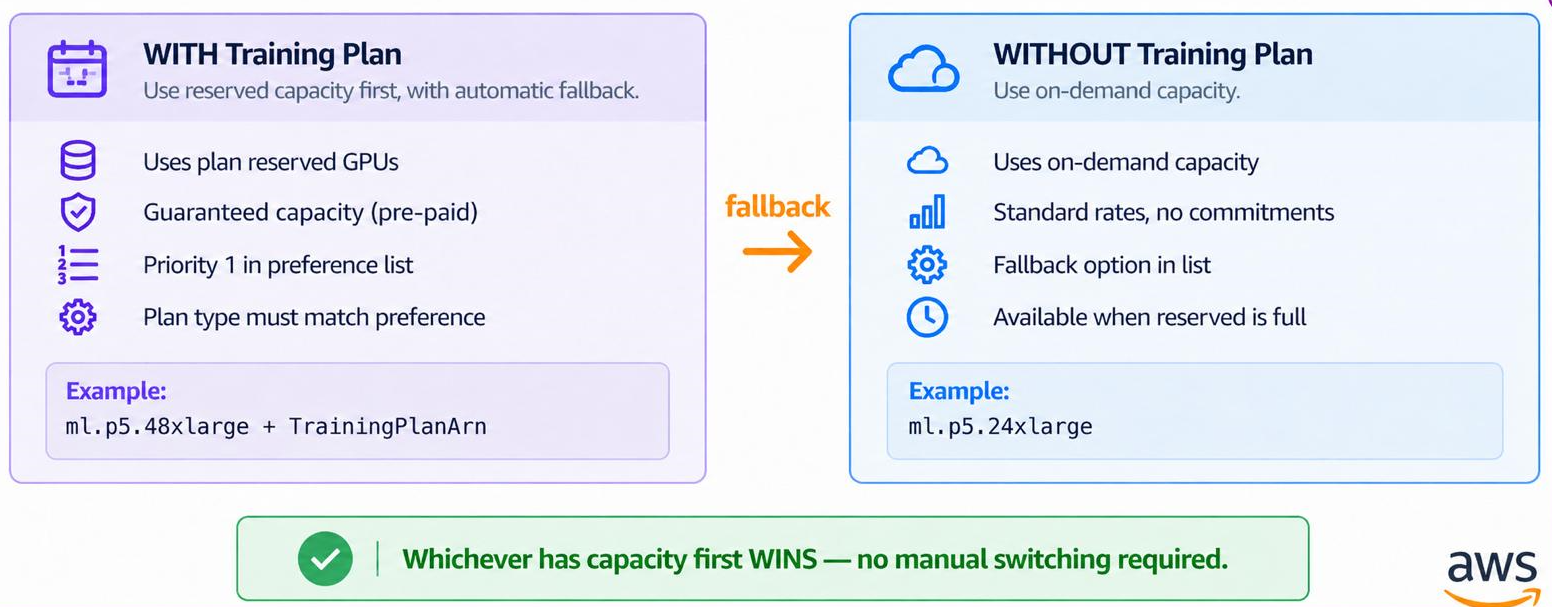
Figure 3: Reserved Flexible Training Plan capacity takes priority, with automatic fallback to on-demand capacity
Now that you understand how instance preference lists work on Amazon SageMaker training jobs, we will walk through the implementation with code examples.
Code example: Training job with instance preferences
The following examples demonstrate how to configure instance preferences using the Amazon SageMaker Python SDK v3 with the ModelTrainer class. Each example shows a different real-world scenario you can adapt for your own workloads.
Example 1: Uniform count of 3 GPU types (P5 to P4d to P4de)
This example specifies three GPU instance types with the same instance count. Amazon SageMaker AI attempts to provision the first preference (P5) and falls back to P4d or P4de if capacity is unavailable.
Using the Amazon SageMaker Python SDK v3 (ModelTrainer):
Example 2: Per-preference counts for compute equivalency
Not all instance types deliver the same throughput per node. When your preference list includes instance types with different GPU architectures, you can specify a different instance count for each entry to achieve roughly equivalent total compute. In this example, two ml.g6.48xlarge instances (16 L40S GPUs total) are listed as the first preference, with four ml.g5.48xlarge instances (32 A10G GPUs total) as the fallback to compensate for lower per-GPU performance.
Tip: Use per-preference counts when your training script can adapt to different GPU counts (for example, through
torchrunwith--nproc_per_node=auto). Each configuration should deliver roughly equivalent total throughput for your workload.
Example 3: Training Plan integration (reserved and on-demand hybrid)
This example combines reserved capacity from a Training Plan with on-demand fallback so that jobs can start even when reserved capacity is fully utilized.
So far, the examples have focused on training jobs where instance flexibility accelerates model experimentation. The same capacity challenges also affect data processing workloads.
The implementation follows a similar pattern. Instead of configuring instance preferences on the training resource, you specify them on the ClusterConfig for your processing job. You provide an ordered list of acceptable instance types, and Amazon SageMaker AI evaluates them in priority order at launch time. The first type with available capacity provisions your processing cluster automatically.
Code example: Processing job with instance preferences
Processing jobs support the same fallback mechanism on ClusterConfig:
Note: Processing jobs don’t support training plan integration. The
TrainingPlanArnsfield is for training jobs only.
Best practices
Keep these guidelines in mind when you configure instance preference lists for your training jobs.
1. List only compatible instance types
Amazon SageMaker AI doesn’t validate cross-type compatibility (GPU architecture, Elastic Fabric Adapter (EFA) support, driver versions). Make sure that your training container works on all listed types.
2. Use per-preference counts for throughput equivalency
If your preference list has different per-node compute power, adjust counts to match total throughput:
3. Combine with Training Plans for guaranteed and flexible capacity
Place your reserved capacity first in the preference list so that Amazon SageMaker AI attempts to launch with pre-paid resources before falling back to on-demand alternatives.
4. Bound queue time with MaxPendingTimeInSeconds
Choose how long the job may keep retrying the list before it stops (only applies to accelerated computing instance types):
Conclusion
Instance Preferences transforms GPU capacity management from an engineering burden into a one-line configuration change. Instead of building custom retry logic, monitoring capacity dashboards, and waking up on-call engineers for failed overnight pipelines, you declare your flexibility upfront and let SageMaker AI handle the rest.
Get started today:
- Update your Amazon SageMaker Python SDK:
pip install --upgrade sagemaker. - Add
instance_preferencesto yourComputeconfiguration using the Amazon SageMaker AI Developer Guide. - List 2–5 compatible instance types in priority order.
- Submit your job from the Amazon SageMaker AI console and let Amazon SageMaker AI find capacity automatically from your preferred list.
To learn more about instance types, pricing, and Training Plans, see the Amazon SageMaker AI detail page and the GitHub code for implementation.
About the authors