

















Migrating multi-model AI agents to Amazon Bedrock AgentCore runtime
Migrate a multi-model healthcare AI agent from self-managed Amazon ECS with AWS Fargate to Amazon Bedrock AgentCore runtime, preserving triple-model orchestration and vector-enhanced knowledge retrieval while reducing infrastructure management. The framework-agnostic pattern applies across healthcare, financial services, and manufacturing.
Organizations building multi-model agentic AI applications face growing infrastructure complexity. Managing container orchestration, scaling policies, identity, and observability for multiple model types adds operational overhead. Teams often spend more time on infrastructure than on agent logic development.
Developers running agentic frameworks on self-managed infrastructure such as Amazon Elastic Container Service (Amazon ECS) with AWS Fargate have full control over their deployment configuration. As agentic workloads evolve and scale, teams might choose to adopt managed runtimes that provide built-in session management, identity, and observability.
Amazon Bedrock AgentCore is a platform to build, connect, and optimize agents at scale, with any framework or model. AgentCore runtime, its managed deployment capability, handles container lifecycle, scaling, identity, and observability, so you can focus on your agent code.
In a previous post, Agentic AI with multi-model framework using Hugging Face smolagents on AWS, we showed how to build a healthcare AI agent with multi-model orchestration on self-managed infrastructure. In this post, we show you how to migrate that multi-model agent to Amazon Bedrock AgentCore runtime. The migration reduces infrastructure management while preserving agent capabilities, including triple-model orchestration and vector-enhanced knowledge retrieval.
Solution overview
This solution migrates a multi-model healthcare AI agent to Amazon Bedrock AgentCore runtime while preserving the existing agent logic. The agent processes medical queries across three model backends with vector-enhanced knowledge retrieval, all running inside a single AgentCore-managed container. You can direct each query to the model backend suited to the task. A domain-specific model such as BioM-ELECTRA-Large-SQuAD2 on Amazon SageMaker AI handles specialized biomedical queries, and a foundation model (FM) such as Llama 3.1 70B Instruct by Meta on Amazon Bedrock handles broader medical reasoning. This approach helps healthcare teams address a range of query types while reducing the operational overhead of managing the underlying infrastructure.
The standalone version from the previous post deployed on Amazon ECS with AWS Fargate includes container orchestration, scaling, identity, and observability configured by the user. The AgentCore version wraps the same agent logic with the AgentCore runtime decorator pattern, and AgentCore runtime handles these operational concerns automatically.
Hugging Face smolagents is an open source Python library designed to build and run agents using a few lines of code. This solution uses Hugging Face smolagents framework as a reference implementation, demonstrating that AgentCore runtime supports any agentic framework. With the bring-your-own (BYO) agent approach, you can deploy existing agent code to AgentCore runtime without rewriting or adapting to a specific framework.
Note: This solution is a sample implementation for demonstration purposes. Production deployments handling medical or other sensitive queries use Amazon Bedrock Guardrails for content filtering and grounding validation as a standard control.
Architecture
The solution consists of the following services and features:
- Amazon Bedrock AgentCore runtime for managed agent container deployment, scaling, identity, and observability.
- Amazon Bedrock with Llama 3.1 70B Instruct by Meta for complex medical reasoning. For model availability by AWS Region, refer to Supported models by AWS Region in Amazon Bedrock.
- Amazon SageMaker AI with BioM-ELECTRA-Large-SQuAD2 for specialized biomedical queries and managed auto scaling.
- Amazon OpenSearch Service for vector similarity matching and contextual knowledge retrieval with medical knowledge indexing.
- Containerized model server with BioM-ELECTRA-Large-SQuAD2 for self-hosted model deployment.
- AWS Identity and Access Management (IAM) for security and access control.
Note: The previous post (standalone version) uses Claude 3.5 Sonnet V2 by Anthropic. This post uses Llama 3.1 70B Instruct by Meta, demonstrating that AgentCore runtime is model-agnostic. The model choice is an implementation decision, not a requirement.
The following diagram illustrates the solution architecture and how the agent orchestrates across three model backends.
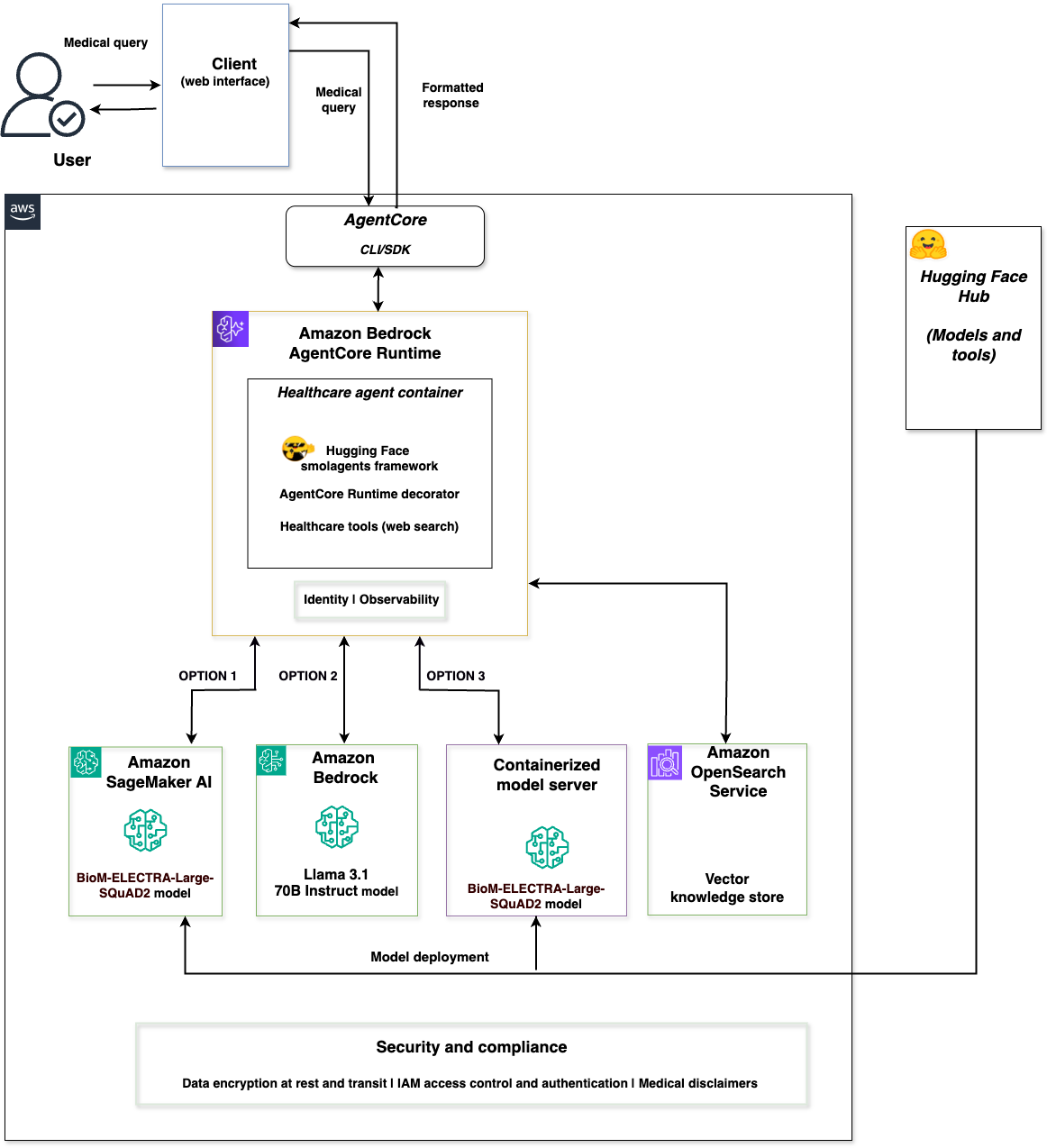
Figure 1: Multi-model healthcare agent architecture on Amazon Bedrock AgentCore runtime
A client web interface connects to Amazon Bedrock AgentCore runtime, which hosts the healthcare agent container. The container uses the Hugging Face smolagents framework with the AgentCore runtime decorator. AgentCore runtime provides built-in identity and observability. The agent orchestrates across three model backends: Amazon SageMaker AI with BioM-ELECTRA, Amazon Bedrock with Llama 3.1 70B Instruct by Meta, and a containerized model server with BioM-ELECTRA. The solution includes Amazon OpenSearch Service for vector-enhanced knowledge retrieval.
This solution supports deployment options with each backend optimized for different scenarios:
- Amazon SageMaker AI for managed endpoints with auto scaling using Hugging Face Hub models.
- Amazon Bedrock for serverless access to foundation models and complex reasoning through AWS APIs.
- A containerized model server for self-hosted model deployment and tool integration from Hugging Face Hub (deployable on Amazon ECS, Amazon Elastic Kubernetes Service (Amazon EKS), or other container environments).
The three backends implement Hugging Face Messages API compatibility, providing consistent request and response formats regardless of the selected model service.
The complete implementation is available in the sample-healthcare-agent-with-agentcore-on-aws GitHub repository.
Migrate the agent to AgentCore runtime
This section walks through migrating the existing healthcare AI agent to Amazon Bedrock AgentCore runtime using the AgentCore CLI.
Prerequisites
Before you deploy the solution, you need the following:
- An AWS account with access to Amazon Bedrock AgentCore runtime and appropriate permissions to create IAM roles and Amazon OpenSearch Service domains.
- AWS Command Line Interface (AWS CLI) version 2.0 or later installed and configured.
- Node.js 20 or later (required for the deployment CLI).
- AWS Cloud Development Kit (AWS CDK) installed.
- AgentCore CLI installed.
- Python 3.10 or later for running deployment scripts.
- Docker installed and running (required for code execution isolation).
- Access to Amazon Bedrock model, Amazon SageMaker AI, and Amazon OpenSearch Service domain in your AWS Region with appropriate IAM permissions to create and manage resources.
- bedrock-agentcore Python SDK installed.
- For this implementation, we’re using Python 3.10+, smolagents framework, transformers 4.55.0+, and boto3.
AgentCore runtime concepts
Amazon Bedrock AgentCore runtime uses a decorator pattern to wrap your agent logic. The key components are:
- BedrockAgentCoreApp – initializes the AgentCore application.
@app.entrypoint– decorates the function that AgentCore runtime calls when a request arrives.app.run()– starts the AgentCore runtime server.
The following code shows the AgentCore integration pattern:
The agent code between the decorator and return statement remains unchanged from the standalone version. AgentCore runtime handles container lifecycle, scaling, identity, and observability automatically.
Set up the project
Create an AgentCore project and add your existing agent using the AgentCore CLI.
Install the AgentCore CLI:
Create a new AgentCore project:
Add your existing agent as a bring-your-own (BYO) agent:
Note: The --framework flag specifies the CLI template. The actual agent code uses Hugging Face smolagents, which is compatible with AgentCore runtime regardless of the template selection.
Prepare the container
- Create a
pyproject.tomlin your agent code directory to define dependencies: - Create a
Dockerfile: - Create a
.dockerignoreto keep the image size within the 2 GB limit:
Deploy to AgentCore runtime
With the project configured, you can deploy the agent using a single CLI command.
Deploy the agent:
The CLI builds the container, pushes it to Amazon Elastic Container Registry (Amazon ECR), and creates the AgentCore runtime agent. Deployment takes approximately 10–15 minutes.
Test the deployed agent
You can test the deployed agent in two ways: using the AgentCore CLI or programmatically with boto3.
Invoke the agent using the AgentCore CLI:
Or, invoke programmatically using boto3:
This path invokes the same deployed agent as the CLI, using the boto3 SDK directly. The agentRuntimeArn identifies your deployed agent, contentType specifies the request format, and payload carries the prompt and model selection.
Key differences from self-managed deployment
The standalone version and the AgentCore runtime version deploy the same agent in different ways. The following sections describe what each path provides.
Amazon ECS with AWS Fargate deployment
The standalone version runs on Amazon ECS with AWS Fargate. You define ECS task definitions and service configuration, set auto scaling policies, configure IAM roles per service, and set up observability through Amazon CloudWatch. Deployment uses a Docker build, an Amazon ECR push, and an ECS service update. This path gives you full control over container configuration, networking, and scaling behavior. The agent code lives in healthcare_agentcore.py, integrates with Amazon Bedrock, Amazon SageMaker AI, and the containerized backend, and uses Amazon OpenSearch Service for vector search.
Amazon Bedrock AgentCore runtime deployment
The AgentCore runtime version runs the same healthcare_agentcore.py agent code with the AgentCore decorator pattern. AgentCore runtime provides container orchestration, session-based scaling, identity management through IAM integration, and observability through built-in tracing and logging. Deployment uses a single command (agentcore deploy). The model integration (Amazon Bedrock, Amazon SageMaker AI, containerized backend) and vector search (Amazon OpenSearch Service) remain the same as the standalone version.
Both deployment approaches have distinct advantages. Amazon ECS with AWS Fargate provides full control over container configuration, networking, and scaling policies, suitable for teams with existing container operations expertise or specific infrastructure requirements. Amazon Bedrock AgentCore runtime is suited for teams that prefer managed infrastructure and want to focus primarily on agent logic development.
Regardless of the deployment path, the following elements remain unchanged when migrating from the standalone version to AgentCore runtime:
- Core agent logic (
BedrockAgentCoreAppdecorator + existing code). - Multi-model orchestration across Amazon Bedrock, Amazon SageMaker AI, and containerized backends.
- Vector-enhanced knowledge retrieval with Amazon OpenSearch Service.
- Hugging Face Messages API compatibility across model backends.
Clean up
To avoid incurring future charges, delete the resources you created when you no longer need them. If you plan to continue using the deployed agent, no action is required.
- Remove the AgentCore runtime agent:
First, remove all resources from your local configuration:Then deploy again to tear down the AWS resources:
- Delete the Amazon SageMaker AI endpoint:
- Delete the Amazon OpenSearch Service domain:
Conclusion
In this post, we showed how to migrate a multi-model healthcare AI agent from self-managed Amazon ECS with AWS Fargate infrastructure to Amazon Bedrock AgentCore runtime. The migration required no changes to the core agent logic. The same healthcare_agentcore.py file orchestrates across Amazon Bedrock, Amazon SageMaker AI, and a containerized model server. It runs on AgentCore runtime with the addition of the AgentCore decorator pattern (BedrockAgentCoreApp, @app.entrypoint, and app.run()). For healthcare teams, this pattern directs specialized biomedical queries to a domain-specific model such as BioM-ELECTRA-Large-SQuAD2 on Amazon SageMaker AI. It routes broader medical reasoning to a foundation model such as Llama 3.1 70B Instruct by Meta on Amazon Bedrock. Together, these backends support a range of query types.
For teams that choose managed infrastructure, AgentCore runtime handles container orchestration, scaling, identity management, and observability. You can focus on agent logic development instead. The framework-agnostic design supports a wide combination of models and agentic frameworks, making this migration pattern applicable across industries including healthcare, financial services, and manufacturing.
To get started, clone the sample-healthcare-agent-with-agentcore-on-aws GitHub repository and follow the deployment steps in this post. To understand the standalone implementation that this post migrates from, see Agentic AI with multi-model framework using Hugging Face smolagents on AWS. If there are questions about getting started with Amazon Bedrock AgentCore, speak with an AWS generative AI Specialist.
Further reading
- Agentic AI on AWS – Build, deploy, and scale AI agents with AWS
- Make agents a reality with Amazon Bedrock AgentCore: Now generally available
- Amazon Bedrock documentation
- Build trustworthy AI agents with Amazon Bedrock AgentCore Observability
About the author