


















Making Amazon Quick enterprise-ready: Automated, auditable cross-account resource promotion
Promoting Amazon Quick resources (agents, action connectors, knowledge bases, flows, and spaces) from a development to a production AWS account has been a manual, error-prone chore. This post shows how to automate cross-account promotion with an idempotent, auditable MCP server on Amazon Bedrock AgentCore.
Amazon Quick is Amazon’s agentic AI companion built for work. You build agents that reason over your data, call action connectors, and carry multi-step tasks to completion. Promoting those resources (chat agents, action connectors, knowledge bases, flows, and spaces) from a development to a production AWS account, the way you would any other application, has been a manual and error-prone chore. This post shows how to automate it with an idempotent, auditable Model Context Protocol (MCP) server on Amazon Bedrock AgentCore.
The building blocks of an agentic solution are its agents, action connectors, knowledge bases, and spaces: chat agents configured with custom instructions, connectors for Slack, Jira, and other integrations, knowledge bases grounded in your own documents, and the Space that binds them together. Teams assemble and iterate on them quickly in a development account.
Most enterprises run separate AWS accounts for development and production, sometimes with quality assurance (QA) in between. When agents, action connectors, and knowledge bases are validated in a development account, there is no native, one-click way to promote them into the next account. Teams rebuild each resource by hand: recreate each agent with the same instructions and starter prompts, re-attach each agent’s action connectors, re-grant resource permissions, and reprovision the Amazon Simple Storage Service (Amazon S3) bucket, bucket policy, and data source behind each knowledge base. The work is slow, difficult to audit, and easy to get subtly wrong, which undermines the governance story enterprises need.
Manage Amazon Quick resources through an API
Amazon Quick resources are programmable. Spaces, agents, action connectors, knowledge bases, and flows are managed through the Amazon Quick API (part of the Amazon Quick Sight API surface), which provides the full resource lifecycle, create, read, update, delete, and list. Anything a business user configures in Amazon Quick, an agent with its instructions and starter prompts, a connector, a knowledge base, or a flow, we can inspect, recreate, update, and govern programmatically, permissions included.
This programmable surface is what makes governed promotion possible. Instead of recreating each resource by hand, we read a resource and its permissions through the API and reapply them in another account exactly as they were. The migrator in this post composes the create, read, update, and list operations into one repeatable workflow, and it never issues a delete against the target, so a run only adds or updates.
In this post, we walk through the Quick Resource Migrator, a sample MCP server hosted on Amazon Bedrock AgentCore runtime, a capability of Amazon Bedrock AgentCore, that automates cross-account promotion of Amazon Quick resources in a single tool call. It’s resource-driven: you pick a resource type (agent, connector, knowledge base, flow, or space) and select by id, by name, or all. It’s idempotent (safe to re-run), and it copies permissions faithfully by describing the source and replaying the same actions in the target. The full source code is available in the aws-samples repository.
Solution overview
The migrator promotes a chosen set of resources in a single call. It is an upsert: a resource that does not yet exist in the target is created, and one that already exists is updated in place. Every update is protected by a versioned backup written to Amazon S3 before the change, so each resource keeps a full history you can review and roll back to. A read-only preview reports exactly what a run would create or update before you commit, and the migration itself runs on Amazon Bedrock AgentCore, so it can be driven from Amazon Quick or any MCP-compatible client.
What gets migrated
- Selection model: Pick a resource type (agent, connector, knowledge base, flow, or space) and choose resources by id, by name, or all. Selection is resource-driven. Migrate a resource type directly, or migrate a space to bring its linked resources across with it.
- Chat agents: Recreated with their custom instructions, identity, tone, starter prompts, and welcome message, with their action connectors re-attached (remapped to the target account). When a space is migrated, its agents are re-linked to it automatically.
- Action connectors: Recreated with their configuration. Secret values are never read from the source. Connectors are created with placeholder credentials and re-authenticated in the target.
- Knowledge bases: The knowledge base is registered in the target account, its data source is recreated, and its permissions are copied. For S3-backed knowledge bases the migrator also provisions the target bucket and its bucket policy (a distinct output of the migration). The documents (S3 objects) themselves are not copied.
- Flows: Recreated in the target account from their definition. Because flow IDs differ across accounts, flows are matched by name: a same-named target flow is updated, otherwise a new one is created. Flow permissions are copied.
- Spaces: Recreated in the target account and re-linked to their agents, connectors, and knowledge bases (with resource Amazon Resource Names (ARNs) remapped to the target). Migrate the linked resources first so the target ARNs resolve. Space permissions are copied.
Key design principles
- Resource-driven selection. You migrate one resource type at a time (agent, connector, knowledge base, flow, or space), selecting by id, by name, or all. Agents are recreated with their action connectors re-attached. Spaces are recreated and re-linked to their agents, connectors, and knowledge bases, with ARNs remapped to the target account.
- Permission fidelity. Permissions aren’t hard-coded. The server calls the relevant
Describe*PermissionsAPI on each source resource and replays the identical action list in the target, remapping principals to registered users in the target account. - Idempotency. Every resource is created-or-updated. The server describes the target first and decides whether to create or update, so re-running a migration converges on the same state instead of producing duplicates or failing.
- Least privilege and isolation. The source role is read-only. The target role holds only the actions the migration needs. The runtime authenticates callers with a Cognito JSON Web Token (JWT) and can run in virtual private cloud (VPC) network mode.
- Safe, reversible updates. Before the migrator updates any existing target resource, it writes a versioned snapshot of that resource, and its dependencies, to a dedicated backup bucket. If that backup can’t be written, the update is aborted. Every created or updated resource is also snapshotted, and a restore tool can roll any resource back to an earlier version.
Architecture
The solution uses a three-account model. A central runner account hosts the MCP server on Amazon Bedrock AgentCore runtime. The server assumes a read-only role in the source account and a read-write role in the target account using AWS Security Token Service (AWS STS), so no long-lived credentials are stored anywhere.
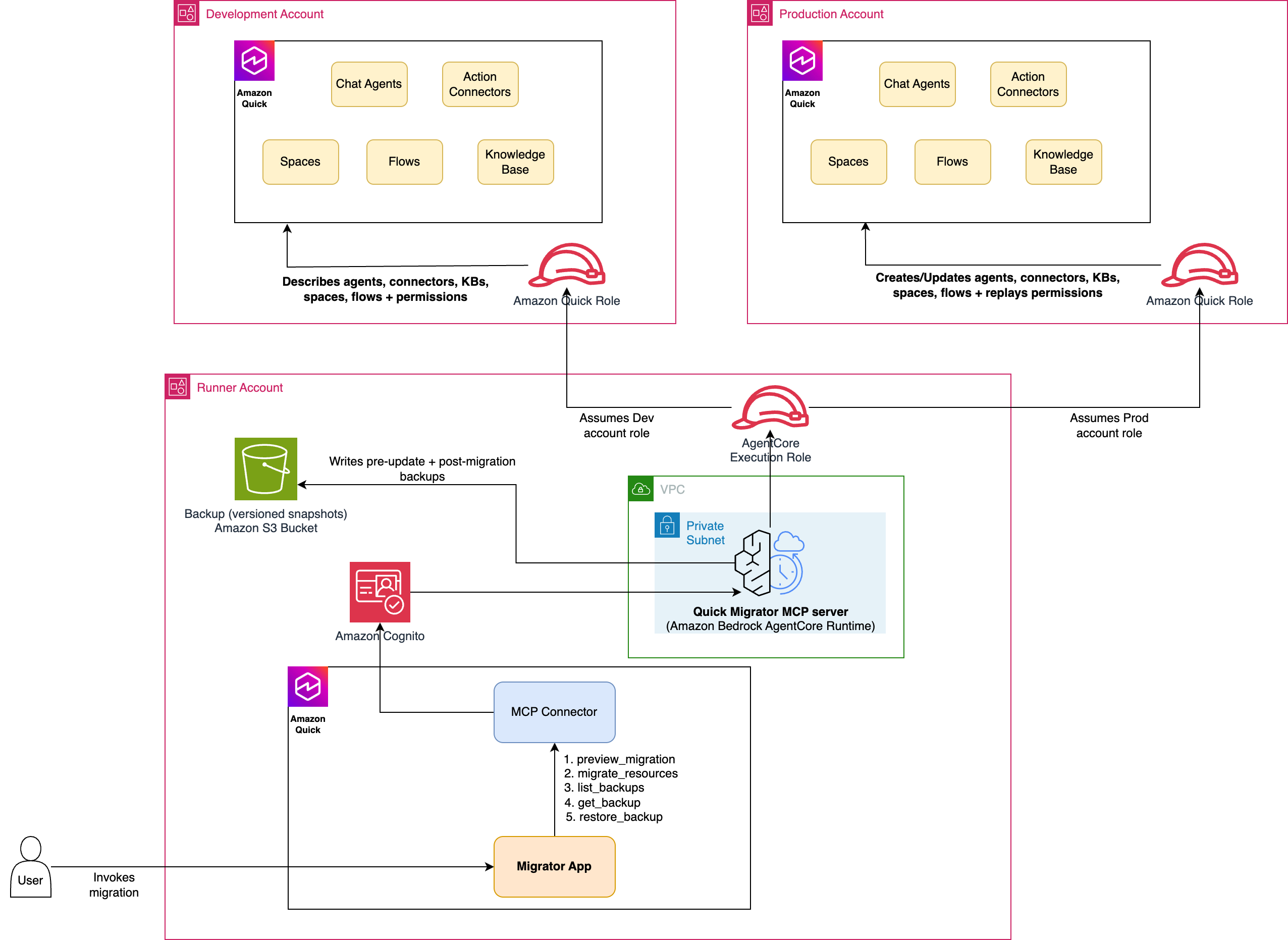
Figure 1: Architecture of the Amazon Quick Resource Migrator MCP server
Component responsibilities
| Component | Responsibility |
| AgentCore runtime (runner account) | Hosts the MCP server (server.py). Assumes roles into the source and target accounts and orchestrates the migration. Runs in VPC network mode with a Cognito JWT authorizer. |
| Amazon Cognito (runner account) | User pool, resource server, and a machine-to-machine app client. Issues the JWT (client-credentials grant, scope invoke) that callers present to AgentCore. |
| Runner execution role | The AgentCore execution role: Amazon CloudWatch Logs, telemetry, and sts:AssumeRole into the source and target roles. |
| Migrator role (source account) | Read-only Quick Sight describe/list permissions plus knowledge base read. |
| Migrator role (target account) | Read-write Quick Sight create/update permissions, knowledge base and S3 write, and ListUsers for principal resolution. |
| Backup bucket (runner account) | Encrypted S3 bucket that stores versioned pre-update and post-migration snapshots of target resources. The runtime writes to it directly. Restore reads from it. Optional (disabled when unset). |
Table 1: Architectural components
Migration flow
- Resolve resources: from the resource type and selector (id, name, or all), resolve the concrete resource IDs in the source account.
- Describe the source: describe each selected resource to capture its configuration and permissions.
- Connectors: recreate each connector. The authentication config is sanitized to the create (write) model with placeholder secrets, then re-authenticated in the target. Copy permissions.
- Knowledge bases: create the target bucket (
knowledge-base-), bucket policy, data source, and knowledge base, then copy knowledge base permissions. S3 objects are not copied.- - Agents: recreate each agent with its action connectors attached (remapped to the target account), then copy agent permissions. Agent-to-space linkage is restored when the space itself is migrated (see the space step).
- Flows: recreate each flow from its definition, matched by name (flow IDs differ across accounts): update a same-named target flow or create a new one, then copy flow permissions.
- Spaces: recreate each space and re-link its agents, connectors, and knowledge bases with ARNs remapped to the target account (migrate those resources first), then copy space permissions.
- Report: return a JSON report of the created or updated resources, buckets, backups, skipped permissions, and any errors.
Tools exposed by the MCP server
The server exposes five tools, all defined in server.py.
preview_migration (read-only)
preview_migration takes a source account ID, a resource type (agent, connector, knowledge base, flow, space, or all), a selector (id, name, or all), and an AWS Region. It returns an inventory of the agents, action connectors, knowledge bases, and flows that would be migrated, with names and types, without making any change. Use it as a dry run to confirm scope and to support a change-management approval step before promotion. When you also pass a target account ID, the response adds a source-to-target mapping that marks each resource CREATE or UPDATE, so you can see exactly what a migration would change before running it.
migrate_resources (full migration)
migrate_resources takes source and target account IDs, a resource type (agent, connector, knowledge base, flow, or space), a selector (id, name, or all), a region, source and target environment names (used in the knowledge base bucket name), and the Quick Sight service role name. It performs the full create-or-update migration described above and returns a structured report of everything it created, updated, and granted, along with any errors. Because it’s idempotent, you can run it repeatedly, for example on every release, and it converges on the same target state.
list_backups (read-only)
list_backups searches the backup catalog and lists the available versions for each asset. Backups are the pre-update snapshots the migrator writes to the backup bucket, one versioned object per update, so you can see the full history for any migrated resource.
get_backup (read-only)
get_backup returns the full stored backup for a given asset and version (the latest by default), including the captured resource configuration and its dependencies.
restore_backup
restore_backup re-applies a stored backup version onto the target resource, updating it in place, or recreating it if it no longer exists. It first takes a fresh pre-restore backup, so the revert is itself reversible.
Deploy the solution
The full source and step-by-step deployment instructions live in the aws-samples repository README. At a high level you deploy three AWS CloudFormation stacks, the cross-account AWS Identity and Access Management (IAM) roles, the VPC network, and the Cognito-authenticated AgentCore runtime that hosts the MCP server, then register that runtime as an action connector in Amazon Quick.
Use the migrator through a Quick App
By registering the runtime as an action connector, you can drive the migrator from Amazon Quick in natural language, and you can also build a Quick App: a point-and-click web experience layered on the same MCP tools. You don’t build that UI by hand. The repository includes a ready-to-use app-builder prompt that you paste into the Amazon Quick app builder, replacing the placeholder connector and action IDs with your own to generate the app. The app turns the workflow into a guided flow: choose a source and target account and the resources to promote, preview what will be created or updated, run the migration, and review a history of every past migration, each backed by the versioned S3 snapshots the server writes. The following screens show that experience.
An example Quick App
- Because the app is generated from a prompt, each build differs. The following screens show one such example. In it, the landing page prompts for the Source Account ID, Target Account ID, resource type (agent, connector, knowledge base, flow, or space), and selector (id, name, or all), with additional options available as needed.
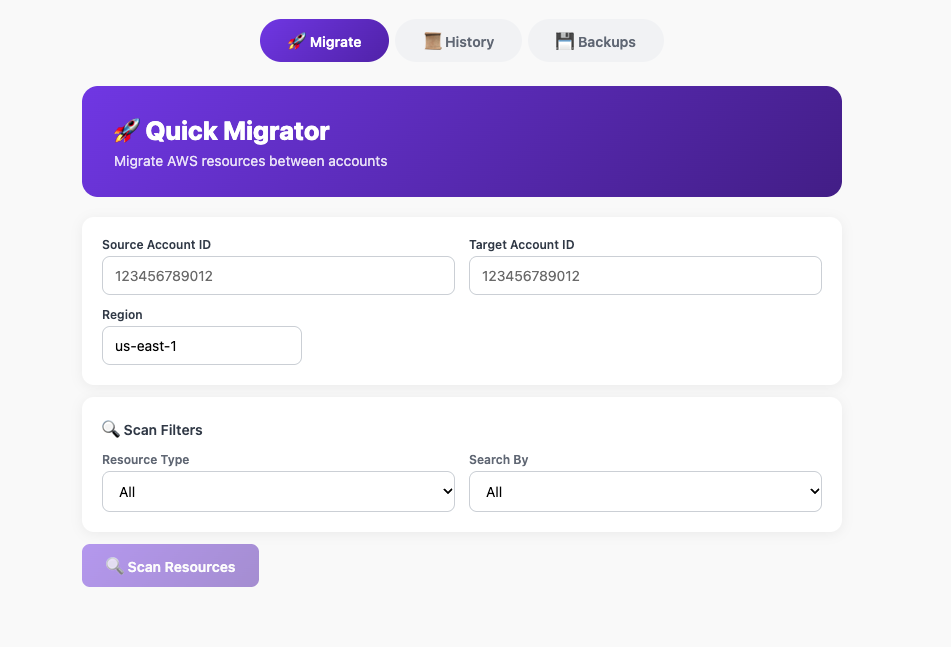
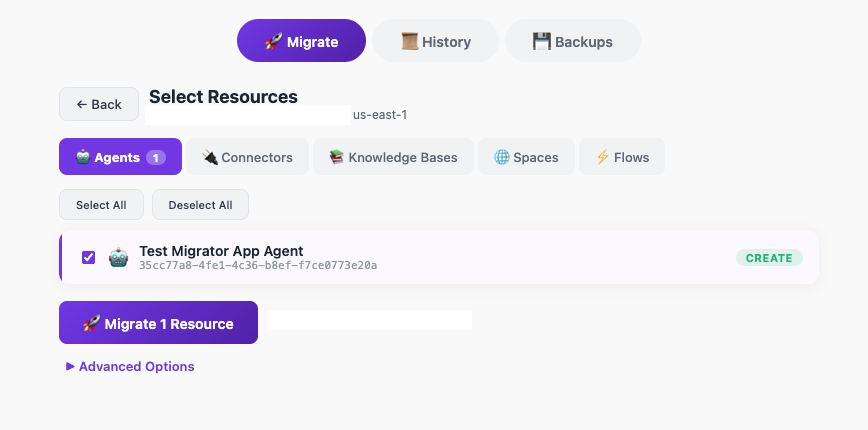
Figure 3: Additional migration options available on the landing page
- After you choose Confirm & migrate, you see a response like the following:
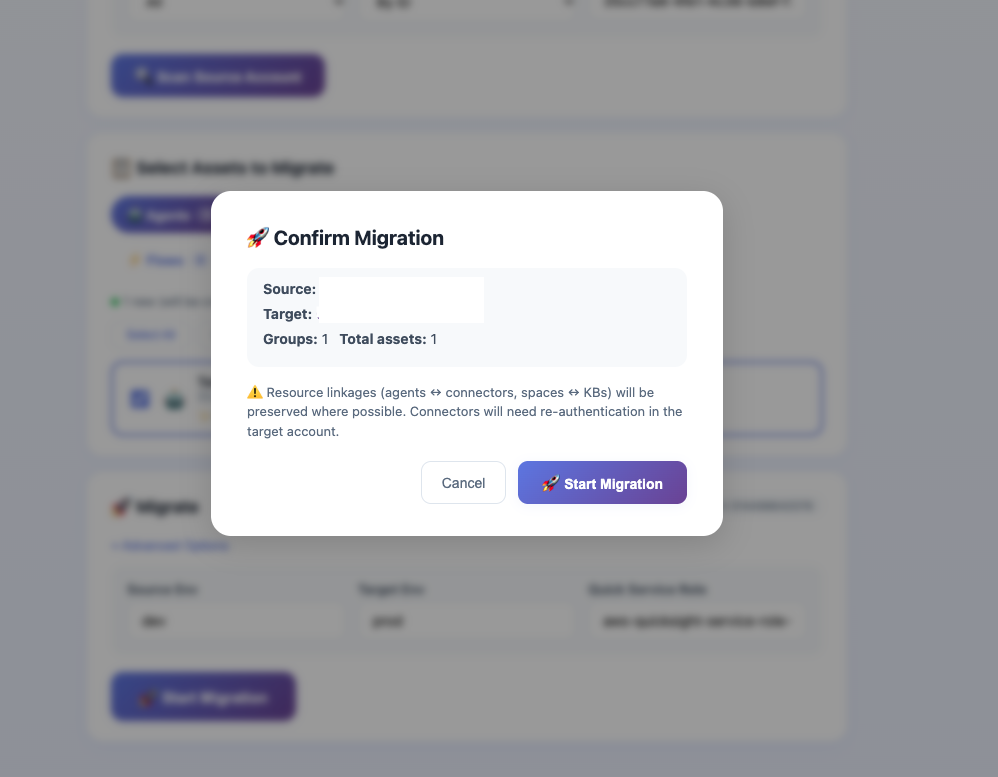
Figure 4: The confirmation response after you choose Confirm and migrate
- After you confirm and migrate, you should see the response from the MCP server returning the resources that were created/updated.
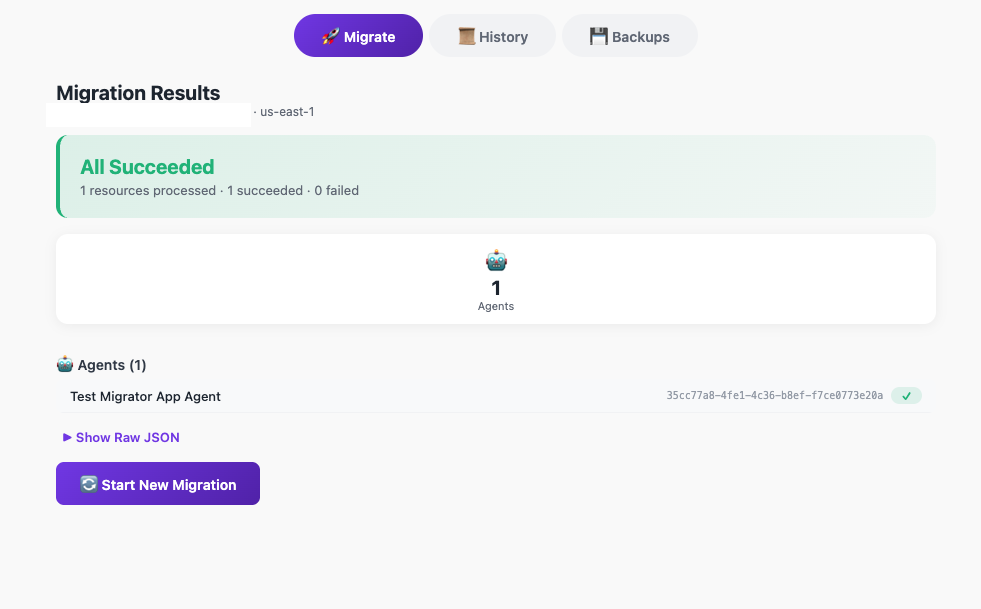
Figure 5: The MCP server response listing the resources that were created or updated
- Open the History tab to see every past migration. Each entry is backed by the versioned snapshot the migrator wrote to Amazon S3, so you get a full, auditable record of what was promoted and when, with the option to inspect any earlier version.
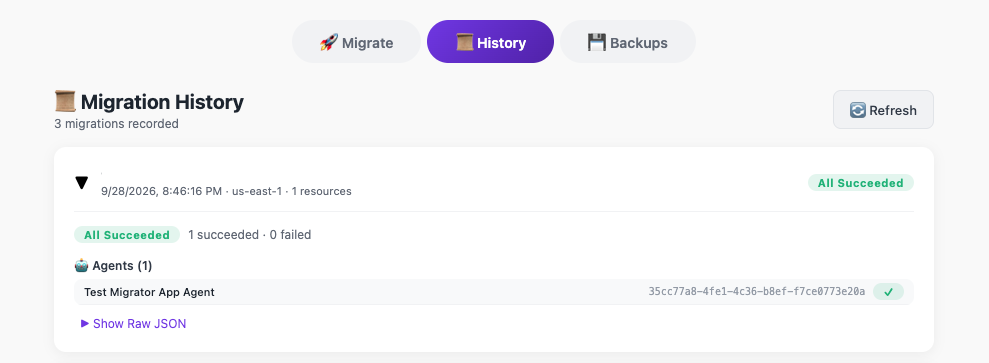
Figure 6: The History tab showing an auditable record of past migrations
- To roll back, select a resource’s backup version and choose Restore. The app re-applies that saved version to the target. Because it first captures a fresh backup before restoring, the revert is itself reversible.
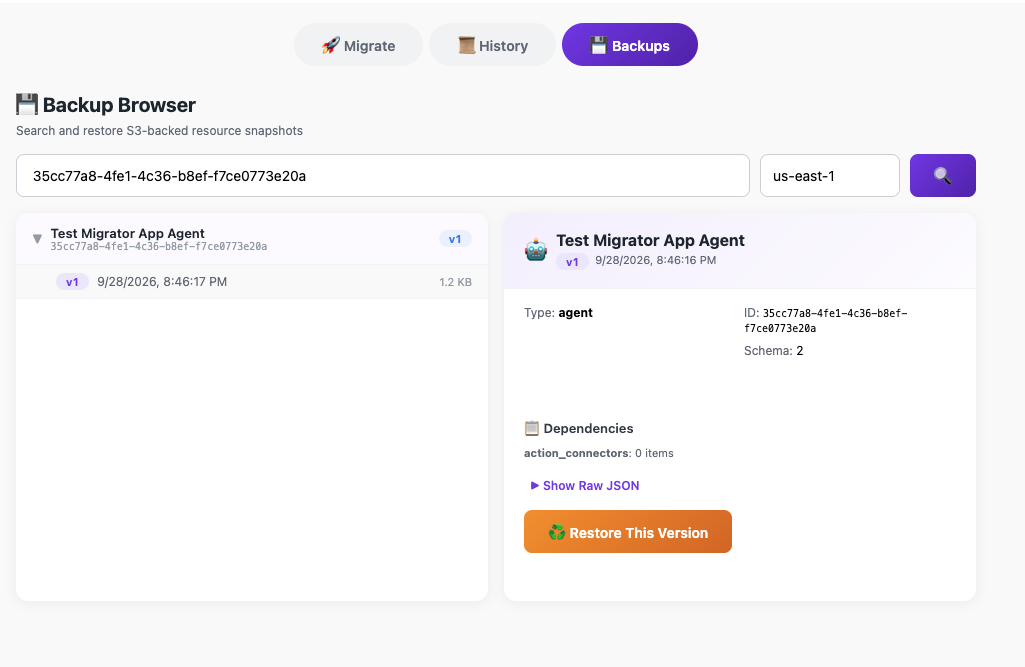
Figure 7: Rolling back a resource to an earlier backup version
Conclusion
Cross-account promotion is a baseline expectation for enterprise software, and until now it has been the missing piece for Amazon Quick. The Quick Resource Migrator turns a slow, manual, hard-to-audit task into a fast, repeatable, and governed one: a single tool call recreates agents, connectors, and knowledge bases in a target account and copies permissions faithfully, all idempotently, so you can run it on every release.
Clone the sample repository, deploy it into a runner account, and try promoting an agent or knowledge base from development to production. Then adapt the pattern to your own governance and hardening requirements.
About the authors