












Cut self-hosted LLM cost and latency with the distributed KV caching agent skill
Self-hosting LLMs on GPUs means paying to recompute the same context on every turn. Distributed KV caching with Amazon ElastiCache can cut inference cost by up to 40% and time to first token by up to 80%. This post walks through the distributed KV caching skill in the Agent Toolkit for AWS, which evaluates and sets up the cache from your coding agent.
Customers increasingly self-host large language models (LLMs) on GPUs for control over cost, accuracy, and latency. However, self-hosting often means paying for redundant GPU work because small, isolated caches on each server can’t hold or share the growing context AI agents and chat applications resend. Consider a legal AI assistant that can accumulate hundreds of thousands of tokens of case history in each conversation. When a lawyer returns to a thread after lunch, responses from the LLM can take minutes. The GPU server that picks up the request has none of that history in its memory. So, the GPU recomputes the key-value (KV) attention states for all of those tokens, a step called prefill, before it writes a word. The same pattern slows down resumed coding agents, agentic AI assistants, and document Q&A assistants. Distributed KV caching with Amazon ElastiCache can cut self-hosted LLM inference costs by up to 40% and time to first token (TTFT) by up to 80%. Distributed KV caching extends GPU-local caches with a shared tier beside your GPU fleet so any server can reuse KV state for days across sessions, routing shifts, and server failures. “Announcing distributed KV caching for self-hosted LLMs with Amazon ElastiCache” dives into the technical details and the performance benchmarks.
This post details the distributed KV caching skill in the Agent Toolkit for AWS. With this skill, you can evaluate and set up distributed KV caching from within your coding agent in a few prompts. The skill guides the agent through checking whether your workload benefits from distributed KV caching, setting up a cache cluster for testing or production workload, and troubleshooting your LLM inference caching. The skill works with Kiro, Claude Code, OpenAI Codex, and other coding agents that support Agent Skills. We walk through how the skill works with four conversations: diagnosing a slow first token, sizing and pricing the cache, setting it up, and fixing a failed transfer.
Why a skill for KV caching and what can it do?
The benefits for your workload depend on characteristics such as LLM models used, user traffic patterns, and prompt routing choices, and can be complex to estimate. We created the KVTrace tool to get close estimates of the benefits for your workload, from your own model and traffic before you deploy any infrastructure, at no additional charge. The skill simplifies this evaluation and the setup, and guides your coding agent through the following best practices before changing anything:
- A fit check before any spend. The agent reads your GPU fleet with a read-only
describe-instancescall and counts Elastic Fabric Adapter (EFA) interfaces. It asks only for what it can’t see: engine, model, tensor-parallel (TP) size, KV data type, server price, and how often prompts repeat. It stops and explains when something doesn’t fit. - Numbers from your workload. For short prompts, loading KV state can take longer than computing it again. Above a certain prompt length (the cutover point), the read wins. That cutover and how often your prompts repeat decide whether the cache is worth its price. The agent estimates savings from your own traffic with KVTrace, at no additional charge, and stops if they don’t cover the cache’s cost. Every number says where it came from.
- Manage configuration across inference servers with the stack you already run. The agent adds the LMCache connector to your existing vLLM or SGLang engine, including vLLM workers under serving frameworks such as llm-d and Ray Serve. It keeps your routing and the engine’s settings and sets the servers in your inference fleet to one KV ID mechanism (hash and seed) and an explicit KV data type. Matching settings avoid key mismatches, where each server writes KV state the others can’t find.
- Implements best practices. Before production traffic, the agent empties the local tiers and checks that two cache-loaded runs give the same output, because a layout mismatch can produce healthy hit counters and wrong answers. The skill guides the agent to seek explicit approval for high-impact operations such as creating, changing, or deleting resources.
Prerequisites
These flows, from estimating benefits to setup, require the following:
- A coding agent that supports Agent Skills, such as Kiro or Claude Code.
- GPU instances that support EFA RDMA write, such as p5.
- LMCache 0.5.8rc1 or later and vLLM 0.11.1 or later (SGLang 0.5.13 or later).
- ElastiCache for Valkey 9.1 or later, on cache.i8ge.48xlarge nodes (if setting up the cache).
Flow 1: Can distributed KV caching help?
We gave the agent this prompt: “My vLLM fleet serves a legal assistant with 64K-token contexts on p5 instances. Returning conversations take 13 seconds for the first token because the GPU recomputes the full conversation history every turn. How do I fix this?”
The agent matches the request to the skill and, in Kiro, asks for approval before loading it. The answer identifies that the latency was caused by cold prefill, and three things in the answer matter for a real deployment. First, it checks for fixes that need no new infrastructure. If you turned off prefix caching, turning it back on can speed up back-to-back turns. If the GPU prefix cache hit rate is already above 90% with session affinity, you might not need a shared KV cache. Second, it identifies constraints specific to the legal AI assistant. A shared KV cache can let one tenant tell from response times whether another tenant sent the same text. Cases that must stay isolated get separate caches, and tenants that share a cache add their own ID to the KV hash. Third, it doesn’t guess the size. It asks for the model and TP size, KV data type, replica count and routing, and how long users wait between turns.
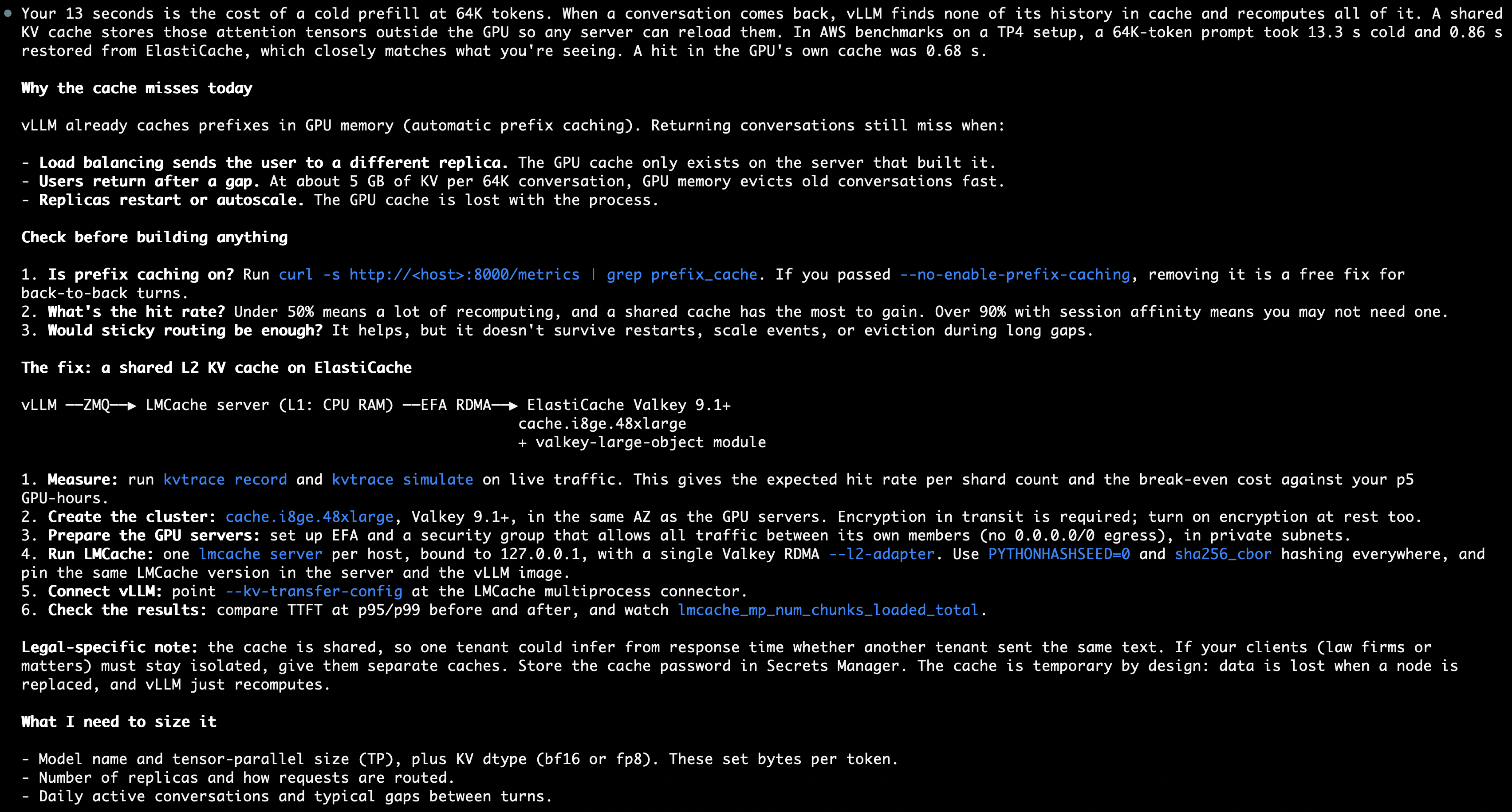
Figure 1: The diagnosis and proposed architecture for the legal assistant
Flow 2: Estimating savings
To size the savings, we gave the agent an example fleet of 8 p5 instances that serve 64,000-token prompts for a multi-turn retrieval-augmented generation (RAG) assistant. The agent looked up the GPU and cache node prices and derived the prefill rate and KV size from benchmarks. Finally, the agent recommended two cache.i8ge.48xlarge nodes for distributed KV caching. The following figure shows the agent’s summary and the inputs it used.
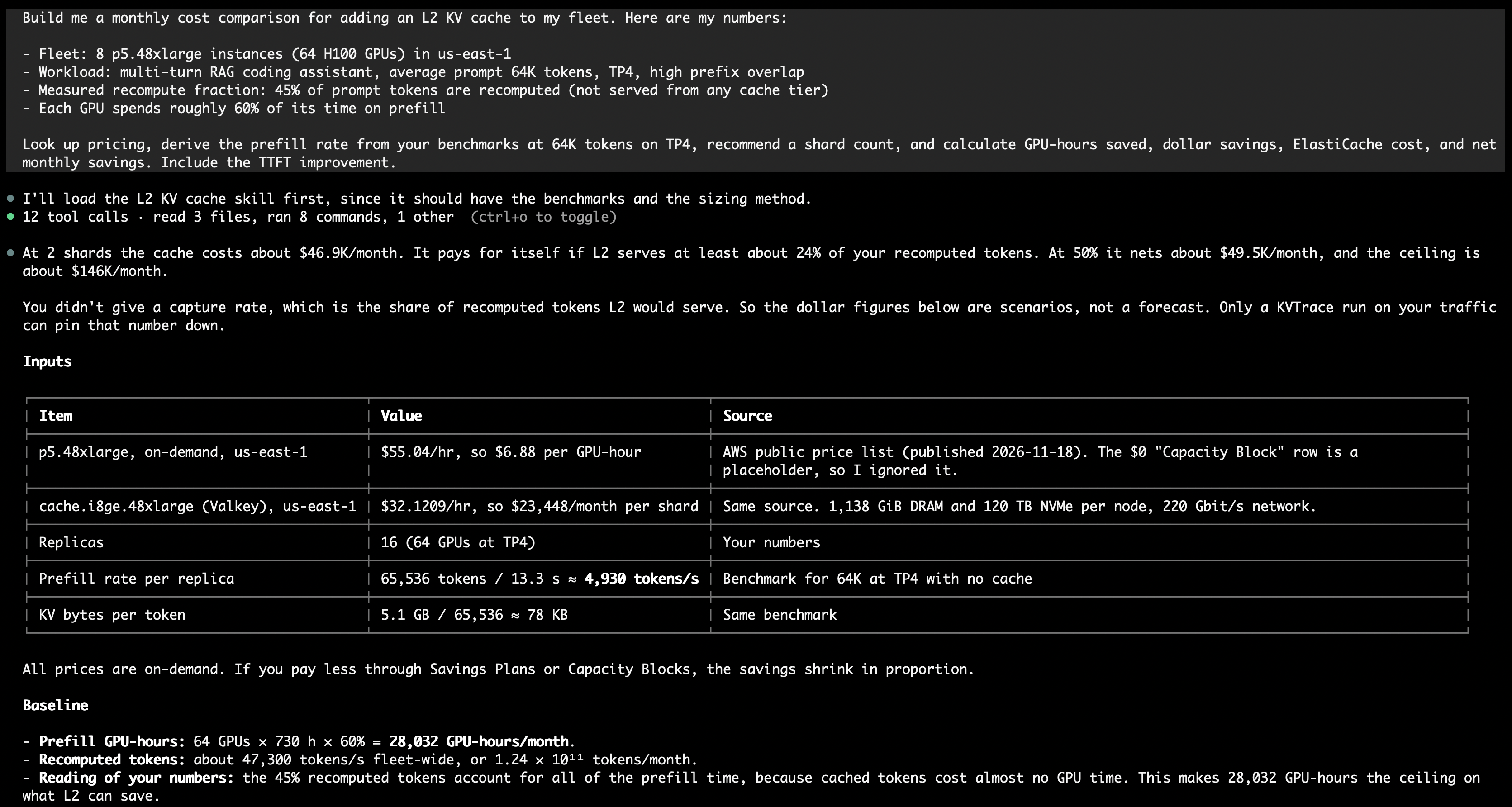
Figure 2: The agent’s summary and inputs. It looked up both prices in the AWS price list and explains how it arrived at the recompute figure
We didn’t provide a cache hit rate, which is the share of recomputed tokens the cache would serve. The agent therefore presents scenarios and recommends a KVTrace run to identify the cache hit rate. KVTrace records the KV cache events from vLLM or SGLang. It then replays them offline against a shared KV cache of each candidate size. The recorder never writes token IDs or prompt text. Traces hold block hashes and token counts. Block hashes come from token content, so pass --anonymize-key-file when your prompts are sensitive. The skill records on every GPU server for a representative window, such as a full business day. The agent also notes that freed GPU time turns into dollars only if you run fewer servers or serve more traffic on the same ones.
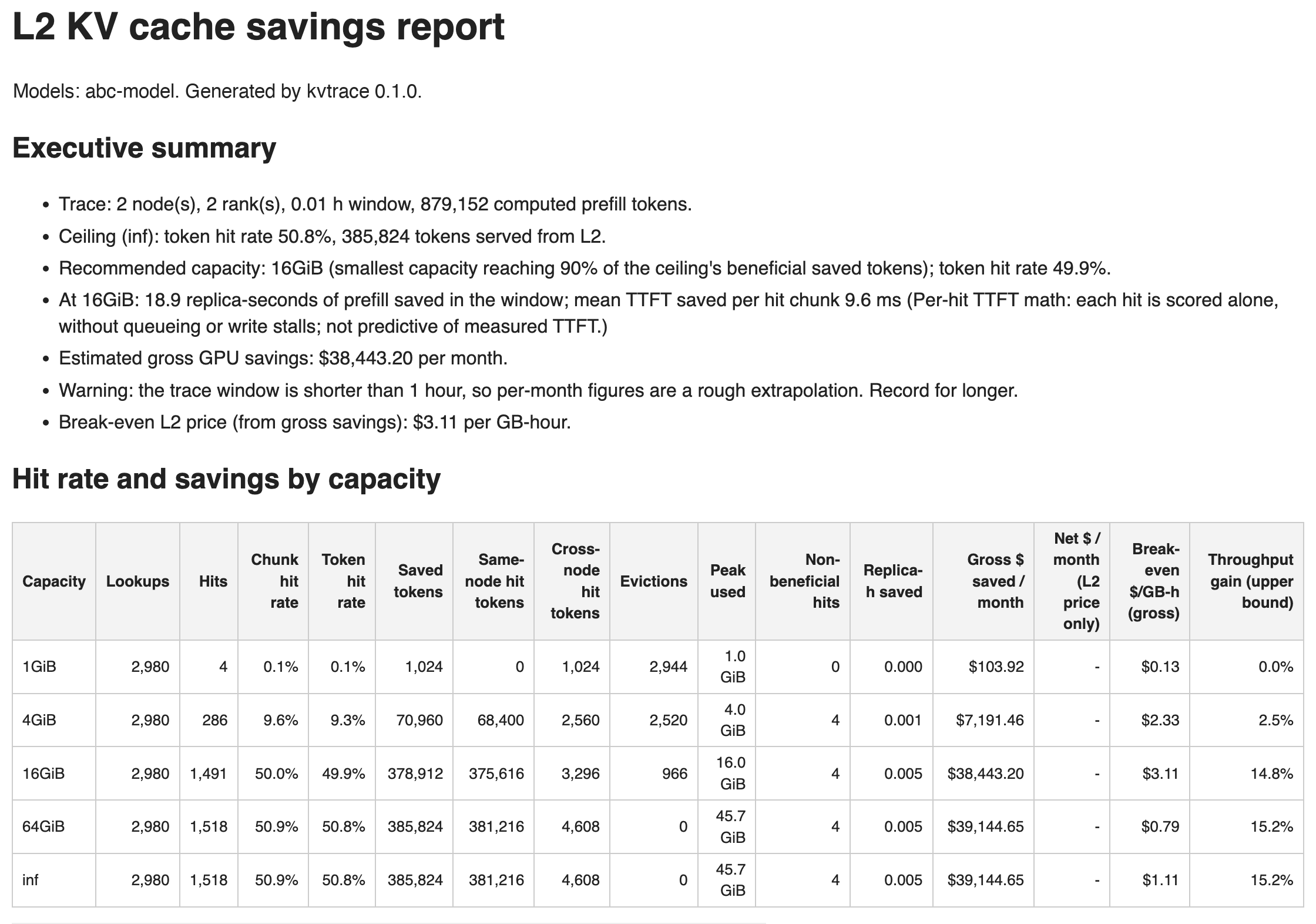
Figure 3: The top of a KVTrace report from synthetic demo traffic. It recommends the smallest capacity that reaches 90% of the savings ceiling.
Flow 3: Setting up a distributed KV cache
We prompted the agent with: “Set up a shared L2 KV cache for LLM inference, starting from scratch.” Before it creates anything, the agent requests your confirmation to set up the suggested cache node count in your Availability Zone, at the estimated price. Once confirmed, it creates the right security group with EFA permissions, and a Valkey 9.1 cluster that uses a custom parameter group with caching eviction policies. LMCache gets its own cache user, with the password in AWS Secrets Manager. The agent prepares the GPU servers and starts one LMCache server per GPU server. Then it checks the cluster with a small test object and confirms that repeated prompts load their KV state from the cache over Remote Direct Memory Access (RDMA). On a GPU fleet, the skill checks the measured L2 share against the KVTrace prediction. For the full setup with every command, see Getting started with distributed KV caching in the Amazon ElastiCache documentation.
Flow 4: Troubleshooting
Prompt: “My LMCache server connects to the ElastiCache cluster and BLOB.RDMA_HELLO succeeds, but actual data transfers are failing. INFO largeobj shows rdma_write_errors climbing. What’s wrong?”
Following the skill’s troubleshooting guide, the agent reasons from the symptom pattern and identifies the likely cause as a security group that blocks EFA traffic between its own members. It provides you commands to check and fix the rule.
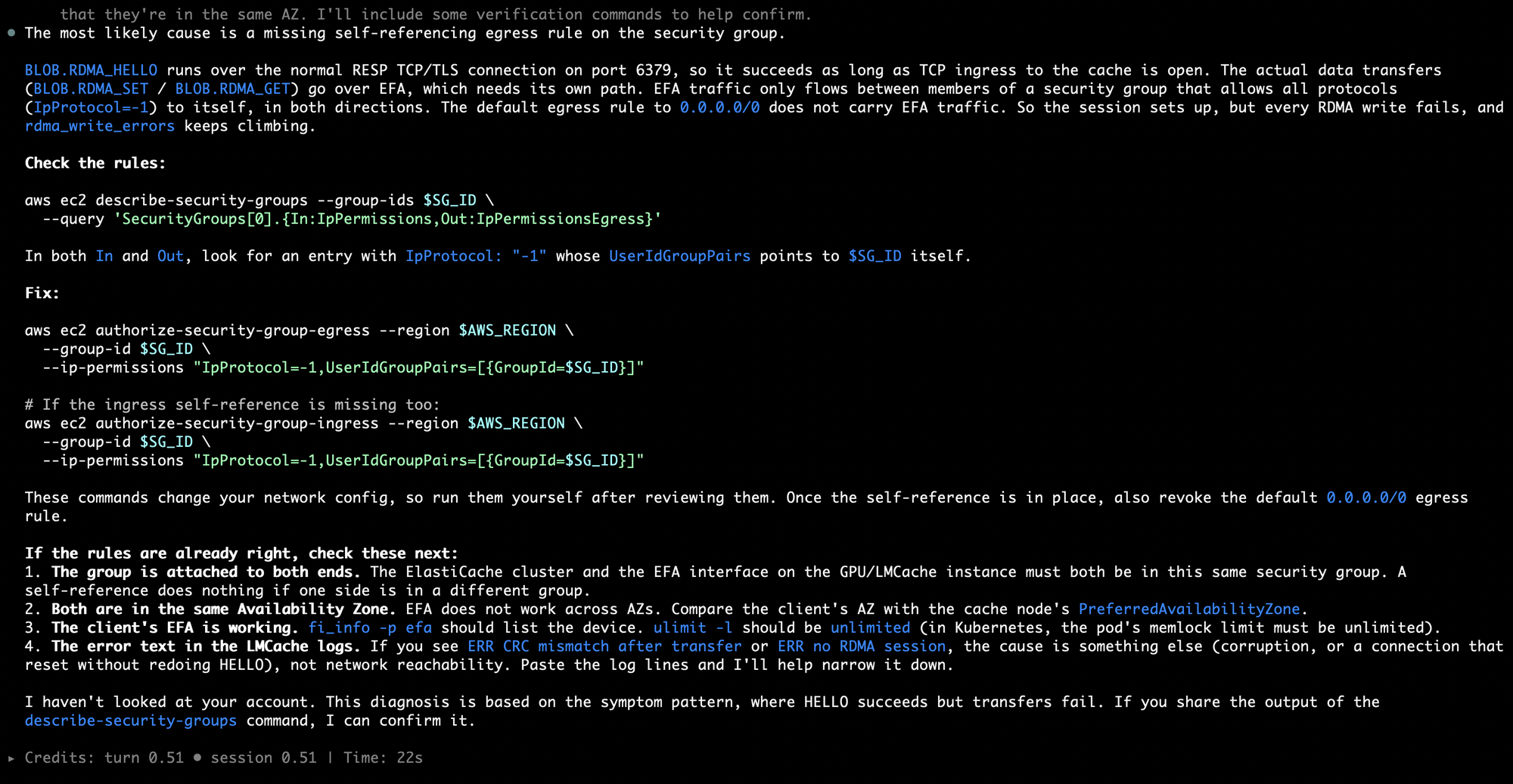
Figure 4: The agent explains the symptom, then gives commands to check and fix the security group
Get started
You can get the distributed KV caching skill or the AWS MCP Server from the Agent Toolkit for AWS. Then describe your problem or ask your AI agent to cut costs and latency on your GPU fleet to get started. To learn more about distributed KV caching with ElastiCache and the performance benchmarks see the AWS blog. You can see getting started with the AWS Command Line Interface (AWS CLI) at Amazon ElastiCache documentation and learn more about KVTrace at the GitHub repo.
About the authors