














Build AI-powered dashboard automation agents with NLP on Amazon Bedrock AgentCore
This solution combines the power of Amazon Bedrock AgentCore, Strands Agents, and Amazon Quick transforms to deliver a secure, scalable, and intelligent system for building and operating AI agents while transforming data into actionable business insights.
Business analysts often wait days for dashboard modifications when responding to changing business requirements. Traditional processes involve submitting modification requests to IT teams, who interpret requirements, navigate API documentation, understand table schemas, and deploy changes. While this approach maintains proper oversight and quality control, it can result in multi-day turnaround times when rapid dashboard updates are needed.
This solution combines the power of Amazon Bedrock AgentCore, Strands Agents, and Amazon Quick transforms to deliver a secure, scalable, and intelligent system for building and operating AI agents while transforming data into actionable business insights.
Solution overview
In this solution, we use a multi-agent architecture built with Amazon Bedrock AgentCore and the Strands framework. Amazon Bedrock AgentCore is an agentic platform for building, deploying, and operating effective agents securely at scale, no infrastructure management needed. It accelerates agents to production with intelligent memory and a gateway to enable secure, controlled access to tools and data. It runs agents with production-grade security and dynamic scaling and monitors performance and quality in production. Strands Agents is a code-first framework for building agents with integration to AWS services. The solution also uses Amazon Quick which delivers AI-powered BI capabilities, transforming your scattered data into strategic insights for everyone so you can make faster decisions and achieve better business outcomes.
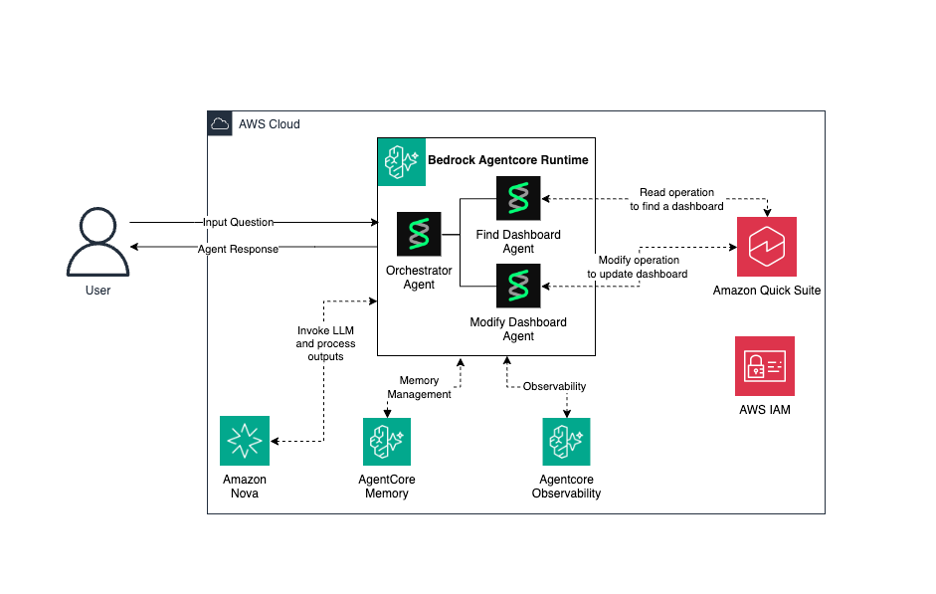
The architecture comprises three specialized agents working together. The Find Dashboard Agent performs discovery operations including searching dashboards and retrieving column metadata from dashboards and datasets. The Modify Dashboard Agent executes configuration changes by validating columns, updating table visuals, and creating new dashboard versions. The Orchestrator Agent routes user requests to the appropriate specialized agents based on intent classification.
The Orchestrator Agent serves as the entry point for user interactions. When users submit natural language queries like “Add lastname to the testing dashboard”, Amazon Nova classifies requests as conversational or operational. Conversational queries receive direct responses using Nova’s large language model (LLM) capabilities. Operational requests are routed through the Strands framework to specialized agents, validates changes against available dataset columns, and executes modifications autonomously while maintaining security controls, audit trails, and preserving original dashboards for rollback purposes.The following diagram illustrates the solution architecture and workflow.
The architecture includes the following components:
- Amazon Bedrock AgentCore – Hosts the Strands Agent orchestrator and specialized sub-agents.
- Amazon Nova – Provides natural language processing (NLP) and reasoning capabilities.
- Amazon Quick – The target service for dashboard discovery and modification operations.
- AgentCore Memory – Maintains conversation context and session state.
- Amazon Bedrock AgentCore Observability – Logs agent decisions and traces API interactions.
To implement the agentic AI solution for Quick self-service, complete the following high-level steps:
- Build the agents (Find Dashboard Agent, Modify Dashboard Agent, and Orchestrator Agent).
- Deploy the agents to Amazon Bedrock AgentCore.
- Test the agent through the AWS Management Console.
Prerequisites
To implement this solution, you must have the following prerequisites:
- An AWS account with permissions for Amazon Bedrock, Amazon Quick, and AWS Identity and Access Management (IAM). For creating a new dashboard, refer to Create an Amazon Quick dashboard for more information.
- An active Amazon Quick account with existing dashboards (creating guide).
- IAM permissions configured to grant the agent access to Quick Application Programming Interfaces (APIs):
quicksight:ListDashboardsquicksight:DescribeDashboardquicksight:DescribeDashboardDefinitionquicksight:DescribeDataSetquicksight:CreateDashboard
- Python 3.10 or later (Python 3.10-3.13 supported for direct code deployment).
- The uv package manager installed (installation guide).
- AWS Command Line Interface (AWS CLI) configured with appropriate credentials.
- Basic understanding of Python and AWS services.
Walkthrough
To build, deploy, and test your AI-powered dashboard automation solution using Amazon Bedrock AgentCore, follow these four steps:
Step 1: Build Quick self-service agents to find and modify dashboards
Build three core agents that power the Quick self-service solution:
- Find Dashboard Agent for discovery operations.
- Modify Dashboard Agent for modification operations.
- Orchestrator Agent that coordinates between them.
Let’s explore each agent’s role and implementation.
1.1 Build the Find Dashboard Agent
This agent handles dashboard discovery operations required for subsequent viewing or modification actions. For example, when a user submits a natural language query such as “show me a report with name ‘testing’,” the orchestrator invokes this agent, which executes the list_dashboards API to retrieve dashboard metadata, filters results based on search criteria, and returns matching dashboards in a structured format.
This discovery agent offers three core capabilities: dashboard search with support for both exact and partial name matching, listing available dashboards in the account, and retrieving column information from both dashboards and their underlying datasets. These discovery functions serve as a prerequisite for dashboard operations, as identifying the target dashboard is required before executing modifications or retrievals.
Each capability is implemented as a Strands @tool function. The following snippet shows the find dashboard tool, which calls the list_dashboards API and filters results using partial name matching:
The agent then wraps these tool functions inside a Strands Agent and exposes itself as a @tool so the orchestrator can invoke it with natural language queries:
This agent-as-tool pattern is what enables the multi-agent architecture. The orchestrator doesn’t call Quick APIs directly, it invokes this agent, which handles natural language understanding and API calls internally.
1.2 Build the Modify Dashboard Agent
With discovery capabilities in place, the next agent handles dashboard configuration changes through a validation-first workflow. Consider a user request like “add lastname to the testing dashboard.” The orchestrator routes this to the Modify Dashboard Agent, which validates the column exists in the dataset schema, retrieves the complete dashboard definition using the describe_dashboard_definition API, updates table visual field wells and field options, and creates a new dashboard version using the create_dashboard API.
This modification agent supports two primary operations: adding columns to dashboards (after validating the requested column exists in the underlying dataset but isn’t already present) and removing columns from dashboards (after confirming the column is currently displayed). Rather than modifying existing dashboards, it creates new dashboards with unique identifiers, preserving the original for audit purposes and supporting rollback if needed.
This validation-first approach helps validate data integrity and prevent configuration errors, while preserving original dashboards supports compliance with governance requirements and provides an audit trail for modifications.
The following snippet shows the core modification tool. It validates the request, updates the dashboard definition’s table visual field wells, and creates a new dashboard:
The agent extracts the dashboard name, action, and column name from the user’s natural language query and passes them to the modify_dashboard tool, which handles validation and execution.
1.3 Create the Orchestrator Agent
The final component coordinates the Find Dashboard Agent and Modify Dashboard Agent as tools within the Strands framework. This orchestrator defines system prompts that instruct routing logic, specifying which agent handles discovery operations versus modification operations. The configuration includes tool registration for both specialized agents, allowing the orchestrator to invoke them based on classified intent.
The routing logic handles multiple query patterns through natural language understanding. Direct requests containing explicit parameters such as dashboard names and column names are immediately delegated to the appropriate specialized agent. Ambiguous requests lacking required parameters trigger follow-up questions to gather missing information before routing. This implementation pattern allows the orchestrator to function as a coordinator rather than an executor, delegating Quick API operations to specialized agents while focusing solely on intent analysis and routing decisions.
The following snippet shows the orchestrator registering both agents as tools and defining the routing logic through its system prompt:
The Bedrock AgentCore integration exposes this orchestrator as the entry point that receives user requests:
Because find_dashboard_agent and modify_dashboard_agent are each wrapped as @tool functions, the orchestrator treats them like any other tool. Amazon Nova analyzes the user’s intent and invokes the appropriate agent automatically.
Step 2: Set up project for agent deployment
Deploy the agents to Amazon Bedrock AgentCore using direct code deployment. This involves initializing the project, adding dependencies, creating the agent files, and deploying to the runtime environment.
2.1 Initialize project
Set up a new Python project using the uv package manager, then navigate into the project directoryuv init quicksight-selfservice-agentcd quicksight-selfservice-agentThis creates a new project structure with the necessary configuration files for managing dependencies and deploying your agent.
2.2 Add dependencies for the project
Install the required Amazon Bedrock AgentCore libraries and development tools for your project. In this example, dependencies are added using the uv add command:
Activate the virtual environment:
These dependencies provide the core framework for building and deploying your agent, including the Strands SDK for agent creation and the Amazon Bedrock AgentCore toolkit for deployment management.
2.3 Create the agent.py file
Download the complete implementation from the GitHub repository as a zip file. Extract the zip and copy the following files to your project root directory:
agent.py– Main orchestrator agent entry point with Amazon Bedrock AgentCore integrationfind_dashboard_agent.py– Specialized agent for dashboard discovery operationsmodify_dashboard_agent.py– Specialized agent for dashboard modification operationsshared/folder – Contains config.py for shared AWS service client configuration
Other required files such as pyproject.toml and configuration files are already part of the project setup from the initialization step. With these files in place, you can now deploy the Quick self-service agent to Amazon Bedrock AgentCore.
Step 3: Deploy to Amazon Bedrock AgentCore Runtime
Amazon Bedrock AgentCore provides a managed environment for deploying Strands Agents with two deployment options: container-based deployment and direct code deployment. For this solution, we can use direct code deployment.
3.1 Configure your agent to Amazon Bedrock AgentCore
Run the following command to configure the Quick self-service agent
The configuration process prompts you to configure deployment settings including deployment type (select option 1 for Amazon Simple Storage Service (Amazon S3) deployment) and default to all other instructions.
3.2 Deploy your agent to the AgentCore Runtime environment:
Run the following command to deploy the Quick self-service agent to Amazon Bedrock
This command builds and pushes the code to Amazon S3, and deploys the agent in Amazon Bedrock AgentCore, making it ready to receive and process requests.
Step 4: Test the agent
Test your agent using the AWS Management Console. The console provides a built-in test environment through the Amazon Bedrock AgentCore interface. Follow these steps to test your agent:
- Navigate to the Amazon Bedrock AgentCore console.
- Verify that the agent got created.
- Navigate to the Amazon Bedrock AgentCore console in the AWS Management Console.
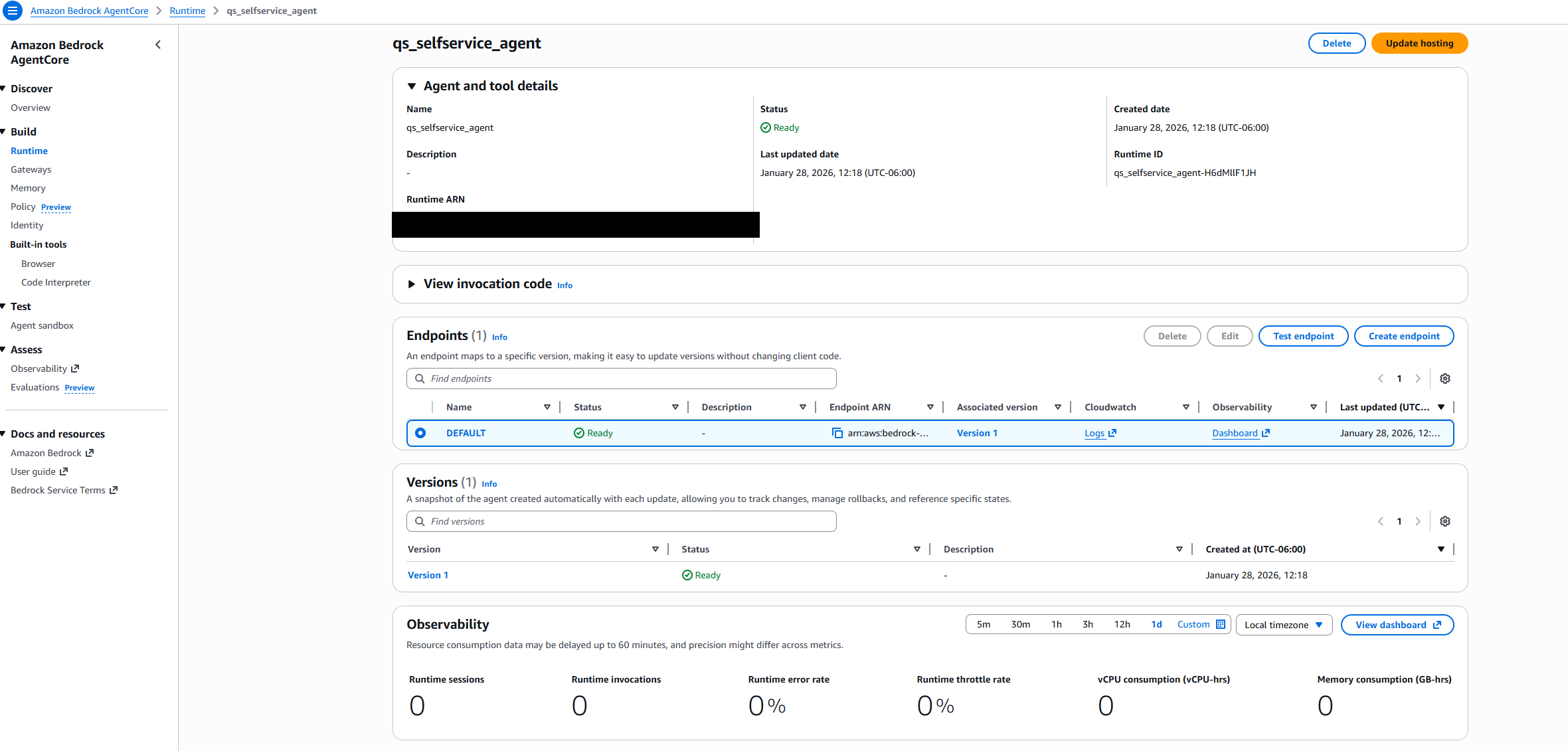
- Locate your agent in the Runtime resources list (for example,
qs_selfservice_agent) should appear with a “Ready” status and a green checkmark in the Status column. - The Endpoints section shows the DEFAULT endpoint with a “Ready” status.
- After both the agent and its endpoint show “Ready” status, your agent has been successfully created and deployed.
- Select the agent ‘DEFAULT’ endpoint and Test endpoint.
- In the testing window, provide the following prompt to invoke “Find dashboard agent”:
{“prompt” : “can you show dashboards with name testing”}
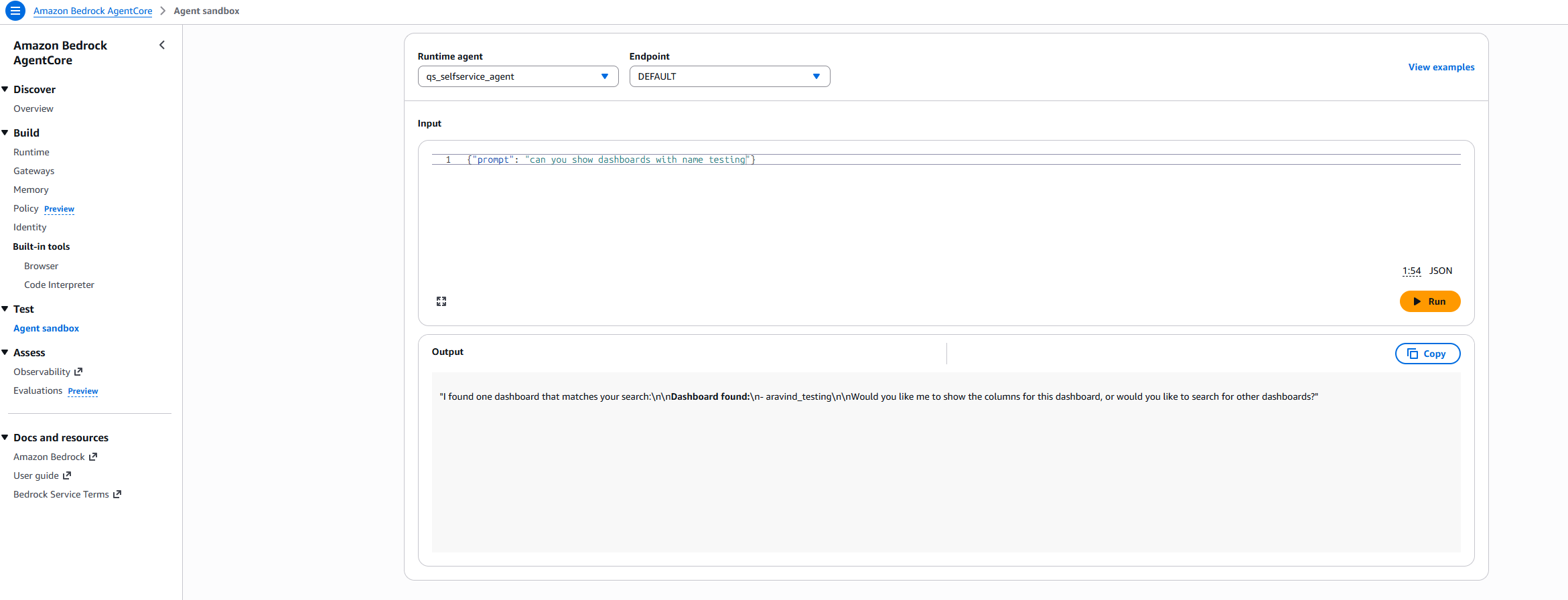
- The agent responds with relevant number of dashboards it found. Further prompt to modify the dashboard to invoke modify dashboard agent.
{“prompt” : “Can you add firstname column to the testing_dashboad”}
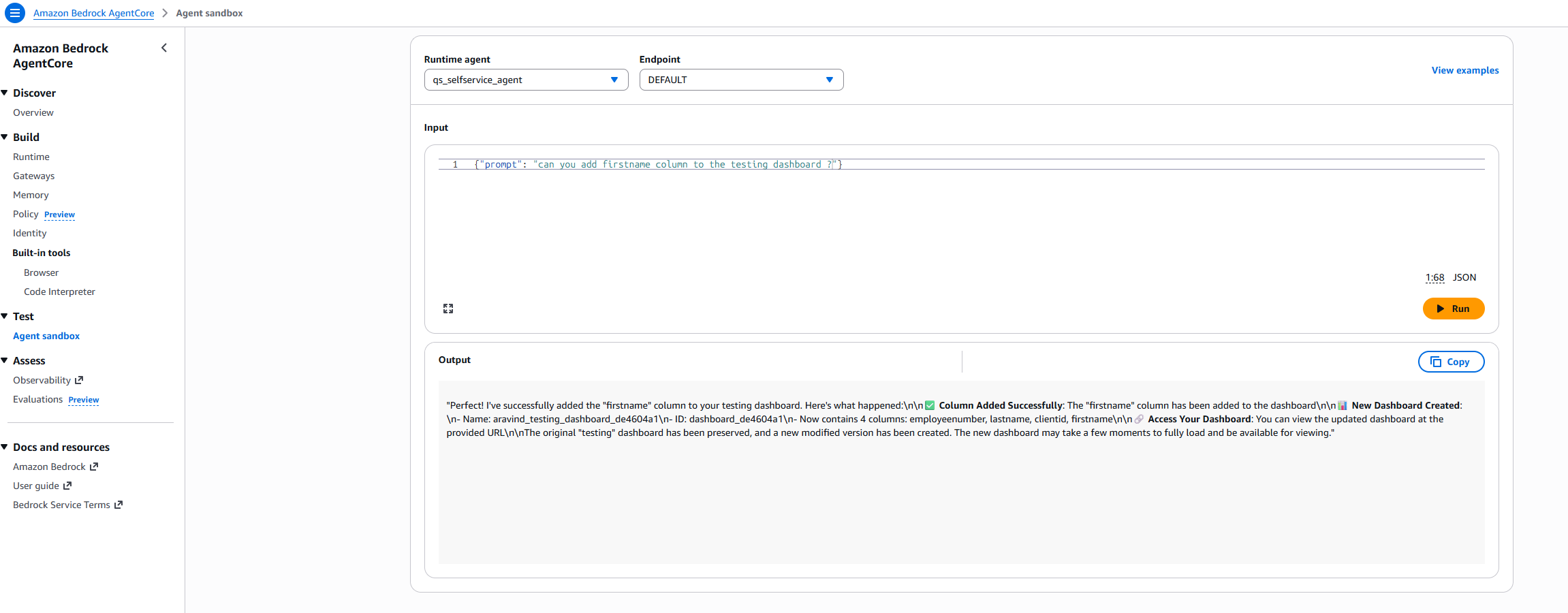
- The initial “XYZ_testing” dashboard doesn’t contain the firstname column, as shown in the following table.
| employeenumber | lastname | clientid |
| A1001 | LN1 | A |
| A1002 | LN2 | A |
| A1003 | LN3 | A |
| A1004 | LN4 | A |
| A1005 | LN5 | A |
| B1001 | LN6 | B |
| B1002 | LN7 | B |
| B1003 | LN8 | B |
| B1004 | LN9 | B |
| B1005 | LN10 | B |
| C1001 | LN11 | C |
| C1002 | LN12 | C |
| C1003 | LN13 | C |
| C1004 | LN14 | C |
| C1005 | LN15 | C |
- The modified “XYZ_testing” dashboard includes the newly added firstname column, as shown in the following table.
| employeenumber | lastname | clientid | Firstname |
| A1001 | LN1 | A | FN1 |
| B1005 | LN10 | B | FN10 |
| C1001 | LN11 | C | FN11 |
| C1002 | LN12 | C | FN12 |
| C1003 | LN13 | C | FN13 |
| C1004 | LN14 | C | FN14 |
| C1005 | LN15 | C | FN15 |
| A1002 | LN2 | A | FN2 |
| A1003 | LN3 | A | FN3 |
| A1004 | LN4 | A | FN4 |
| A1005 | LN5 | A | FN5 |
| B1001 | LN6 | B | FN6 |
| B1002 | LN7 | B | FN7 |
| B1003 | LN8 | B | FN8 |
| B1004 | LN9 | B | FN9 |
As you see, firstname column got added successfully and newly modified dashboard got created. You have created a solution that uses a multi-agent architecture powered by Amazon Bedrock AgentCore and the Strands framework to enable self-service dashboard management for finding a dashboard or modifying a dashboard. You also created an Orchestrator Agent that intelligently routes user requests based on intent.
Clean up
To avoid incurring future charges, delete the following resources:
- Delete the AgentCore Runtime deployment using the AWS Console or CLI:
- Remove the ECR repository – Navigate to the Amazon Elastic Container Registry (Amazon ECR) console and delete the container repository created during deployment, or use the following CLI command:
- Remove test Quick dashboards – Navigate to the Amazon Quick console and delete modified dashboard versions with UUID suffixes created during testing, or use the following CLI command:
- Delete Amazon CloudWatch Log groups – Navigate to the Amazon CloudWatch console and remove log groups associated with the agent (format:
/aws/bedrock/agentcore/), or use the following CLI command:
Conclusion
In this post, we combined Strands Agents, Amazon Bedrock AgentCore, and Amazon Nova to turn multi-day dashboard modification requests into seconds-long natural language interactions. The orchestrator-subagent pattern extends beyond Quick to other API-driven services where business users depend on IT for routine changes. Using this pattern, organizations can build autonomous AI systems that accelerate operational workflows while maintaining enterprise security, audit trails, and rollback capabilities.
Try out the solution, and if you have any comments or questions, leave them in the comments section.
About the authors