
![[Notice] Temporary Maintenance Oct 8 PDT / Oct 9 CEST](https://clan.akamai.steamstatic.com/images/46074831/acaf8855d3caa78719852fa866d8fae0245e46e7.png?#)














Extending MCP support for Amazon Bedrock AgentCore Gateway
While deploying Model Context Protocol (MCP) servers in production, enterprises need fine-grained access control across servers, observability into which teams use which tools, security guarantees against data exfiltration, and centralized credential management, all at scale. Amazon Bedrock AgentCore Gateway sits between MCP servers and the clients that consume them, centralizing credential management, observability, and secure […]
While deploying Model Context Protocol (MCP) servers in production, enterprises need fine-grained access control across servers, observability into which teams use which tools, security guarantees against data exfiltration, and centralized credential management, all at scale. Amazon Bedrock AgentCore Gateway sits between MCP servers and the clients that consume them, centralizing credential management, observability, and secure connectivity into a single trusted entry point.
Today, we’re extending AgentCore Gateway with new capabilities that further strengthen support for enterprise MCP deployments. This post covers extended MCP tool schema support, MCP prompts and MCP resources as first-class primitives, dynamic listing for runtime discovery of MCP servers, streaming and session management for stateful real-time interactions, elicitation for mid-execution input requests, and OAuth 2.0 on-behalf-of token exchange for delegated authentication. For hands-on examples, visit the GitHub samples repository.
Unite MCP servers for enterprise through AgentCore Gateway
Without a centralized gateway, every MCP server that your organization builds must independently handle credentials, policy enforcement, private connectivity, and logging. This means that your legal team’s contract review MCP server, your finance team’s data retrieval MCP server, and your operations team’s incident response MCP server each carry the same infrastructure burden. Security teams review each server individually, developers wait for approvals, and nobody has a unified view of how MCP infrastructure is being used across the organization.
AgentCore Gateway helps avoid this duplication by establishing a single-entry point that MCP traffic flows through. The following diagram shows the main features for AgentCore Gateway that allow central governance and control.
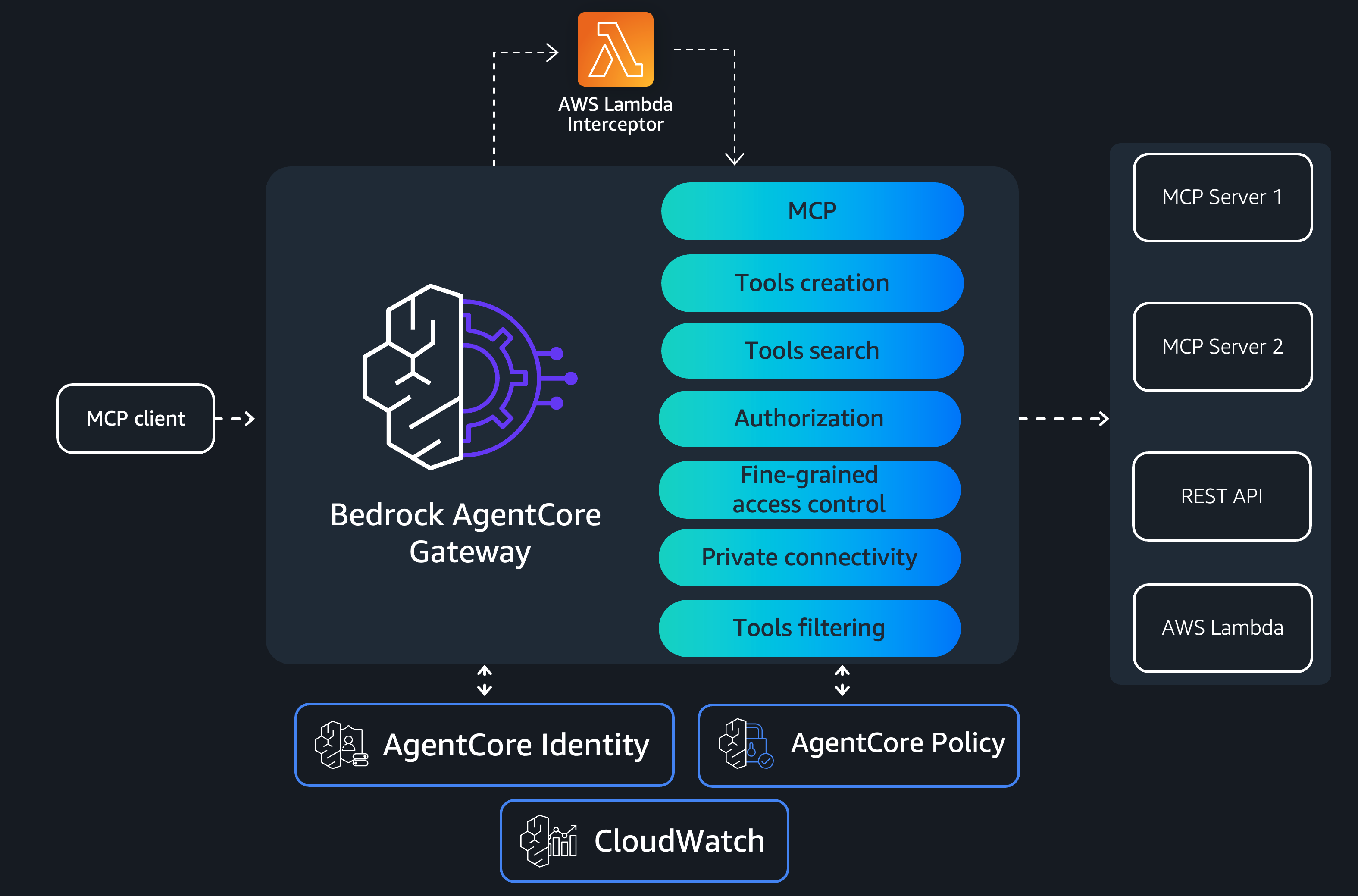
Each team builds only the business logic for their MCP server. AgentCore Gateway handles everything else. It aggregates capabilities across different target types, including MCP servers, REST APIs, AWS Lambda functions, and more. Resource-based policies (RBP) control who can invoke AgentCore Gateway, for example, restricting invocation to an Amazon Virtual Private Cloud (Amazon VPC). Service control policies (SCPs) govern how AgentCore Gateway is maintained within your AWS organization.
For network isolation, AgentCore Gateway supports AWS PrivateLink for both control plane and data plane operations so that traffic stays within your Amazon VPC boundaries. You can also connect to private API endpoints or MCP servers through managed VPC resource mode. Centralized application and identity logs help you manage audit and compliance requirements.
With interceptor capability, AWS Lambda functions can customize requests and responses, enabling fine-grained access control, sanitization, custom authorization logic, and more. Integration with AgentCore Policy (Preview) provides agentic guardrails defined around your tools for deterministic policy enforcement at a centralized plane. AgentCore Gateway also helps facilitate the OAuth 2.0 authorization code flow, where the agent authenticates on behalf of a user before invoking tools.
Now, you will walk through the new capabilities that we’re adding to AgentCore Gateway to further strengthen enterprise MCP support.
Surface your MCP server primitives through a single gateway
AgentCore Gateway becomes a single MCP endpoint that aggregates capabilities from every MCP server in your organization. Clients see one unified tool catalog, one prompt library, and one resource namespace, not 20 separate connections to manage. Under the hood, AgentCore Gateway supports all three MCP primitives: tools, prompts, and resources. Tool definitions in MCP include an optional outputSchema for defining expected output structure and annotations describing behavioral properties such as whether a tool is read-only or destructive, alongside the standard name, icons, description, and inputSchema. The gateway also supports prompts, resources, and resource templates through their full set of MCP methods: tools/list, tools/call, prompts/list, prompts/get, resources/list, resources/read, and resources/templates/list. The following architecture diagram shows how AgentCore Gateway facilitates list and invoke calls.
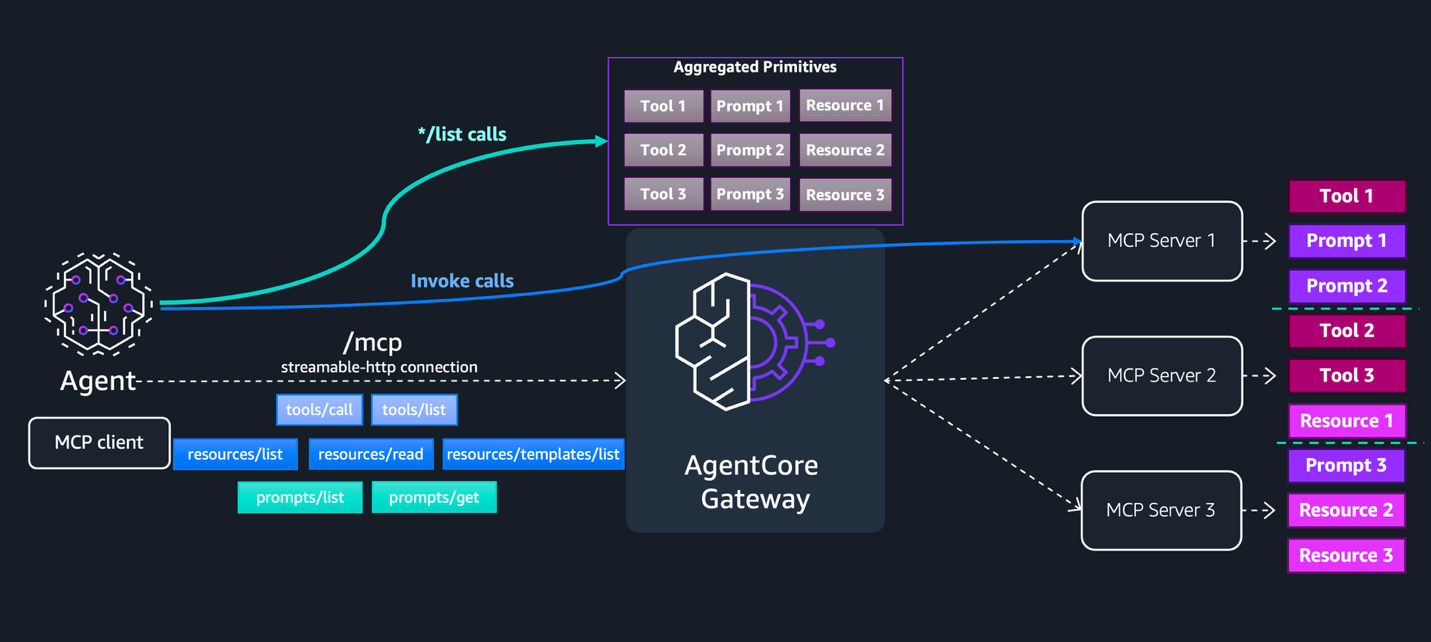
In the default listing mode, AgentCore Gateway discovers and caches tools, prompts, and resources from connected MCP server targets. This cache is implicitly refreshed whenever you call CreateGatewayTarget or UpdateGatewayTarget, and can be explicitly refreshed using the SynchronizeGatewayTargets API. When clients make list calls such as tools/list, prompts/list, or resources/list, AgentCore Gateway returns the response directly from this cache without invoking the MCP server target. The actual interaction with the MCP server target only happens during invoke operations: tools/call, prompts/get, and resources/read. At that point AgentCore Gateway routes the request to the correct target.
Tools and prompts returned by AgentCore Gateway are prefixed with the target name using the format targetName___. Unlike tools and prompts, resource URIs are returned without a target name prefix; the original URI from the downstream MCP server is passed through. When creating an MCP server target that exposes resources, you can optionally specify a resourcePriority value (1–1000) to control how AgentCore Gateway resolves conflicts when multiple targets expose the same resource URI. If no priority is defined, a default value of 1000 is applied. When a conflict occurs, AgentCore Gateway returns the resource from the target with the lowest resourcePriority value. If two conflicting resources share the same priority, the resource from the target that was synchronized first is returned.
Because resource URIs are provided by the downstream MCP server target and aren’t validated or sanitized by AgentCore Gateway, take care with untrusted targets. A malicious or compromised MCP server could return URIs pointing to internal endpoints or local file system paths. Validate and sanitize resource URIs before following them, and don’t automatically fetch or render URIs from untrusted MCP server targets.
Dynamic listing for runtime flexibility
Some MCP servers personalize their capabilities per user. A permissions-aware server might expose approve_expense only to managers, or a multi-tenant server might surface HIPAA-compliant tools only for healthcare customers. Dynamic listing lets you preserve that server-side access control while still routing through AgentCore Gateway.
When creating a target, you choose between two listing modes: default and dynamic. In default listing mode, AgentCore Gateway invokes the MCP server during CreateGatewayTarget or UpdateGatewayTarget operations to discover and cache tools, prompts, and resources. This cache can be explicitly refreshed using the SynchronizeGatewayTargets API. When clients make list calls, AgentCore Gateway serves the response directly from this cache without contacting the backend server. In dynamic listing mode, AgentCore Gateway doesn’t invoke the MCP server during CreateGatewayTarget or UpdateGatewayTarget operations. Instead, list calls are forwarded live to the MCP server at request time, using the identity of the calling user. In both modes, invoke operations such as tools/call, prompts/get, and resources/read route directly to the MCP server target. The following architecture diagram illustrates how both modes work together.
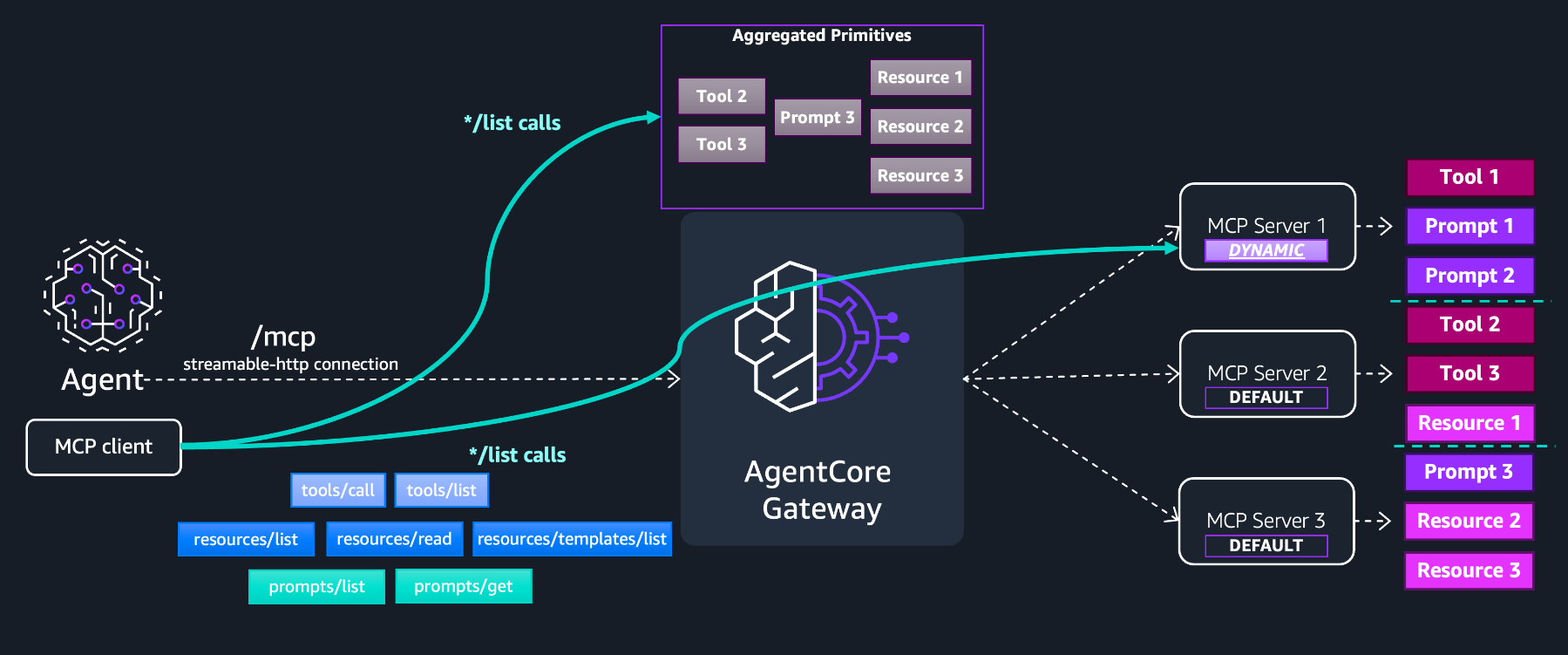
MCP Server 1 is configured with dynamic listing mode, while MCP Server 2 and 3 use default listing mode. The AgentCore Gateway cache contains only the capabilities from the default mode servers. During list calls, the response is paginated; the cached and MCP Server 1 primitives are returned on different pages. Because the primitives aren’t indexed at AgentCore Gateway for dynamic listing targets, the semantic tool search capability can’t be used.
This dual-mode architecture also gives you flexibility for multi-tenancy and fine-grained access control (FGAC). For both listing modes, you can enforce policies centrally using AgentCore Policy or AWS Lambda response interceptors to filter capabilities based on tenant identity. For example, you can restrict a tenant to only see read-only tools. For dynamic listing mode, you can manage access control directly at the MCP server itself, since list operations execute under the end user’s identity, and the MCP server target returns only the capabilities that user is authorized to access.
Streaming, session management, and elicitation
Many enterprise MCP workflows go beyond straightforward request-response tool calls. An MCP server might need to stream progress updates while generating a report, pause mid-execution to ask a user for approval before performing a sensitive action, or maintain context across a multi-step conversation that spans several tool invocations. AgentCore Gateway supports Streamable HTTP transport, MCP session management, and elicitation, which enable stateful, real-time, human-in-the-loop interactions.
Streamable HTTP
Without streaming, a tool call that takes 45 seconds returns nothing until completion, and the user stares at a spinner. With streaming, they see progress events in real time. When a client sends a tools/call request with Accept: application/json, text/event-stream, AgentCore Gateway opens an SSE stream and forwards events from the MCP server target in real time, including progress notifications, logging messages, and the final tool result. Clients that send only Accept: application/json continue to receive a single JSON response, preserving full backward compatibility.
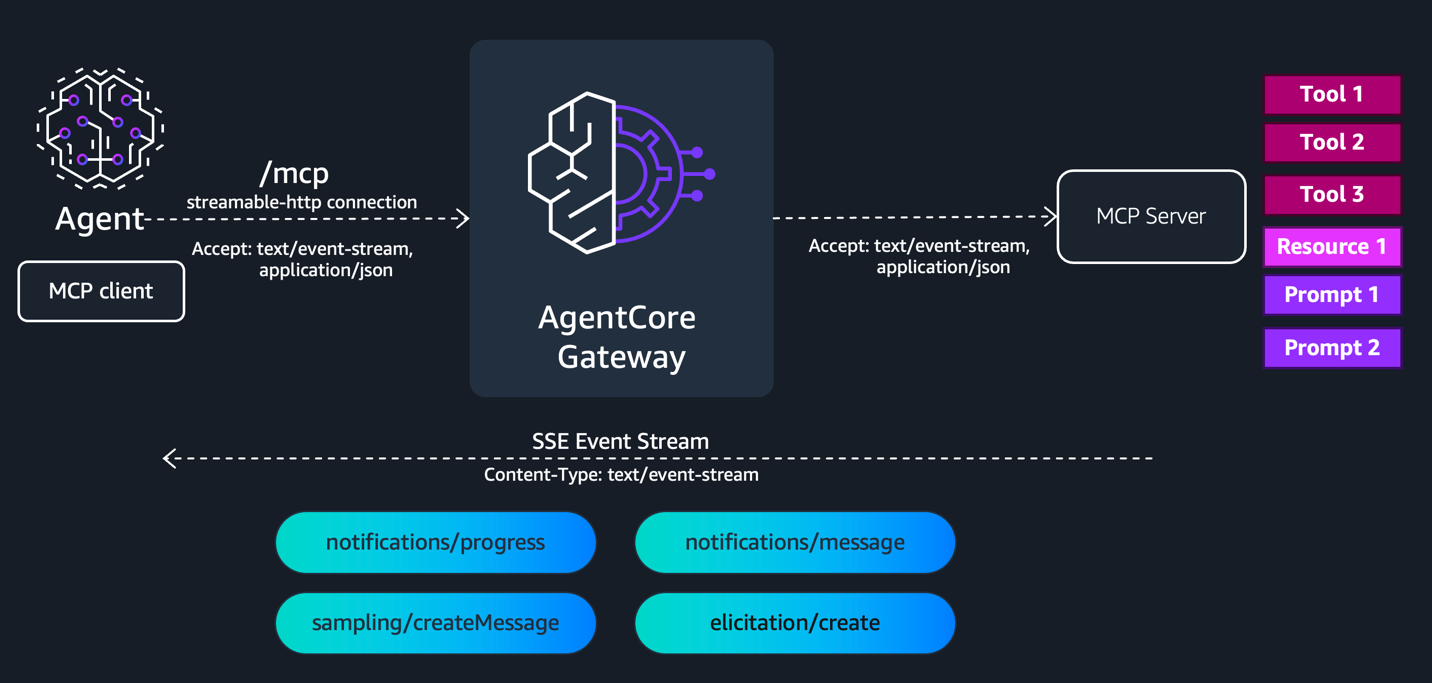
When response streaming is enabled on AgentCore Gateway, the response interceptor behavior changes and must check the isStreamingResponse field in gatewayResponse to distinguish between streaming and non-streaming responses. The response interceptor is invoked for events that contain a JSON-RPC id field. The response interceptor isn’t invoked for notifications/progress, notifications/message, and pings. To enable streaming, set the enableResponseStreaming block during the CreateGateway or UpdateGateway API call.
When thinking about streaming use cases with AgentCore Gateway, keep the following in mind. AgentCore Gateway determines the HTTP status code from the first event in the stream. If an error occurs mid-stream, it’s delivered as a JSON-RPC error object within an SSE frame rather than as an HTTP status code, since the status has already been sent. Pre-stream errors such as authentication failures, throttling, or validation errors are returned as standard JSON-RPC error responses with no SSE framing.
Session management
Session management introduces stateful multi-turn workflows to AgentCore Gateway. When you enable sessions, AgentCore Gateway generates a Mcp-Session-Id on the first initialize request and returns it as a response header. The client includes this header on subsequent requests, allowing AgentCore Gateway to track client interactions, maintain mappings to downstream MCP server sessions, and correlate elicitation requests across tool calls.
To enable sessions, add a sessionConfiguration block during the CreateGateway or UpdateGateway API call. You can configure the session timeout from a minimum of 15 minutes to a maximum of 8 hours. The default is 1 hour.
Sessions are scoped to the authenticated user. AgentCore Gateway derives the user identity from the authorization context, the JWT bearer token for OAuth ingress or the IAM credentials for AWS_IAM ingress, and validates that every request within a session originates from the same user. This helps prevent session hijacking, where one client attempts to use another client’s session identifier. AgentCore Gateway returns HTTP 400 if a session-enabled gateway receives a request without an Mcp-Session-Id header, and HTTP 404 for expired or non-existent sessions.
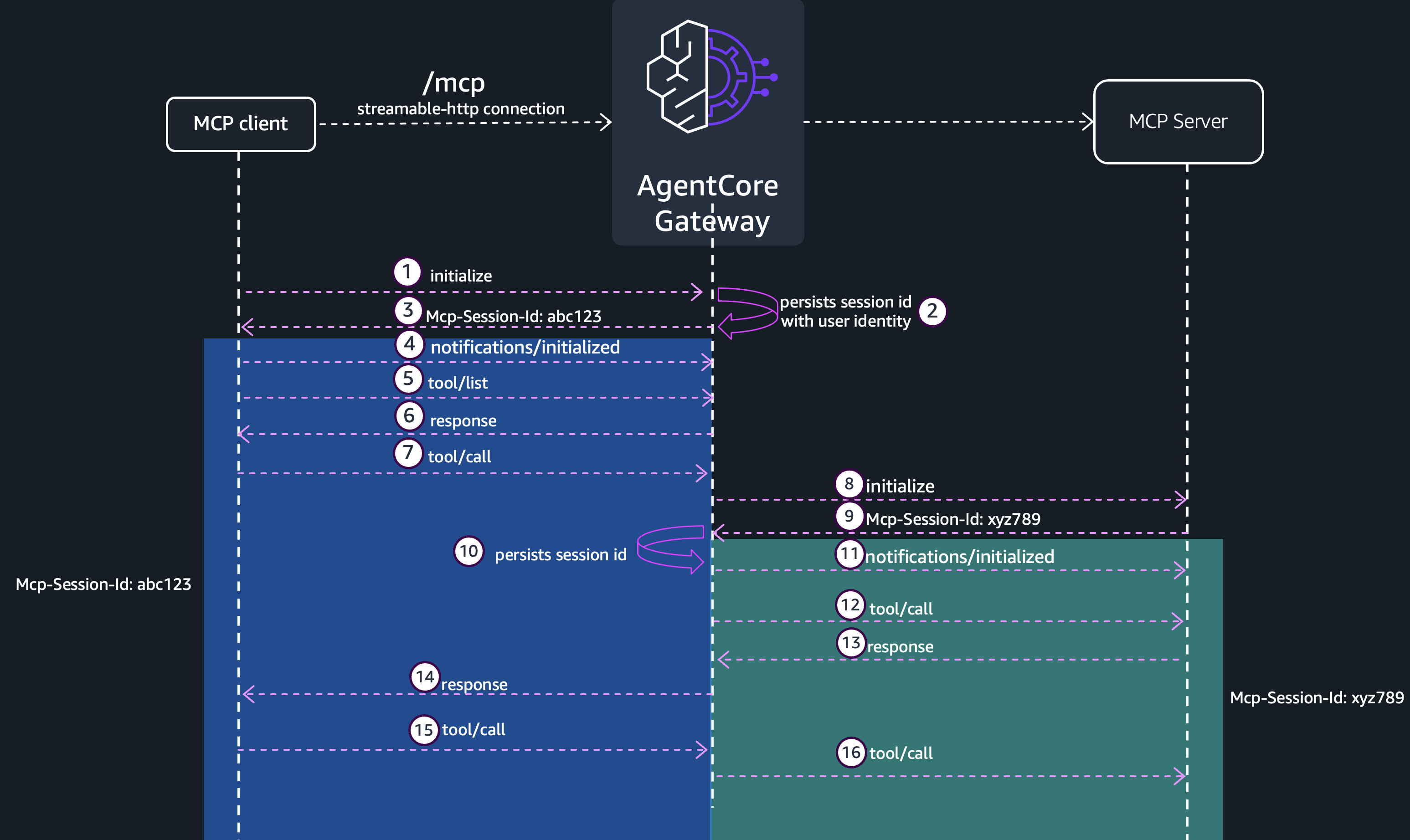
Behind the scenes, AgentCore Gateway persists the session ID in a fully managed durable store to manage sessions across requests. When AgentCore Gateway receives the first tool call for a given MCP server target within a session, it initializes a connection to that target, negotiates capabilities on behalf of the client, and stores the target session identifier. Subsequent tool calls to the same target within the session reuse this mapping, avoiding repeated initialization overhead. Because of this behavior, AgentCore Runtime doesn’t need to cold-start a new micro-VM on each request, resulting in faster response times.
When thinking about sessions for your AgentCore Gateway, keep the following in mind. Enabling sessions is a prerequisite for elicitation. If you’re using header propagation to forward Mcp-Session-Id to targets today, you can’t simultaneously enable session management because the gateway needs to own the session lifecycle. If a downstream MCP server session expires before the gateway session timeout, the gateway re-initializes the target transparently and continues serving the client.
Elicitation
Elicitation enables MCP servers behind AgentCore Gateway to pause execution and request input from the end user. This is particularly valuable for high-risk operations where the server needs explicit user confirmation, structured data collection, or out-of-band authentication before proceeding.
AgentCore Gateway supports the following elicitation modes. In form mode, the MCP server sends a flat JSON Schema describing the fields that it needs, and the client renders a form for the user to complete. In URL mode, the server sends a URL that the client opens for the user, typically an OAuth consent screen or an external approval workflow. In URL exception mode, the server returns URLElicitationRequiredError containing a URL, prompting the client to redirect the user and retry the tool call after the user completes the external flow.
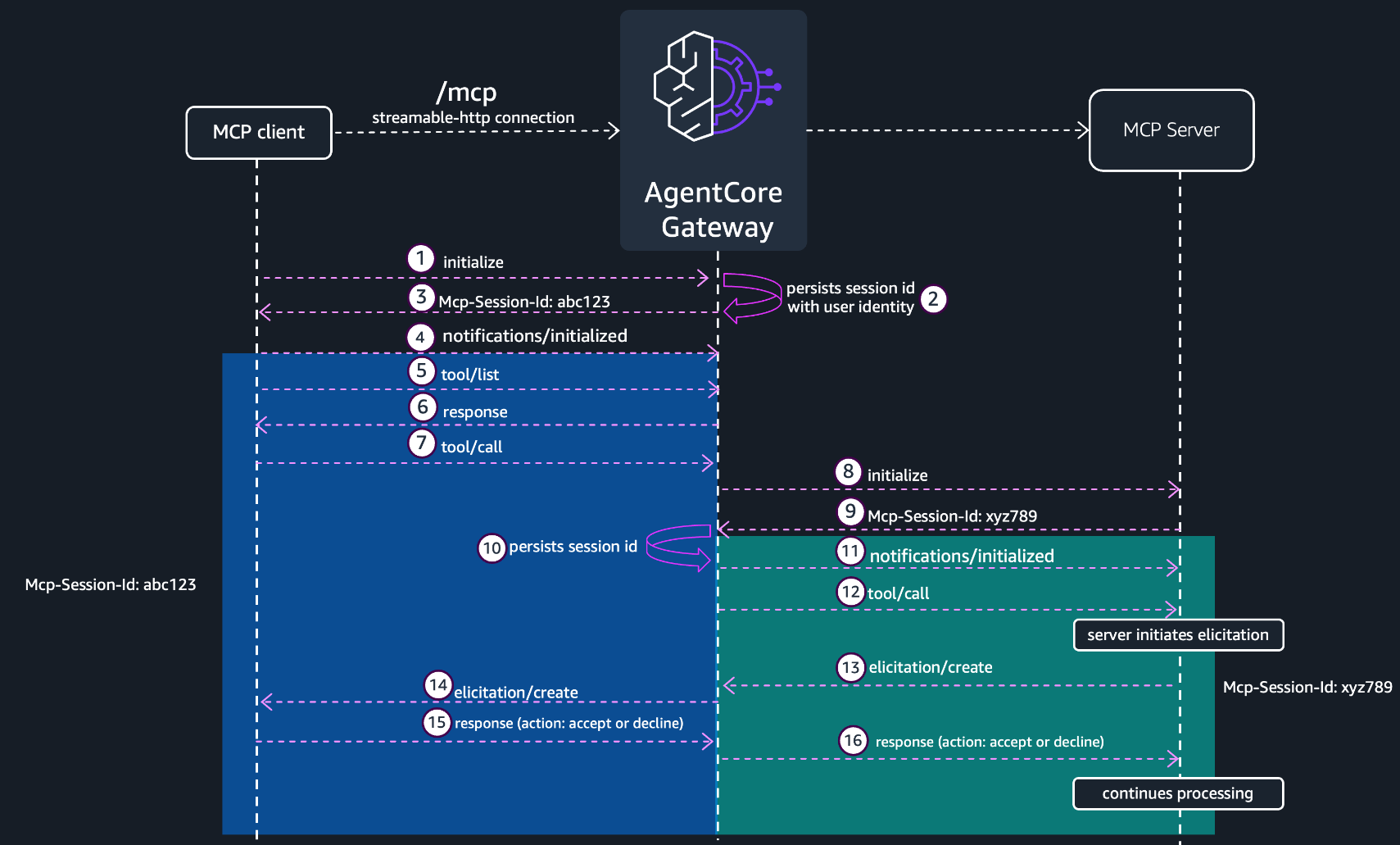
Here’s how form mode elicitation works through AgentCore Gateway. Steps 1–6 cover session initialization and tool discovery. After that, the client sends a tools/call request with the Mcp-Session-Id header. AgentCore Gateway forwards the tool call to the MCP server target. The target opens an SSE stream and sends an elicitation/create request. AgentCore Gateway forwards the elicitation/create request to the client on the SSE stream. The client presents the form to the user and collects the response. The client then sends the elicitation response (action: accept or decline) using the same Mcp-Session-Id. AgentCore Gateway forwards the response to the MCP server target, which acknowledges HTTP 202 Accepted. The target continues to process the request with the new information.
Elicitation requires both streaming and sessions to be enabled on your gateway. AgentCore Gateway respects capability negotiation; it only declares elicitation support to a downstream MCP server when the connecting client has declared support for it during initialization. This means if a client doesn’t support elicitation, the MCP server won’t attempt to send elicitation requests, avoiding unexpected behavior. AgentCore Gateway also supports multiple active elicitations per session, so a client can have concurrent tool calls each with their own pending elicitation.
When thinking about elicitation for your AgentCore Gateway, keep the following in mind. Elicitation timeout is governed by the AgentCore Gateway connection timeout. If a user takes longer than the connection timeout to respond to a form or complete a URL flow, the request times out. Plan your connection timeout accordingly for workflows that involve human interaction. If the connection between the client and AgentCore Gateway breaks during an elicitation, AgentCore Gateway does not support resuming that specific tool call. The client should retry the original tools/call request. The gateway supports elicitation pass-through for MCP server targets only. For non-MCP target types such as REST APIs or AWS Lambda functions, elicitation is not applicable since those targets do not initiate elicitation requests.
OAuth 2.0 on-behalf-of token exchange
When your agents need to access downstream resources on behalf of authenticated users, AgentCore Gateway supports OAuth 2.0 on-behalf-of (OBO) token exchange through AgentCore Identity. This enables a zero-trust authentication model where the original user’s identity is preserved and propagated through every hop in the request chain, while each layer receives a token scoped precisely to its intended audience.
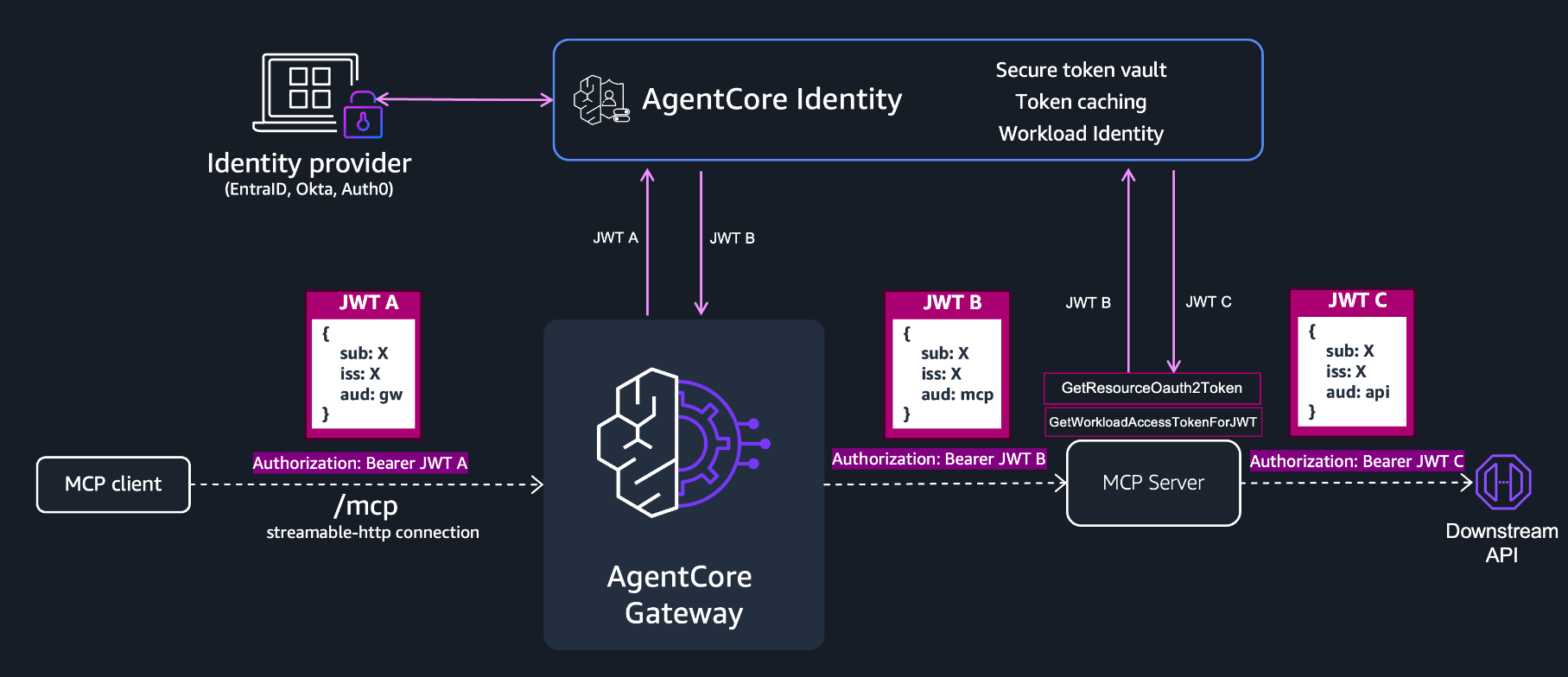
The MCP client authenticates to AgentCore Gateway with JWT A, scoped to the gateway audience (aud: gw), over the /mcp streamable HTTP connection. When AgentCore Gateway needs to call a downstream MCP server target, it calls AgentCore Identity to exchange JWT A for JWT B, now scoped to the MCP server audience (aud: mcp). If the MCP server in turn needs to call a further downstream API, it can use GetResourceOAuth2Token to obtain JWT C scoped to the downstream API audience (aud: api). At every hop, the original user identity (sub: X) is carried forward, so downstream services can enforce fine-grained, per-user authorization without triggering additional consent flows. The claims used in this flow are strictly for example purposes, and should only be used to understand this diagram.
AgentCore Identity acts as the central token broker for this entire flow. It provides a secure token vault for storing OAuth credentials and client secrets so that neither AgentCore Gateway nor MCP servers need to manage credentials directly, and workload identity for service-to-service authentication using AWS workload identity rather than long-lived secrets. It supports standard token exchange (RFC 8693) or JWT authorization grant (RFC 7523), depending on the identity provider.
Conclusion
With this release, you can build stateful multi-turn agent workflows with real-time progress streaming, human approval gates that pause and resume execution, and zero-trust identity propagation, through a single managed endpoint. No custom session stores, no hand-rolled streaming infrastructure, no shared service account credentials. Your MCP servers stay focused on business logic. AgentCore Gateway handles the rest: discovery, streaming, state, identity, and policy, centrally governed and incrementally adoptable.
To get started, review the Amazon Bedrock AgentCore Gateway documentation for configuration details on each feature covered in this post. For hands-on examples, visit the GitHub samples repository. If you’re already running MCP servers behind AgentCore Gateway, you can adopt these capabilities incrementally without changes to your existing AgentCore Gateway or target configurations.
About the authors