
















Build an AI-Powered Equipment Repair Assistant Using Amazon Bedrock AgentCore
In this post, you build an AI-powered equipment repair assistant using Amazon Bedrock AgentCore that helps farmers and field technicians diagnose equipment problems, identify required parts, and access manufacturer-approved repair procedures through natural language. The solution uses AgentCore Runtime with the Strands Agents SDK, Amazon Nova 2 Lite as the foundation model, Amazon Bedrock Knowledge Base for retrieval-augmented generation (RAG), and AgentCore Memory for conversation persistence.
Managing equipment repairs for heavy farm machinery often requires technicians to diagnose issues without the right parts, leading to multiple site visits, extended downtime, and substantial financial losses, especially during harvest season.
In this post, you build an AI-powered equipment repair assistant using Amazon Bedrock AgentCore that helps farmers and field technicians diagnose equipment problems, identify required parts, and access manufacturer-approved repair procedures through natural language. The solution uses AgentCore Runtime with the Strands Agents SDK, Amazon Nova 2 Lite as the foundation model, Amazon Bedrock Knowledge Base for retrieval-augmented generation (RAG), and AgentCore Memory for conversation persistence.
Solution overview
This solution combines a web frontend with an AgentCore-hosted agent that answers equipment diagnostic questions using indexed manufacturer documentation.
Amazon Cognito manages user authentication, and AWS Amplify hosts the web application. The equipment repair agent runs on AgentCore Runtime, built with the Strands Agents SDK. It queries a Bedrock Knowledge Base containing indexed equipment manuals, parts catalogs, and repair documentation. AgentCore Memory maintains conversation history across sessions so technicians can ask follow-up questions without repeating context.
The following diagram shows how these components work together.
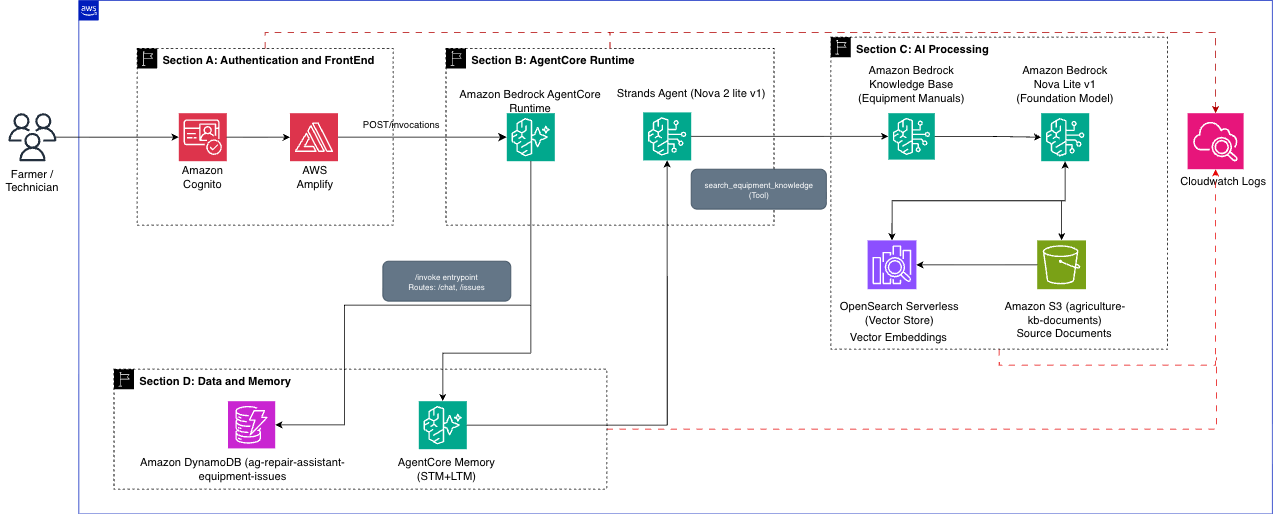
The architecture contains the following key sections:
Section A – Authentication and Frontend: The CloudFormation stack deploys Amazon Cognito (User Pool, Identity Pool) for authentication and AWS Amplify for hosting the React web application. Users authenticate through Cognito, and the frontend communicates directly with the AgentCore Runtime endpoint.
Section B – AgentCore Runtime: The AgentCore Runtime hosts the Strands-based agent and exposes the /invocations endpoint. The frontend calls this endpoint directly using a Cognito Bearer token. The agent’s invoke() entrypoint routes requests internally based on the path field in the payload (/chat for AI queries, /issues for CRUD operations), providing a single entry point for backend operations with built-in session management and health checks.
Section C – AI Processing: The Strands Agent uses a custom search_equipment_knowledge tool that calls the Bedrock Knowledge Base via the retrieve_and_generate API. The Knowledge Base indexes equipment documentation stored in Amazon S3 using Amazon OpenSearch Serverless for vector search and Amazon Titan Embeddings for semantic matching.
The following code snippet shows how the agent’s Knowledge Base retrieval tool queries manufacturer documentation:
@tool
def search_equipment_knowledge(query: str) -> str:
    """Search equipment manuals, parts catalogs, and repair docs."""
    response = bedrock_agent_runtime.retrieve_and_generate(
        input={"text": query},
        retrieveAndGenerateConfiguration={
            "type": "KNOWLEDGE_BASE",
            "knowledgeBaseConfiguration": {
                "knowledgeBaseId": KNOWLEDGE_BASE_ID,
                "modelArn": f"arn:aws:bedrock:{REGION}::foundation-model/{MODEL_ID}",
            },
        },
    )
    return response.get("output", {}).get("text", "No results found.")
Section D – Data and Memory: Amazon DynamoDB stores equipment service tickets (issue CRUD operations). AgentCore Memory provides short-term memory for within-session context and long-term memory for cross-session fact persistence. Amazon CloudWatch and AWS X-Ray provide automatic observability.
The following steps describe the request flow when a technician asks a question:
- The technician opens the web application and authenticates through Amazon Cognito.
- The technician submits a question through the chat interface.
- The frontend sends the query to the AgentCore Runtime /invocations endpoint with a Cognito Bearer token.
- AgentCore validates the token, routes the request to the agent, and retrieves the relevant context from previous conversations.
- The Strands Agent sends the query to Amazon Nova 2 Lite for inference.
- The model invokes the search_equipment_knowledge tool, which queries the Bedrock Knowledge Base.
- The Knowledge Base searches indexed equipment manuals and returns relevant documentation with source citations.
- The model synthesizes a diagnostic response with repair procedures and parts recommendations.
- The response is returned to the technician with source attribution for verification.
Prerequisites
Before you begin, verify that you have:
- An AWS account with appropriate permissions to deploy AgentCore agents. For required IAM permissions, see IAM Permissions for AgentCore Runtime.
- Amazon Bedrock model access for Amazon Nova 2 Lite in your deployment AWS Region. You can use a different supported model of your choice. For current model availability, see Model support by AWS Region.
- The AWS Command Line Interface (AWS CLI) v2.0 or later installed and configured with appropriate credentials.
- Python 3.10 or newer installed.
- Terminal or command prompt access.
Cost estimate: For testing, the primary costs are Amazon Bedrock model invocations (Amazon Nova 2 Lite at $0.30/$2.50 per million input/output tokens) and the Bedrock Knowledge Base (OpenSearch Serverless at approximately $0.24/hour while active). Other services (AgentCore Runtime, Amazon DynamoDB, Amazon S3, Amazon Cognito, AWS Amplify) fall within the AWS Free Tier for testing volumes. For detailed estimates, use the AWS Pricing Calculator.
Important: Deploy all resources in the same AWS Region. The CloudFormation stack, Knowledge Base, and AgentCore launch command must use the same Region.
Creating the Knowledge Base
Before deploying the agent, create and populate the Amazon Bedrock Knowledge Base with agricultural equipment documentation. This Knowledge Base provides the source material for diagnostic recommendations and repair guidance.
Step 1: Prepare your documentation
For testing, download equipment manuals from the John Deere Technical Information Store. You can also use your own organization’s equipment documentation. For this blog, we use the John Deere 1023E and 1025R Compact Utility Tractor Operator’s Manuals.
Collect and organize your agricultural equipment documentation:
- Equipment manuals (PDF format recommended)
- Technical service guides and troubleshooting documentation
- Parts catalogs with part numbers and specifications
- Maintenance schedules and preventive care instructions
- Safety protocols and manufacturer warnings
Document preparation tips:
- Verify documents are text-searchable (not scanned images)
- Use consistent naming conventions (for example, Manufacturer_Model_DocumentType.pdf)
- Remove any proprietary information that should not be accessible to all users
Step 2: Create an S3 bucket for the Knowledge Base
aws s3 mb s3://agriculture-kb-documents-
aws s3 cp ./equipment-docs s3://agriculture-kb-documents- --recursive
Step 3: Create the Bedrock Knowledge Base
Follow the instructions to create a Knowledge Base with the following settings:
- Knowledge Base name: Agriculture-Equipment-Repair-KB
- Data source: s3://agriculture-kb-documents-
(the bucket created in Step 2) - Parsing strategy: Amazon Bedrock default parser
- Chunking strategy: Default chunking
- Embeddings model: Amazon Titan Embeddings G1 – Text
- Vector store: Quick create a new vector store (Amazon OpenSearch Serverless)
Step 4: Sync and test the Knowledge Base
After the Knowledge Base is created, sync your data source to begin ingesting documents (typically 10-20 minutes). For details, see Sync to ingest your data sources. Use the Test functionality in the Bedrock console to verify the Knowledge Base responds to sample queries. Record the Knowledge Base ID from the details page.
Deploy the solution
Step 5: Deploy supporting infrastructure
- Launch the CloudFormation stack. You will be redirected to the AWS CloudFormation console.
- In the stack parameters, the template URL will be prepopulated.
- For Stack name, enter a name for your deployment (default: ag-repair-assist).
- For KnowledgeBaseId, enter the Knowledge Base ID recorded in the previous section.
- Review and create the stack.
- After successful deployment, note the following values from the CloudFormation stack’s Outputs tab:
- AgentCoreExecutionRoleArn – used when configuring the agent
- CognitoDiscoveryUrl – used when configuring the agent
- UserPoolClientId – used when configuring the agent
- EquipmentIssuesTableName – used when deploying the agent
- UserPoolId – used when configuring the frontend
- IdentityPoolId – used when configuring the frontend
- AmplifyConsoleUrl – used for frontend deployment
- AmplifyAppUrl – your application URL
Step 6: Deploy the agent (from your local machine)
Run the following commands from your local terminal with AWS credentials configured. Requires Python 3.10 or newer.
- Create project directory and set up environment
mkdir agriculture-repair-agent && cd agriculture-repair-agent
python3 -m venv .venv
source .venv/bin/activate
- Install the AgentCore toolkit and dependencies
pip install "bedrock-agentcore-starter-toolkit>=0.1.21" strands-agents strands-agents-tools boto3
- Next, download and extract the agent code. This contains two files: agriculture_repair_agent.py (the agent logic) and requirements.txt (dependencies).
- Configure the agent. This command sets up the execution role, OAuth, and memory settings for your AgentCore deployment:
agentcore configure -e agriculture_repair_agent.py
- When prompted, enter the following values:
Agent Name: Press Enter to use the default name (agriculture_repair_agent)
Requirements File: Press Enter to confirm requirements.txt dependency file
Deployment Configuration: Select Choice 1. "Direct Code Deploy - Python only, no Docker required" and press Enter.
Select Python runtime version: If you have multiple Python versions, select 3.10 or higher
Execution Role: paste Agent configuration details after setup
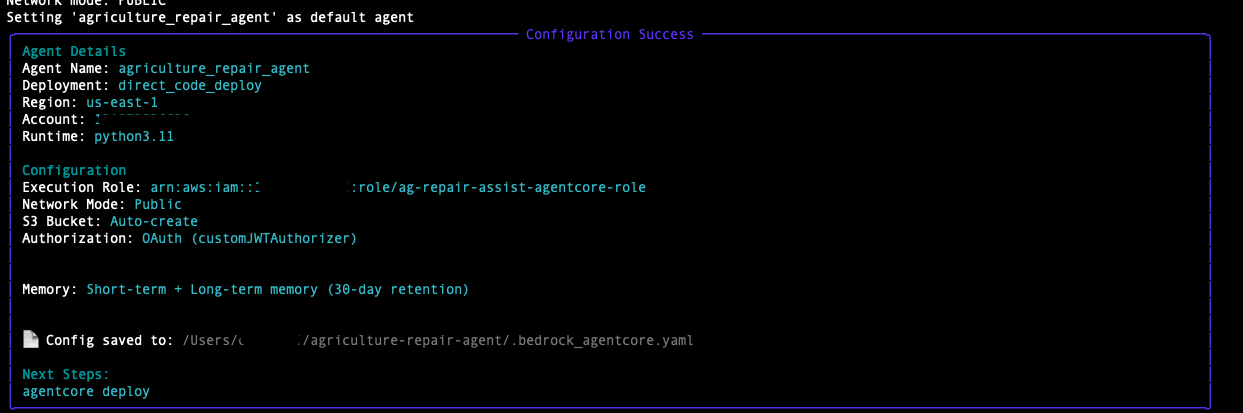
- Deploy the agent to AgentCore Runtime. No local Docker is required. The process takes approximately 5–10 minutes.
agentcore launch --env KNOWLEDGE_BASE_ID= --env TABLE_NAME= --env MODEL_ID=us.amazon.nova-2-lite-v1:0
- After completion, note the Agent Runtime ARN from the output.
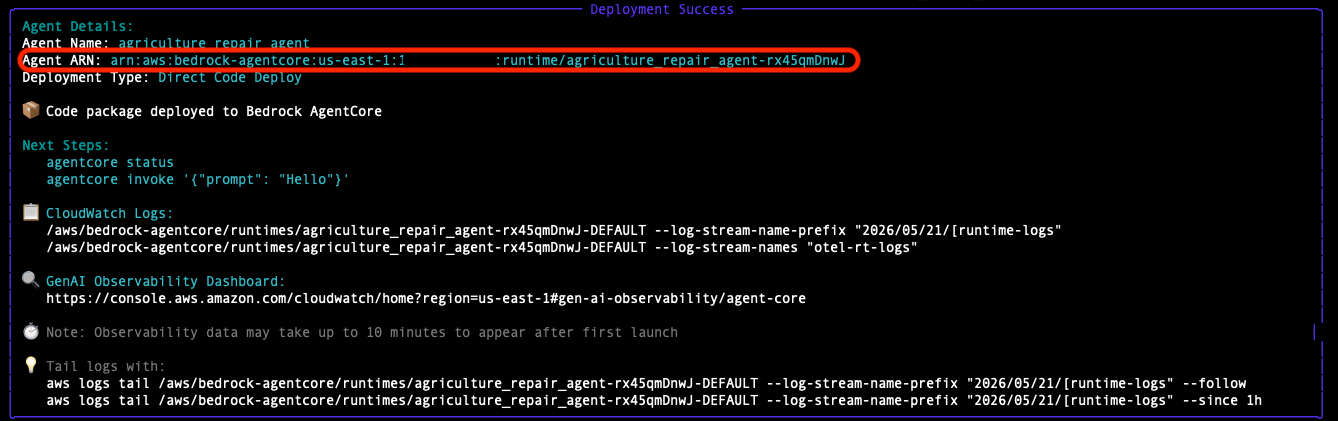
The CloudFormation stack creates the agent execution role with the required permissions. No additional IAM configuration is needed.
Step 7: Deploy the frontend
- Download the ML-18699-FrontEnd.zip from the link above.
- Navigate to the AmplifyConsoleUrl in the Step 5 CloudFormation Outputs.
- Click Deploy updates, choose the Drag and drop method, click Choose .zip folder and then click Save and Deploy.
- Wait for deployment to complete.
Using the web application
Open the AmplifyAppUrl from the Step 5 CloudFormation Outputs. On first launch, you will be prompted to enter your configuration details. Enter the values from your CloudFormation stack Outputs (Step 5) and agent deployment (Step 6).
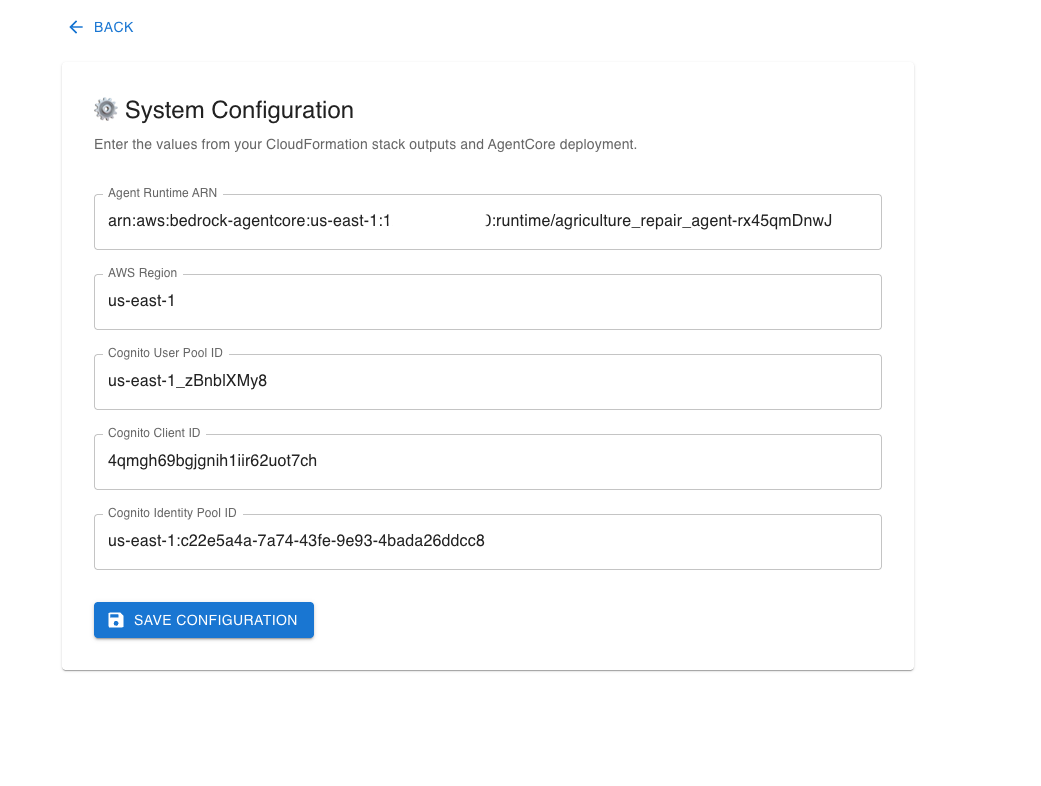
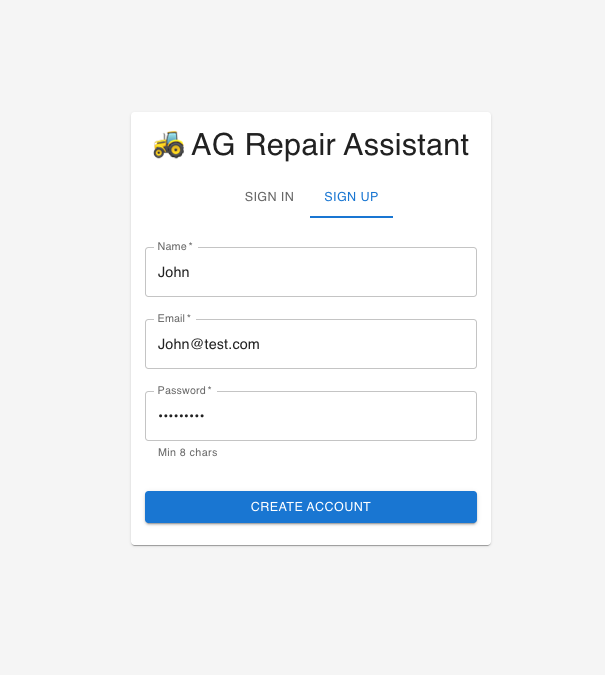
After saving the configuration, create an account using the Sign-Up option, verify your email, and sign in.
After signing in, you will see the main dashboard.
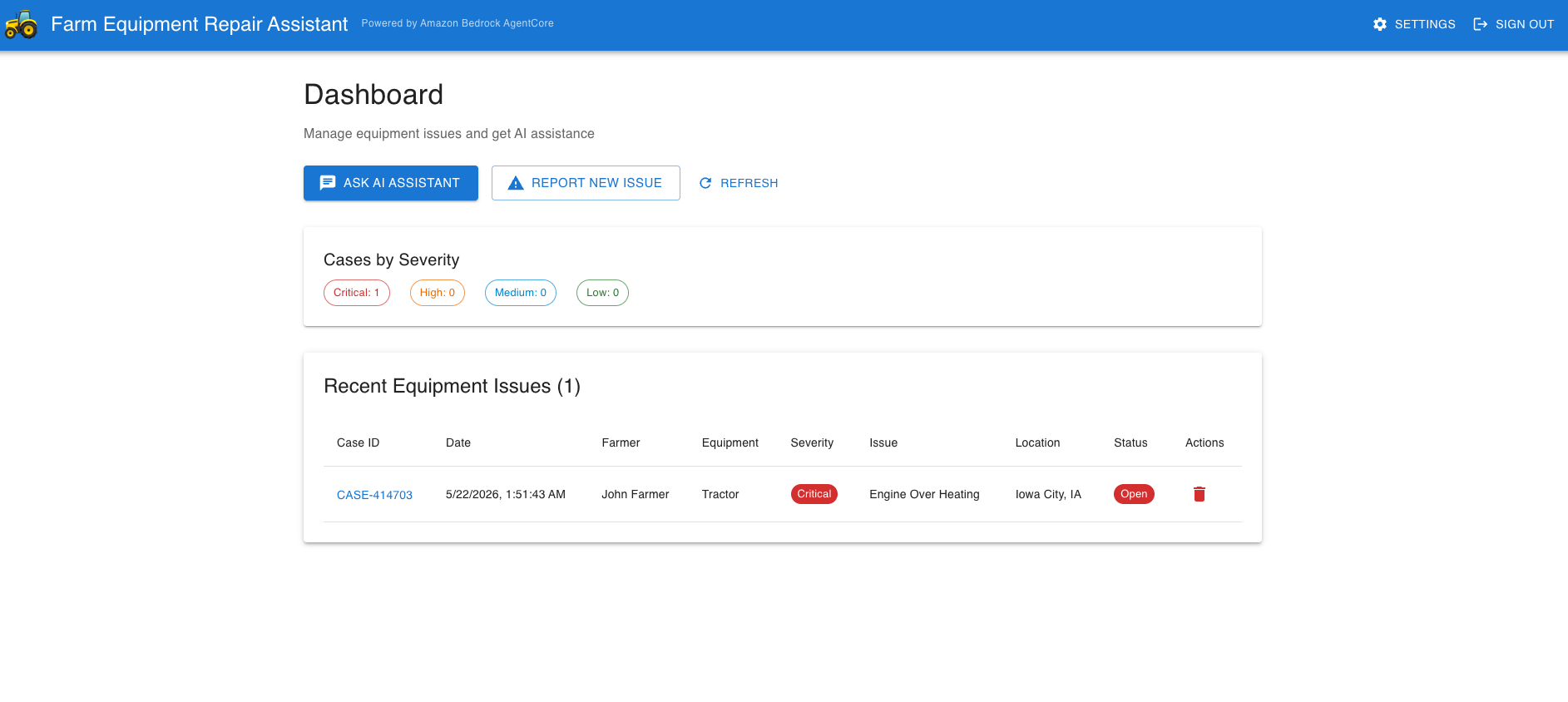
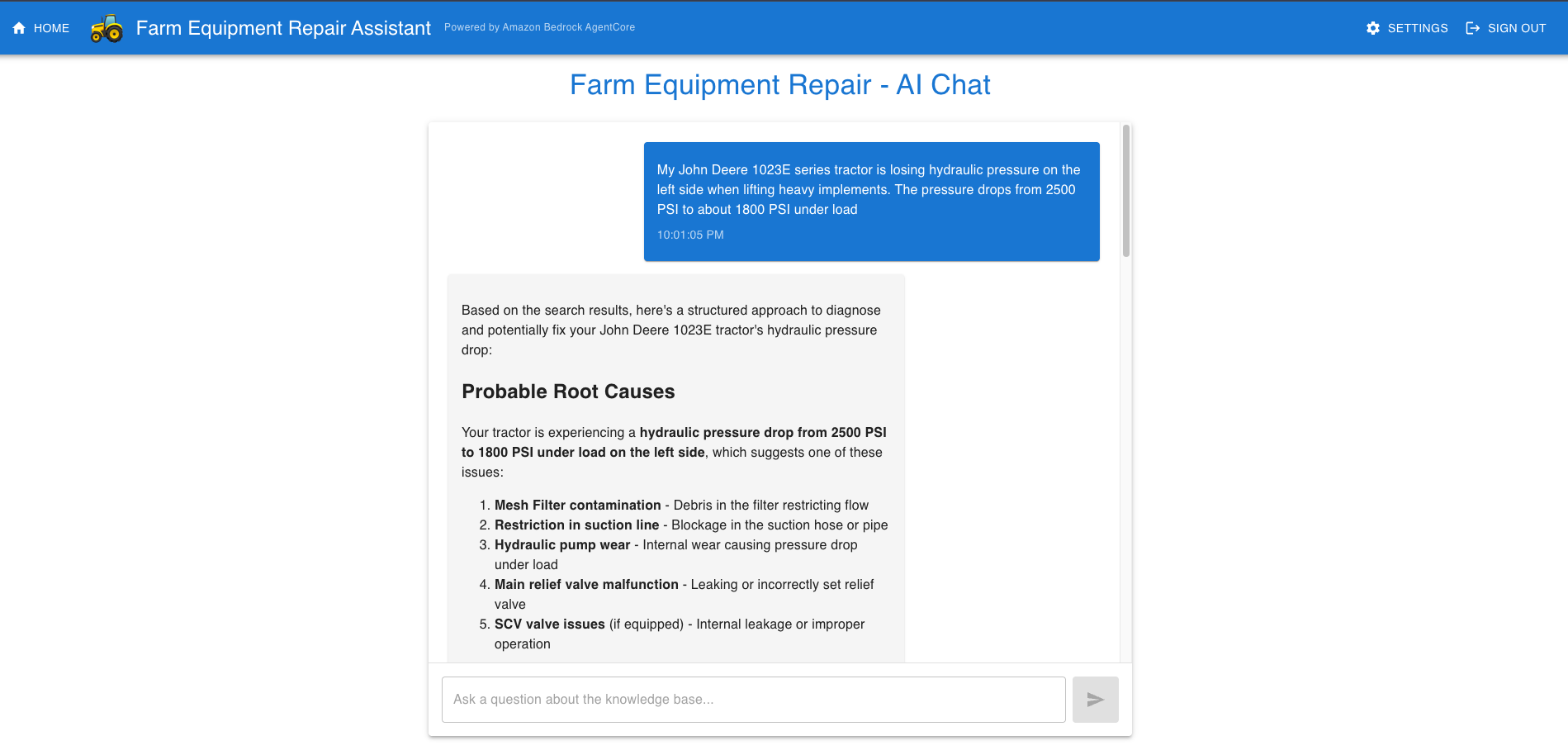
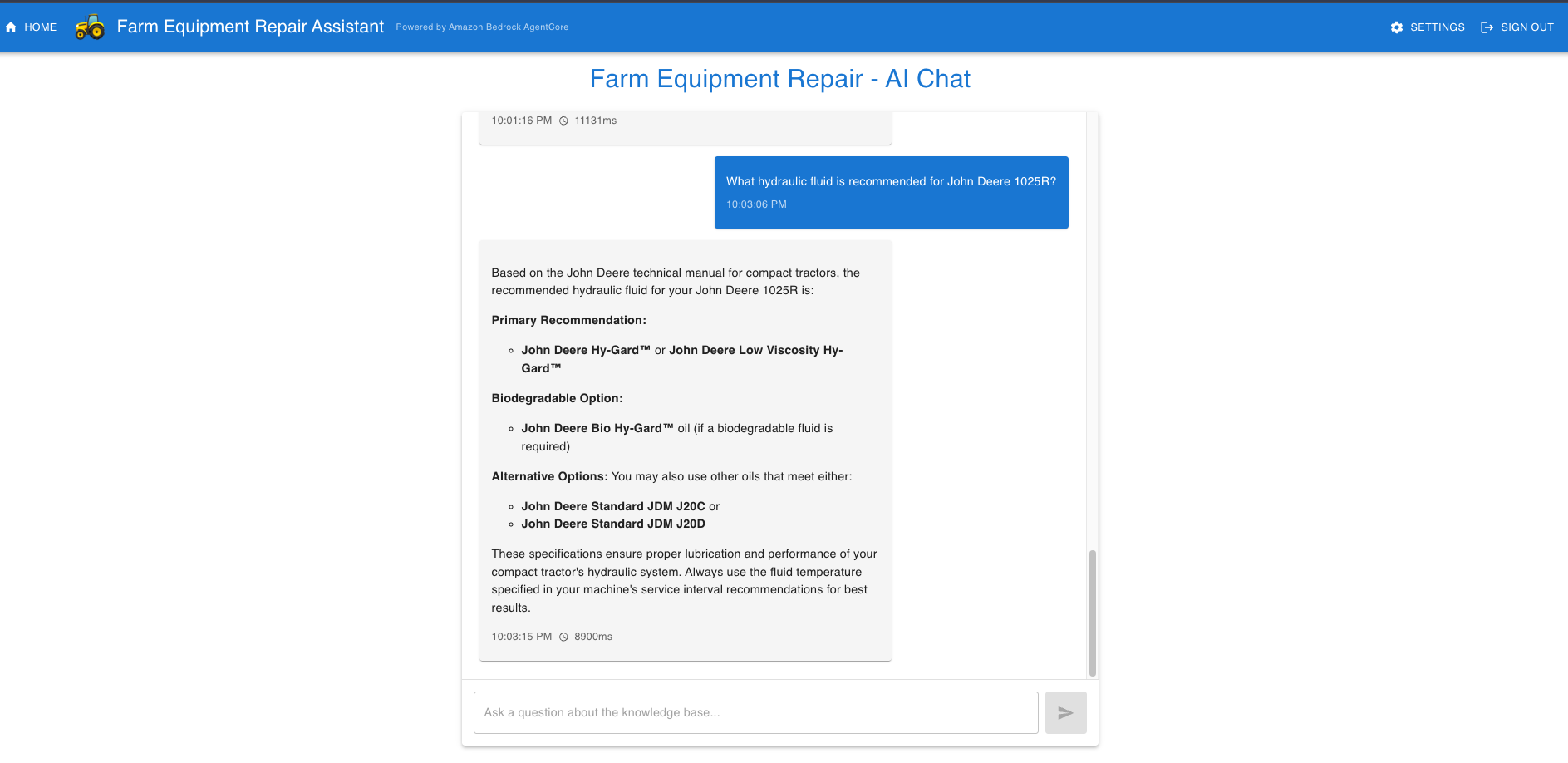
Here are a few sample queries to try:
Issue analysis:
Prompt: My John Deere 1023E series tractor is losing hydraulic pressure on the left side when lifting heavy implements. The pressure drops from 2500 PSI to about 1800 PSI under load.
Technician chat:
Prompt: What hydraulic fluid is recommended for John Deere 1025R?
Clean up
Important: AWS resources deployed by this solution incur ongoing charges until deleted. This includes Amazon DynamoDB, Amazon S3, AWS Amplify hosting, and Amazon Cognito. AgentCore Runtime and Amazon Bedrock incur charges only when used. Complete all cleanup steps below to stop incurring charges.
Warning: Deleting an S3 bucket permanently removes all stored equipment documentation. Back up any files you want to retain before proceeding.
- Delete the agent:
agentcore destroy
- Delete the CloudFormation stack:
aws cloudformation delete-stack --stack-name ag-repair-assist
- Delete the Knowledge Base:
In the Amazon Bedrock Knowledge Bases console, select Agriculture-Equipment-Repair-KB and choose Delete.
- Empty and delete the S3 bucket:
aws s3 rm s3://agriculture-kb-documents- --recursive
aws s3 rb s3://agriculture-kb-documents-
Implementation considerations
Data management and Knowledge Base setup
As manufacturers release new equipment models and revise existing documentation, the Knowledge Base must evolve accordingly. Regular synchronization schedules paired with automated workflows enable the system to process new uploads seamlessly.
Amazon Bedrock AgentCore configuration
Different troubleshooting scenarios demand varying levels of technical complexity and response accuracy. The Strands Agents code-first approach lets you swap models by changing the MODEL_ID environment variable. AgentCore Memory configuration adds conversation intelligence. Short-term memory maintains context within a diagnostic session, while long-term memory persists technician specializations, farmer fleet details, and recurring issue patterns across sessions. The retrieval configuration top_k and relevance_score thresholds should be tuned based on the breadth and depth of your documentation corpus.
Extensibility
To add new capabilities (inventory checks, parts ordering, dealer communication), add a new @tool function to the agent code. No infrastructure changes are required.
Compliance and safety
Every repair recommendation must align with manufacturer warranties and safety guidelines. Safety protocols embedded throughout the system make sure that users receive proactive warnings about hazards associated with repair procedures. Agricultural equipment involves high-pressure hydraulics, electrical systems, rotating machinery, and other potentially dangerous components. The system must highlight key safety concerns prominently.
Scaling to enterprise grade
This solution is designed to be lightweight for testing and evaluation. When scaling to a production environment, consider the following enhancements:
- Amazon Bedrock Guardrails: Add prompt attack detection and content filtering to protect against malicious input in equipment descriptions. Configure denied topics to prevent the agent from providing guidance outside its domain.
- API protection: Place Amazon CloudFront in front of the AgentCore Runtime endpoint with AWS WAF for rate limiting and OWASP protection.
- Multi-factor authentication: Enable Amazon Cognito MFA (TOTP-based software tokens) for stronger user authentication.
- Observability and alerting: AgentCore automatically generates metrics, logs, and traces viewable through Amazon CloudWatch generative AI observability dashboards. Configure alarms for agent error rates and response latency. Enable Amazon Bedrock model invocation logging for audit trails.
- Data lifecycle: Implement Amazon S3 lifecycle policies for equipment documentation versioning and Amazon DynamoDB point-in-time recovery for issue data backup.
- Multi-region deployment: For global field service teams, deploy AgentCore Runtime in multiple AWS Regions with region-specific Knowledge Bases containing localized equipment documentation.
Next steps
After deploying and testing this solution, consider the following enhancements:
- Parts ordering integration: Add a @tool that connects to your parts inventory system, enabling the agent to check stock availability and place orders directly from the diagnostic conversation.
- Dealer communication: Add a @tool that sends diagnostic summaries to the nearest authorized dealer via Amazon Simple Email Service (Amazon SES) or Amazon Simple Notification Service (Amazon SNS).
- IoT telemetry integration: Connect equipment sensors through AWS IoT Core to automatically create issues when anomalous readings are detected, pre-populating the diagnostic context for the agent.
- Mobile field app: Build a mobile-optimized frontend for technicians to use on-site, with offline caching for areas with limited connectivity.
Conclusion
This AI-powered equipment repair assistant demonstrates how Amazon Bedrock AgentCore can improve agricultural field service operations. By combining a code-first Strands Agent with comprehensive manufacturer documentation through a Bedrock Knowledge Base, the solution provides technicians with precise diagnostic recommendations and parts identification before they arrive on-site.
Key benefits of this implementation include:
- Reduced mean time to resolution: faster diagnosis and repair through AI-powered analysis grounded in manufacturer documentation
- Improved first-time fix rates: comprehensive pre-service analysis makes sure technicians arrive with the right parts and procedures
- Conversation memory: AgentCore Memory maintains context across multi-turn diagnostic sessions and persists knowledge across sessions
- Simplified operations: a single AgentCore Runtime endpoint replaces the need for separate API Gateway, Lambda, and Bedrock Agent resources
- Built-in observability: automatic X-Ray tracing and CloudWatch integration provide end-to-end visibility without additional setup
- Code-first development: the Strands Agent’s @tool decorator pattern lets you extend capabilities and test locally before deploying
The extensible architecture makes sure organizations can adapt this foundation to their specific equipment portfolios and service requirements. Adding new tools (for parts ordering, inventory checks, or dealer communication) requires only a new @tool function, with no infrastructure changes.
The sample code in this blog post is made available under the MIT-0 license. See the LICENSE file for details.
Disclaimer: This content is provided for informational purposes only and should not be considered legal or compliance advice. Customers are responsible for making their own independent assessment of the information in this document and any use of AWS products or services.
Resources
- Amazon Bedrock AgentCore documentation
- Strands Agents SDK
- Amazon Bedrock User Guide
- Amazon Bedrock Knowledge Bases
About the authors