


















Simplify model selection in Amazon Bedrock with the open source Model Profiler
The Amazon Bedrock Model Profiler is an open source tool that aggregates model metadata from multiple AWS APIs and external sources into a single, searchable interface. In this post, you’ll learn what the Model Profiler provides, the real-world scenarios it supports, and how to deploy it in your own environment in under five minutes.
Generative AI adoption is accelerating across industries, and Amazon Bedrock provides a managed service for building production-ready AI applications. With access to more than 100 foundation models from providers such as Anthropic, OpenAI, Meta, Mistral AI, Cohere, and Amazon, teams have the flexibility to choose the right model for each use case.
But choice comes with complexity. Comparing models across capabilities, pricing, regional availability, context window limits and throughput isn’t straightforward. That information is scattered across console pages, documentation, and regional API calls. For organizations evaluating models for new workloads, optimizing cost and performance, or migrating from other AI systems, this fragmented discovery process slows experimentation and delays production decisions.
The Amazon Bedrock Model Profiler addresses this gap. This open source tool aggregates model metadata from multiple AWS APIs and external sources into a single, searchable interface. With advanced filtering, side-by-side comparisons, and detailed model cards, teams can explore the full Amazon Bedrock catalog and make informed, data-driven decisions by easing the manual search effort across various documents and model cards.
In this post, you’ll learn what the Model Profiler provides, the real-world scenarios it supports, and how to deploy it in your own environment in under five minutes.
Solution overview
The Model Profiler is a web application that lets you browse, filter, and compare every foundation model available on Amazon Bedrock in one place. Instead of navigating multiple console pages and documentation sites, you get a single interface with model cards, side-by-side comparisons, regional availability maps, and pricing breakdowns updated daily.
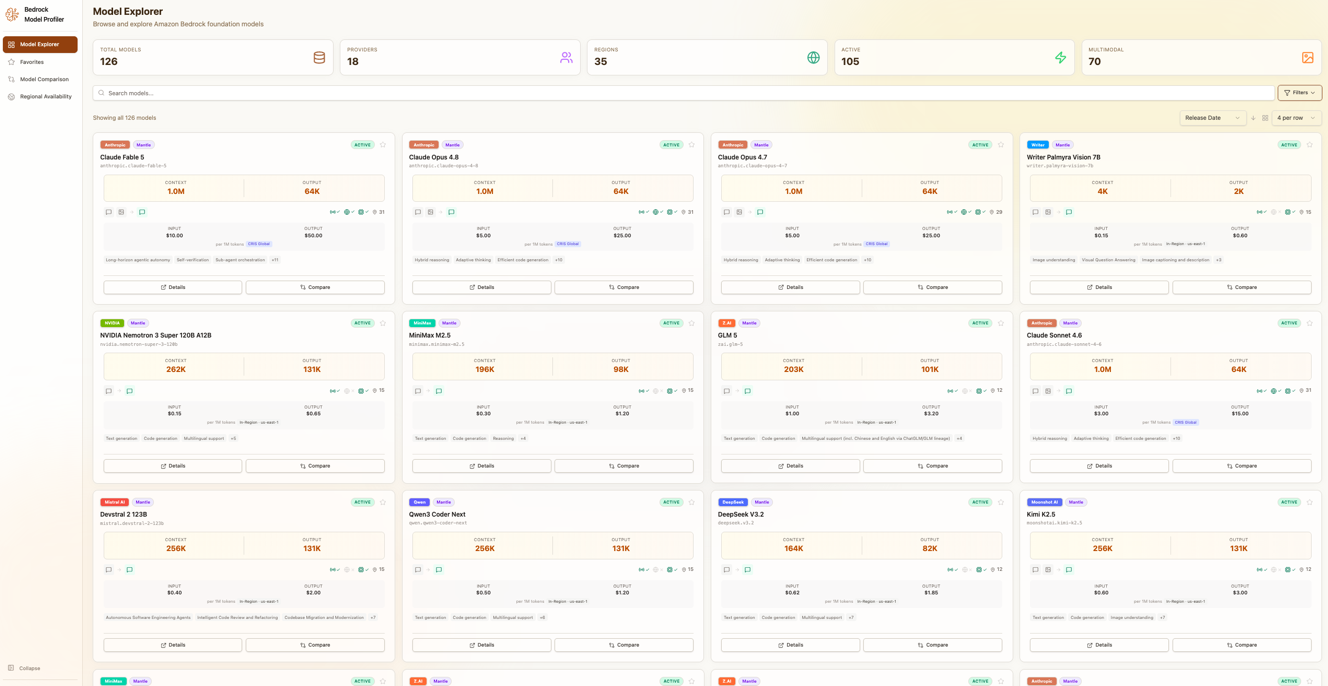
Model Profiler showing the Model Explorer interface
Behind the interface, a fully automated serverless pipeline collects and processes data from seven distinct sources: five AWS APIs and two public URLs. This keeps the catalog accurate without manual intervention.
| Source | Type | Auth | Data Collected |
| Amazon Bedrock ListFoundationModels API | AWS API | IAM (Sigv4) | Model specifications, capabilities, modalities, and regional availability across 33 regions |
| AWS Price List API | AWS API | IAM (Sigv4) | On-demand, batch, and reserved-tier pricing across three service codes |
| AWS Service Quotas API | AWS API | IAM (Sigv4) | Tokens-per-minute (TPM) limits, requests-per-minute (RPM) quotas, and throughput constraints |
| Amazon Bedrock ListInferenceProfiles API | AWS API | IAM (Sigv4) | Cross-region inference configurations and geographic scopes |
| Amazon Bedrock Mantle API | AWS API | IAM (Sigv4) | Mantle inference availability across regions |
| LiteLLM Model Database | Public URL | None | Token specifications including context window sizes and max output tokens |
| AWS Documentation | Public URL | None | Model lifecycle status (active, legacy, end-of-life) |
Understanding key quota metrics is essential when evaluating models. Tokens-per-minute (TPM) measures how many tokens you can process per minute. Think of it as your throughput ceiling, where 1,000 tokens equals roughly 750 words of text. Requests-per-minute (RPM) limits how many API calls you can make regardless of size. Both quotas vary by model and Region.
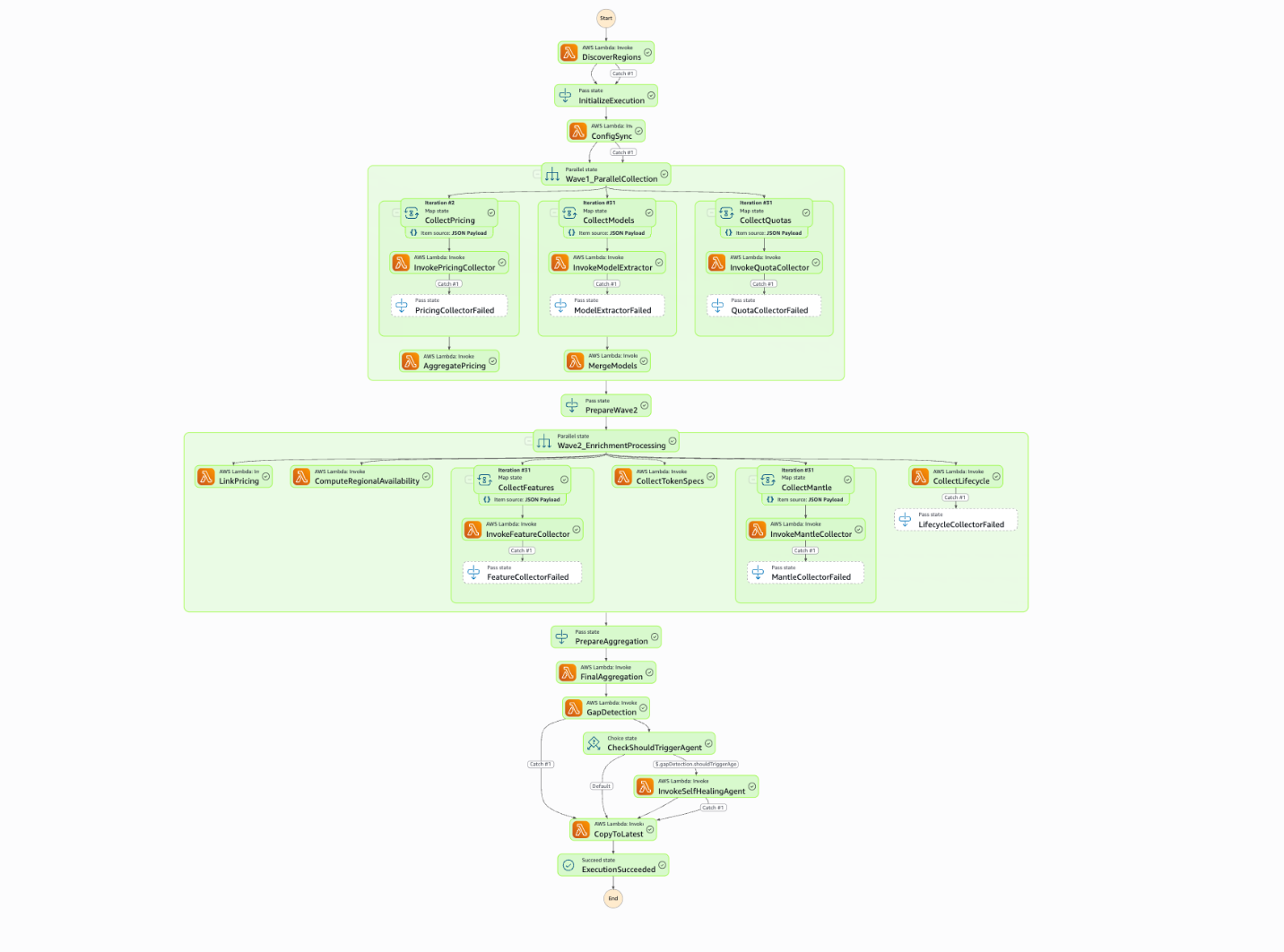
Architecture diagram of the Model Profiler data pipeline
The Model Profiler runs a fully automated data pipeline orchestrated by AWS Step Functions. Seventeen AWS Lambda functions process data across four phases, using inter-Lambda S3 caching to reduce API calls from approximately 480 to 29 per execution. That represents a 97% cache hit rate. A self-healing agentic system powered by Amazon Bedrock detects data gaps and automatically applies safe configuration fixes. The entire pipeline completes in 8–12 minutes and runs daily at 6 AM UTC.
The schedule is configurable through the Amazon EventBridge rule in the AWS CloudFormation template. You can adjust the cron expression to run at a different time or frequency based on your requirements.
Phase 0: Initialization
The pipeline begins by dynamically discovering which AWS regions currently support Amazon Bedrock. No Region list is hardcoded, so newly launched regions are picked up automatically. It then initializes the execution context (S3 paths, cache keys) and synchronizes configuration between the backend and the React front end, making sure both sides stay consistent without manual intervention.
Phase 1: Parallel collection
Three independent collection branches run simultaneously. The Pricing branch queries the AWS Price List API across three service codes and aggregates results by provider and model. The Models branch fans out to Amazon Bedrock-enabled regions, calling ListFoundationModels in each and deduplicating results into a single canonical model list. The Quotas branch gathers tokens-per-minute and requests-per-minute service limits in parallel.
Phase 2: Parallel enrichment
Once raw data is collected, six enrichment steps run concurrently, reading from the cached data rather than re-calling APIs, to link pricing records to models, compute regional availability, determine cross-region inference support, fetch context window sizes, probe the Mantle API, and determine each model’s lifecycle status.
Phase 3: Aggregation and intelligence
The final aggregator merges the enrichment data into two production-ready JSON files: bedrock_models.json (the full model catalog with specifications, quotas, availability, and lifecycle status) and bedrock_pricing.json (pricing organized by provider and model). Both files are copied to Amazon Simple Storage Service (Amazon S3) and served through Amazon CloudFront.
Before publication, a gap detection system scans the output for seven types of data quality issues. When gaps exceed configured thresholds, a self-healing agent analyzes the gap report and automatically applies safe fixes. Changes are versioned and backed up, and suggestions that do not meet safety criteria are logged for manual review rather than auto-applied.
Deployment options
The solution offers two deployment options. Local mode runs entirely on your machine using your existing AWS credentials. Run the data collector, start the frontend, and begin exploring with read access to Amazon Bedrock and Pricing APIs. No cloud infrastructure is needed.
AWS deployment provides a fully serverless architecture with automated daily data refresh. An AWS Step Functions workflow orchestrates AWS Lambda functions that collect fresh data every day at 6 AM UTC, storing results in Amazon S3 and serving them through Amazon CloudFront. The local collector imports the same transformation functions as the Lambda code, maintaining identical output whether you run locally or in production.
Key features
The Model Profiler provides four core capabilities that streamline model selection: from discovery and comparison to regional planning and tracking your shortlist.
Model Explorer
The Model Explorer is your starting point for discovering Amazon Bedrock models. Browse 120+ foundation models in a searchable, filterable interface. You can narrow results by provider (Anthropic, Meta, Amazon, Mistral AI, Cohere, and 14 others), by capabilities such as vision, code generation, function calling, or embeddings, and by input and output modalities. Modalities describe the types of data a model can process: a text-only model handles written content, while a multimodal model might accept text and images as input and generate text, images, or both as output. Region filters show only models available in your target regions, and a status filter lets you focus on active models or include legacy options.
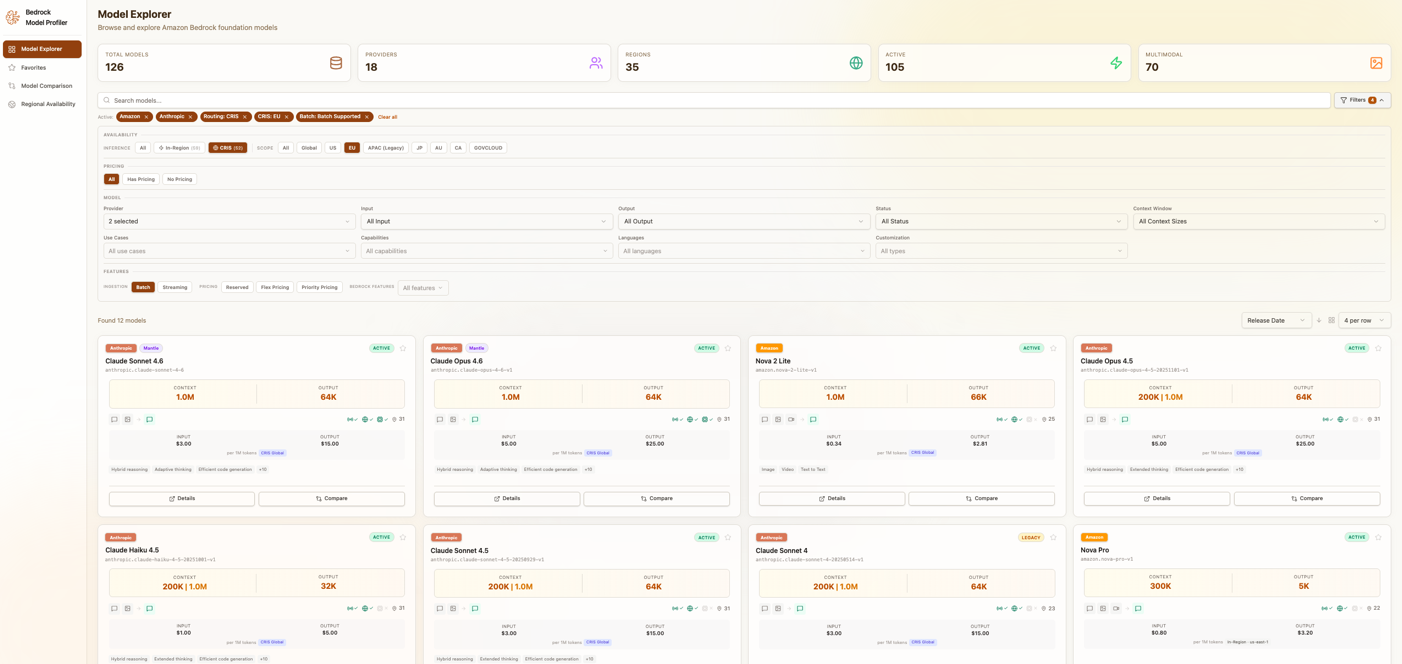
Model Explorer interface showing filter options and model cards
A consumption options filter lets you refine results by how you want to use a model. In Region provides on-demand inference in a specific AWS Region with per-token pricing. Cross-Region Inference Service (CRIS) routes requests across regions for higher throughput. Batch processes large volumes asynchronously at lower cost, with results delivered to Amazon S3. Mantle provides managed inference endpoints with dedicated capacity and custom configurations.
The explorer supports two view modes. Card view provides visual browsing with key specifications at a glance. Table view enables dense comparison across many models. Full-text search works across model names, descriptions, and provider information.
Every model has a comprehensive detail view consolidating the available information: technical specifications (modalities, context windows, inference types), pricing breakdowns by Region and consumption type, regional availability with cross-region inference details, service quotas per Region (TPM and RPM limits), and links to official documentation and provider information.
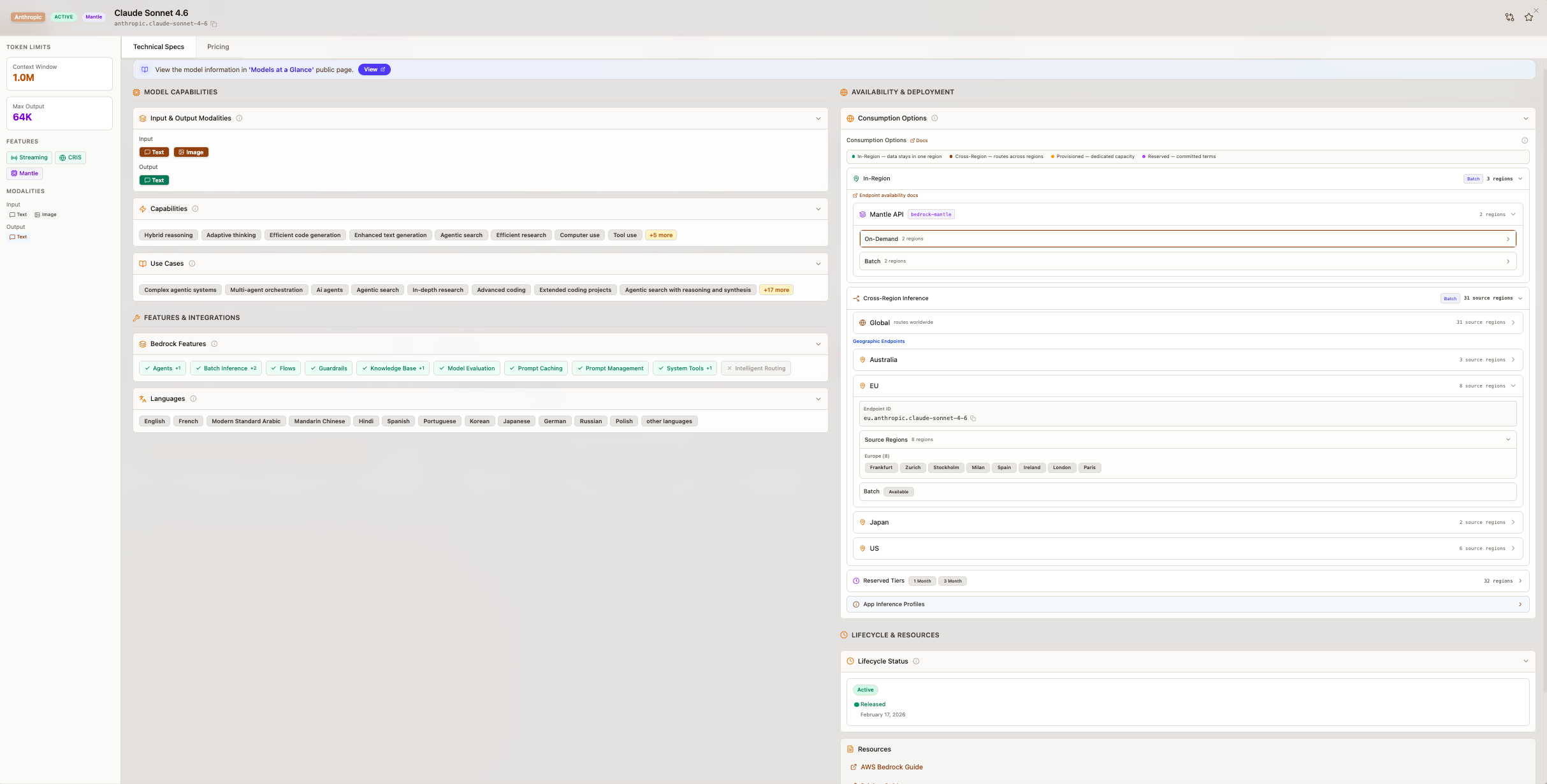
Model card displaying technical specifications information
Model Comparison
Once you have identified candidate models, the comparison view lets you analyze them across every dimension that matters.
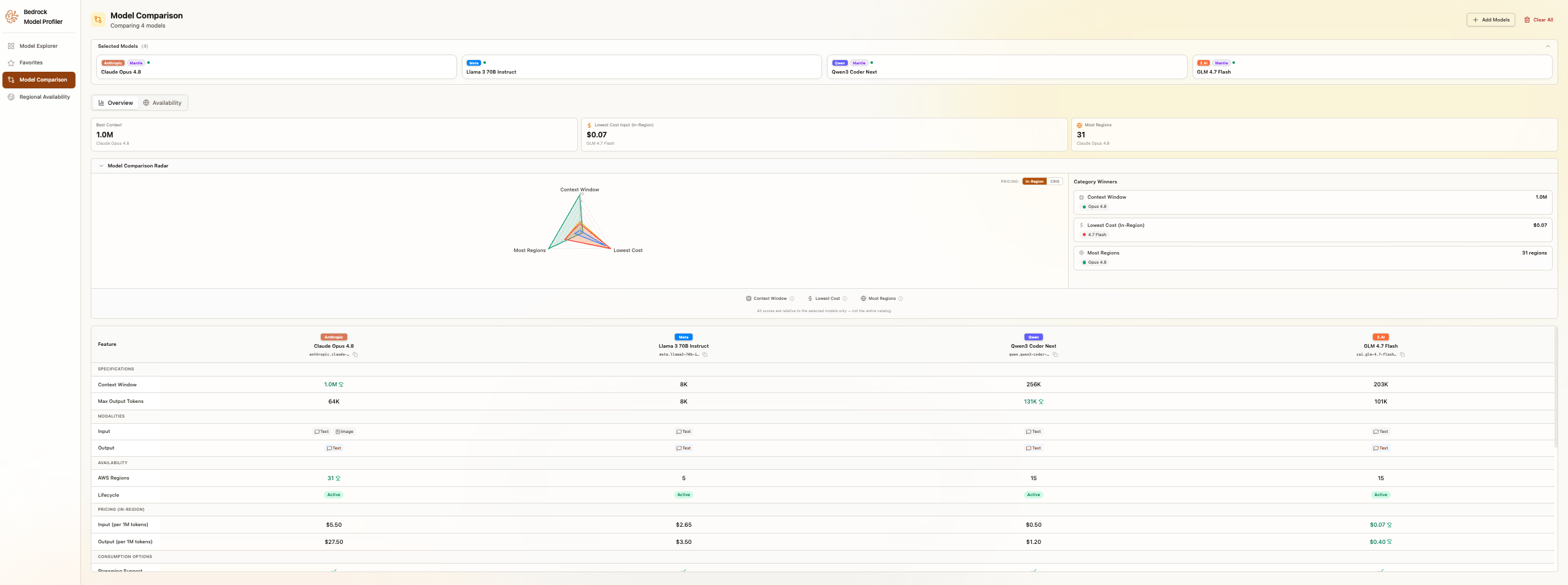
Model Comparison view showing four models side-by-side with tabs for Overview and Availability
Compare up to 25 models simultaneously across four dimensions. Pricing covers input and output token costs across regions, with on-demand, batch, and provisioned tiers. Regional availability shows maps of where each model is available, including cross-region inference support. Specifications include context window sizes, maximum output tokens, and supported features. A capabilities matrix shows what each model supports side by side.
Amazon Bedrock offers multiple pricing options to match different workload patterns. On-demand tiers include standard, flex, and priority options with per-token pricing and no commitment. Batch pricing provides discounts ranging from 30-50% depending on the model and modality for non-time-sensitive jobs processed within 24 hours. Reserved tier provides dedicated capacity at a fixed hourly rate for sustained high-volume workloads. For detailed pricing by model, see the Amazon Bedrock Pricing page.
Regional Availability Matrix
For teams planning multi-region deployments, the Regional Availability view provides a comprehensive model-by-region matrix across all 33 Amazon Bedrock-enabled regions. Regions are grouped by geographic area (NAMER, EMEA, APAC, LATAM), and each cell shows how a model is available in that region: on-demand (In Region), Cross-Region Inference (CRIS), or Mantle.
You can filter the matrix by availability type to quickly answer questions like “which models support CRIS in Europe?” or “what is available on-demand in ap-southeast-2?” Expanding a model row reveals inference profile IDs, CRIS source regions, and geographic scopes. The matrix also surfaces model lifecycle status (active, legacy, or end-of-life), so you can identify models approaching deprecation and plan migrations in advance. For organizations operating across multiple geographies, this view replaces what would otherwise require dozens of individual API calls and manual cross-referencing of lifecycle documentation.
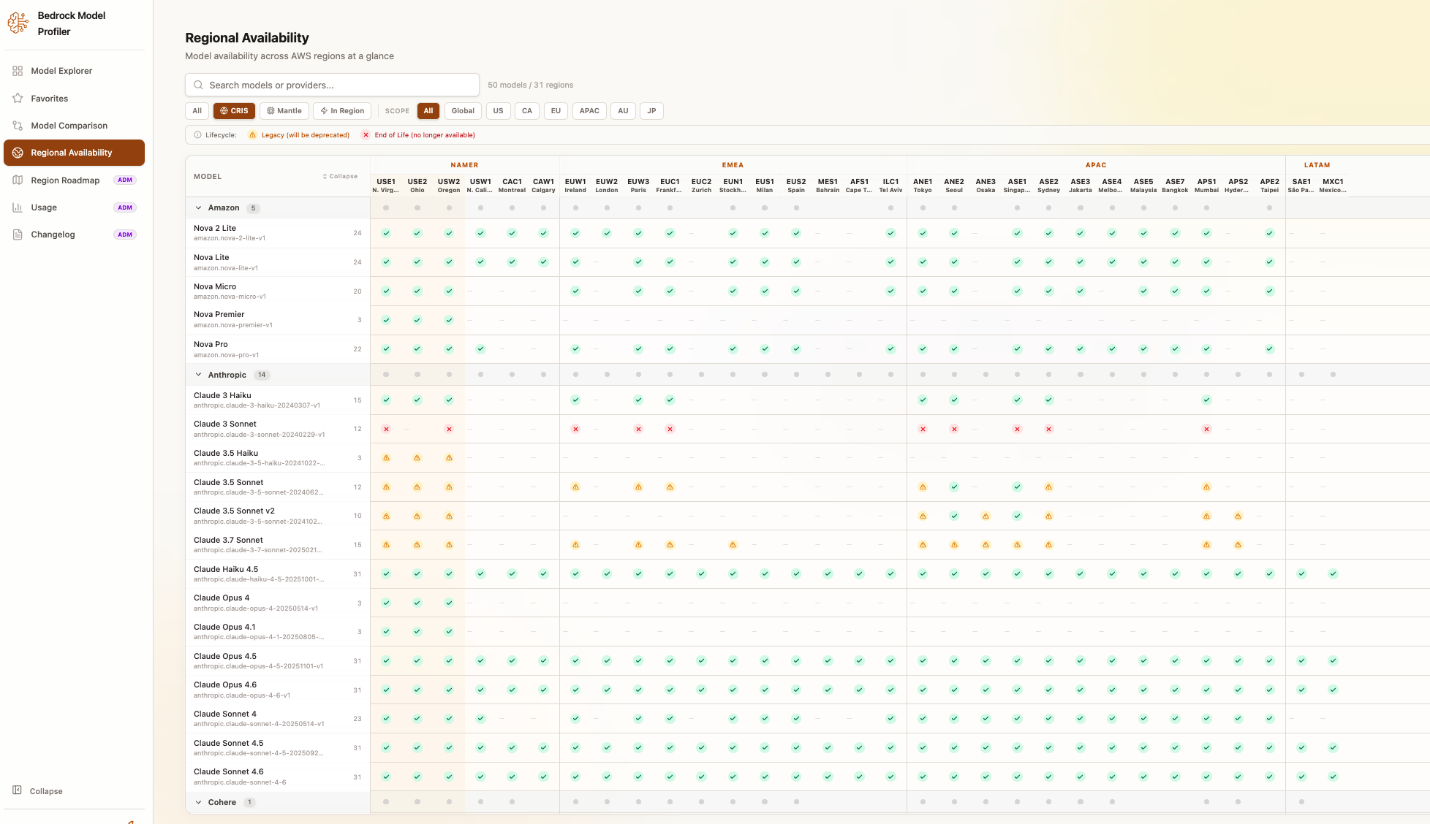
Regional Availability matrix showing model availability per region, with color-coded cells indicating model status
Favorites
As you explore models, you can star models to add them to your Favorites list, a personal shortlist that persists across browser sessions. The Favorites tab provides the same filtering, sorting, and detail views as the main explorer, scoped to just your saved models. This is useful for tracking a working set of candidate models during an evaluation, or for keeping quick access to the models your team uses most.
Use cases
Let’s explore how different teams approach model selection based on their unique requirements. The following scenarios feature fictional organizations. They use real AWS pricing and quota data combined with realistic workload assumptions to demonstrate the solution’s capabilities.
Selecting compliance-aligned models across European regions
Octank Financial Services needed to build an AI-powered document analysis system for regulatory compliance. The team required models with vision capabilities to process scanned documents, but operations had to remain exclusively within EU regions to meet data residency requirements. With dozens of multimodal models on Amazon Bedrock and pricing that varies across regions, the team estimated 6 to 8 hours of manual research just to shortlist candidates.
Using the Model Profiler, the team filtered by “vision” capability and EU regions to immediately see qualifying models. They used the Regional Availability matrix to confirm on-demand availability in eu-west-1 and eu-central-1, then compared pricing side by side to find the most cost-effective option. Service quotas confirmed that throughput would meet their projected 50,000 daily document reviews.
The result: model evaluation dropped from an estimated 8 hours to 25 minutes. The team also discovered that their preferred model was 18% cheaper in eu-west-1 than eu-central-1, and found a newer model with a larger context window that alleviated the need to split long regulatory documents across multiple calls.
Migrating from a third-party AI provider
Octank Health operated a clinical documentation assistant built on a third-party AI provider and needed to migrate to Amazon Bedrock for tighter AWS integration and cost control. Their requirements were specific: a context window of 128K tokens or more, low latency, and availability in at least three US regions for redundancy. Mapping their current provider’s capabilities to the Amazon Bedrock catalog manually across the different regions required extensive research across multiple documentation sources.
The team used capability filters to find models matching their requirements, then opened the comparison view to evaluate context windows, output limits, and pricing across candidates. The Regional Availability view confirmed which models supported cross-region inference with US scope, giving them automatic failover without application changes. Lifecycle status flags helped them avoid a model that was approaching legacy status.
The evaluation completed in under 45 minutes. The team selected a model with a 200K context window (a significant upgrade from their previous 128K limit) at 15% lower cost per token. The cross-region inference availability check helped prevent them from choosing a model without cross-region support, which would have required rearchitecting their failover strategy.
Multi-region deployment: Planning global expansion
Octank Media was expanding their AI-powered content recommendation engine from the US to Europe and Asia-Pacific. Before committing to an architecture, they needed to confirm their current model’s availability in target regions, understand which consumption options were supported in each, and verify that service quotas could handle projected traffic.
The Regional Availability matrix gave the team a single view of their model across all 33 regions, broken down by In Region, CRIS, and Mantle. Filtering by APAC and EMEA regions revealed exactly where their model was available and how. The lifecycle status column confirmed the model was active in the target regions with no upcoming deprecation. Quota comparison across regions identified ap-northeast-1 as a potential bottleneck requiring a quota increase request before launch.
The multi-region feasibility analysis completed in 20 minutes. Previously, the same work required querying individual regions through the AWS Command Line Interface (AWS CLI) and cross-referencing documentation. Identifying the quota constraint in Tokyo before production helped prevent an outage and confirming CRIS availability in Europe established a reliable fallback strategy for traffic spikes.
Prerequisites
Before deploying the Model Profiler, confirm you have the following in place.
For local deployment:
- Python 3.11 or later.
- Node.js 18 or later.
- AWS credentials configured with read access to the following services:
For AWS deployment (additional requirements):
- AWS Serverless Application Model (AWS SAM) CLI installed.
- AWS credentials with permissions to deploy CloudFormation stacks, Lambda functions, S3 buckets, Step Functions, and CloudFront distributions. The AWS SAM template creates the necessary IAM policies automatically, so you only need permission to deploy the stack itself.
Deployment walkthrough
The Model Profiler offers two deployment paths. Choose local deployment to explore quickly on your own machine, or the AWS serverless deployment for an automatically refreshed, hosted interface.
Option 1: Local deployment
Deploy the Model Profiler locally in under five minutes with no cloud infrastructure required.
Step 1: Clone the repository
Step 2: Set up the Python environment
Step 3: Collect model data
Run the data collector using your AWS profile. This queries APIs across 25 regions and typically completes in 1-2 minutes.
You’ll see progress output as each phase completes:
Step 4: Start the front end
Navigate to http://localhost:5173 in your browser. The application loads data directly from the local data/ directory.
Option 2: AWS deployment
Deploy the full serverless solution with automated daily refresh.
Step 1: Verify your AWS account
If you have multiple profiles, set the one to use:
Step 2: Deploy the backend stack
The backend must be deployed first using AWS SAM. This creates the Lambda functions, Step Functions workflow, S3 data bucket, and EventBridge schedule.
The guided deployment prompts you for a stack name, region, and parameters. Use the defaults for a standard deployment or customize as needed.
Step 3: Deploy the front end and link infrastructure
Once the backend stack is running, the setup script deploys the remaining infrastructure and connects everything together.
The script performs five steps:
- Verifies the backend stack exists and retrieves the data bucket name.
- Deploys the front-end infrastructure (S3 hosting bucket and CloudFront distribution).
- Updates the backend stack with the CloudFront ARN so the data bucket grants read access to the CDN.
- Optionally deploys the analytics stack if Amazon Cognito credentials are configured in frontend/.env.
- Builds the React front end and uploads it to S3.
When complete, you’ll receive a CloudFront URL where the application is accessible. Data refreshes automatically every day at 6 AM UTC. For additional help, see the deployment guide in the repository at https://github.com/aws-samples/bedrock-model-profiler or open an issue at https://github.com/aws-samples/bedrock-model-profiler/issues
Clean up
If you deployed the AWS infrastructure for evaluation purposes, remove the resources once you’ve completed your model selection to avoid ongoing charges.
Leaving unused infrastructure deployed can accumulate unexpected costs over time, particularly if you’re running the profiler in multiple regions or accounts for testing. Additionally, removing evaluation stacks helps maintain a clean AWS environment and helps prevent confusion when managing production resources.
For local deployment: Delete the cloned repository directory. No cloud resources were created. For AWS deployment: Delete the CloudFormation stack to remove all resources:
This removes the S3 buckets, Lambda functions, Step Functions workflow, and CloudFront distribution.
Conclusion
Selecting the right foundation model is an important decision when building generative AI applications, and it should not require days of manual research. The Amazon Bedrock Model Profiler consolidates capabilities, pricing, and regional availability for 120+ models into a single interface so your team can move from question to decision in minutes.
You can deploy the Model Profiler locally in under five minutes with no cloud infrastructure required. If you prefer automated daily refreshes and a hosted interface, the serverless AWS deployment option takes just a few additional steps. Either way, you get the same complete view of the Amazon Bedrock catalog.
Ready to get started? Clone the repository at github.com/aws-samples/bedrock-model-profiler and deploy locally in under five minutes. Explore Amazon Bedrock and review Amazon Bedrock pricing to plan your model strategy. The project is open source under the MIT No Attribution (MIT-0) license. Bug reports, feature requests, and pull requests are welcome.
Related resources
Important: This repository contains sample code for educational or development purposes. Review and test thoroughly before production use. AWS services and model availability vary by Region and change over time. For current pricing information, see the Amazon Bedrock pricing page.
About the authors