













Run agent-driven Amazon SageMaker HyperPod operations with InstantStart
HyperPod InstantStart is an open source control plane that composes Amazon EKS orchestration with the managed capabilities of Amazon SageMaker HyperPod. It drives the same guarded operations through both a web interface and an AI agent, turning cluster bootstrap, capacity, training, inference, and storage into dependable, agent-driven infrastructure.
If you run foundation model (FM) workloads on Amazon SageMaker HyperPod, you know the work is rarely a single task. It is a chain of dependent ones. An infrastructure team creates the network and control plane, attaches accelerator capacity, and installs cluster dependencies in the right order. It also prepares storage and identity, keeps distributed jobs alive through hardware faults, deploys model servers, and watches all of it. Each step has its own API, its own failure modes, and its own waiting period. Most of the operational pain lives in the handoffs between them.
Amazon SageMaker HyperPod removes a large share of that burden. It offers managed, resilient compute and Amazon EKS integrated capabilities for health monitoring, node autoscaling, training recovery, and inference. Amazon Elastic Kubernetes Service (Amazon EKS) stays the user-managed orchestration surface. This gives your team direct Kubernetes access. It also makes your team responsible for composing AWS resources, add-ons, workloads, and day-two operations into a coherent whole.
HyperPod InstantStart is an open source control plane built around that composition problem. It gives you two ways to drive the same control plane. In the web interface, creating a cluster with dependencies installed, automatic node recovery on, and storage mounted is a form, a progress panel, and a refresh button. In a terminal, it is one sentence.
An AI agent then plans the multi-stage workflow, launches each stage, and polls asynchronous AWS operations to completion. It pauses only for the decisions that are genuinely yours, such as Availability Zone, instance type, and capacity type. Then it hands back a running cluster with storage mounted. Both interfaces call the same backend APIs, pass the same validations, and read the same persisted operation state. Neither one has private logic the other lacks.
In this post, we walk through the system underneath both interfaces. We show how it turns cluster bootstrap, capacity, training, inference, and storage into guarded, retryable operations. We cover which parts are HyperPod managed capabilities and which parts the project adds. And we explain why encoding operational rules into a control-plane API, instead of handing an agent a raw CLI, is what makes agent-driven infrastructure dependable.
Solution overview
HyperPod InstantStart runs as a single out-of-band management container in your AWS account. It calls AWS service APIs and the Kubernetes API. It doesn’t sit in the data path of a training job or an inference request. Everything it creates is a standard AWS or Kubernetes resource. You can inspect it with the AWS Command Line Interface (AWS CLI) and kubectl.
The following diagram illustrates the solution architecture and where responsibility changes hands.
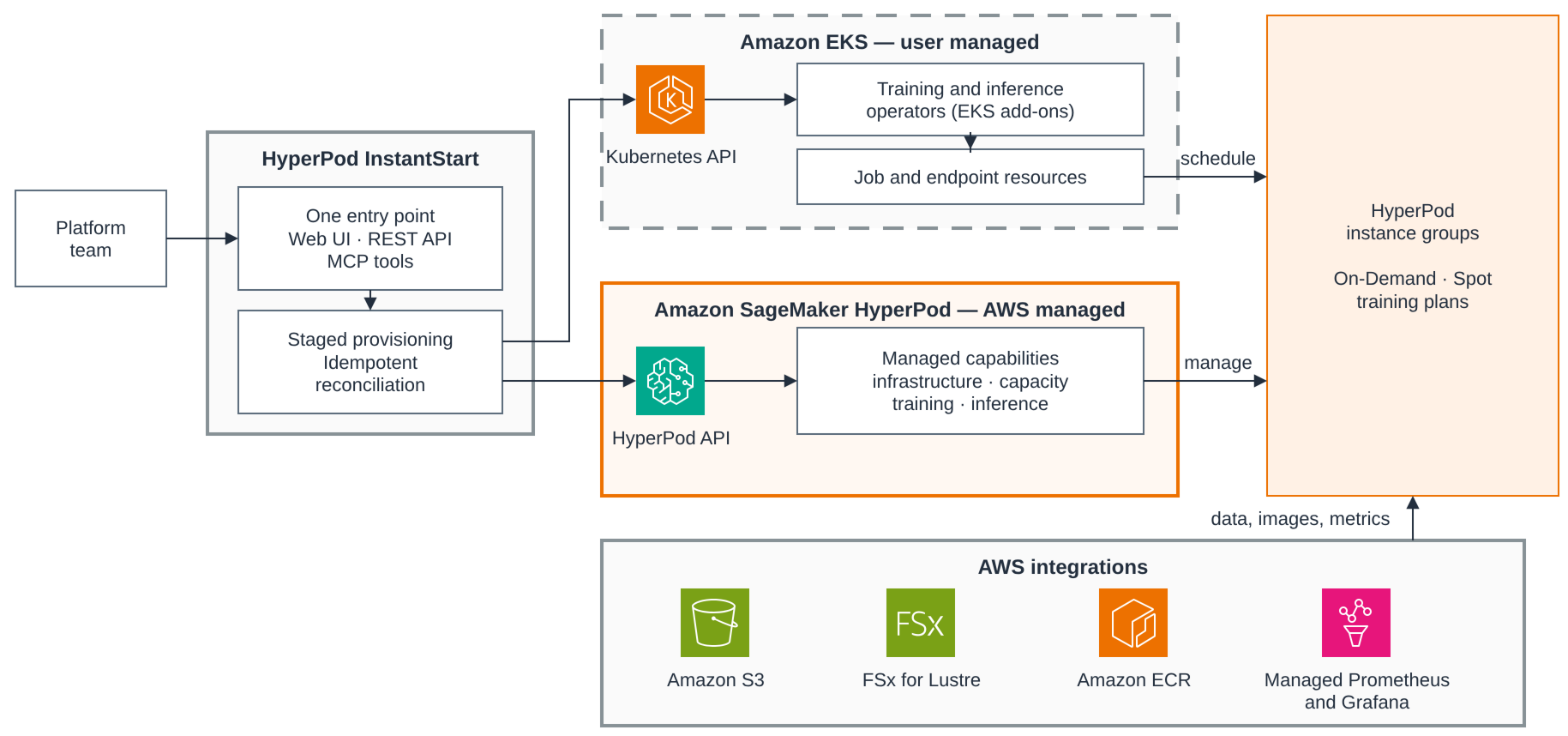
Read the diagram from left to right. Your infrastructure team drives one entry point. The web UI, the REST API, and the Model Context Protocol (MCP) tools that the AI agent uses are three faces of the same container, so both interfaces enter through one door. Behind them sits the staged provisioning and idempotent reconciliation logic that the rest of this post describes. From there the control plane calls two API surfaces.
The Kubernetes side is Amazon EKS, which stays user-managed. It holds the Kubernetes API, the HyperPod training and inference operators installed as EKS add-ons, and the HyperPodPyTorchJob and InferenceEndpointConfig resources they reconcile into training and inference pods. The AWS side is Amazon SageMaker HyperPod, which is AWS managed. Its capabilities fall into four groups. Infrastructure covers health monitoring, deep health checks, and automatic node recovery. Capacity covers continuous provisioning and managed Karpenter autoscaling. Training covers process-level recovery and managed tiered checkpointing. Inference covers intelligent routing and tiered key-value (KV) caching.
The two halves meet at the HyperPod instance groups. Kubernetes schedules pods onto them, and HyperPod manages them. That is the single most useful thing to know when something needs attention, because it tells you which half AWS operates and repairs without your involvement. AWS integrations sit around that path, and the diagram shows the storage and observability ones. Amazon Simple Storage Service (Amazon S3), Amazon FSx for Lustre, and Amazon Elastic Container Registry (Amazon ECR) carry images, data, and checkpoints. Amazon Managed Service for Prometheus and Amazon Managed Grafana receive health and utilization. Managed MLflow on Amazon SageMaker AI also receives metrics and artifacts.
InstantStart organizes this environment into four layers.
| Layer | InstantStart contribution | Managed foundation |
| Infrastructure | Staged EKS creation or import, dependency reconciliation, network layout, multi-cluster state | AWS CloudFormation and Amazon EKS |
| Capacity and resilience | Instance-group workflows, capacity-type choices, managed-feature configuration | HyperPod health monitoring, automatic node recovery, continuous provisioning, managed Karpenter |
| Workloads and data | Training recipes, two inference paths, model download and storage workflows, MLflow integration | HyperPod training and inference operators, Amazon S3, FSx for Lustre, managed MLflow |
| Interfaces | Web UI with live state, REST APIs, MCP tools, and agent skills | AWS and Kubernetes APIs remain directly inspectable |
One design principle ties the two interfaces together. The MCP tools wrap the backend’s own REST APIs, the exact code paths the browser calls, rather than the AWS CLI or SDK, so a validation added once protects both. We return to why that matters for agents. First, let’s watch the control plane do its main job.
Prerequisites
Use least-privilege IAM roles for deployment and ongoing operations. Follow AWS guidance for CloudFormation access control and SageMaker HyperPod IAM, and limit Amazon S3 access to the designated project bucket. Two capacity items take AWS turnaround time, so start them early. Request an Amazon SageMaker service quota increase for Cluster Usage on each instance type you intend to run, and for high-end accelerator types, purchase an Amazon SageMaker Flexible Training Plan to reserve capacity. Check your virtual private cloud (VPC) quota as well, because the staged provisioning path creates a VPC per cluster by default.
- A management environment to run the container in. The project provides an AWS CloudFormation template that creates the environment, shared S3 bucket, and supporting IAM roles. Deploy it from the AWS Management Console or with the AWS CLI.
On the instance created by the stack, clone the repository and run ui-panel/start-prod.sh. The script pulls the prebuilt container image from public Amazon ECR and starts it with yourkubectland AWS credentials mounted, serving the web interface on port 3099. Reach that port through an AWS Systems Manager port-forwarding session rather than opening it to the internet. The template’s security group allows public access to it for convenience. Restrict that before you use the environment for anything real. - For the agent interface, Kiro CLI installed and authenticated. The MCP server and the agent skills ship inside the same container, so nothing else needs installing locally.
Creating a cluster: A conversation and a console
Moving from an empty account to usable HyperPod capacity takes several long-running, order-dependent stages. InstantStart deliberately separates them into EKS control-plane creation, active-cluster selection, dependency reconciliation, HyperPod cluster creation, and storage setup. Separating them means a failure in a later stage doesn’t roll back an earlier stage that already succeeded. EKS control-plane creation finishes in roughly 8–12 minutes. Every later stage records its own status and is independently retryable.
Through the web interface, this is the Cluster Management page. You enter a cluster tag, create, and watch the staged progress indicators. Through the agent, the whole pipeline is a conversation. The following is a condensed transcript from a real session with the hypd-inst-agent, an agent configuration for Kiro CLI that loads the project’s MCP server and skills.
Three behaviors in this transcript come from workflow rules encoded in the project’s agent skill, not from improvisation.
- The agent polls to completion. Every long-running operation is followed by
wait_secondsand a status tool until it reaches a terminal state. The agent is not allowed to stop early and tell you to check back later. The conversation ends with a verified cluster, not a submitted request. - The agent asks only decision-grade questions. Cluster tag, Availability Zone, instance type, and capacity type are your decisions. Subnet CIDRs, route tables, security groups, and installation order aren’t. They are control-plane work.
- The agent inspects before it creates. It lists existing clusters first. It queries valid Availability Zones and instance types before offering choices, so the options that you see are the ones this account and Region can actually satisfy.
The networking that the conversation doesn’t mention shows what the control plane encodes. The AWS CloudFormation path can create or reuse the VPC. It separates EKS control-plane subnets from HyperPod compute subnets, because their address-space needs differ by an order of magnitude. Compute subnets are sized at /20 to hold large accelerator fleets. Every capacity path runs through one function, ensureComputeSubnet(), with a fixed priority. It uses an explicitly specified subnet, or reuses a compatible per-Availability-Zone subnet, or creates one complete with route table and S3 gateway endpoint association. Cluster creation and later capacity expansion share this logic, so there is exactly one place where the network layout can be right or wrong.
Capacity choices, with resilience as the default
After the control plane exists, capacity management becomes the recurring operation. You add an instance group for a new workload, choose how to pay for it, and trust the control plane to keep it healthy.
InstantStart creates HyperPod clusters with automatic node recovery enabled. HyperPod can reboot or replace faulty nodes based on findings from its health-monitoring agent, basic health checks, and, when configured, deep health checks. Deep checks stress-test GPUs and Elastic Fabric Adapter (EFA) connectivity before nodes accept work. Health findings also project into Kubernetes labels, taints, and annotations, so your schedulers and tooling can react through the Kubernetes API without calling AWS.
When you add an instance group, the system treats the full capacity decision as one create-time operation rather than scattered follow-up configuration.
- Capacity type. Choose On-Demand, Amazon Elastic Compute Cloud (Amazon EC2) Spot Instances for fault-tolerant workloads, or reserved capacity through an Amazon SageMaker training plan. A training plan pins its capacity to specific Availability Zones. The control plane reconciles your zone selection against the plan rather than letting the mismatch surface as a confusing failure. Capacity type is fixed for the life of the group.
- Network interface mode. Instance types with multiple network cards can request EFA-only interfaces, which conserve VPC IP addresses. This setting is fixed after the group is created. The InstantStart surfaces it as a create-time field instead of letting you discover the immutability from a rejected update.
- Subnet placement. By default, groups share the per-AZ compute subnet. A large group can request a dedicated subnet to avoid IP exhaustion, and that subnet deliberately outlives the group so a successor can reuse it.
The following screenshot shows the Add Instance Group form, where these choices become one create-time step.
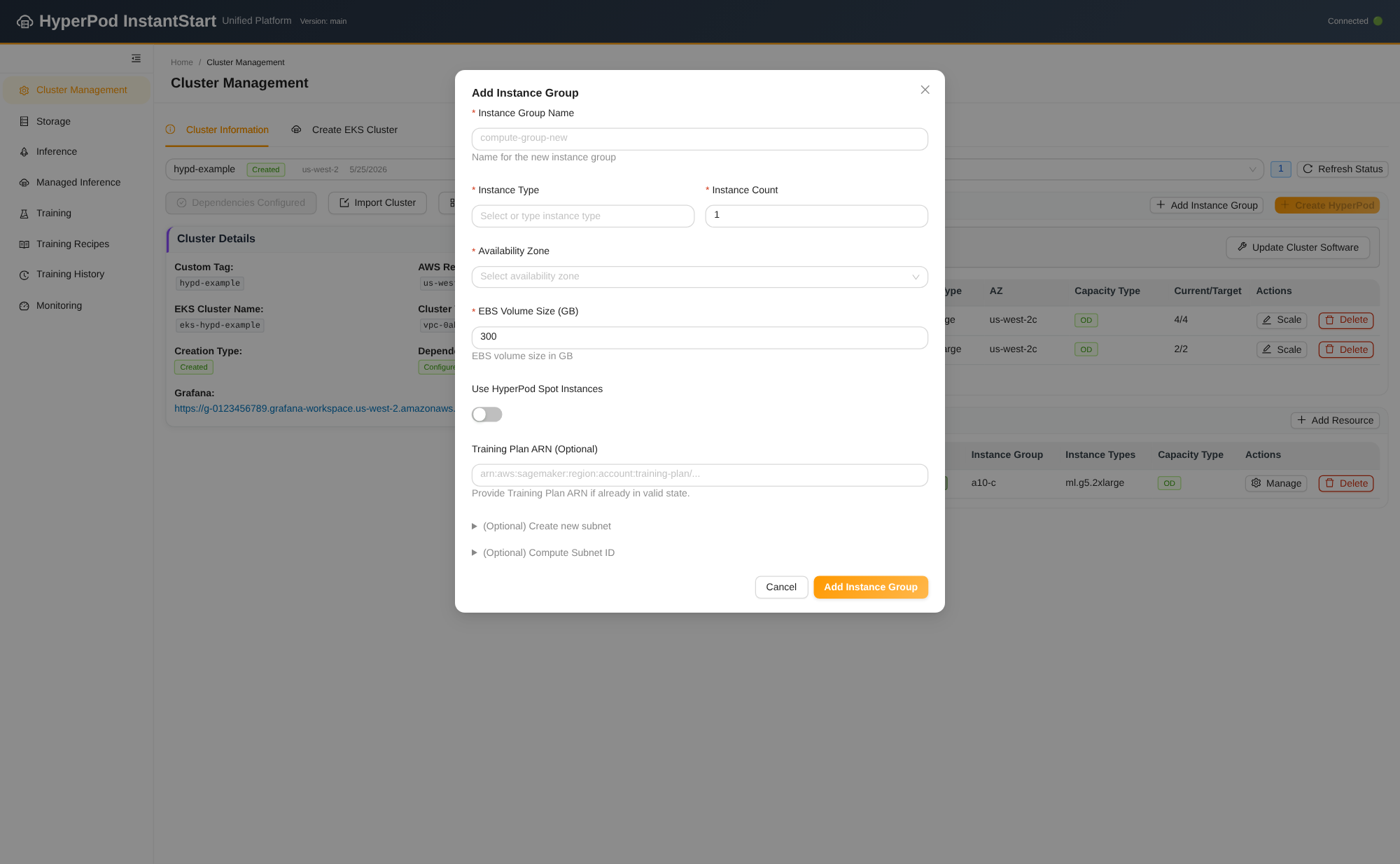
Figure 2: The Add instance group form, where capacity choices become one create-time step
Some instance-group fields are immutable and others are easy to lose. So the control plane doesn’t hand-assemble an update request. Whenever it resubmits an instance group, it normalizes the group through an explicit field allowlist. Settings such as OnStartDeepHealthChecks and NetworkInterface carry forward, so an unrelated scaling operation can’t silently reset a group’s health-check or EFA configuration. The same normalization runs whether the request came from the web interface or an MCP tool call.
Managed Karpenter: Autoscaling without operating Karpenter
A static instance group sets how much capacity you own. HyperPod managed Karpenter-based node autoscaling decides how much of it runs at any moment. AWS operates the Karpenter controller itself, and nodes launch from HyperPod instance groups scaled up from zero rather than from raw Amazon EC2. Autoscaled capacity therefore inherits the health monitoring and automatic node recovery described earlier, instead of arriving as unmanaged instances. Scheduling stays a standard Karpenter NodePool bound to a HyperpodNodeClass, which InstantStart provisions with working defaults, including consolidation that scales an idle group back toward zero. Because the control plane already defaults to continuous provisioning and automatic recovery, enabling managed Karpenter is a validated toggle rather than a runbook. One scoping note: HyperPod managed Karpenter manages HyperPod instance groups, not general-purpose Amazon EC2 capacity.
Managed capabilities as reconciled state, not runbooks
HyperPod ships several managed capabilities, and each has a documented multi-step setup. These include the training operator, the inference operator, managed tiered checkpointing, and managed autoscaling. InstantStart exposes them in one Advanced Features panel. The value is not the checkboxes. It is that each checkbox maps to a dependency-aware backend operation.
The following screenshot shows the Advanced Features panel, where each toggle maps to a backend operation.
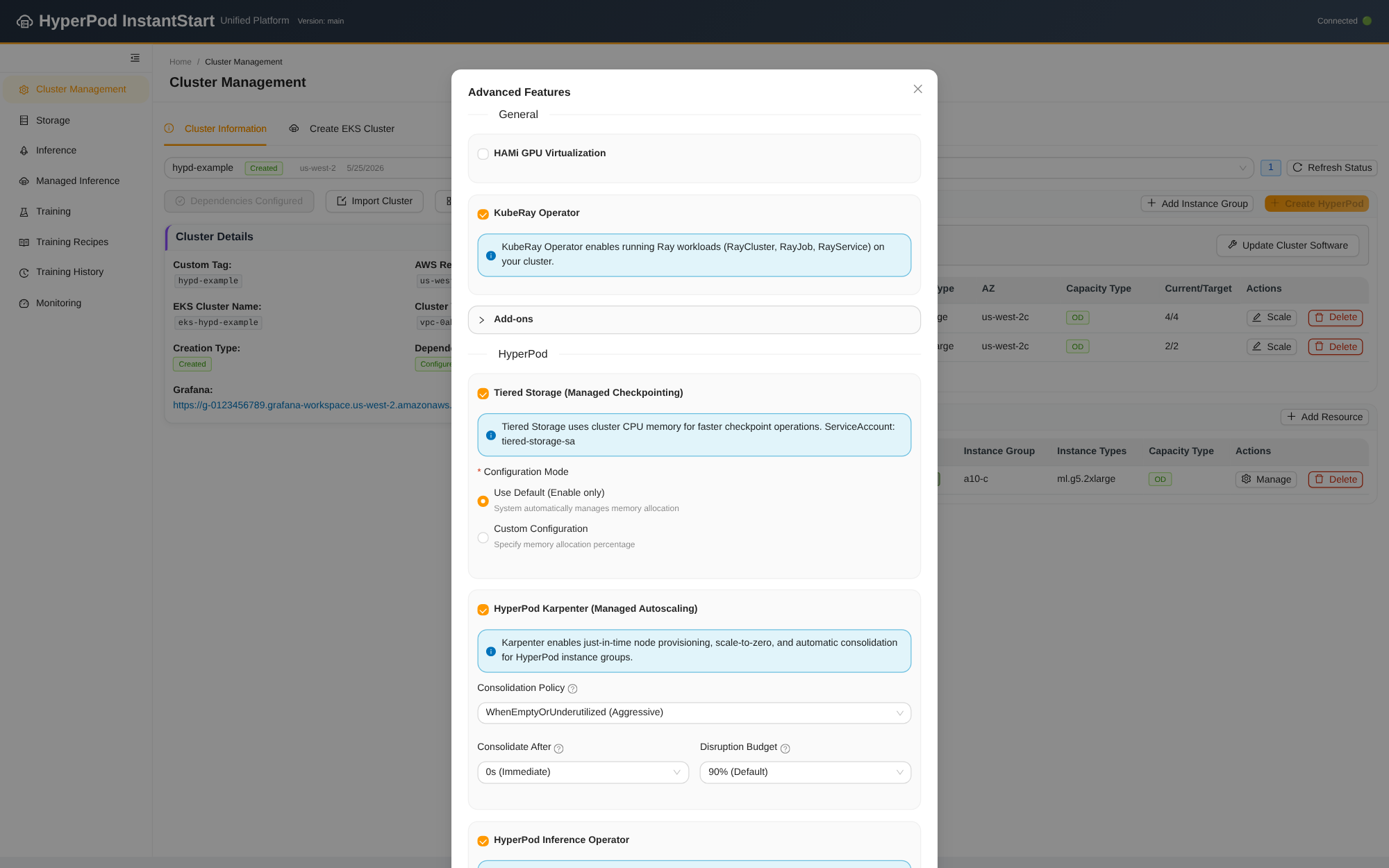
Figure 3: The Advanced Features panel, where each toggle maps to a dependency-aware backend operation
Enabling managed tiered checkpointing, for example, does more than flip a cluster setting. Managed tiered checkpointing uses multiple storage tiers, including cluster CPU memory. Persisting checkpoints requires an identity chain, a Kubernetes service account, an IAM role and policy, an OpenID Connect (OIDC) trust relationship, and the annotation binding them together. The toggle provisions that chain end to end, and disabling it removes the same chain. Half-provisioned IAM Roles for Service Accounts (IRSA) is one of the least pleasant things to debug on EKS, so the operation is closed-loop in both directions.
The panel also taught the project a lesson about idempotency. An early implementation submitted every form value as desired state, and that produced a real bug. Enabling the inference operator installs cert-manager as a dependency when it is absent. The form’s cert-manager field still held a stale value. A later unrelated submission then removed the dependency that had just been installed. The fix was an explicit-diff contract. The interface submits only the fields the user actually touched. The backend checks field presence, reads actual cluster state, and no-ops when actual and requested state already match. That contract applies the same way to UI requests and MCP requests, which is exactly why an agent can be trusted to call the same endpoint.
Through the agent, the whole panel is one exchange.
The agent reads current state first and sends only the two features requested. The backend reconciles each independently. It is the same three-part discipline the web form follows.
Training: Two submission paths and a recipe layer
The training surface separates two decisions. How a job is submitted and kept alive is one. Which framework the job runs is another. The control plane gives you two task-submission paths at the bottom and a recipe layer on top. Adopting a new training framework doesn’t mean adopting a new operational model.
Training and serving share the same cluster, and the control plane gives each of them two paths. The following diagram illustrates all four, the recipe layer above them, and the substrate they land on. Highlighted boxes mark where a HyperPod managed capability applies, and the sections below walk each path in turn.
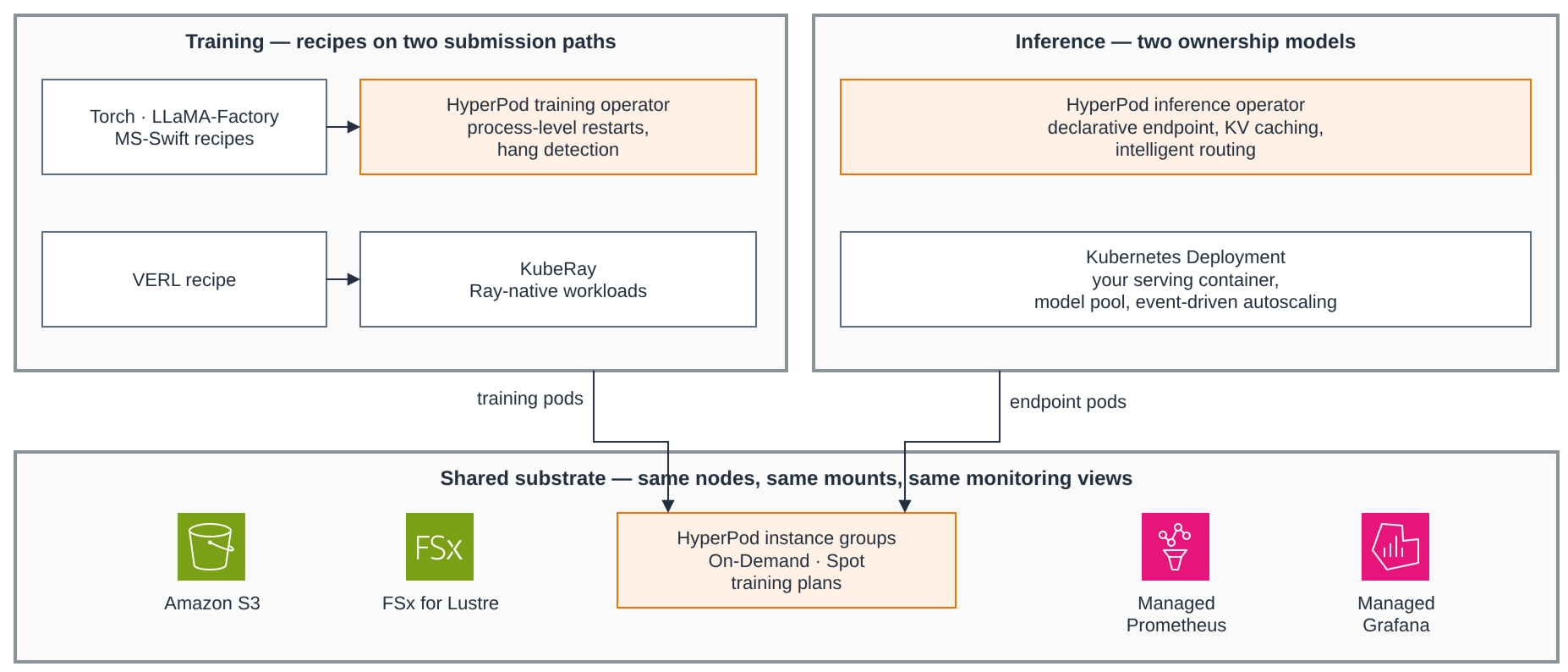
Figure 4: The two training paths and two inference paths, the recipe layer over them, and the shared HyperPod substrate
The task layer: Recoverable submission through the training operator or KubeRay
The first path is the Amazon SageMaker HyperPod training operator. It adds process-level fault recovery, hang-job detection through log-pattern monitoring, and outlier detection for distributed training. A single failed process no longer costs you a whole multi-node job restart. InstantStart installs it as an EKS add-on and submits work as HyperPodPyTorchJob resources, with the recovery policy visible in the workload specification rather than buried in defaults.
Read that as a recovery budget. Up to three in-place process restarts within a six-hour evaluation window, then the operator escalates to a single full job restart. Containers launch through hyperpodrun instead of torchrun, and the operator injects topology values such as NNODES and NPROC_PER_NODE. That removes the most common source of distributed-launch misconfiguration while keeping the contract thin. You bring your own image and shell entry point. It also greatly simplifies the PyTorch distributed configuration you would otherwise assemble by hand.
The second path is standard KubeRay, which InstantStart installs on request from the Advanced Features panel described earlier. Some workloads are Ray-native by design, most notably reinforcement learning, where a head node coordinates rollout and training workers. For those, forcing them through a PyTorch job abstraction would be the wrong shape. Ray clusters and jobs are submitted as first-class workloads onto the same HyperPod nodes, with the same storage mounts and the same monitoring views. Choosing a path is a statement about the workload’s orchestration model, not a fork in the control plane.
The recipe layer: Frameworks as configuration
On top of the task layer, the project ships recipes that integrate widely used training frameworks. Switching frameworks changes a form, not your operations.
Recipes ship for plain PyTorch scripts, LLaMA-Factory, MS-Swift, and VERL reinforcement learning, the last of these on the KubeRay path. Each takes an entry script or a framework configuration file, and the repository documents the per-framework fields.
The recipes share one data contract. The same S3 bucket is mounted at ~/workspace/s3 in the development environment and at /s3 inside pods. You can edit a training script or a dataset definition locally and the next job picks it up, with no image rebuild. Recipes that run through the training operator inherit its recovery behavior without per-framework work. That is the payoff of separating the two layers.
Training also connects to day-two workflows. Job logs stream to the browser over WebSocket. Each recipe can optionally report metrics such as training throughput to managed MLflow on Amazon SageMaker AI. InstantStart automates the service-account IAM path that training pods use to write runs, and the UI reads run history for display, including cross-account experiment sharing under fine-grained IAM permissions. One accuracy note. Managed MLflow is an Amazon SageMaker AI capability, and the CSI drivers described later are Amazon EKS capabilities. InstantStart’s contribution is wiring them into the workflow, not reimplementing them.
Serving models two ways
For inference, the control plane offers two paths with genuinely different ownership models. Keeping both is a deliberate choice, not a transition.
The managed path hands lifecycle to the HyperPod inference operator. You describe the endpoint declaratively, including model location in Amazon S3, worker image, invocation port, GPU resources, and replicas. The operator reconciles it into model workers, load balancing, and TLS. Two managed capabilities are the main reason to choose this path, and both are declared alongside the endpoint.
Managed tiered KV caching keeps an L1 cache in CPU memory with an L2 tier backed by Redis or Amazon SageMaker managed tiered storage. Intelligent routing offers prefix-aware, KV-aware, session, and round-robin strategies. InstantStart’s job here is validation and generation. It renders the configuration, checks the parts that must agree with each other, and leaves reconciliation to the operator.
The following screenshot shows the managed inference form, with KV caching and intelligent routing declared alongside the endpoint.
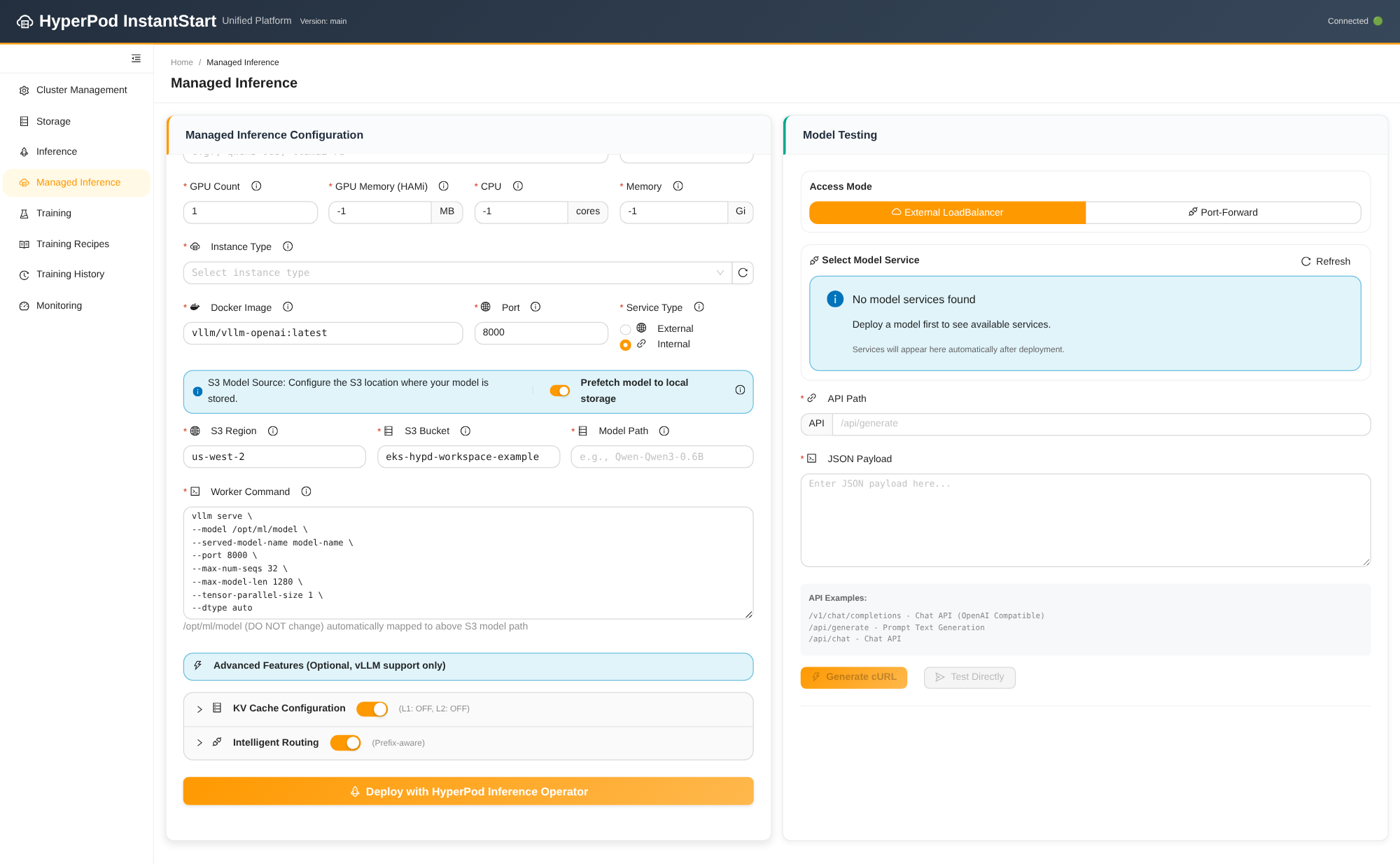
Figure 5: The managed inference form, with KV caching and intelligent routing declared alongside the endpoint
The self-managed path deploys a serving container of your choice, such as vLLM, SGLang, or your own, as a standard Kubernetes deployment. It offers three service shapes: an external load balancer, a cluster-internal service, or a model pool. The pool keeps warm GPU workers labeled business=unassigned. Reassigning one to a service changes a label instead of recreating a pod and reloading weights. Scale-in refuses to remove workers still bound to a service. For multi-replica SGLang serving, the control plane can also deploy the SGLang router with cache-aware routing and drive autoscaling through Kubernetes Event-driven Autoscaling (KEDA). The scale target is the model workers, not the router that supplies the metrics.
Deployment through the agent shows the guardrails in the tool contract. The project’s deployment skill forbids inferring GPU count from a tensor-parallel flag, so the agent confirms it.
The conversation ends the way an operation should. The deployed model answers a request. There is no resource ID and no assumption.
Models and storage underpin both paths. The control plane mounts Amazon S3 through the Mountpoint for Amazon S3 CSI driver for read-mostly model artifacts, and Amazon FSx for Lustre for high-throughput read/write training data and checkpoints. Downloading a model from Hugging Face runs as a CPU-only Kubernetes job, so no GPU sits idle while bytes move. The job stages files on instance NVMe before copying them to the object-store mount. That data-transfer practice is encoded once, in the job template, and reused by both interfaces.
What makes a control plane agent-ready
Everything described so far would justify InstantStart as a self-service web solution. The agent interface, which the project calls agent-driven AI infrastructure, is where those same design choices pay off again. Launch the agent and state an outcome. A few decision-grade interactions later, you have one of three things. A cluster with dependencies reconciled, automatic node recovery enabled, and storage mounted. A model deployment answering requests. Or a managed-operator configuration reconciled end to end. The implementation has three layers.
The following diagram illustrates the agent control path.
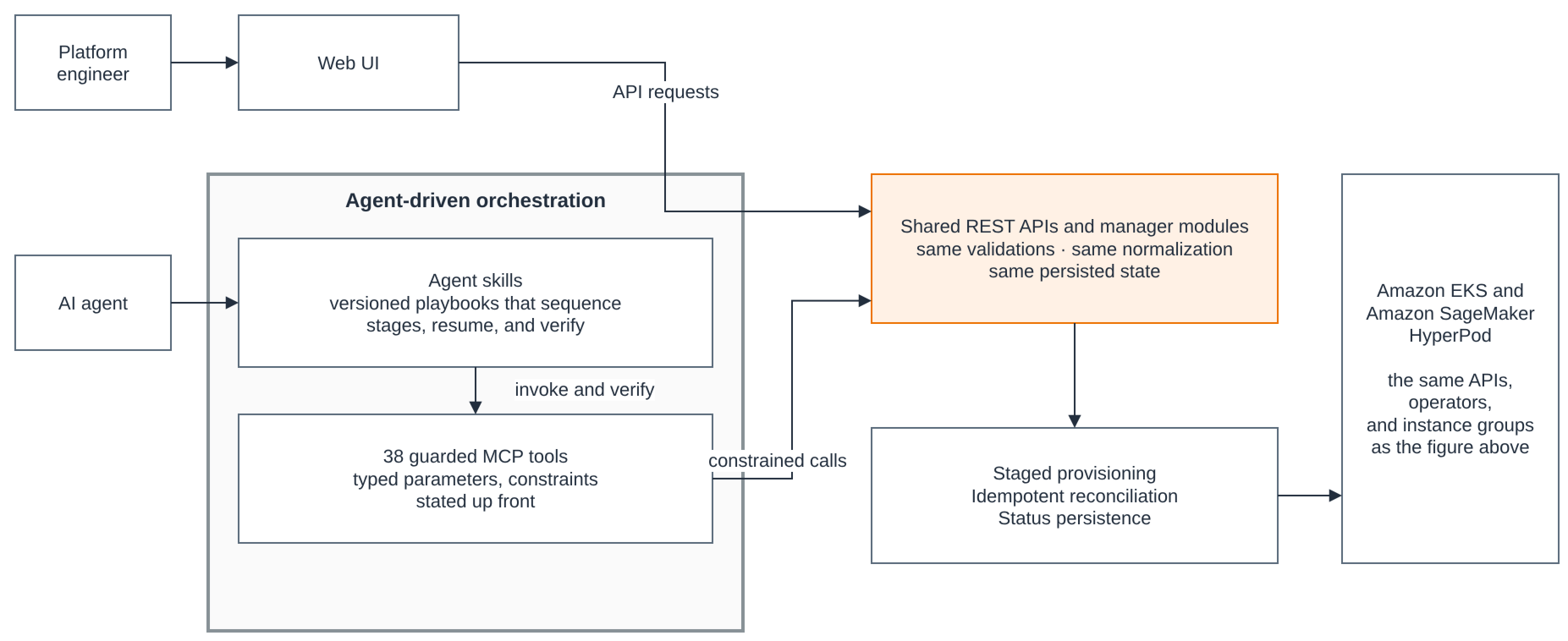
Figure 6: The agent control path, from agent skills through MCP tools to the shared backend API
Agent skills define complete workflows. A skill is a markdown playbook the agent reads before acting. The cluster-creation skill sequences the six-stage pipeline and defines how to probe current state and resume an interrupted workflow. The deployment skill encodes the GPU-count confirmation and forbids scheduling inference onto CPU-only nodes. The instance-group skill encodes the training-plan Availability Zone reconciliation. Skills are versioned files in the repository. They are operational knowledge kept as reviewable code, not informal prompt tweaks.
MCP tools expose bounded domain operations. The server publishes 38 tools covering cluster lifecycle, instance groups, managed features, storage, model download, inference deployment, jobs, and node operations. Parameters carry domain meaning, such as capacity type, Availability Zone, EFA-only mode, replicas, and service exposure. Tool documentation states constraints up front so the agent doesn’t need to discover them from rejected API calls. Every mutating tool names the status tool that determines completion, which makes the poll-to-terminal-state rule mechanical.
Tools reuse the backend API. This is the layer that separates the design from an agent with an AWS CLI. Adding an instance group through MCP enters the same manager code the browser uses, with the same subnet resolution, the same field normalization, and the same status persistence. Compared with pointing a coding agent directly at AWS CLI or SDK calls, this architecture gives you three concrete advantages.
- Built-in best practices. The tools wrap the project’s backend APIs, so configurations follow the control plane’s encoded rules instead of drifting with agent improvisation. Each operation costs one tool call instead of a long chain of CLI invocations that eat context-window space.
- Workflow orchestration by design. Skills define the multi-step business processes, so the agent doesn’t re-plan the execution path each session. Workflows stay reproducible across runs and across model versions.
- Zero local setup. The backend and the MCP server ship in the same container, so the agent environment needs no locally installed toolchain beyond the agent itself.
The reliability contracts that the web interface needed turn out to be exactly what an agent needs too. Operations persist their phase before polling begins, so a status query doesn’t race the process that owns state transitions. A browser refresh doesn’t replay a mutation, and neither does an agent retry. The API response is the single authority for success or failure, so the agent, like the UI, doesn’t need to reconcile conflicting signals. And the explicit-diff feature contract means an agent enabling one capability carries no hidden intent about the others.
There are also clear boundaries. Provisioning workflows may change state after confirming consequential parameters with you. The bundled diagnostic skills, adapted from the AWS agent-plugins/sagemaker-ai collection for NCCL, node health, and cluster-creation failures, follow a stricter policy. They investigate read-only on their own, present state-changing commands as suggestions, and wait for approval. They escalate in the order investigate, then reboot, then replace. Underneath both policies, IAM, Kubernetes authorization, network controls, and backend validation remain the actual security boundaries. The agent widens access to the control plane. It doesn’t widen its privileges.
Observability
An operation is not complete just because an API accepted it, and neither interface treats it that way. The Monitoring page surfaces node health, GPU totals and availability, and live views of pods, services, deployments, InferenceEndpointConfig, and HyperPodPyTorchJob resources, and the agent reads the same state through status tools. For fleet-level metrics, HyperPod publishes to Amazon Managed Service for Prometheus, with dashboards in Amazon Managed Grafana through the HyperPod observability add-on.
The following screenshot shows the Monitoring page, with cluster status on the left and live workload status on the right.
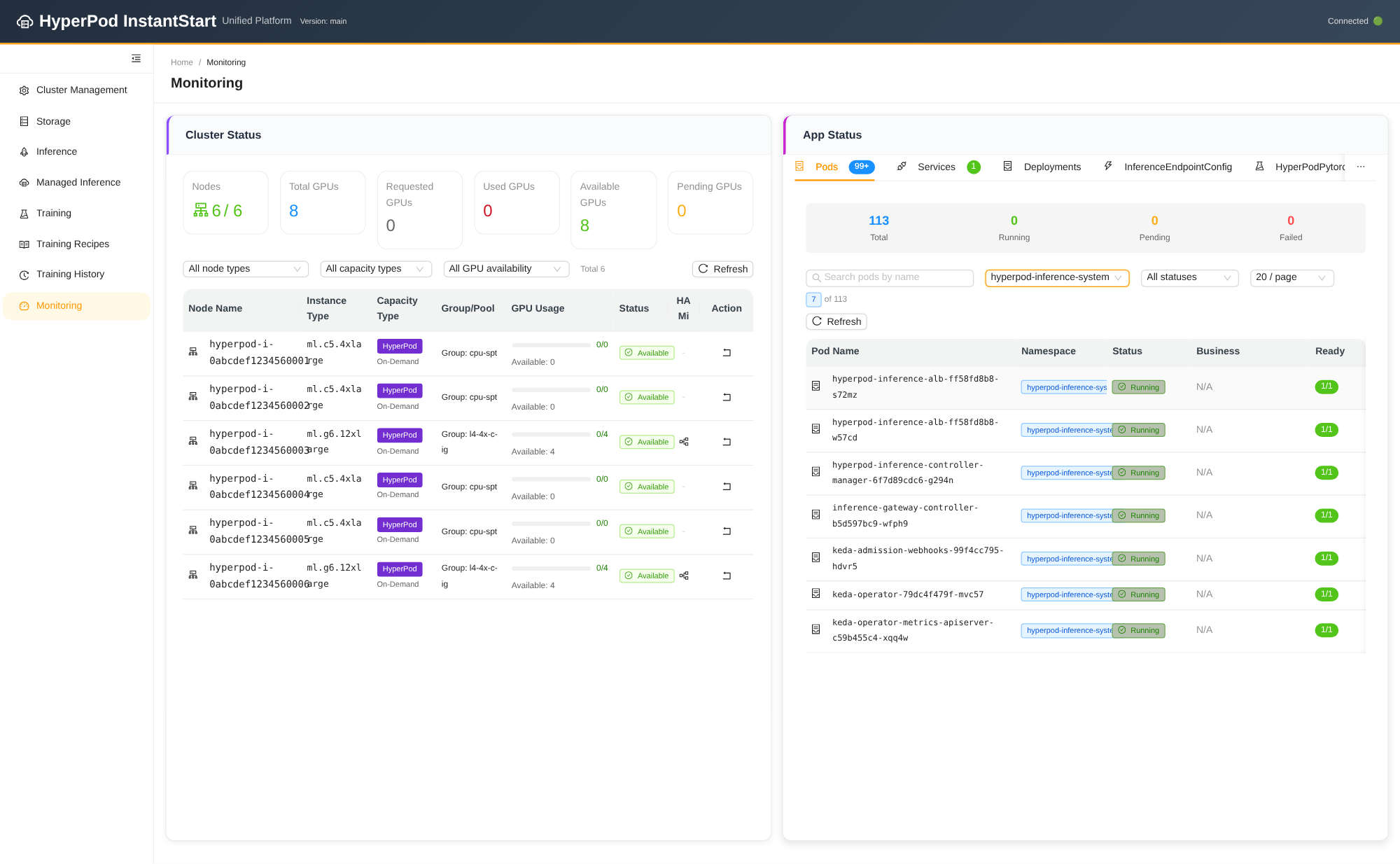
Figure 7: The Monitoring page, showing cluster status alongside live workload status
Equally important, the control plane doesn’t become the only place where state exists. Generated custom resources, deployments, node labels, and AWS resources stay inspectable with kubectl and the AWS CLI, which matters for both trust and troubleshooting.
Considerations
The solution reduces integration and runbook burden. It doesn’t remove architecture decisions or service constraints. Weigh the following before you adopt these patterns.
- The EKS orchestration surface stays yours to secure. Kubernetes access, workload authorization, network egress, and IAM should follow least-privilege policies, for the agent’s credentials as much as for human operators.
- Agent skills are operational code. Their workflow and confirmation rules can affect capacity, cost, and availability. Version them, review them, and test them against the APIs they invoke, the same standard you apply to the backend.
- Not every training capability composes. Elastic training currently excludes Spot Instances, managed tiered checkpointing, and checkpointless training. Verify the combination you plan to rely on.
- Costs and quotas span services. Amazon EKS, HyperPod instances, storage, load balancing, managed observability, and managed MLflow all appear on the bill. Amazon SageMaker HyperPod cluster-usage quotas, and training-plan reservations for high-end GPU types, need arranging before the first cluster.
Conclusion
In this post, we walked through HyperPod InstantStart, an open source control plane that composes Amazon EKS orchestration with the managed capabilities of Amazon SageMaker HyperPod. Those capabilities include automatic node recovery, managed Karpenter autoscaling, the training operator’s process-level restarts, the inference operator’s KV caching and intelligent routing, and managed tiered checkpointing. It brings them together into one stateful, self-service solution with two interfaces.
The web interface and the AI agent are equally capable because they share one backend. Both drive the same guarded APIs, and the project has encoded its networking rules, field-preservation invariants, dependency reconciliation, and completion criteria into those APIs. If you are building agent-driven operations for your own infrastructure, the reusable decision is the order of work: invest in the control plane contract first, and the agent inherits every guarantee you encoded.
To get started with HyperPod on Amazon EKS, see Amazon EKS support in SageMaker HyperPod. For an end-to-end tutorial covering cluster management and FM training, visit the Amazon EKS Support in Amazon SageMaker HyperPod Workshop. To deploy the solution described in this post, through either interface, see the HyperPod-InstantStart repository and its launch guide.
About the authors